
1. Introduction
Thank you for purchasing the Redragon GS511 Wireless RGB Desktop Speakers. This manual provides detailed instructions for setting up, operating, and maintaining your speakers to ensure optimal performance and longevity. Please read this manual thoroughly before use.
2. Product Features
- Wireless Connectivity: Bluetooth 5.3 for stable, low-latency audio transmission from compatible devices.
- Enhanced Audio: Equipped with 2-inch full-range drivers and a 2.0 channel stereo core for clear and rich sound.
- Dual-Play Design: Can be configured as two separate vertical speakers or combined into a single horizontal soundbar.
- Dynamic RGB Backlight: Customizable RGB lighting effects to enhance your gaming or listening experience.
- Integrated Control: All-in-one volume knob with power on/off, RGB mode, and connection mode adjustments.
- USB Powered: Convenient power supply via USB connection.
3. Package Contents
Verify that all items are present in the package:
- Redragon GS511 Speakers (Left and Right units)
- USB Power/Audio Cable
- User Manual (this document)
4. Setup Instructions
4.1 Physical Configuration
The Redragon GS511 speakers offer two primary configurations:
- Split Speaker Mode: Place the left and right speaker units separately on either side of your monitor or desired listening area. Ensure the cable connecting the two units is not strained.
- Soundbar Mode: Connect the two speaker units together to form a single soundbar. Align the connection points and gently push them together until they lock securely. This configuration is ideal for placement directly under a monitor or TV.

Image: Redragon GS511 speakers in soundbar configuration, showing the integrated design.

Image: Redragon GS511 speakers separated into two vertical units, showcasing their individual form factor.
4.2 Power Connection
Connect the provided USB cable to the speaker unit and then to a powered USB port on your computer, gaming console, or a USB wall adapter (not included). The speakers require a constant USB power source to function, including for Bluetooth mode.
5. Operating Instructions
5.1 Power On/Off and Volume Control
The main control knob is located on the right speaker unit (or the right side of the soundbar).
- Power On/Off: Press and hold the control knob for approximately 3 seconds to turn the speakers on or off.
- Volume Adjustment: Rotate the control knob clockwise to increase volume and counter-clockwise to decrease volume.
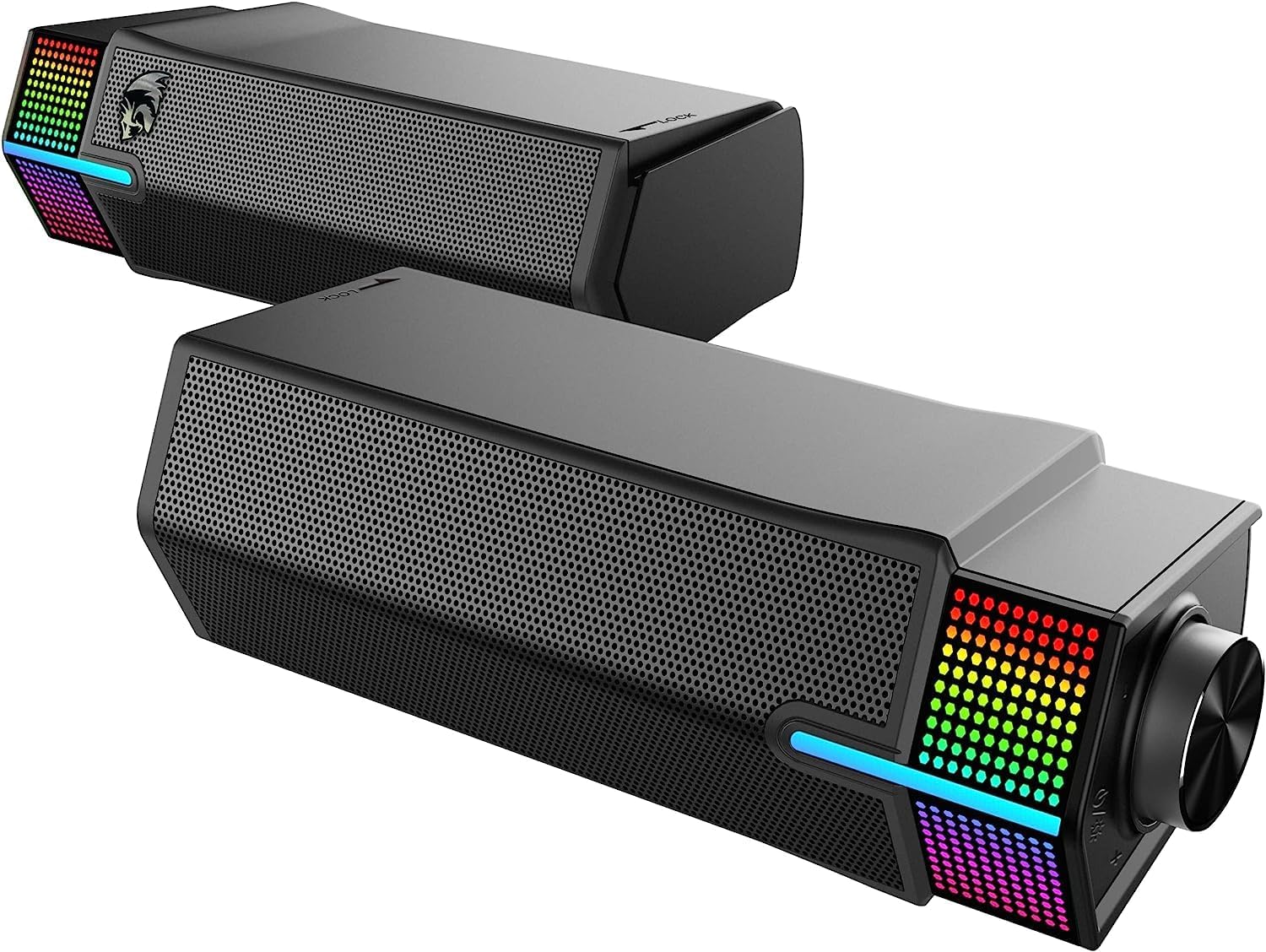
Image: Detailed view of the control knob and RGB lighting on the Redragon GS511 speaker unit.
5.2 Connectivity Modes
The GS511 supports both USB audio and Bluetooth 5.3 connectivity.
- Switching Modes: Briefly press the control knob to cycle between USB audio mode and Bluetooth mode. An indicator light or audio cue will confirm the selected mode.
- Bluetooth Pairing: In Bluetooth mode, the speakers will automatically enter pairing mode (indicated by a flashing light). On your device (smartphone, tablet, laptop), search for "Redragon GS511" in the Bluetooth settings and select it to pair.
- USB Audio: When connected via USB, the speakers will function as a standard USB audio device. Ensure your computer's audio output is set to the Redragon GS511.
5.3 RGB Lighting Control
The speakers feature customizable RGB lighting.
- Changing RGB Modes: Press the dedicated RGB button (usually located near the control knob) to cycle through various lighting effects and colors.
- Turning RGB Off: Continue pressing the RGB button until the lights turn off, or refer to specific instructions for a dedicated off function if available.

Image: Redragon GS511 speakers in split mode, demonstrating the active RGB lighting on both units.
6. Maintenance
To maintain the performance and appearance of your Redragon GS511 speakers:
- Cleaning: Use a soft, dry cloth to wipe the exterior surfaces. Do not use liquid cleaners or abrasive materials.
- Storage: Store the speakers in a cool, dry place away from direct sunlight and extreme temperatures when not in use for extended periods.
- Avoid Moisture: The speakers are not waterproof. Keep them away from water and high humidity.
7. Troubleshooting
| Problem | Possible Cause | Solution |
|---|---|---|
| No sound |
|
|
| Low volume output |
|
|
| Bluetooth pairing issues |
|
|
| RGB lights not working |
|
|
8. Specifications
| Model | GS511 |
| Brand | Redragon |
| Connectivity Technology | Bluetooth 5.3, USB |
| Audio Output Mode | Stereo (2.0 Channel) |
| Speaker Maximum Output Power | 2W x 2 (RMS) |
| Frequency Response | 60Hz - 20kHz |
| Power Source | USB Powered (Corded Electric) |
| Control Method | Touch (Control Knob) |
| Item Dimensions (D x W x H) | 9.3D x 7W x 20.5H centimeters (per unit, approx.) |
| Item Weight | 850 Grams |
| Material | ABS Plastic |
| Special Features | Customizable RGB Lighting, Dual-Play Design |
9. Warranty and Support
For warranty information and technical support, please refer to the warranty card included with your product or visit the official Redragon website. Keep your purchase receipt as proof of purchase.
Redragon Official Website: www.redragonzone.com