
1. Product Overview
The Mesliese VS6601S Vacuum Sealer Machine is designed for efficient food preservation, extending the freshness of your food up to 10 times longer than traditional storage methods. It features a powerful 90Kpa suction, a versatile 6-in-1 function, and a compact design for easy storage.

Image: Mesliese VS6601S Vacuum Sealer Machine in Pink.
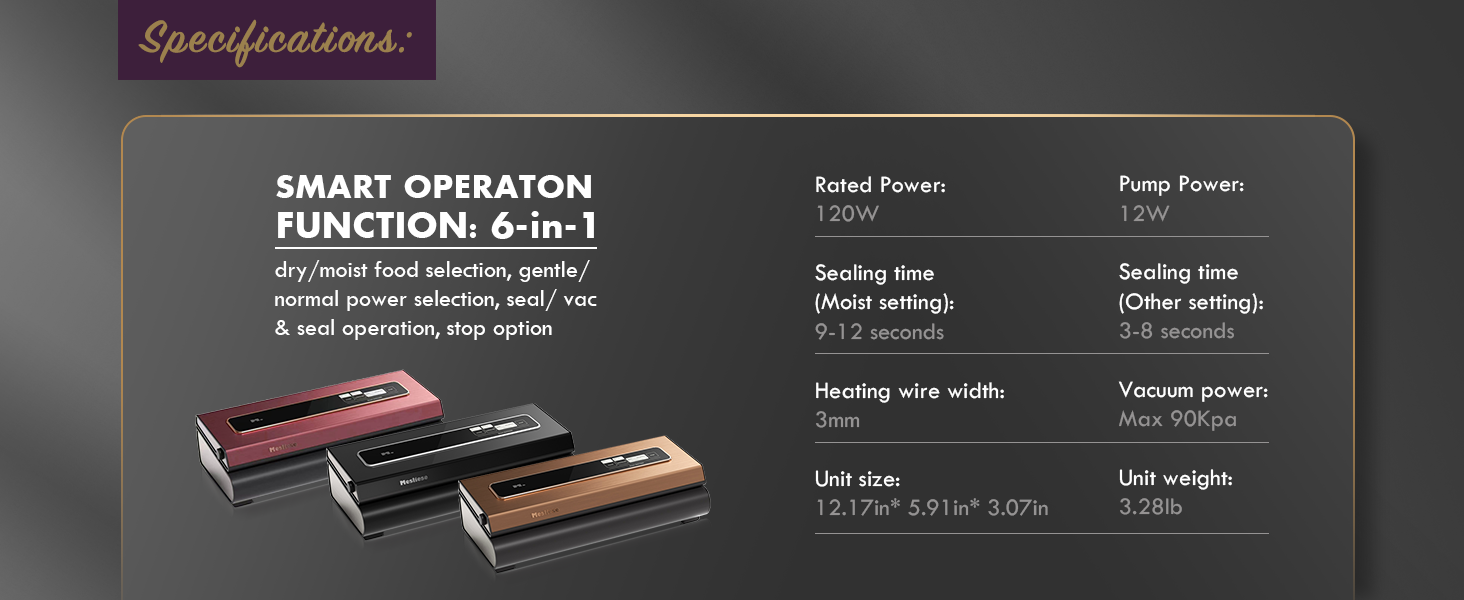
Image: Diagram illustrating the powerful 90Kpa suction of the Mesliese vacuum sealer.
Key Features:
- Powerful 90Kpa Suction: Ensures efficient air removal for optimal food preservation.
- 6-in-1 Functions: Includes 'Dry & Moist' modes, 'Normal & Soft' modes, 'SEAL' only, 'VAC & SEAL', and external vacuuming for canisters/jars.
- Built-in Cutter: For customizing bag lengths from rolls.
- 12mm Widened Heating Strip: Provides a strong, durable, and steady seal.
- Compact Design: Unit size is 14.9"L x 5.7"W x 3.5"H for easy storage.
- ETL Listed: Ensures product safety and quality.
2. Setup
2.1 Unboxing and Components
Upon opening the package, ensure all components are present:
- 1x Mesliese Vacuum Sealing Machine
- 2x Vacuum Rolls (8"x6.6')
- 5x Pre-cut Bags (BPA free, 11"x16")
- 1x Air Suction Hose
- 1x AC Power Cable
- 2x Sealing Sponge/Gaskets (replacements)
- 1x User Manual

Image: All components included in the Mesliese vacuum sealer package.
2.2 Initial Power Connection
- Take out the power cord.
- Plug the connection end into the machine.
- Connect the power supply to a suitable outlet.
- Tear off any protective film from the operation panel.
- Check if the indicator light is on to confirm power connection.
2.3 Preparing Bags from Rolls
If using bag rolls, you can customize the bag length:
- Locate the built-in cutter on the side of the machine.
- Pull out the desired length of bag material from the roll.
- Use the built-in cutter to cut the bag horizontally.
- Seal one end of the cut bag using the 'SEAL' function (refer to Section 3.2).
Video: Demonstration on how to use the built-in cutter to create custom-sized bags from rolls and seal one end.
3. Operating Instructions
3.1 Vacuum & Seal Operation
- Place the food into the vacuum bag, ensuring the open end of the bag is clean and dry.
- Open the lid of the vacuum sealer. Place the open end of the bag into the vacuum chamber, making sure it extends beyond the heat sealing strip but does not exceed the vacuum chamber.
- Close the lid firmly with both hands, pressing down on both ends until you hear two distinct "click" sounds. This indicates the machine is properly locked.
- Select the appropriate food mode: 'Dry' for solid items like nuts or crackers, or 'Moist' for items with some liquid content like marinated meats or fruits.
- Select the appropriate pressure mode: 'Normal' for most foods, or 'Gentle' for delicate items to prevent crushing.
- Press the 'VAC & SEAL' button. The machine will automatically vacuum the air and then seal the bag.
- Once the 'seal' indicator light turns off, press the release buttons on both sides of the machine to open the lid and remove your vacuum-sealed bag.

Image: Visual guide for the 4-step vacuum and seal operation.
Video: Detailed operation guide for the Mesliese VS6601S Vacuum Sealer, demonstrating various modes and sealing processes.
3.2 Seal Only Operation
To seal a bag without vacuuming:
- Place the open end of the bag onto the heat sealing strip.
- Close the lid firmly with both hands until you hear two "click" sounds.
- Press the 'SEAL' button. The machine will seal the bag without removing air.
- Once the 'seal' indicator light turns off, release the lid and remove the bag.
3.3 External Vacuuming for Canisters/Jars
The included air suction hose allows for external vacuuming of compatible canisters, jars, or wine bottles:
- Connect one end of the vacuum accessory hose to the 'vacuum interface' port on the machine.
- Connect the other end of the hose to the lid of your vacuum-sealable canister or jar.
- Press the 'Vacuum Jar/Pickle' mode button on the control panel. The machine will begin to remove air from the container.
- Once vacuuming is complete, the machine will stop automatically. Remove the hose.

Image: Mesliese vacuum sealer connected to a vacuum jar using the accessory hose.
4. Maintenance
4.1 Cleaning the Vacuum Chamber
The stainless steel surface and smooth cambered vacuum chamber are designed for easy cleaning. If any liquid or food residue enters the vacuum chamber during operation:
- Unplug the machine from the power outlet.
- Wipe the vacuum chamber and sealing area with a damp cloth or sponge.
- Ensure the area is completely dry before next use.
4.2 Storage
To maintain the longevity and performance of your vacuum sealer:
- After each use, allow the appliance to cool down for at least 20 seconds.
- When not in use, keep the machine in an unfastened state (lid slightly open). This prevents the sealing gaskets from losing elasticity due to long-term compression, which could affect future vacuuming performance.
- Store in a compact, dry place.
4.3 Replacing Sealing Sponges/Gaskets
The machine comes with two replacement sealing sponges/gaskets. If the original gaskets show signs of wear or damage, or if sealing performance decreases:
- Carefully remove the old gaskets from their grooves.
- Clean the grooves thoroughly.
- Insert the new gaskets firmly into the grooves, ensuring they are properly seated.
5. Troubleshooting
If you encounter issues with your Mesliese Vacuum Sealer, refer to the following common solutions:
| Problem | Possible Cause | Solution |
|---|---|---|
| Machine does not power on. | Power cord not properly connected or outlet issue. | Ensure power cord is securely plugged into both the machine and a working electrical outlet. |
| Lid does not lock or you don't hear "clicks". | Insufficient pressure applied to the lid. | Press down firmly on both ends of the lid until two "click" sounds are heard. |
| Bag does not vacuum properly or loses vacuum. | Bag opening not correctly placed, moisture in sealing area, or damaged gaskets. | Ensure bag opening is flat and clean, placed correctly within the vacuum chamber and past the heat strip. Clean any moisture. Check and replace gaskets if worn. |
| Seal is weak or incomplete. | Moisture or food particles on the sealing strip, or worn sealing strip. | Clean the sealing strip and ensure it is dry. If issues persist, the sealing strip may need replacement (contact support). |
| Liquid is sucked into the vacuum chamber. | Excess liquid in the bag. | For liquid-rich foods, use the 'Moist' mode. Alternatively, pre-freeze liquids or place a paper towel at the top of the bag to absorb excess moisture before vacuuming. |
6. Specifications
| Feature | Detail |
|---|---|
| Brand | Mesliese |
| Model Number | VS6601S |
| Material | Stainless Steel |
| Color | Pink (as per current product) |
| Product Dimensions | 14.9"L x 5.7"W x 3.5"H |
| Item Weight | 4.9 Pounds |
| Power Source | AC |
| Operation Mode | Manual |
| Wattage | 120 watts |
| Voltage | 220.0 |
| Suction Power | Max 90Kpa |
| Sealing Time | 9-12 seconds (Moist setting), 3-8 seconds (Other setting) |
| Heating Wire Width | 12mm |
7. Warranty and Support
7.1 Warranty Information
Mesliese offers a 5-year warranty for the VS6601S Vacuum Sealer Machine. This warranty covers refund or replacement for any manufacturing defects or malfunctions under normal use. Please retain your proof of purchase for warranty claims.
7.2 Customer Support
For any questions, technical assistance, or warranty claims, please contact Mesliese customer support:
- Email: support@mesliese.co
- Online Chat: Scan the Messenger QR code below to start a live chat.

Image: Mesliese Brand Logo.

