
Introduction
Welcome to the MARVO FIT Pro White Mouse user manual. This guide provides comprehensive instructions for setting up, operating, maintaining, and troubleshooting your new optical mouse. Please read this manual carefully before using the product.
Package Contents
Please verify that all items are present in the package:
- MARVO FIT Pro Mouse Host
- Type-C Data Cable
- 2.4G USB Receiver
- Magnetic Side Grips (Small and Big)

This image displays the MARVO FIT Pro mouse host, a Type-C data cable for charging and wired connection, a 2.4G USB receiver for wireless connectivity, and interchangeable magnetic side grips with small and big options.
Setup Instructions
Connecting the Mouse
The MARVO FIT Pro mouse supports both 2.4G wireless and wired USB connections.
Wireless Connection (2.4G)
- Locate the 2.4G USB receiver. It may be stored in a compartment on the underside of the mouse.
- Plug the 2.4G USB receiver into an available USB-A port on your computer.
- Turn on the mouse using the power switch, usually located on the underside.
- The computer should automatically detect and install the necessary drivers.

The MARVO FIT Pro White Mouse can be connected wirelessly using the included 2.4G USB receiver for a clutter-free setup.
Wired Connection
- Connect the Type-C end of the provided data cable to the mouse.
- Connect the USB-A end of the data cable to an available USB-A port on your computer.
- The mouse will function as a wired device and will also charge its internal battery.
Installing Side Grips
The mouse comes with interchangeable magnetic side grips (small and big) to suit your ergonomic preference.
- Select the desired side grip (small or big).
- Align the grip with the magnetic attachment points on the side of the mouse.
- Gently place the grip until it snaps securely into place magnetically.
This image illustrates the MARVO FIT Pro mouse alongside its magnetic side grips, which can be easily attached or swapped for personalized comfort.
Operating the Mouse
Basic Functions
The MARVO FIT Pro mouse features 5 buttons and an optical sensor for precise tracking and versatile control:
- Left Click Button: Primary action button for selecting items and executing commands.
- Right Click Button: Secondary action button, typically used for context menus and additional options.
- Scroll Wheel/Middle Button: Used for vertical scrolling and as a clickable button for various functions.
- Side Buttons (2): Located on the left side, these buttons are typically programmable for functions like forward/back navigation in web browsers or custom commands in applications.

This image provides a clear view of the mouse's top surface, highlighting the left and right click buttons, the scroll wheel, and the two side buttons for enhanced functionality.
LED Lighting
The MARVO FIT Pro mouse features integrated multicoloured LED lights. These lights typically indicate power status, DPI settings, or can be customized through dedicated software (if available). Please refer to the official MARVO website for any available customization software or driver updates.

The image displays the MARVO FIT Pro mouse with its vibrant LED lighting active, showcasing the aesthetic and functional illumination of the device.
Maintenance and Care
- Cleaning: Use a soft, dry, lint-free cloth to clean the mouse surface. For the optical sensor, use a cotton swab lightly dampened with isopropyl alcohol, ensuring no liquid enters the mouse body.
- Storage: Store the mouse in a cool, dry place away from direct sunlight, excessive dust, and extreme temperatures.
- Avoid Liquids: Do not expose the mouse to liquids or excessive moisture.
- Cable Care: If using the wired connection, avoid bending or twisting the USB cable excessively to prevent internal damage.
Troubleshooting Common Issues
Mouse Not Responding
- Check Connection: Ensure the 2.4G USB receiver is securely plugged into a working USB port, or the Type-C data cable is firmly connected to both the mouse and the computer.
- Power On: Verify the mouse's power switch (usually on the underside) is in the "ON" position.
- Battery Level: If using wirelessly, ensure the mouse has sufficient charge. Connect the USB-C cable to charge the internal battery.
- Try Another Port: Plug the receiver or cable into a different USB port on your computer.
- Restart Computer: Sometimes a simple computer restart can resolve connectivity issues.
Erratic Cursor Movement
- Clean Sensor: Gently clean the optical sensor on the underside of the mouse with a soft cloth or cotton swab.
- Surface: Use the mouse on a clean, non-reflective, opaque surface or a high-quality mouse pad. Avoid glass or highly reflective surfaces.
- Interference: If using wirelessly, move the mouse closer to the receiver or away from other wireless devices (e.g., Wi-Fi routers, cordless phones) that might cause signal interference.
Product Specifications
| Feature | Detail |
|---|---|
| Brand | MARVO |
| Model Number | S0449555 |
| Color | White (with multicoloured LED lighting) |
| Connectivity Technology | USB (Wired) / 2.4G (Wireless) |
| Special Feature | LED Lights, Interchangeable Magnetic Side Grips |
| Movement Detection Technology | Optical |
| Button Quantity | 5 (Left, Right, Scroll Click, 2 Side Buttons) |
| Hand Orientation | Right |
| Compatible Devices | Personal Computer |
| Operating System | Windows, Linux |
| Power Source | Rechargeable Internal Battery (via USB-C) |
| Item Weight | 0.4 Kilograms |
| Item Dimensions (L x W) | 6.75" x 4.94" |
| Enclosure Material | Plastic |
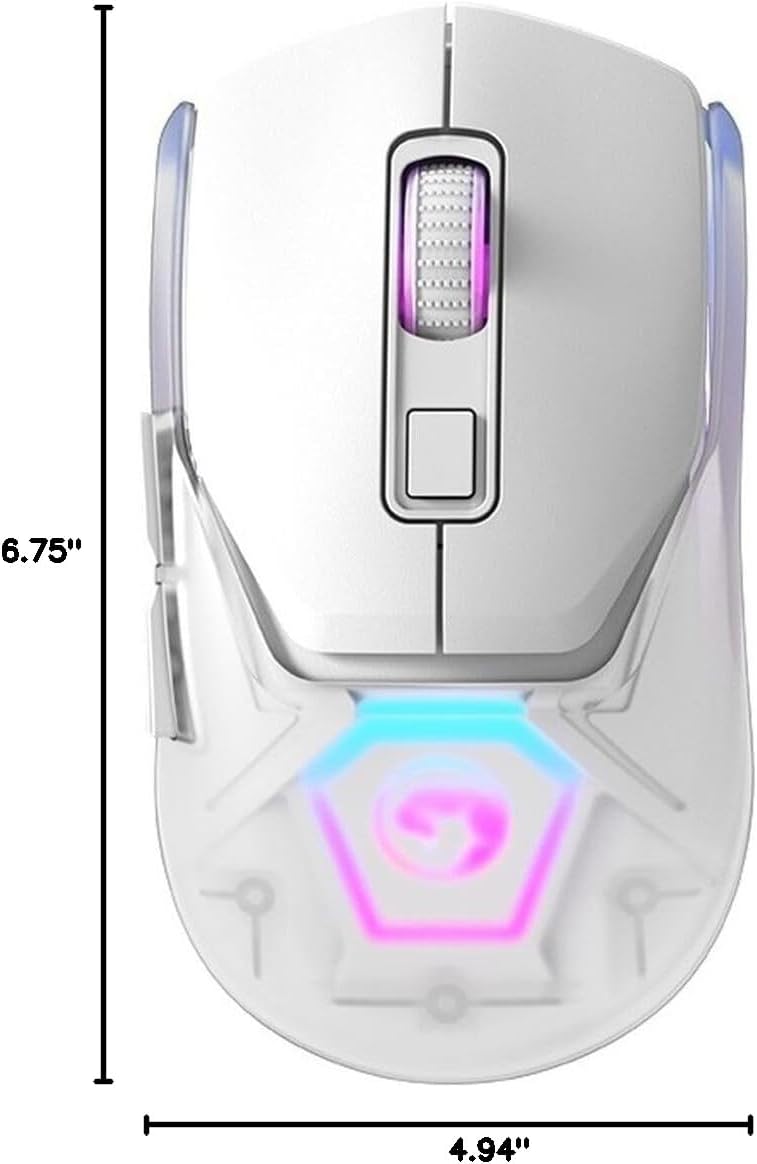
This diagram illustrates the physical dimensions of the MARVO FIT Pro mouse, measuring 6.75 inches in length and 4.94 inches in width.
Warranty and Customer Support
For detailed warranty information, technical assistance, and customer support, please visit the official MARVO website or contact your authorized retailer. It is recommended to retain your purchase receipt as proof of purchase for any warranty claims.
- Manufacturer: Marvo
- Model Number: S0449555
- ASIN: B0CBZ5G5HQ
- Brand Store: MARVO Official Store