
Introduction
This manual provides essential information for the safe and effective use of your Hyper Tough HT Charge 20-Volt 1.5-Amp Lithium-ion Power Tool Battery. Please read this manual thoroughly before first use and retain it for future reference. This battery is designed to provide reliable power for compatible Hyper Tough 20-Volt power tools.
Important Safety Information
Always observe basic safety precautions when using electrical products, especially when dealing with batteries. Failure to follow these instructions may result in electric shock, fire, and/or serious injury.
- Read all instructions: Before using the battery, read all instructions and cautionary markings on the battery, battery charger, and product using the battery.
- Charge only with specified charger: Use only the charger specified by the manufacturer. A charger that is suitable for one type of battery pack may create a risk of fire when used with another battery pack.
- Do not expose to water: Do not immerse the battery in water or other liquids.
- Avoid extreme temperatures: Do not store or use the battery in locations where the temperature may reach or exceed 104°F (40°C).
- Proper disposal: Dispose of batteries properly. Do not dispose of batteries in a fire. They may explode. Check with local codes for special disposal instructions.
- Do not short-circuit: Do not short-circuit the battery pack.
- Do not damage: Do not drop, puncture, or otherwise damage the battery.
- Keep away from children: Store batteries out of reach of children.
Setup
Before first use, ensure the battery is fully charged. Use only a compatible Hyper Tough 20-Volt battery charger.
- Charging the Battery:
- Connect the charger to a standard electrical outlet.
- Slide the battery pack onto the charger until it clicks into place.
- Allow the battery to charge until the charger's indicator light signals a full charge (refer to your charger's manual for specific indicator details).
- Once charged, remove the battery from the charger.
- Inserting the Battery into a Tool:
- Ensure the power tool is turned off and disconnected from any power source if applicable.
- Align the battery pack with the battery port on the power tool.
- Slide the battery into the tool until it securely locks into place. A click sound indicates proper installation.
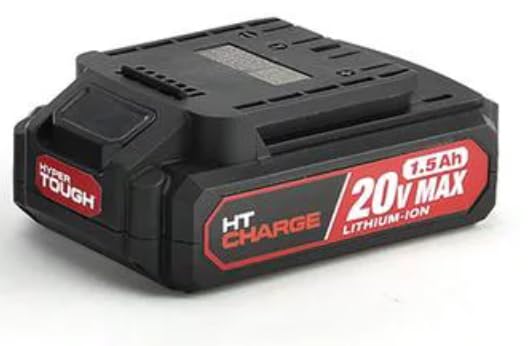
Image: Hyper Tough HT Charge 20-Volt 1.5-Amp Lithium-ion Power Tool Battery. This image shows the black battery pack with red and white "HT Charge 20V MAX 1.5Ah Lithium-Ion" branding on the side, and "Hyper Tough" on the front.
Operating Instructions
Once the battery is charged and properly installed in a compatible Hyper Tough 20-Volt power tool, the tool is ready for operation. Always refer to your specific power tool's instruction manual for detailed operating procedures.
- Powering On: Activate the power tool according to its specific controls.
- Monitoring Battery Level: Some tools or chargers may have battery level indicators. Monitor these to determine when recharging is necessary.
- Removing the Battery: To remove the battery, press the release latches (if present) on the battery pack or tool, and slide the battery out.
Maintenance and Storage
Proper maintenance and storage will extend the life of your battery.
- Cleaning: Keep the battery terminals clean and free of debris. Use a clean, dry cloth to wipe the battery. Do not use solvents or harsh chemicals.
- Storage:
- Store the battery in a cool, dry place, away from direct sunlight and extreme temperatures.
- For long-term storage, it is recommended to store the battery with a partial charge (around 50%). Fully discharging or fully charging for extended periods can reduce battery life.
- Store away from metallic objects that could short-circuit the terminals.
- Recycling: When the battery reaches the end of its life, recycle it responsibly. Do not dispose of it in household waste. Contact your local waste management facility for information on lithium-ion battery recycling programs.
Troubleshooting
If you encounter issues with your battery, refer to the following common solutions:
| Problem | Possible Cause | Solution |
|---|---|---|
| Battery not charging | Charger not plugged in; Battery not seated correctly; Faulty charger or battery; Extreme temperature. | Ensure charger is plugged into a live outlet; Re-seat battery firmly on charger; Test with another battery/charger if available; Move to a room temperature environment. |
| Tool not powering on with charged battery | Battery not fully inserted; Tool malfunction; Battery issue. | Ensure battery is fully clicked into place; Test battery with another compatible tool; If issue persists, battery may need replacement. |
| Reduced run time | Battery not fully charged; Battery nearing end of life; Operating in extreme conditions. | Ensure full charge cycle; Battery may need replacement if old; Avoid operating in very hot or cold conditions. |
Specifications
| Feature | Detail |
|---|---|
| Model Number | AQ950050G |
| Battery Type | Lithium-ion |
| Voltage | 20-Volt MAX |
| Capacity | 1.5 Amp Hours (Ah) |
| Weight | Approximately 1 pound |
| Recommended Use | Power Tool |
| Manufacturer | Hyper Tough |
Warranty and Support
For information regarding warranty coverage, technical support, or service for your Hyper Tough HT Charge battery, please refer to the warranty card included with your original purchase or visit the official Hyper Tough website. Keep your proof of purchase for warranty claims.
For further assistance, please contact Hyper Tough customer service.


