
hoco. Y11
Hoco Y11 Smart Sport Watch User Manual
Model: Y11
1. Introduction
Thank you for choosing the Hoco Y11 Smart Sport Watch. This manual provides detailed instructions on how to set up, operate, and maintain your new device. The Hoco Y11 is designed to enhance your daily life with features like a vibrant 1.5-inch display, comprehensive health monitoring, multiple exercise modes, and convenient Bluetooth call functionality. Its IP68 water resistance ensures durability for various activities.
2. What's in the Box
Upon opening the package, please ensure all the following items are present:
- Hoco Y11 Smart Sport Watch (with one strap attached)
- Additional Strap (silicone)
- Magnetic Charging Cable
- User Manual (this document)

Image: Contents of the Hoco Y11 Smart Sport Watch package, including the watch, an extra silicone strap, and the charging cable.
3. Setup Guide
3.1 Charging the Watch
Before first use, fully charge your Hoco Y11 Smart Sport Watch. Connect the magnetic charging cable to the charging points on the back of the watch and plug the USB end into a standard USB power adapter (not included) or a computer's USB port. The watch display will indicate charging status.
- Battery Capacity: 320 mAh
- Estimated Battery Life: 3 days (dual Bluetooth mode), 5-7 days (single Bluetooth mode)

Image: The Hoco Y11 Smart Sport Watch connected to its magnetic charging cable.
3.2 Powering On/Off
- Power On: Press and hold the side power button until the screen lights up.
- Power Off: From the watch face, swipe down to access quick settings or navigate to the settings menu. Select the power off option and confirm. Alternatively, press and hold the side power button and select 'Power Off' when prompted.
3.3 App Pairing and Bluetooth Connection
To unlock the full potential of your Hoco Y11, pair it with your smartphone via the dedicated companion application. The watch supports Bluetooth 5.0 for stable connectivity and call functionality.
- Download the official Hoco Smart Watch app from your smartphone's app store (iOS App Store or Google Play Store).
- Ensure Bluetooth is enabled on your smartphone.
- Open the Hoco Smart Watch app and follow the on-screen instructions to create an account or log in.
- In the app, navigate to 'Add Device' or 'Pair Device'. The app will search for nearby Bluetooth devices.
- Select 'Hoco Y11' from the list of found devices.
- Confirm the pairing request on both your watch and smartphone.
- Once paired, the watch will synchronize data with the app, and you can customize settings, view health data, and receive notifications.

Image: The Hoco Y11 Smart Sport Watch in a typical usage scenario, connected to a smartphone.
4. Operating the Watch
4.1 Display and Navigation
The Hoco Y11 features a 1.5-inch main screen with a resolution of 360x360 pixels. Navigate the watch interface using touch gestures and the physical side buttons.
- Swipe Up/Down: Access notifications or quick settings.
- Swipe Left/Right: Cycle through widgets like activity tracking, heart rate, weather, etc.
- Tap: Select an item or open an application.
- Side Buttons: Typically, one button acts as a power/back button, and the other can be customized for quick access to a specific function or exercise mode.
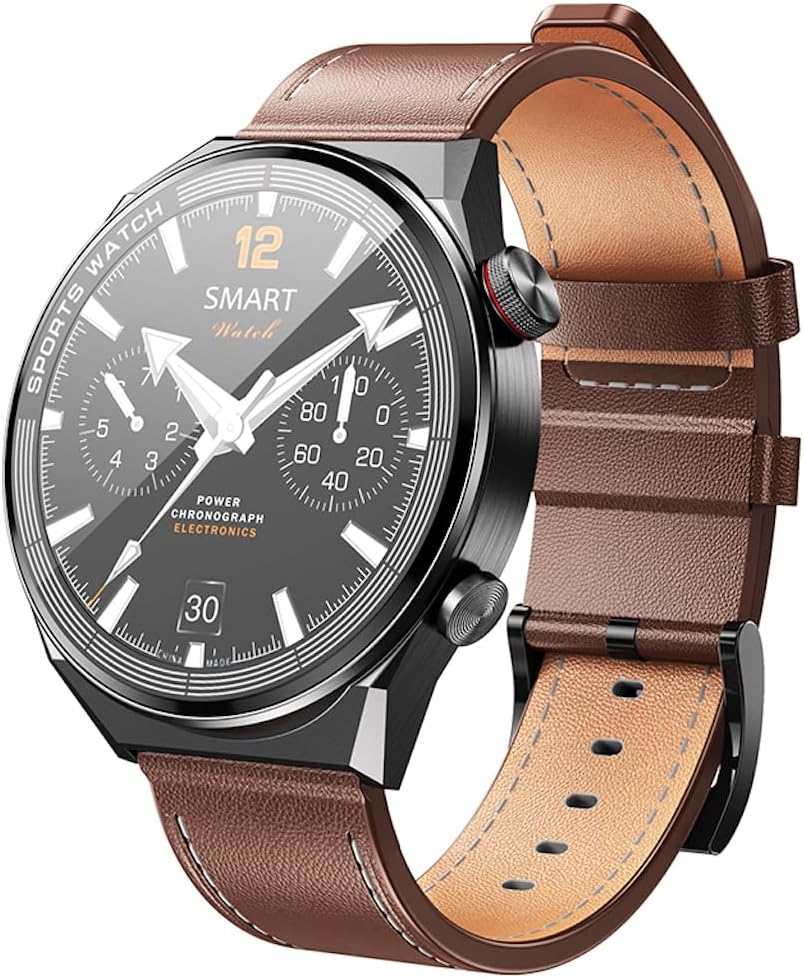
Image: The Hoco Y11 Smart Sport Watch displaying a classic watch face.
4.2 Health Monitoring
The Hoco Y11 provides comprehensive health tracking features:
- Heart Rate Monitoring: Continuously tracks your heart rate throughout the day. View real-time data on the watch or detailed trends in the app.
- Sleep Monitoring: Analyzes your sleep patterns, including deep sleep, light sleep, and awake times.
- Breathing Training: Guided breathing exercises to help you relax and reduce stress.

Image: The rear view of the Hoco Y11, highlighting the optical heart rate sensor.
4.3 Exercise Modes
The watch supports multiple exercise modes to track your workouts accurately. Select your desired activity from the exercise menu to record data such as duration, calories burned, and heart rate during your workout.
4.4 Bluetooth Call Functionality
With its built-in microphone and speaker, the Hoco Y11 allows you to make and receive calls directly from your wrist when connected to your smartphone via Bluetooth. Ensure the call function is enabled in the companion app.
4.5 Language Settings
The Hoco Y11 supports 20 languages. You can change the language setting through the watch's settings menu or via the companion app. Supported languages include Chinese, English, Russian, Arabic, Vietnamese, Danish, Thai, Polish, Persian, Spanish, Malay, Greek, French, Italian, German, Portuguese, Turkish, Latin, Romanian, and Hebrew.
5. Maintenance
5.1 Water Resistance (IP68)
The Hoco Y11 Smart Sport Watch is IP68 water-resistant, meaning it is protected against dust ingress and can withstand immersion in water up to 1.5 meters for up to 30 minutes. It is suitable for daily use, hand washing, and light rain. Note: It is not recommended for hot showers, saunas, or diving, as steam and high water pressure can compromise the seal.
5.2 Cleaning and Care
- Wipe the watch and straps regularly with a soft, dry cloth.
- If necessary, use a slightly damp cloth to clean the surface, then dry thoroughly.
- Avoid using harsh chemicals, abrasive cleaners, or solvents, as these can damage the watch's finish and components.
- Ensure the charging contacts on the back of the watch are clean and dry before charging.
6. Troubleshooting
If you encounter issues with your Hoco Y11 Smart Sport Watch, please refer to the following common solutions:
| Problem | Solution |
|---|---|
| Watch does not power on. | Ensure the watch is fully charged. Connect it to the charger for at least 30 minutes. Try pressing and holding the power button for 10-15 seconds. |
| Cannot pair with smartphone. | Ensure Bluetooth is enabled on your phone and the watch. Make sure the watch is discoverable. Restart both the watch and your phone. Try resetting the watch to factory settings (if available in settings). |
| Inaccurate heart rate/sleep data. | Ensure the watch is worn snugly on your wrist, not too loose or too tight. Clean the sensor on the back of the watch. Avoid excessive movement during readings. |
| Battery drains quickly. | Reduce screen brightness. Turn off unnecessary notifications. Limit continuous heart rate monitoring if not needed. Ensure no background apps are running excessively on the watch. |
| No call audio/microphone issues. | Check Bluetooth connection. Ensure call audio is routed to the watch in your phone's Bluetooth settings. Verify microphone and speaker are not obstructed. |
7. Specifications
| Feature | Detail |
|---|---|
| Brand | hoco. |
| Model Number | Y11 |
| Main Screen | 1.5 inches; 360x360 resolution |
| Water Resistance | IP68 |
| Processor | Ruiyu 8762DK |
| Memory | 128 MB |
| Bluetooth Version | 5.0 (supports calls) |
| Battery Capacity | 320 mAh |
| Battery Life (Dual Bluetooth) | 3 days |
| Battery Life (Single Bluetooth) | 5-7 days |
| Supported Functions | Breathing training, multiple exercise modes, sleep monitoring, heart rate monitoring |
| Included Straps | Two (one leather, one silicone) |
| Supported Languages | 20 languages (Chinese, English, Russian, Arabic, Vietnamese, Danish, Thai, Polish, Persian, Spanish, Malay, Greek, French, Italian, German, Portuguese, Turkish, Latin, Romanian, Hebrew) |
| Operating System | Android (compatible) |
| Compatible Devices | Smartphone |
| Battery Composition | Lithium-ion |
8. Warranty and Support
Hoco products are manufactured to the highest quality standards. For warranty information, technical support, or any inquiries regarding your Hoco Y11 Smart Sport Watch, please refer to the official Hoco website or contact your local distributor.
Official Hoco Website: http://www.hocotech.com
Related documentsY11


Ask a question about this manual
Ask about setup, troubleshooting, compatibility, parts, safety, or missing instructions. Manuals+ will review the question and use this page’s manual context to help answer it.