
1. Introduction
The Brifit Digital Refrigerator Freezer Thermometer provides accurate temperature readings for your refrigerator, freezer, or other indoor/outdoor environments. Its compact design and clear display make it suitable for various applications, helping you maintain optimal conditions for food preservation and other needs.
Key Features:
- MAX/MIN Temperature Recording: Displays maximum, minimum, and current temperatures simultaneously.
- Temperature Range: Measures from -20℃ to 50℃ (-4℉ to 122℉).
- Unit Switching: Easily switch between Celsius (℃) and Fahrenheit (℉).
- Waterproof Rating: IPX3 waterproof for use in refrigerated or frozen environments.
- Flexible Placement: Features a foldable stand for tabletop use and a hook for hanging.

2. Product Overview
The Brifit Digital Thermometer features a clear LCD display and simple controls for ease of use.

Display Information
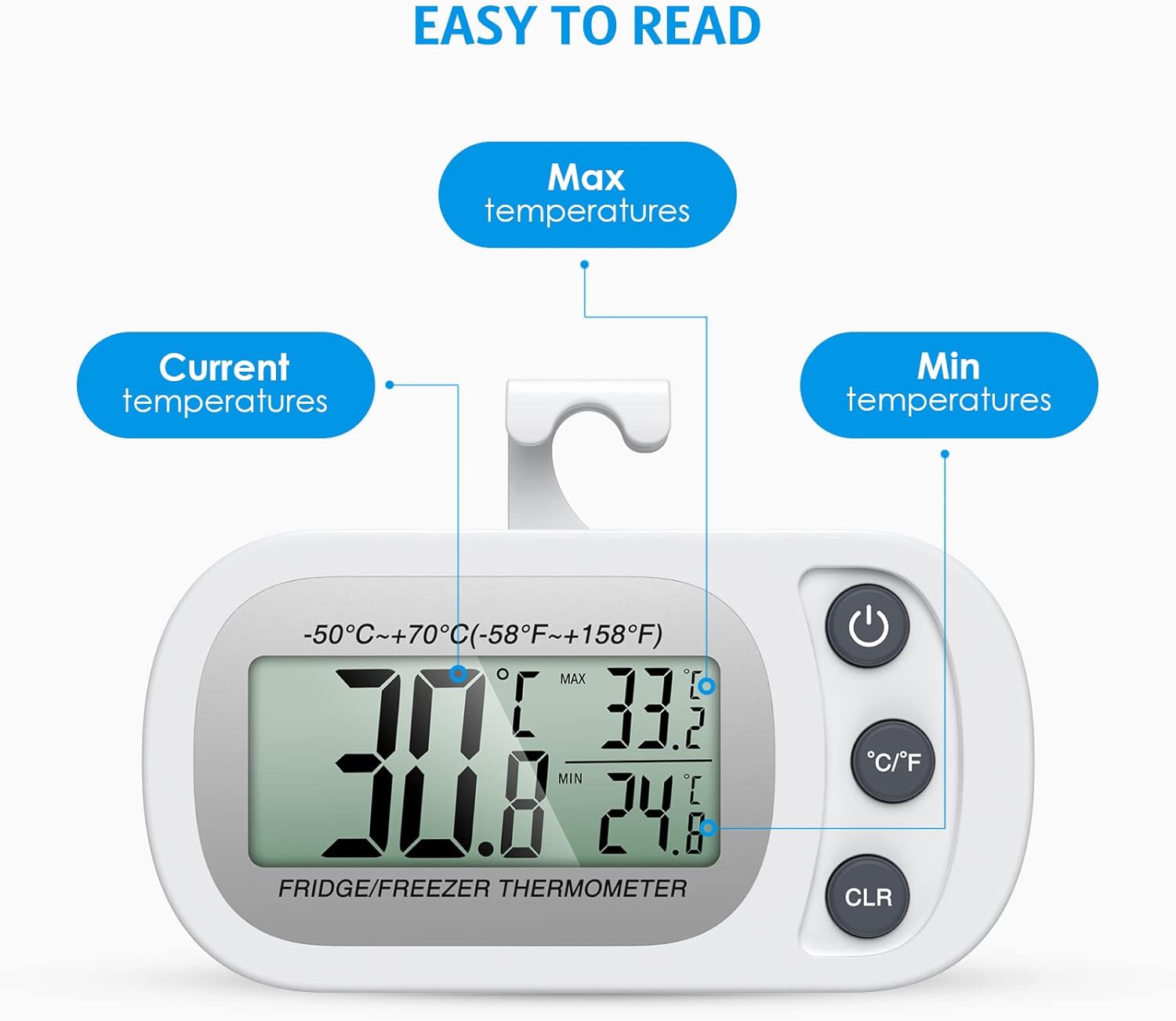
- Current Temperature: The large digits indicate the real-time temperature.
- MAX Temperature: The highest temperature recorded since the last reset.
- MIN Temperature: The lowest temperature recorded since the last reset.
Buttons

- Power Button (①): Press to turn the device on or off.
- °C/°F Switch (②): Press to toggle between Celsius and Fahrenheit temperature units.
- CLR Button (③): Press to reset the recorded MAX/MIN temperatures.
3. Setup
Battery Installation
The thermometer requires one CR2032 battery (one battery is typically included for initial use). If the display becomes irregular or unclear, the battery may need replacement.
- Locate the battery compartment on the back of the device.
- Use a small screwdriver to open the screw and remove the ABS casing.
- Insert a new CR2032 battery, ensuring correct polarity (+/-).
- Replace the casing and secure the screw.
Note: Some units may have a protective film on the battery that needs to be removed before first use. If the device does not power on, check for this film or replace the battery.
Placement Options
The thermometer offers two convenient placement methods:
- Tabletop Placement: Use the integrated foldable stand to place the thermometer on any flat surface.
- Hanging Placement: Flip the stand to use the integrated hook, allowing you to hang the thermometer on a refrigerator shelf or other suitable location.

4. Operating Instructions
Power On/Off
Press the Power Button (①) once to turn the thermometer on. Press and hold the Power Button for a few seconds to turn it off.
Switching Temperature Units
Press the °C/°F Switch (②) to toggle the temperature display between Celsius (℃) and Fahrenheit (℉).
Understanding MAX/MIN Readings
The thermometer continuously records the highest (MAX) and lowest (MIN) temperatures since the last reset. These values are displayed alongside the current temperature.
Resetting MAX/MIN Readings
To clear the recorded MAX/MIN temperatures and start a new recording cycle, press the CLR Button (③). The MAX/MIN values will reset to the current temperature.
5. Maintenance
Battery Replacement
Replace the CR2032 battery when the display becomes dim, irregular, or stops functioning. Follow the battery installation steps outlined in Section 3.
Cleaning
Wipe the thermometer with a soft, damp cloth. Do not use abrasive cleaners or immerse the device in water, despite its IPX3 rating, to prevent damage to internal components.
6. Troubleshooting
- Inaccurate Readings:
If you suspect inaccurate readings, try restarting the device by removing and reinserting the battery. Ensure the thermometer has been in the environment for several minutes to stabilize its reading. - Display is Blank or Irregular:
Check the battery. The battery may be depleted or improperly installed. Replace the CR2032 battery if necessary. Ensure any protective film on the battery has been removed. - Display Turns Off in Very Cold Temperatures:
While designed for freezer use, extreme temperatures significantly below -18℃ (0℉) may affect LCD performance. This is a characteristic of LCD technology at very low temperatures. The device should resume normal operation once the temperature rises within its specified operating range. - MAX/MIN Values Not Resetting:
Ensure you are pressing the 'CLR' button firmly. If the issue persists, try removing and reinserting the battery to perform a hard reset.
7. Specifications
| Feature | Specification |
|---|---|
| Model Number | WA4W_2PCS |
| Temperature Range | -20℃ to 50℃ (-4℉ to 122℉) |
| Accuracy | ±1℃ (±2℉) |
| Resolution | 0.1℃ (0.2℉) |
| Power Source | 1 x CR2032 Battery |
| Waterproof Rating | IPX3 |
| Dimensions (approx.) | 88mm (L) x 46mm (W) x 16mm (D) |


8. Warranty and Support
Brifit products are designed for reliability and performance. While specific warranty details are not provided in this manual, please refer to your purchase documentation or contact Brifit customer support for any warranty-related inquiries or technical assistance.
For further support, please visit the official Brifit website or contact their customer service department through the retailer where the product was purchased.