
Crane EE-5958CWH
Crane x HALLS Collapsible Cool Mist Humidifier User Manual
Model: EE-5958CWH
1. Introduction
Thank you for purchasing the Crane x HALLS Collapsible Cool Mist Humidifier. This manual provides important information for the proper setup, operation, and maintenance of your humidifier. Please read it thoroughly before use and retain it for future reference.
Important Safety Instructions
- Always place the humidifier on a firm, flat, water-resistant surface.
- Do not operate without water in the tank.
- Keep out of reach of children and pets.
- Unplug the unit when not in use or before cleaning.
- Do not block air vents.
2. Product Features
- VAPOR PAD COMPATIBLE: Designed to be used with HALLS Vapor Pads.
- ADJUSTABLE SETTINGS: Features variable controls to easily set the desired humidity level (Low, Medium, High). Suitable for various uses including plant, baby, bedroom, or children's room humidification.
- COLLAPSIBLE TANK: Unique collapsible design allows the tank to shrink to half its original size, ideal for travel and compact storage.
- LARGE ROOM HUMIDIFIER: Equipped with an easy-to-clean top-fill tank that holds 1 gallon of water, providing up to 24 hours of continuous humidification for indoor spaces.
- EASY FILL: Filter-free design with a top-fill tank for convenient refilling. Simply remove the lid and pour water directly into the 1-gallon tank. The tank opening is large enough for easy manual cleaning.
3. Package Contents
- Crane x HALLS Collapsible Cool Mist Humidifier Unit
- Power Cord
- User Manual
- One HALLS Soothing Vapor Pad (additional pads sold separately)
4. Setup
- Unpack the Humidifier: Carefully remove all packaging materials and place the humidifier on a flat, stable surface.
- Expand the Tank: If the tank is in its collapsed state, gently pull the top section upwards until it is fully extended and locked into place.
- Fill the Water Tank: Remove the top lid. Fill the tank with clean, cool tap water. Do not fill past the MAX fill line. Replace the lid securely.
- Insert Vapor Pad (Optional): If using a HALLS Vapor Pad, open the aroma tray located on the side of the base and insert one pad. Close the tray.
- Position the Mist Lid: Rotate the 360° mist lid to direct the mist away from walls, furniture, and electronics.
- Connect Power: Plug the power cord into a standard electrical outlet.

Figure 1: Crane x HALLS Humidifier in its fully expanded state, ready for use.

Figure 2: Demonstrating the easy top-fill design of the humidifier tank.
5. Operating Instructions
- Power On: Press the power button (labeled with a power icon) on the front of the unit to turn the humidifier on. The indicator light will illuminate.
- Adjust Mist Output: Repeatedly press the power button to cycle through the mist output settings: Low (LO), Medium (MED), and High (HI). Select the desired humidity level for your environment.
- Automatic Shut-Off: The humidifier will automatically shut off when the water tank is empty. The indicator light may change color or turn off to signal this.
- Power Off: To turn off the humidifier manually, cycle through the settings until the unit powers down, or unplug it from the outlet.
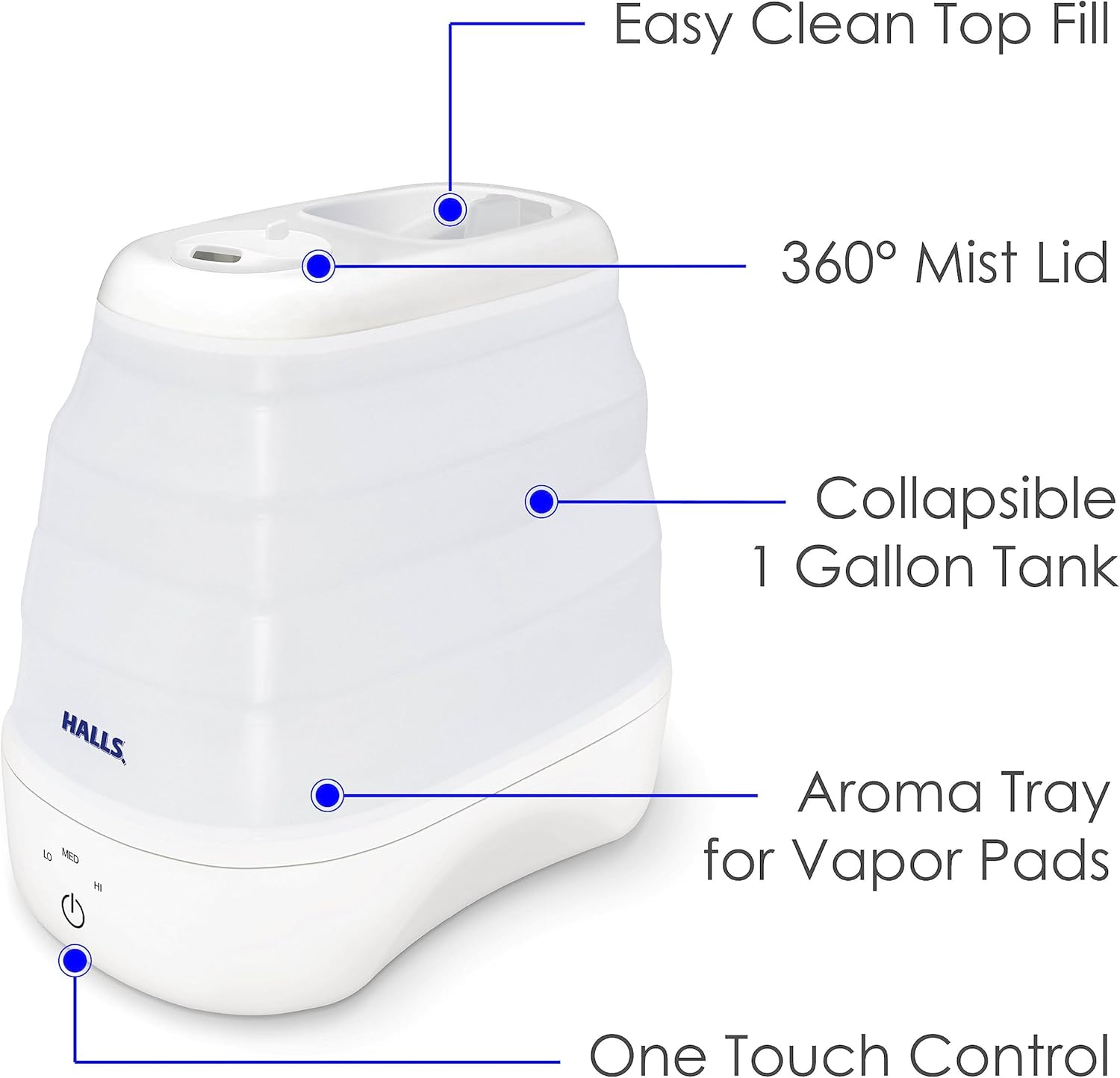
Figure 3: The intuitive one-touch control panel for power and mist intensity.
6. Maintenance and Cleaning
Regular cleaning is essential to prevent mineral buildup and ensure optimal performance. Unplug the unit before any cleaning or maintenance.
Daily Maintenance:
- Empty any remaining water from the tank and base.
- Rinse the tank and base with fresh water.
- Allow all parts to air dry completely before reassembling or storing.
Weekly Cleaning:
- Disassemble: Remove the top lid and the collapsible tank from the base.
- Clean the Tank: Wipe the inside of the tank with a soft cloth and a mild detergent solution. Rinse thoroughly.
- Clean the Base: Fill the base with a mixture of 2 tablespoons of white vinegar and 1 gallon of water. Let it soak for 20-30 minutes.
- Clean the Nebulizer: Use a small brush (not included) to gently clean the nebulizer (the small disc in the center of the base) to remove mineral deposits.
- Rinse and Dry: Pour out the vinegar solution and rinse all parts thoroughly with clean water until the vinegar smell is gone. Allow all parts to air dry completely before reassembly.

Figure 4: The humidifier in its collapsed state, demonstrating its compact form for easy storage or travel.

Figure 5: The compact size of the humidifier allows for convenient storage in small spaces.
7. Troubleshooting
| Problem | Possible Cause | Solution |
|---|---|---|
| No Mist Output | No water in tank; Unit not plugged in; Mineral buildup on nebulizer. | Refill tank; Plug in unit; Clean nebulizer as per maintenance instructions. |
| Unusual Odor | Stagnant water; Dirty tank/base. | Empty and clean tank/base thoroughly. Use fresh water daily. |
| Excessive Condensation | Mist output too high for room size; Humidifier placed too close to objects. | Reduce mist output; Move humidifier to a more open area. |
| Unit Not Turning On | Power cord not connected; No power at outlet. | Ensure power cord is securely plugged in; Check outlet with another appliance. |
8. Specifications
- Product Dimensions: 7.5 x 9.5 x 12.5 inches
- Weight: 3.33 Pounds
- Model Number: EE-5958CWH
- Manufacturer: Crane
- Power: 110 volts
- Water Tank Capacity: 1 Gallon
- Run Time: Up to 24 hours
- Coverage Area: Up to 500 Square Feet
- Special Features: Adjustable Humidity Control, Removable Tank, Quiet Operation, Auto Shut Off, Aroma Diffuser
- Filter Type: Ultraviolet (Filter-free design for user convenience)
9. Warranty and Support
For warranty information and customer support, please refer to the warranty card included with your product or visit the official Crane website. You can also contact Crane customer service directly for assistance with product registration, troubleshooting, or replacement parts.
Website: Visit the Crane Store on Amazon
Related documentsEE-5958CWH


Ask a question about this manual
Ask about setup, troubleshooting, compatibility, parts, safety, or missing instructions. Manuals+ will review the question and use this page’s manual context to help answer it.