
Introduction
This manual provides essential information for the safe and effective operation, maintenance, and troubleshooting of your DEWALT DCD794 20V Cordless 1/2" Drill Driver. The DCD794 is a compact and lightweight tool designed for drilling and fastening applications, delivering up to 1,650 RPMs with a 1/2" ratcheting chuck and an integrated LED work light.

Image: Front view of the DEWALT DCD794 20V Cordless 1/2" Drill Driver.
General Safety Information
Always observe basic safety precautions to reduce the risk of fire, electric shock, and personal injury. Keep your work area clean and well-lit. Do not operate power tools in explosive atmospheres, such as in the presence of flammable liquids, gases, or dust. Keep children and bystanders away while operating a power tool. Wear appropriate personal protective equipment, including eye protection, hearing protection, and gloves. Ensure the tool is switched off before making any adjustments, changing accessories, or storing it.
Product Overview
The DEWALT DCD794 Drill Driver is engineered for performance and durability. Key features include:
- 1/2" Ratcheting Chuck: Provides high bit retention for secure accessory gripping.
- 2-Speed Transmission: Allows for versatile drilling and fastening applications.
- 15 Clutch Settings: Offers precise control for various torque requirements.
- LED Work Light: Illuminates the work area for improved visibility.
- Compact and Lightweight Design: Enhances user comfort and maneuverability.
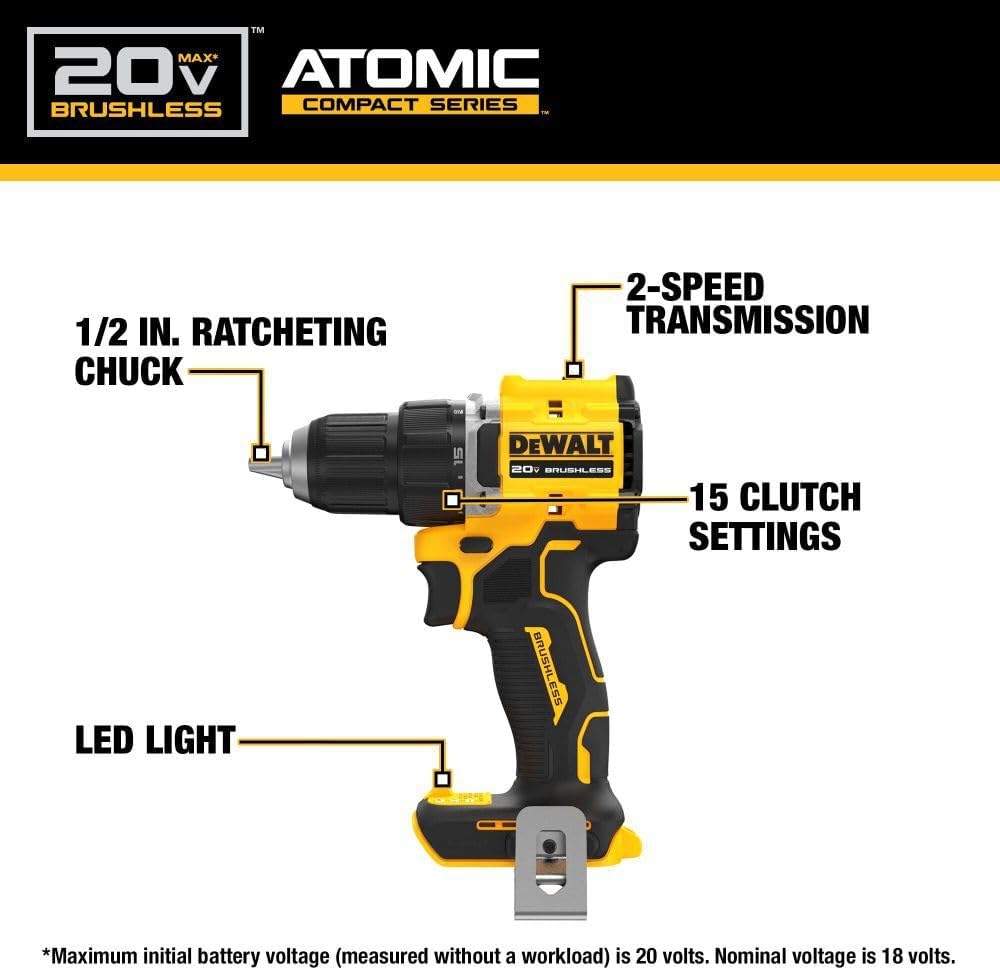
Image: Diagram highlighting the 1/2 inch ratcheting chuck, 2-speed transmission, 15 clutch settings, and LED light on the DEWALT DCD794 Drill Driver.
Setup
Battery Installation and Removal
- To install the battery, align the battery pack with the rails inside the tool's handle. Slide the pack firmly into the tool until it locks into place.
- To remove the battery, press the release button on the battery pack and pull the pack out of the handle.

Image: The DEWALT DCD794 Drill Driver with a 20V battery pack attached to the base.
Bit Installation and Removal
- To install a drill bit or driver accessory, grasp the rear half of the chuck and rotate the front half counter-clockwise until the chuck jaws open wide enough to accept the accessory.
- Insert the accessory fully into the chuck.
- Grasp the rear half of the chuck and rotate the front half clockwise until the accessory is firmly clamped.
- To remove, reverse the process.
Operating Instructions
Speed Selection
The drill driver features a 2-speed transmission for optimal performance across different applications. Use the speed selector switch located on top of the tool:
- Position 1 (Low Speed): For high torque applications, such as driving screws or drilling large diameter holes.
- Position 2 (High Speed): For faster drilling with smaller bits.

Image: The DEWALT DCD794 Drill Driver being used to drill into wood, illustrating its 2-speed transmission capability.
Clutch Settings
The adjustable clutch ring allows you to select the appropriate torque setting for your task. Rotate the ring to align the desired number with the indicator mark. Lower numbers are for driving small screws or into soft materials, while higher numbers are for driving larger screws or into harder materials. The drill symbol setting provides maximum torque for drilling applications.
Trigger Switch and LED Light
The variable speed trigger switch controls the tool's speed. Press the trigger to start the tool and vary the pressure to adjust the speed. The integrated LED work light activates when the trigger is pressed, illuminating the work surface. The light remains on for a short period after the trigger is released.
Maintenance
Regular maintenance ensures optimal performance and extends the life of your tool.
- Cleaning: Use a soft, damp cloth to clean the exterior of the tool. Do not use harsh chemicals or abrasive cleaners. Keep the ventilation slots clear of dust and debris.
- Chuck Maintenance: Periodically clean the chuck jaws to ensure proper gripping.
- Battery Care: Store batteries in a cool, dry place away from direct sunlight. Do not store batteries in a discharged state for extended periods.
- Inspection: Regularly inspect the tool for any damaged parts, loose screws, or worn components. Have any damaged parts repaired by a qualified service technician.
Troubleshooting
| Problem | Possible Cause | Solution |
|---|---|---|
| Tool does not start | Battery not charged or improperly installed | Charge battery fully; ensure battery is securely inserted. |
| Loss of power during operation | Battery charge low | Recharge battery. |
| Bit slips in chuck | Chuck not tightened sufficiently or jaws are dirty | Tighten chuck firmly; clean chuck jaws. |
| Excessive vibration | Bent drill bit or accessory | Replace with a straight, undamaged accessory. |
Specifications
| Feature | Specification |
|---|---|
| Brand | DEWALT |
| Model Number | DCD794B-NBX |
| Power Source | Battery Powered (20 Volts) |
| Maximum Rotational Speed | 1650 RPM |
| Maximum Chuck Size | 0.5 Inches |
| Maximum Torque | 1.5 Newton Meters |
| Maximum Power | 300 Watts |
| Material Type | Plastic |
| Item Dimensions (L x W x H) | 6"L x 3"W x 8"H |
| Item Weight | 2.54 Pounds |
Warranty Information
DEWALT provides a limited warranty for its products. For specific details regarding the warranty period, coverage, and terms for your DCD794 Drill Driver, please refer to the warranty card included with your purchase or visit the official DEWALT website. Keep your proof of purchase for warranty claims.
Support
For further assistance, technical support, or to locate authorized service centers, please visit the official DEWALT website or contact their customer service. You can find more information and resources at the DEWALT Store on Amazon or the main DEWALT corporate website.


