
Metabo 602083000
Metabo AS 20 L PC Universal Vacuum Cleaner User Manual
Model: 602083000
Introduction
This manual provides essential information for the safe and efficient operation, maintenance, and troubleshooting of your Metabo AS 20 L PC Universal Vacuum Cleaner. Please read this manual thoroughly before using the appliance and keep it for future reference.
The Metabo AS 20 L PC is a durable and robust all-purpose vacuum cleaner designed for versatile use in various environments, including domestic settings, offices, and workshops. It features a 20-liter capacity for efficient dust and debris suction and is engineered for ease of use and maneuverability.

Figure 1: Metabo AS 20 L PC Universal Vacuum Cleaner, showing its compact design with hose and attachments.
Safety Instructions
Always observe the following safety precautions to reduce the risk of fire, electric shock, or injury.
- Read all instructions: Before operating the vacuum cleaner, read and understand all safety warnings and instructions.
- Electrical Safety: Ensure the power supply voltage matches the rating label on the vacuum cleaner. Do not use with a damaged cord or plug.
- Indoor Use Only: This appliance is designed for indoor use. Do not expose to rain or moisture.
- Flammable Materials: Do not vacuum flammable or combustible liquids, such as gasoline, or use in areas where they may be present.
- Hot Materials: Do not vacuum burning or smoking materials, such as cigarettes, matches, or hot ashes.
- Filter Maintenance: Always ensure filters are correctly installed before operation. Clean or replace filters regularly as instructed.
- Supervision: Close supervision is necessary when the appliance is used by or near children.
- Disconnect Power: Always unplug the vacuum cleaner from the electrical outlet before performing any maintenance, cleaning, or when not in use.
- Proper Storage: Store the vacuum cleaner indoors in a dry place.
Package Contents
Verify that all items listed below are included in your package:
- Metabo AS 20 L PC Universal Vacuum Cleaner unit
- Suction hose
- Floor nozzle
- Crevice tool
- Upholstery tool
- Filter (foam type)
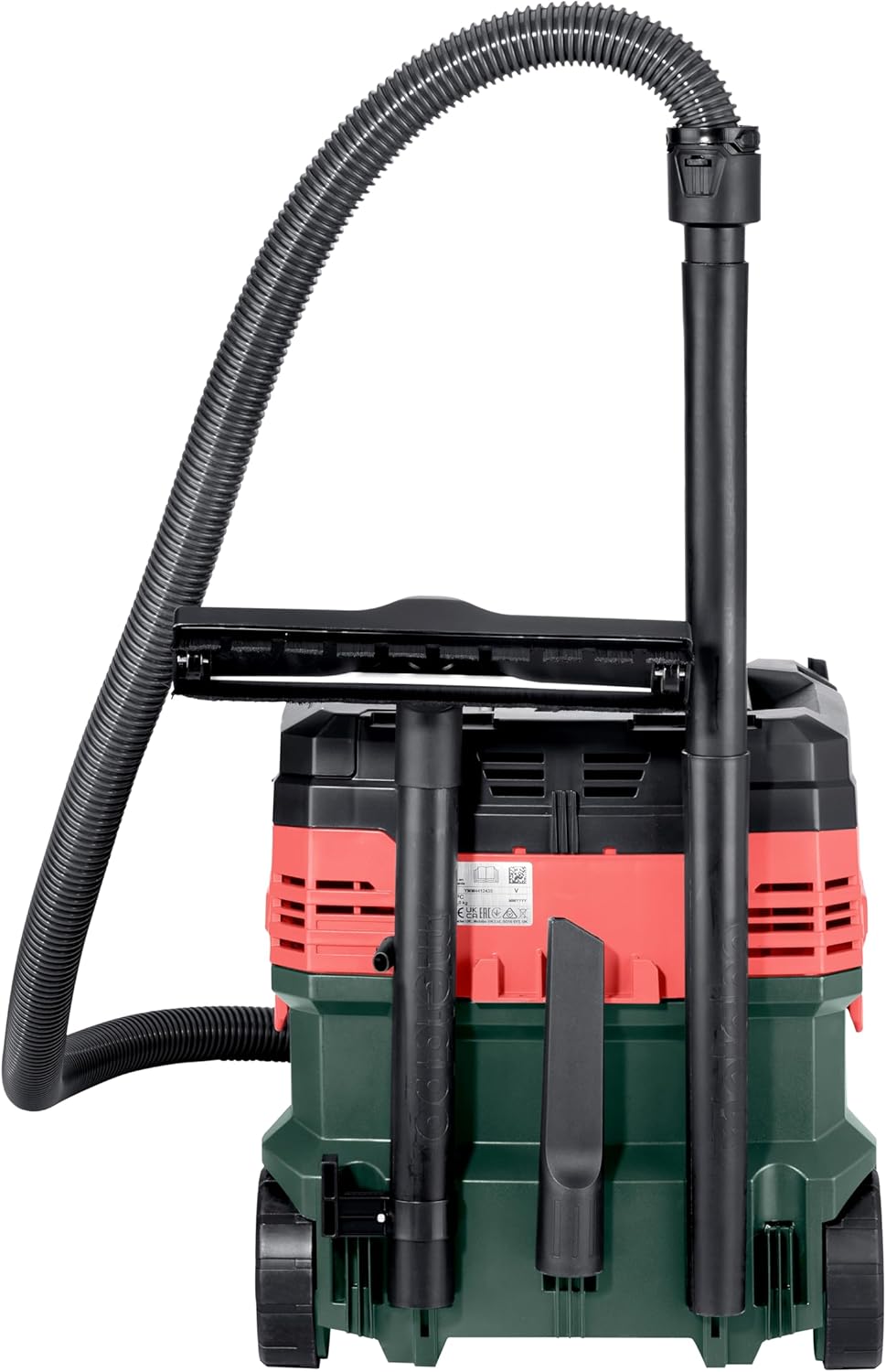
Figure 2: Rear view of the vacuum cleaner showing integrated storage for accessories like the crevice tool and floor nozzle.
Setup
- Unpacking: Carefully remove all components from the packaging. Retain packaging for future transport or storage.
- Attaching Wheels: Ensure the wheels are securely attached to the base of the vacuum cleaner for easy mobility.
- Connecting the Suction Hose:
Insert the larger end of the suction hose firmly into the suction inlet on the front of the vacuum cleaner until it clicks into place. For optimal performance, ensure a secure connection.

Figure 3: Illustration of how to connect the suction hose to the vacuum cleaner, showing the "CLICK!" mechanism for secure attachment.
- Installing Filters:
For dry vacuuming, ensure the appropriate dry filter is installed. For wet vacuuming, a foam filter is typically used. Refer to the internal compartment for filter access.

Figure 4: Top view of the vacuum cleaner with the lid open, revealing the internal compartment for filter access and the "PressClean" button.
- Attaching Accessories: Connect the desired nozzle (floor, crevice, or upholstery) to the smaller end of the suction hose.
Operating Instructions
General Operation
- Power Connection: Plug the power cord into a suitable electrical outlet (220 Volts).
- Power On/Off: Locate the power switch on the top of the unit and switch it to the "ON" position to start the vacuum. Switch to "OFF" when finished.
- Dry Vacuuming: Ensure the dry filter is correctly installed. Use appropriate attachments for different surfaces like carpets or hard floors.
- Wet Vacuuming: Before wet vacuuming, remove the dry filter and install the foam filter. Ensure the tank is empty. Do not overfill the tank; the vacuum has a float mechanism to prevent overfilling.
Using the PressClean Feature
The Metabo AS 20 L PC features a "PressClean" function for semi-automatic filter cleaning, which helps maintain suction power.
- To activate, press the "PressClean" button located on the top of the unit (refer to Figure 4).
- This function briefly reverses the airflow to dislodge dust from the filter, improving suction performance.
- Use this feature periodically during operation, especially when you notice a decrease in suction power.
Maintenance
Regular maintenance ensures optimal performance and extends the life of your vacuum cleaner.
- Emptying the Tank:
After each use, especially after wet vacuuming, empty the collection tank. Disconnect the power cord before opening the tank.
For dry debris, dispose of contents responsibly. For liquids, pour out the liquid carefully.
- Filter Cleaning and Replacement:
The foam filter used for wet vacuuming should be rinsed with water and allowed to air dry completely before reinstallation.
For dry filters, tap off excess dust or use the "PressClean" function. Replace filters when they show signs of wear or damage, or if suction power remains low after cleaning.
- Hose and Accessory Care:
Inspect the hose and accessories regularly for blockages or damage. Clear any obstructions to maintain airflow.

Figure 5: The flexible suction hose, shown coiled for storage, should be regularly checked for blockages.
- Exterior Cleaning: Wipe the exterior of the vacuum cleaner with a damp cloth. Do not use harsh chemicals or abrasive cleaners.
Troubleshooting
Refer to the table below for common issues and their solutions.
| Problem | Possible Cause | Solution |
|---|---|---|
| Vacuum does not turn on. | No power supply; power switch off; damaged cord/plug. | Check power outlet; ensure switch is ON; inspect cord/plug for damage (do not use if damaged). |
| Low suction power. | Clogged filter; blocked hose/nozzle; full tank. | Clean or replace filter; clear blockages; empty tank. Use PressClean function. |
| Motor stops during wet vacuuming. | Tank is full (float mechanism activated). | Empty the collection tank. |
| Unusual noise. | Blockage in hose/nozzle; damaged motor. | Check and clear blockages. If noise persists, contact customer support. |
Specifications
Detailed technical specifications for the Metabo AS 20 L PC Universal Vacuum Cleaner:
| Feature | Detail |
|---|---|
| Brand | Metabo |
| Model Number | 602083000 |
| Color | Black |
| Capacity | 20 Liters |
| Power | 1200 Watts |
| Voltage | 220 Volts |
| Sound Level | 80 dB |
| Features | Compact |
| Item Weight | 9.4 Kilograms |
| Spare Parts Availability | 1 Year |
| Filter Type | Foam |
| Surface Recommendation | Carpet |
| Power Source | AC |
| Cordless? | No |
| Country of Origin | China |

Figure 6: Technical drawing showing the dimensions of the Metabo AS 20 L PC vacuum cleaner (381mm x 398mm x 377mm).
Warranty and Support
Metabo products are manufactured to high-quality standards and come with a manufacturer's warranty. For specific warranty details, please refer to the warranty card included with your product or visit the official Metabo website.
For technical support, spare parts, or service inquiries, please contact your authorized Metabo dealer or the Metabo customer service department. Ensure you have your model number (602083000) and purchase information ready when contacting support.
Spare parts availability is listed as 1 year from the date of purchase.
Related documents602083000


Ask a question about this manual
Ask about setup, troubleshooting, compatibility, parts, safety, or missing instructions. Manuals+ will review the question and use this page’s manual context to help answer it.