
G-POWER C60Q
G-POWER C60Q Portable Power Bank Instruction Manual
Model: C60Q | Brand: G-POWER
Introduction
Thank you for choosing the G-POWER C60Q Portable Power Bank. This device is designed to provide reliable and versatile power for your electronic devices, including laptops, smartphones, cameras, and drones, whether you are at home, traveling, or enjoying outdoor activities. With its high capacity, multiple output ports, and advanced safety features, the C60Q ensures your devices stay charged and ready for use.
Safety Information
Please read all safety instructions carefully before using the G-POWER C60Q. Failure to follow these instructions may result in electric shock, fire, or serious injury.
- Do not expose the power bank to water, moisture, or extreme temperatures.
- Do not disassemble, repair, or modify the device. This will void the warranty and may cause damage or injury.
- Keep the power bank away from heat sources, direct sunlight, and flammable materials.
- Use only approved chargers and cables for recharging the power bank.
- Do not short-circuit the output ports.
- Keep out of reach of children.
- Ensure proper ventilation during use to prevent overheating. The device features a smart cooling fan for optimal temperature management.
Product Overview
The G-POWER C60Q is a compact and powerful portable power station. Familiarize yourself with its components:

Image: The G-POWER C60Q portable power bank shown with its two included USB-C charging cables. The device is black with a red accent band and features an AC outlet with a protective cover.
Components and Ports:
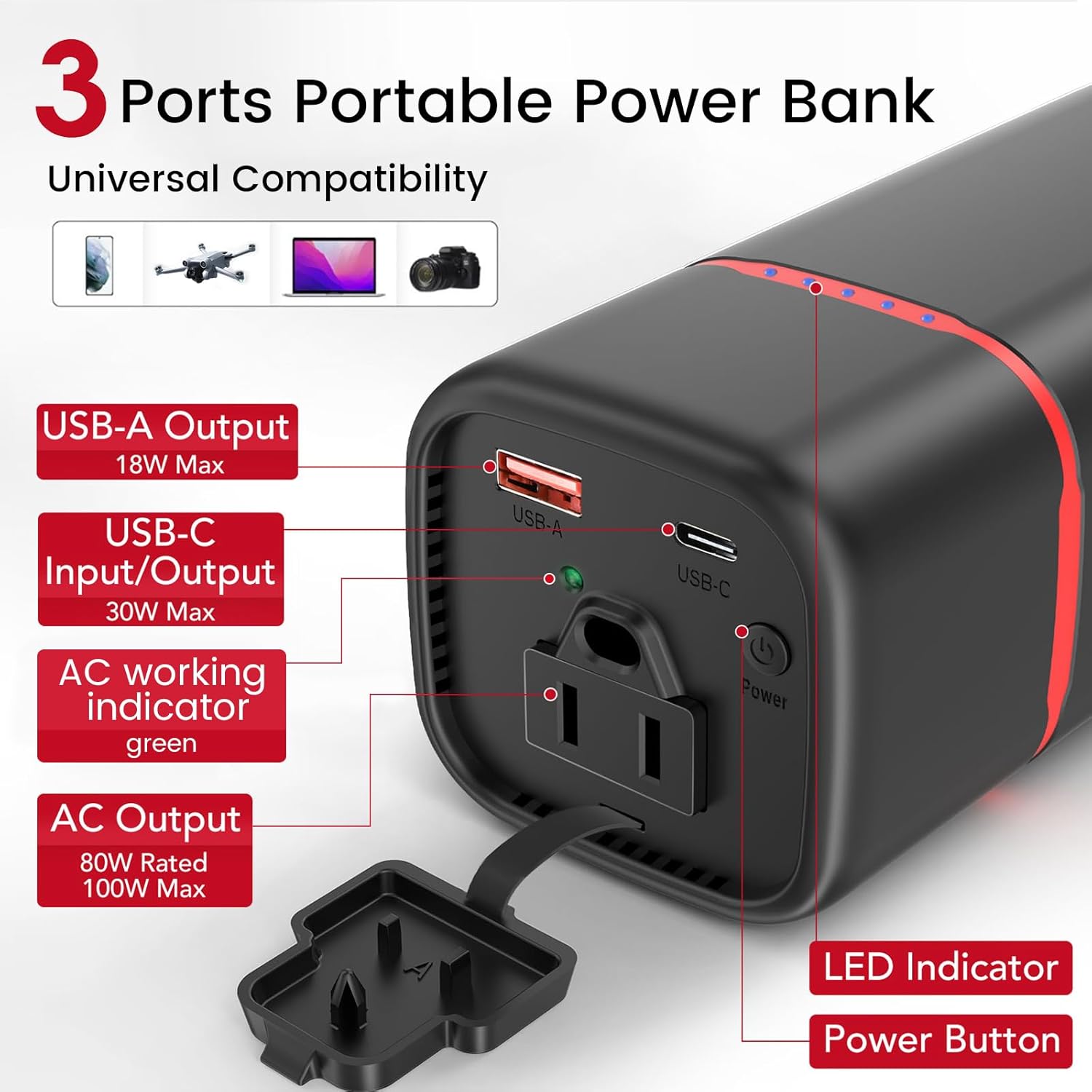
Image: A detailed view of the G-POWER C60Q's top panel, highlighting the USB-A output, USB-C input/output, AC outlet with its protective cover, power button, and LED indicator lights.
- AC Outlet (80W Rated, 100W Peak): Provides standard wall power for laptops and other AC-powered devices. Features a protective cover.
- USB-C Input/Output (30W Max PD): A versatile port for both charging the power bank and fast charging compatible devices like laptops, tablets, and smartphones.
- USB-A Output (18W Max QC): Standard USB port for charging smartphones, smartwatches, and other USB-powered devices.
- Power Button: Used to turn the device on/off and activate the AC outlet.
- LED Indicators: Display the remaining battery capacity and AC working status.
Setup
Initial Charging:
Before first use, it is recommended to fully charge your G-POWER C60Q. This ensures optimal battery performance and longevity.
- Connect the provided USB-C cable to the USB-C port on the power bank.
- Connect the other end of the USB-C cable to a compatible USB-C wall charger (e.g., G-POWER 65W charger for rapid recharge).
- The LED indicators will illuminate to show charging progress. All LEDs will be solid when fully charged.
- A full recharge takes approximately 2.5 hours with a 65W charger.
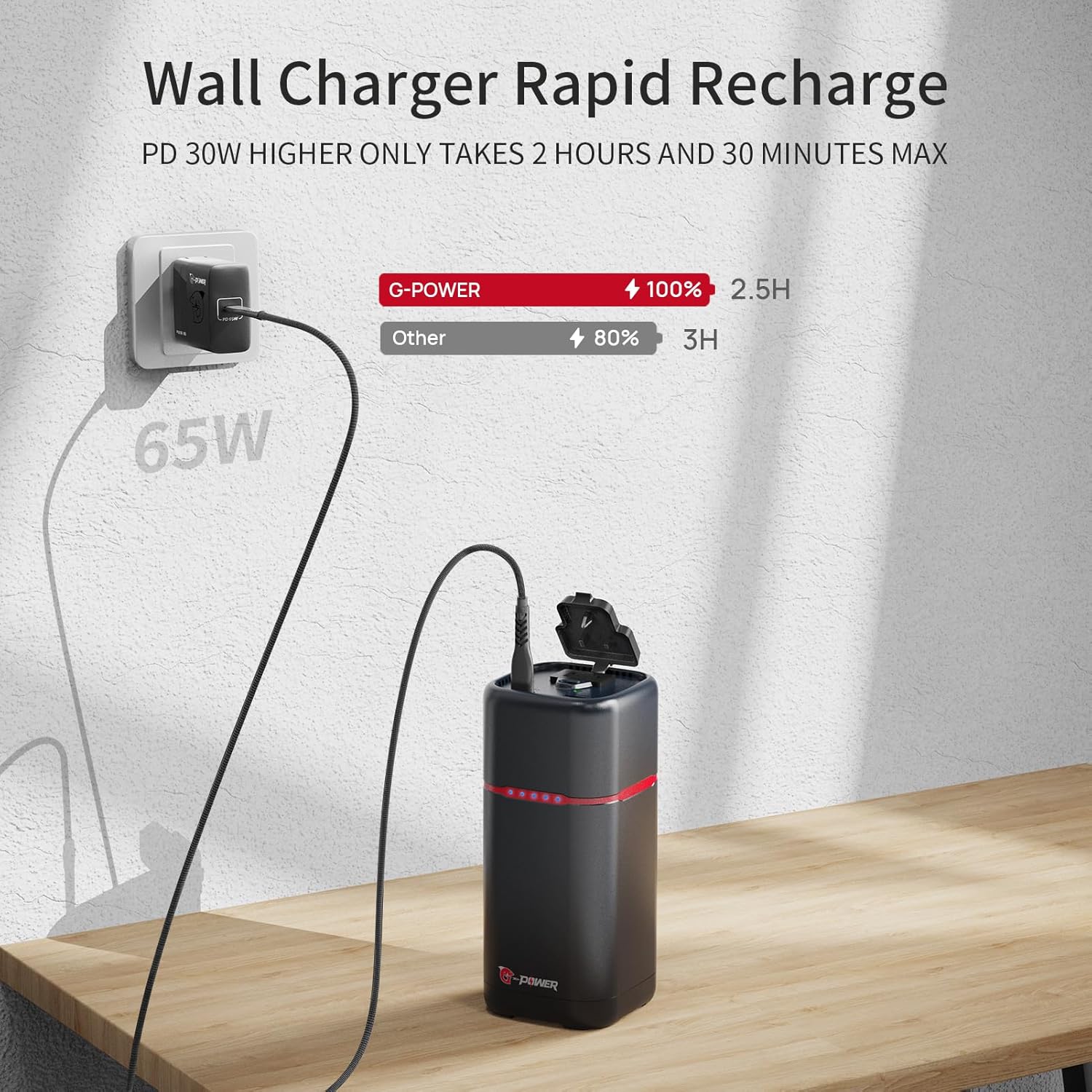
Image: The G-POWER C60Q power bank connected to a wall outlet via a 65W G-POWER charger for rapid recharging.
Operating Instructions
Charging Devices:
The G-POWER C60Q can charge multiple devices simultaneously using its various output ports.
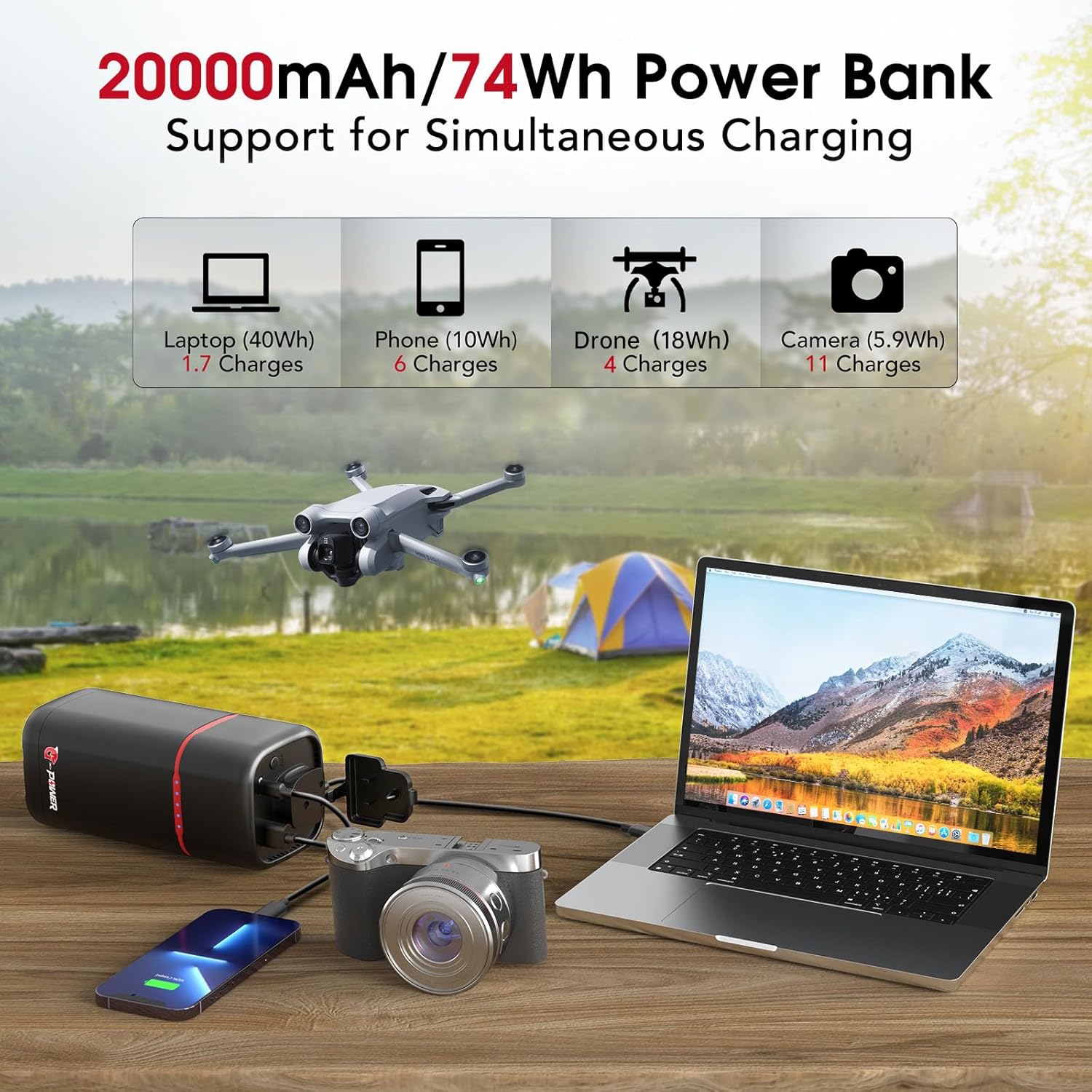
Image: The G-POWER C60Q power bank simultaneously charging a laptop via its AC outlet, a camera, and a smartphone, demonstrating its multi-device charging capability.
- Using the AC Outlet:
- Press and hold the power button until the green indicator light appears next to the AC outlet. This activates the AC output.
- Plug your device's power adapter into the AC outlet.
- Ensure your device's power consumption does not exceed 100W.
- Using the USB-C Port:
- Connect your device to the USB-C port using a compatible USB-C to USB-C cable.
- The power bank will automatically begin charging your device.
- Using the USB-A Port:
- Connect your device to the USB-A port using a compatible USB-A cable.
- The power bank will automatically begin charging your device.
The LED indicators will show the remaining battery level of the power bank during charging.
Maintenance
Proper maintenance ensures the longevity and optimal performance of your G-POWER C60Q.
- Cleaning: Use a soft, dry cloth to clean the exterior of the power bank. Do not use liquid cleaners or abrasive materials.
- Storage: Store the power bank in a cool, dry place away from direct sunlight and extreme temperatures. If storing for extended periods, charge the device to about 50-70% capacity every 3-6 months to maintain battery health.
- Battery Care: Avoid fully discharging the battery frequently. Recharge the power bank when the battery level is low.
Troubleshooting
If you encounter issues with your G-POWER C60Q, refer to the table below for common problems and solutions.
| Problem | Possible Cause | Solution |
|---|---|---|
| Power bank not charging. | Cable not connected properly; charger not working; faulty cable. | Ensure cable is securely connected. Try a different charger or cable. |
| Device not charging from power bank. | Power bank battery low; incorrect port used; device not compatible; AC outlet not activated. | Recharge power bank. Ensure correct port is used. For AC, hold power button until green light appears. Check device compatibility. |
| AC outlet not working. | AC outlet not activated; device power consumption too high. | Press and hold the power button until the green indicator light appears. Ensure device power is within 100W. |
| Power bank overheating. | Excessive load; poor ventilation. | Reduce connected devices. Ensure power bank is in a well-ventilated area. If overheating persists, discontinue use and contact support. |
Specifications
Detailed technical specifications for the G-POWER C60Q Portable Power Bank:
| Feature | Detail |
|---|---|
| Model Number | C60Q |
| Battery Capacity | 20000mAh / 74Wh |
| AC Output | 80W Rated, 100W Peak |
| USB-C Input/Output | 30W Max (Power Delivery) |
| USB-A Output | 18W Max (Quick Charge) |
| Product Dimensions | 6 x 2.75 x 2.75 inches |
| Item Weight | 1.5 pounds |
| Battery Type | Lithium Ion (8 cells included) |
| Special Features | AC Outlet, Fast Charging, LED Indicator Lights, Over Charging Protection, Over Voltage Protection, Overcurrent Protection, Overload Protection, Short Circuit Protection, Overtemperature Protection |
| Color | Deep Black - PD 30W+AC |
Warranty and Support
G-POWER products are manufactured to the highest quality standards. For warranty information, technical support, or any inquiries regarding your G-POWER C60Q, please refer to the contact information provided with your purchase or visit the official G-POWER website.
You can also visit the G-POWER Store on Amazon for more information and product updates.
Ask a question about this manual
Ask about setup, troubleshooting, compatibility, parts, safety, or missing instructions. Manuals+ will review the question and use this page’s manual context to help answer it.