
Bietrun WXM26A
Bietrun 4-Channel Wireless Microphone System User Manual
Model: WXM26A
Brand: Bietrun
Introduction
This user manual provides comprehensive instructions for the Bietrun 4-Channel Wireless Microphone System (Model WXM26A). This system is designed for professional audio applications, offering clear, stable sound transmission over a range of up to 160 feet. It features four individual handheld microphones with adjustable echo, treble, and bass controls, making it suitable for various uses such as karaoke, church events, conferences, singing performances, and DJ setups.
Please read this manual thoroughly before operating the device to ensure proper setup, optimal performance, and longevity of your microphone system.
Package Contents
Verify that all items listed below are included in your package:
- 1 x Receiver Unit
- 4 x Handheld Microphones
- 2 x Antennas
- 1 x 6.35mm TS Cable
- 4 x Microphone Foam Covers
- 1 x Power Charger
- 1 x User Manual (this document)
Setup Guide
1. Initial Setup and Power Connection
Connect the included power charger to the DC 12V IN port on the receiver unit and plug it into a standard power outlet. Attach the two antennas to the ANT.A and ANT.B ports on the rear of the receiver.

Image: The Bietrun 4-Channel Wireless Microphone System, showing the receiver unit with two antennas and four handheld microphones.
2. Microphone Battery Installation
Each microphone requires 2 AA batteries (not included). Open the battery compartment at the bottom of each microphone and insert the batteries, ensuring correct polarity (+/-) as indicated inside the compartment. Close the compartment securely.
Note: We recommend using high-quality alkaline batteries for optimal performance and battery life.
3. Automatic Connection
Once the receiver is powered on and microphones have batteries, turn on each microphone. The microphones will automatically connect to the receiver. The AF-RF indicator lights on the receiver will illuminate, with the RF light indicating a successful connection.

Image: Close-up of the Bietrun receiver showing the individual volume knobs and the AF-RF indicator lights for each channel (A, B, C, D).
4. Connecting to Audio Devices
The receiver offers multiple output options for connecting to your audio system:
- 6.35mm Mix Output: Use the included 6.35mm TS cable to connect the "MIX OUT" port on the receiver to the microphone input (e.g., 6.35mm MIC input) of your speaker, amplifier, karaoke machine, or audio mixer.
- XLR Individual Outputs: For professional setups, use XLR cables (not included) to connect the individual XLR outputs (BAL.A, BAL.B, BAL.C, BAL.D) to the corresponding XLR inputs on your audio mixer. This allows for independent control of each microphone channel.

Image: A diagram illustrating various connection methods for the Bietrun receiver, including 6.35mm mix output to a speaker/mixer and XLR outputs to an audio mixer.
5. Optimum Boot and Shutdown Order
To prevent unexpected noise and ensure system stability, follow these recommended power sequences:
Optimum Boot Order: Audio Mixer → Audio Amplifier → Stage Speaker → Receiver → Microphone
Optimum Shutdown Order: Microphone → Receiver → Stage Speaker → Audio Amplifier → Audio Mixer
Operating Instructions
1. Microphone Controls (Echo, Treble, Bass, Volume)
Each handheld microphone features integrated controls for sound customization:
- Echo: Adjust the reverberation effect (10 levels).
- Treble: Control the high-frequency response (5 levels).
- Bass: Adjust the low-frequency response (8 levels).
- Volume: Control the individual microphone's output volume (5 levels).
Use these controls to tailor the sound to your preference and the specific acoustic environment.
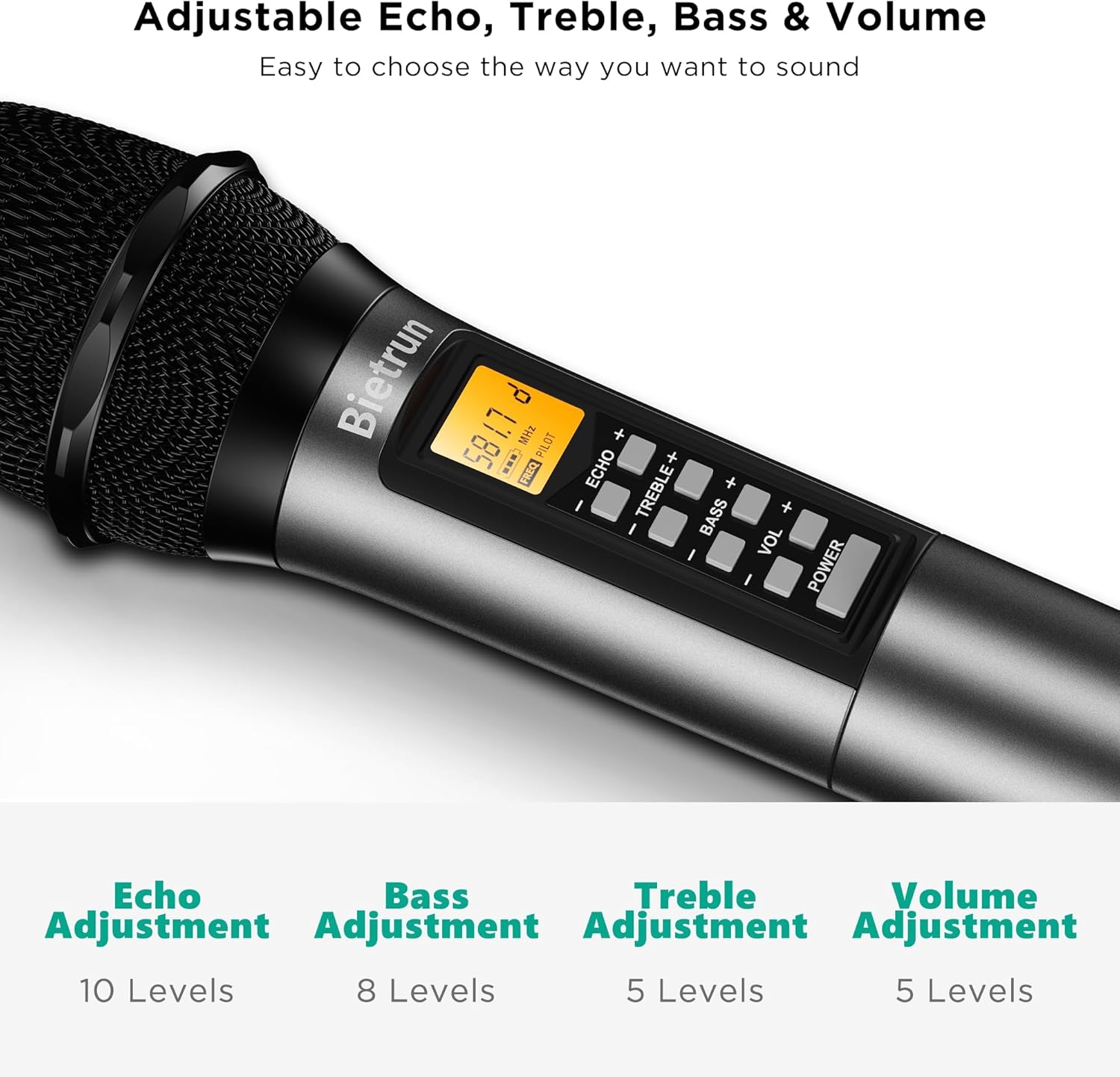
Image: A detailed view of a Bietrun microphone's control panel, highlighting the buttons for Echo, Treble, Bass, and Volume adjustments.
2. Individual Frequency and Interference Resistance
Each of the four microphones operates on its own distinct UHF frequency within the lawful signal bands (500 - 599MHz) with US FCC ID compliance. This design minimizes interference between microphones and from other wireless devices, ensuring clear audio transmission.
- Mic A: 552.5 MHz (and 552.6/7/8/9 MHz)
- Mic B: 561.5 MHz (and 561.6/7/8/9 MHz)
- Mic C: 574.5 MHz (and 574.6/7/8/9 MHz)
- Mic D: 581.5 MHz (and 581.6/7/8/9 MHz)

Image: A graphic illustrating the distinct frequency channels (A, B, C, D) for each microphone, displayed on their screens.
3. Operating Range
The Bietrun wireless microphone system offers an operating range of approximately 160 feet (50 meters) in open, unobstructed environments. Performance may vary depending on obstacles, interference, and battery levels.
Image: A visual representation of the 160 feet UHF operating distance between the microphones and the receiver.
4. Indicator Lights
- AF (Audio Frequency) Indicator Light: This light turns red when the microphone channel senses sound, indicating audio signal presence.
- RF (Radio Frequency) Connection Indicator Light: This light indicates the connection status of the microphones to their corresponding channels (A, B, C, D). A steady light indicates a stable connection.
5. Sound Quality and Microphone Design
The Bietrun microphones are equipped with a built-in dynamic unidirectional microphone core (95dB±2dB) designed to deliver crisp, clear sound with minimal dropouts, hiss, or feedback. The design features a solid mesh cover to protect the mic core and thickened insulation cotton to reduce noise and prevent plosives.

Image: An illustration detailing the internal design and sound characteristics of the microphone, including its cardioid pickup pattern, solid mesh cover, and thickened insulation cotton for clear audio.
6. Recommended Uses
This versatile wireless microphone system is ideal for a wide range of applications, including but not limited to:
- Karaoke and Singing
- Weddings and Ceremonies
- Church Services
- Conferences and Speeches
- DJ Performances
- Web Podcasts
- Yoga and Dancing Instruction
- Family Parties and Events

Image: A collage demonstrating the Bietrun microphone system's use in different scenarios, such as meetings, classrooms, karaoke sessions, and event hosting.
Maintenance
Proper maintenance ensures the longevity and optimal performance of your Bietrun wireless microphone system:
1. Cleaning
Use a soft, dry cloth to clean the receiver and microphones. Avoid using abrasive cleaners, solvents, or harsh chemicals.
2. Durability and Handling
The microphones are designed for durability, having undergone strict high and low-temperature tests. They exhibit excellent shatter and shock resistance, with buttons tested for over 50,000 clicks. While robust, always handle the equipment with care to ensure its long-term performance.

Image: A visual representation of the durability features of the microphone, including its resistance to temperature extremes, impact, and the longevity of its buttons.
3. Storage
When not in use for extended periods, remove batteries from the microphones to prevent leakage. Store the system in a cool, dry place away from direct sunlight and extreme temperatures.
4. General Handling
Handle microphones and the receiver with care. Avoid dropping them or subjecting them to strong impacts.
5. Antennas
Ensure antennas are not bent or damaged. Properly position them for best signal reception.
6. Foam Covers
Regularly clean or replace microphone foam covers to maintain hygiene and sound quality.
Troubleshooting
| Problem | Possible Cause | Solution |
|---|---|---|
| No sound from microphone |
|
|
| Poor sound quality (static, dropouts) |
|
|
| Echo/Treble/Bass controls not working |
|
|
Specifications
| Feature | Detail |
|---|---|
| Brand | Bietrun |
| Model Name | WXM26A |
| Number of Channels | 4 |
| Connectivity Technology | UHF |
| Frequency Response | 552.5 MHz (Individual frequencies for each mic: A-552.5/6/7/8/9 MHz, B-561.5/6/7/8/9 MHz, C-574.5/6/7/8/9 MHz, D-581.5/6/7/8/9 MHz) |
| Microphone Form Factor | Handheld |
| Polar Pattern | Unidirectional |
| Audio Sensitivity | 95 dB |
| Signal-to-Noise Ratio | 95 dB |
| Power Source | Corded Electric (Receiver), Battery Powered (Microphones - 2 AA per mic) |
| Connector Type | 1/4 inch mix output, 4 XLR outputs |
| Compatible Devices | Amplifier, Karaoke Machine, Speakers, Audio Mixers, PA systems |
| Item Weight | 4.88 pounds |
| Package Dimensions | 12.64 x 10.75 x 4.69 inches |
| Date First Available | July 13, 2023 |
Warranty and Support
For warranty information, technical support, or service inquiries regarding your Bietrun 4-Channel Wireless Microphone System, please refer to the contact information provided on the product packaging or visit the official Bietrun website. Keep your purchase receipt as proof of purchase for any warranty claims.
Manufacturer: Bietrun
Related documentsWXM26A

Ask a question about this manual
Ask about setup, troubleshooting, compatibility, parts, safety, or missing instructions. Manuals+ will review the question and use this page’s manual context to help answer it.