
Introduction
This manual provides instructions for the Lamshaw Magnetic USB Charging Cable, designed specifically for the FITVII HM68 Fitness Tracker. Please read this manual carefully to ensure proper use and longevity of your charging cable. This product is a replacement charging cable and does not include the fitness tracker.

Image: Two Lamshaw magnetic USB charging cables, black in color, coiled neatly.
Setup
Follow these steps to prepare your FITVII HM68 Fitness Tracker for charging using the Lamshaw Magnetic USB Charging Cable.
- Identify Cable Ends: The charging cable has two distinct ends: a standard USB-A connector and a magnetic pogo pin connector.
- Connect to Power Source: Insert the USB-A connector into a compatible power source. This can be a computer's USB port, a laptop, a power bank, or a wall charger with a USB-A output. Ensure the power source is active.
- Attach to Fitness Tracker: Carefully align the magnetic pogo pin connector with the charging contacts on the back of your FITVII HM68 Fitness Tracker. The magnets will help guide the connector into the correct position. Ensure a secure and stable connection.
- Verify Connection: Once connected, the fitness tracker should display a charging indicator (e.g., a battery icon with a lightning bolt or increasing percentage).

Image: A FITVII HM68 fitness tracker with its screen showing 100% charge, connected to the magnetic charging cable. A close-up of the magnetic connector and USB-A plug is also shown.
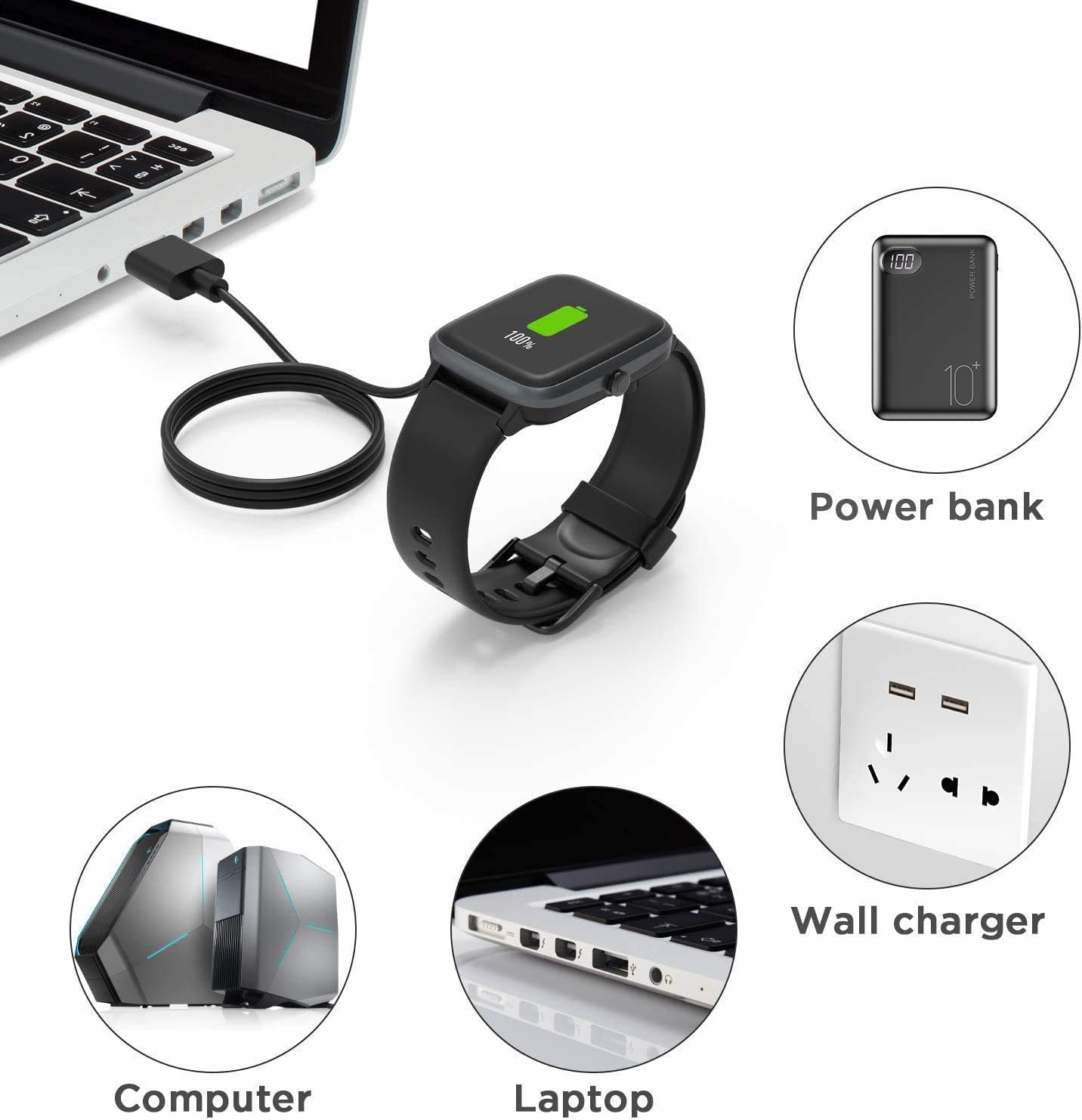
Image: A diagram illustrating multiple charging methods, including connecting the USB cable to a computer, laptop, power bank, or wall charger.
Operating Instructions
Once the cable is properly connected, the fitness tracker will begin charging automatically.
- Charging Time: A full charge for the FITVII HM68 Fitness Tracker typically takes approximately 2.5 hours when using a 1A output current power source.
- Battery Life: After a full charge, the fitness tracker can offer up to 7 days of usage time and approximately 30 days of standby time, depending on usage patterns.
- Charging Indication: The fitness tracker's screen will display the current charge percentage and a charging animation.

Image: A graphic indicating that a full charge takes 2.5 hours with a 1A output current.

Image: A FITVII HM68 fitness tracker charging on a desk, with text indicating '30 days Standby' and '7 days usage time'.
Maintenance
Proper care of your charging cable will ensure its longevity and reliable performance.
- Storage: The cable features a flexible PVC jacket, making it easy to roll and store. Avoid sharp bends or kinks that could damage the internal wires.
- Cleaning: Keep the magnetic pogo pins and the USB-A connector free from dust, dirt, and moisture. Use a dry, soft cloth to gently wipe the connectors if needed.
- Environmental Conditions: Avoid exposing the cable to extreme temperatures, direct sunlight for prolonged periods, or highly humid environments.
- Handling: Always grasp the connectors when plugging or unplugging the cable, rather than pulling on the cable itself, to prevent damage to the wire connections.

Image: A detailed view of the charging cable, highlighting its components: Pure Copper Probe for rapid and stable conduction, ABS+PC material for durability, and Flexible PVC Cable for easy storage.
Troubleshooting
If you encounter issues while charging your FITVII HM68 Fitness Tracker, consider the following:
- Device Not Charging:
- Ensure the USB-A connector is fully inserted into a functional power source.
- Verify that the magnetic pogo pin connector is correctly aligned with the charging contacts on the fitness tracker. The magnets should attract, not repel. If the magnets repel, the device will not charge.
- Check for any debris or obstruction on the charging contacts of both the cable and the fitness tracker.
- Try a different USB power source (e.g., a different USB port on your computer, another wall adapter) to rule out a faulty power source.
- If the device still does not charge, the cable itself may be faulty. Consider testing with another compatible charging cable if available, or contact customer support.
- Slow Charging:
- Ensure your power source provides at least 1A output current for optimal charging speed. Lower current outputs will result in slower charging.
- Avoid using damaged or worn-out USB ports or adapters.
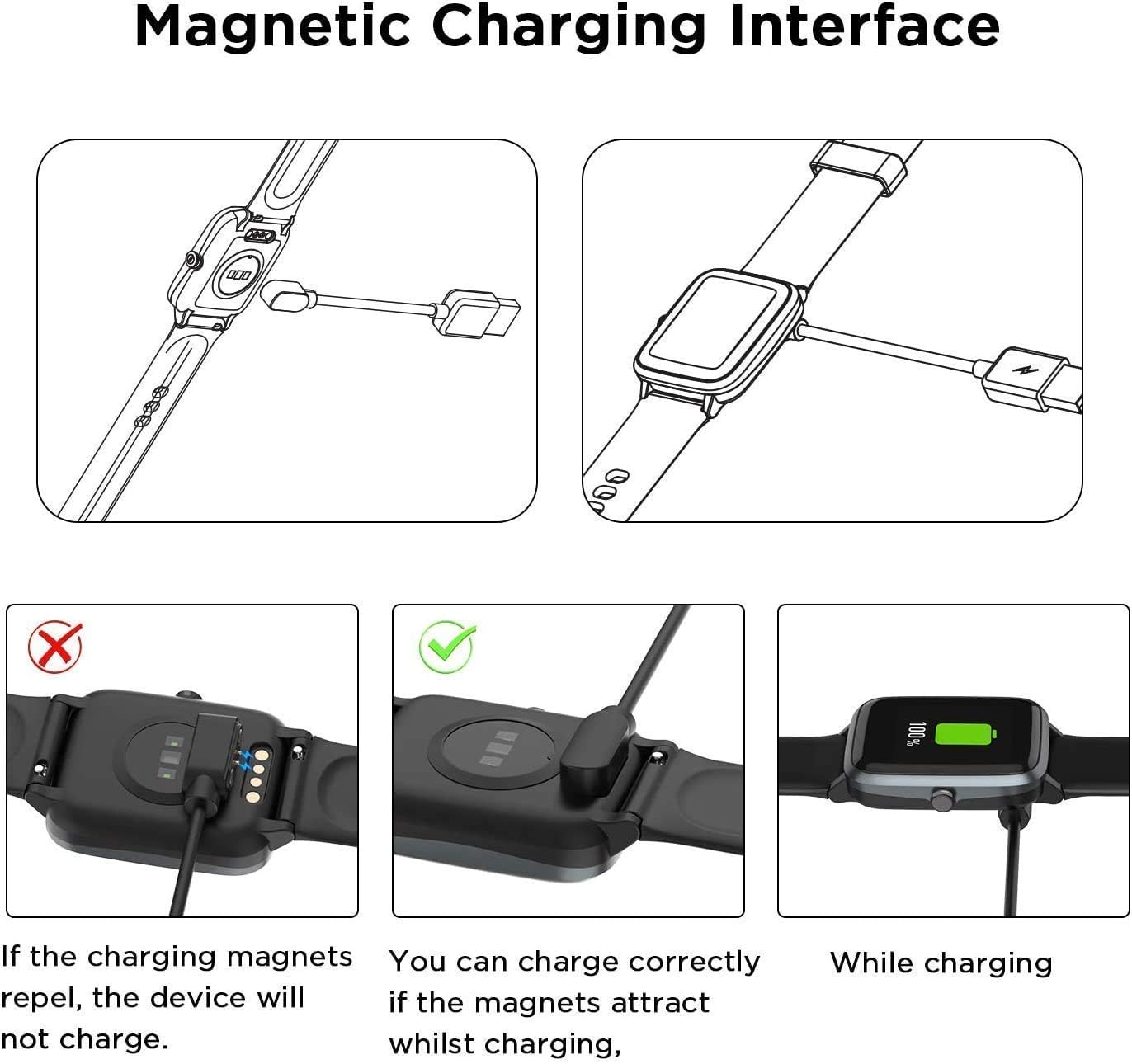
Image: A visual guide demonstrating the correct magnetic charging interface where magnets attract, and an incorrect connection where magnets repel, preventing charging.
Specifications
- Product Type: Magnetic USB Charging Cable
- Compatibility: Specifically designed for FITVII HM68 Fitness Tracker Watches
- Connector Type (Device End): Magnetic Pogo Pin
- Connector Type (Power Source End): USB-A
- Cable Length: Approximately 3.3 feet (1 meter)
- Materials: ABS+PC (connector housing), Pure Copper Probe (pins), Flexible PVC (cable jacket)
- Recommended Output Current: 1A for optimal charging speed
Warranty and Support
For product support, technical assistance, or warranty inquiries, please refer to the contact information provided by your retailer or the manufacturer, Lamshaw. Keep your purchase receipt for warranty claims.