
1. Introduction
The TEKCOPLUS TK373PLUS is a versatile 4-channel digital thermocouple thermometer and data logger designed for precise temperature measurement across various applications. It supports K, J, and T-type thermocouples, offering a wide measurement range and advanced features such as data recording, high/low alarms, and PC connectivity for data analysis. This manual provides essential information for the safe and effective operation of your device.
2. Safety Information
- Read all instructions carefully before operating the device.
- Do not expose the device to extreme temperatures, humidity, or direct sunlight.
- Ensure probes are correctly connected before taking measurements.
- Avoid using the device in environments with strong electromagnetic interference.
- Do not attempt to repair or modify the device; refer all servicing to qualified personnel.
- Dispose of batteries according to local regulations.
3. Package Contents
Verify that all items listed below are present in your package:
- 1 x TEKCOPLUS TK373PLUS Thermometer
- 4 x Type-K Thermocouple Probes
- 3 x AAA Batteries
- 1 x USB Cable
- 1 x Carrying Bag

Image: Contents of the TEKCOPLUS TK373PLUS package, including the thermometer, four K-type probes, USB cable, and carrying bag.
4. Product Overview
The TK373PLUS features a robust design with a large LCD display and intuitive button layout for ease of use. It includes four input sockets for thermocouples, allowing simultaneous measurement of up to four temperature points.

Image: Front and back views of the TEKCOPLUS TK373PLUS thermometer, highlighting the LCD screen, buttons, 4-channel input sockets, battery compartment, and overall dimensions (177mm x 70mm).
4.1 Display Elements

Image: Detailed view of the thermometer's LCD display, showing indicators for data hold, alarm limits, auto power off, data record, max/min values, K/J/T probe type, ADJ compensation, battery level, USB connection, temperature unit, and individual channel displays (T1, T2, T3, T4).
4.2 Buttons and Functions
- Power Button (O): Turns the device on or off.
- H:M/M:S Button: Switches between Hour:Minute and Minute:Second time display modes.
- MAX/MIN Button: Cycles through maximum, minimum, and average temperature readings.
- MODE Button: Enters different operational modes.
- REC/HOLD Button: Short press to hold current data; long press (2s) to start/stop data recording.
- °C/°F Button: Switches between Celsius and Fahrenheit temperature units.
- ADJ/TYPE Button: Short press to adjust compensation; long press (2s) to select thermocouple type (K/J/T).
5. Setup
5.1 Battery Installation
- Locate the battery compartment on the back of the device (refer to Product Overview image).
- Open the battery cover.
- Insert 3 AAA batteries, ensuring correct polarity (+/-).
- Close the battery cover securely.
5.2 Thermocouple Probe Connection
The device supports K, J, and T-type thermocouples. Ensure you use the correct type for your application.
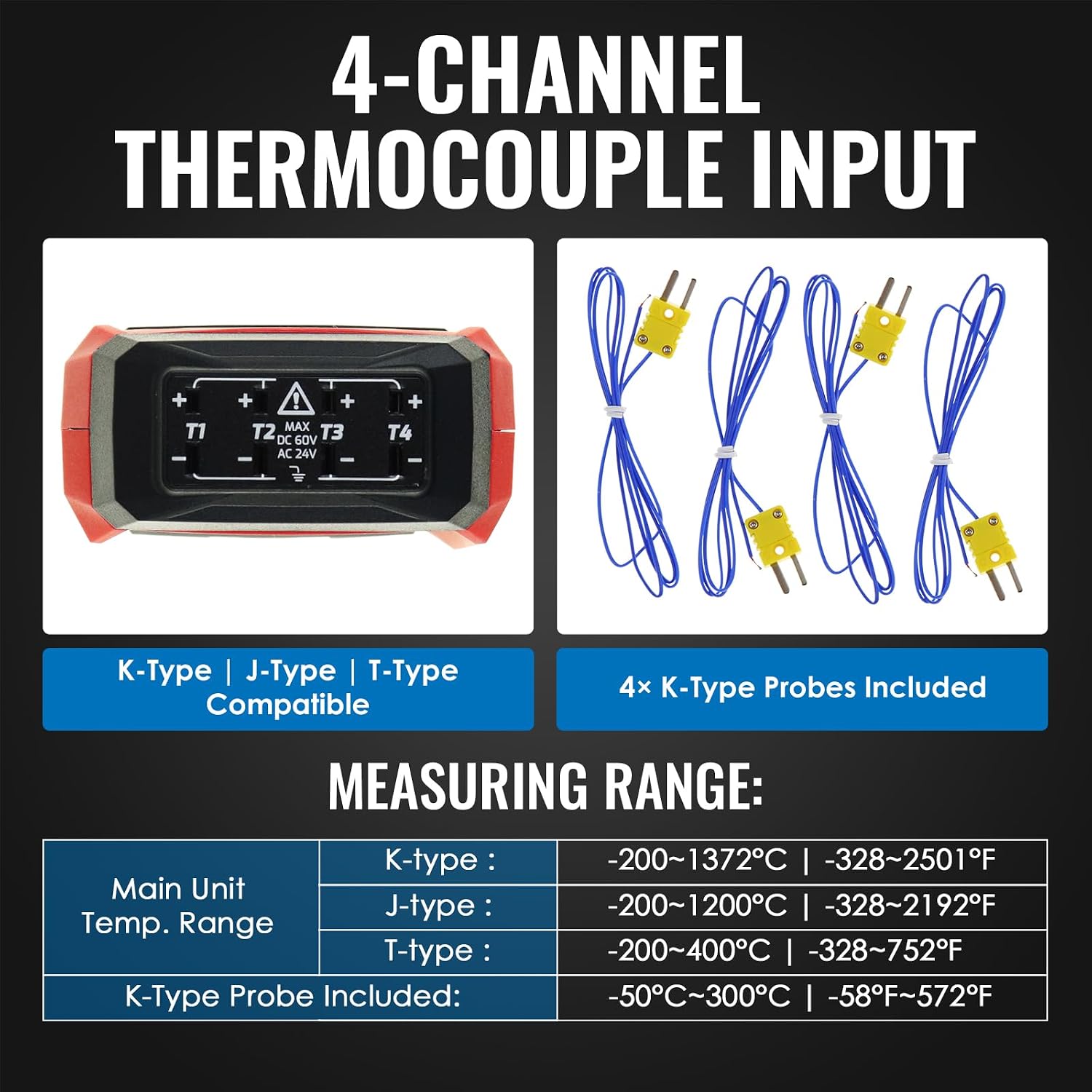
Image: Illustration of the 4-channel input sockets, indicating compatibility with K, J, and T-type thermocouples. The image also details the measuring ranges for the main unit and included K-type probes.
- Identify the thermocouple type (K, J, or T) you intend to use.
- Connect the thermocouple probe(s) to the desired input sockets (T1, T2, T3, T4) on the top of the device. Ensure the polarity of the probe matches the input socket.
- If using a different type than K, long press the ADJ/TYPE button to cycle through K, J, and T types until the correct type is displayed.
6. Operating Instructions
6.1 Basic Temperature Measurement
- Press the Power button to turn on the device.
- The display will show temperature readings for all connected channels (T1, T2, T3, T4).
- Place the thermocouple probe(s) at the desired measurement points.
6.2 Switching Temperature Units (°C/°F)
Press the °C/°F button to toggle between Celsius and Fahrenheit temperature units.
6.3 Data Hold Function
Press the REC/HOLD button briefly to freeze the current readings on the display. Press it again to release and resume live measurement.
6.4 Max/Min/Average Readings
Press the MAX/MIN button to cycle through the maximum, minimum, and average temperature values recorded since the device was powered on or the function was reset.
6.5 High/Low Alarm Settings
The device features independent per-channel high and low alarms. When a measured value exceeds or falls below the preset thresholds, an audible and visible alarm will activate.

Image: The thermometer's display indicating an active alarm, with default upper limit (1300°C / 2372°F) and lower limit (-200°C / -328°F) settings shown. The alarm triggers when measured values exceed these thresholds.
Refer to the full user manual (available via QR code in package) for detailed instructions on setting specific alarm thresholds for each channel.
6.6 ADJ Compensation
The ADJ compensation function allows for fine-tuning of temperature readings to improve accuracy. You can adjust compensation values from -9 to 9 °C for calibration purposes.
- Press the ADJ/TYPE button briefly to enter compensation adjustment mode.
- Use the arrow buttons (if available, or refer to full manual) to increase or decrease the compensation value.
- Press ADJ/TYPE again to confirm and exit.
7. PC Data Logging
The TK373PLUS can record up to 5000 groups of temperature readings internally. For extended data logging and analysis, connect the device to a computer.

Image: The thermometer held in a hand, illustrating its integrated data logger capabilities including storing 5,000 readings, one-click export to Excel and BMP via software, instant analysis, and compatibility with Windows 7, 8, and 10 (64-bit).
7.1 Starting Data Recording
Long press the REC/HOLD button for over 2 seconds to start recording data on the meter. Repeat to stop recording.
7.2 Connecting to PC and Software

Image: The thermometer connected to a laptop via a USB cable, demonstrating its PC data logging capability. The laptop screen shows a graph and tabular data, indicating unlimited PC logging via software and export formats like Excel and BMP. OS compatibility is Windows 7, 8, & 10 (64-bit).
- Install the provided software on your computer (compatible with Windows 7, 8, and 10, 64-bit).
- Connect the thermometer to your PC using the supplied USB cable.
- Launch the software to access recorded data, perform real-time logging, and export data in formats such as Excel or BMP images.
8. Maintenance
- Cleaning: Wipe the device with a soft, dry cloth. Do not use abrasive cleaners or solvents.
- Storage: When not in use for extended periods, remove the batteries and store the device in a cool, dry place, preferably in its carrying bag.
- Battery Replacement: Replace batteries when the low battery indicator appears on the display.
9. Troubleshooting
- No Display/Device Not Turning On: Check battery installation and ensure batteries are not depleted. Replace if necessary.
- Inaccurate Readings: Ensure probes are correctly connected and are of the appropriate type (K, J, T). Use the ADJ compensation function for calibration if needed. Verify that the thermocouple type selected on the device matches the connected probe.
- Data Logging Issues: Ensure the device is properly connected to the PC and the software is correctly installed and running. Check USB cable connection.
- Alarm Not Triggering: Verify that alarm thresholds are set correctly and the alarm function is enabled.
10. Specifications
| Feature | Specification |
|---|---|
| Brand | TEKCOPLUS |
| Model Name | TK373PLUS |
| Item Model Number | TK373PLUS |
| Manufacturer Part Number | TK343PLUS |
| Power Source | Battery Powered |
| Battery(ies) | 3 AAA - included |
| Product Dimensions (L x W x H) | 29.79 x 10.21 x 5.99 cm; 540 grams |
| Item Length | 20 Centimeters |
| Display Type | Digital |
| Special Feature | Large Display |
| Color | K/J/T-type Thermocouple Meter |
| Outer Material | Acrylonitrile Butadiene Styrene |
| Connectivity Technology | USB |
| Included Components | Thermometer |
| Upper Temperature Rating | 1372 Degrees Celsius |
| Resolution | 0.1 degree |
| Reusability | Single Use (Note: This might refer to probes, not the main unit) |
| Outdoor/Indoor Usage | Indoor |
| Care Instructions | Wiping |
| Age Range Description | Adult |
| Counting Unit | 1 Total |
| Date First Available on Amazon.com.be | October 16, 2023 |
11. Warranty and Support
For warranty information or technical support, please refer to the contact details provided with your purchase documentation or visit the official TEKCOPLUS website. Keep your purchase receipt as proof of purchase.