
Introduction
This manual provides detailed instructions for the operation and maintenance of your WENPZERAY Y-706 Portable AM/FM/SW Pocket Radio. Please read this manual thoroughly before using the device to ensure proper function and longevity.
Product Overview
The WENPZERAY Y-706 is a compact and versatile portable radio designed for various listening needs. It features multiple band reception, MP3 playback capabilities, Bluetooth connectivity, and flexible power options.
Key Features:
- Multi-Band Reception: FM (88-108MHz), AM (530-1710kHz), SW (6.5-18MHz).
- Portable Design: Small, lightweight, and equipped with a wrist strap for easy carrying.
- MP3 Player: Supports USB flash drives and TF (Micro SD) cards for MP3 audio playback.
- Bluetooth Connectivity: Bluetooth 5.3 for wireless audio streaming from compatible devices.
- High-Quality Sound: Built-in DSP chip and loud speaker for clear audio.
- Headphone Jack: 3.5mm earphone jack for private listening.
- Multiple Power Options: Operates on 3x AAA batteries, a BL5C rechargeable battery (not included), or via USB charging.
Package Contents:
- WENPZERAY Y-706 Portable Radio
- USB Charging Cable
- Owner's Manual (this document)
Product Diagram
Familiarize yourself with the various parts and controls of your Y-706 radio.
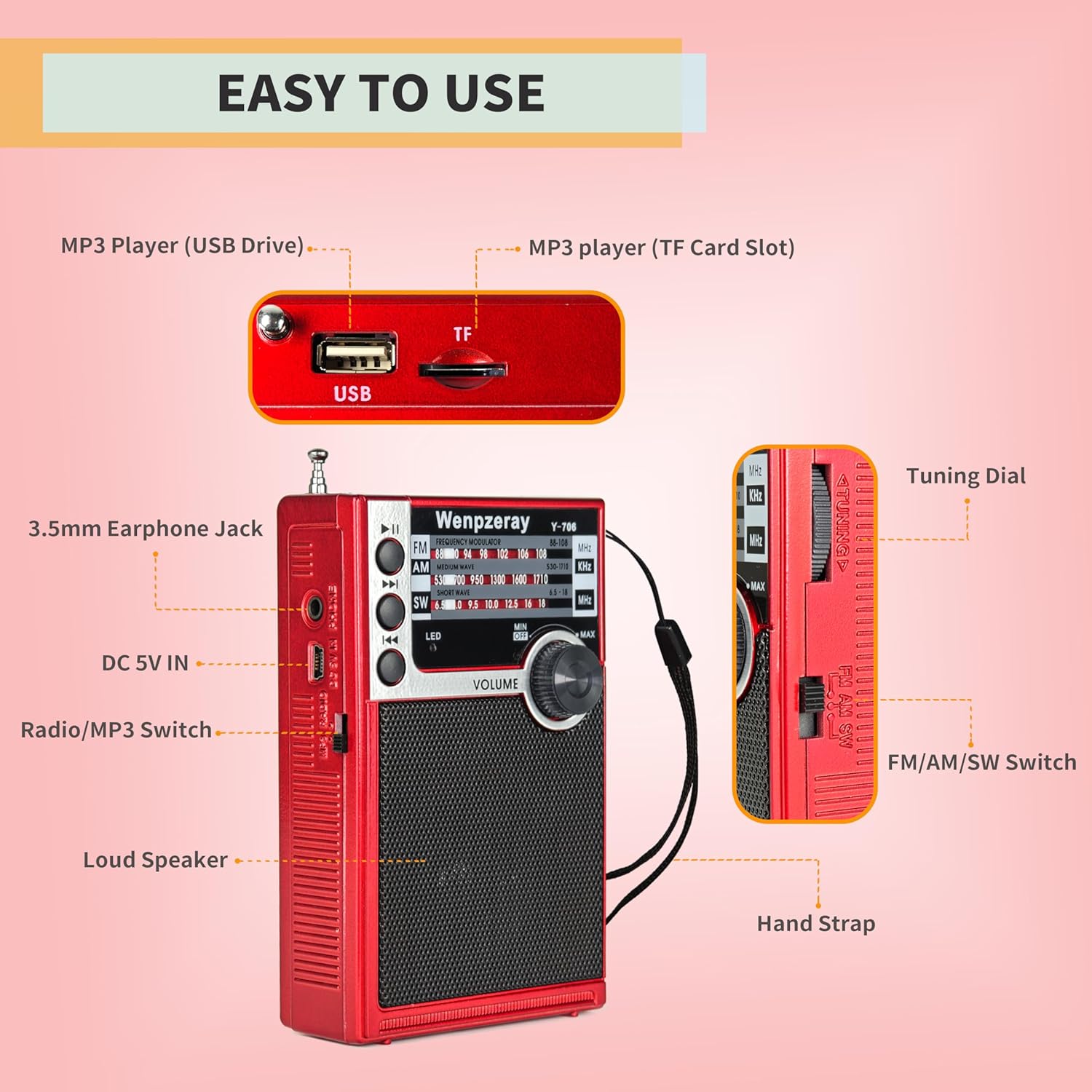
Figure 1: Front and Side View of WENPZERAY Y-706 Radio with labeled controls. Key features include the MP3 Player (USB Drive), MP3 Player (TF Card Slot), 3.5mm Earphone Jack, DC 5V IN port, Radio/MP3 Switch, Loud Speaker, Tuning Dial, FM/AM/SW Switch, and Hand Strap.

Figure 2: Front view of the WENPZERAY Y-706 Portable Radio, showcasing the speaker grille, tuning dial, and band display.
Setup
1. Powering the Radio
The Y-706 radio offers three power options:
- 3x AAA Batteries: Open the battery compartment cover on the back of the radio. Insert three AAA batteries, ensuring correct polarity (+/-).
- BL5C Rechargeable Battery: A BL5C battery (not included) can be inserted into the dedicated slot in the battery compartment.
- USB Charging: Connect the supplied USB charging cable to the DC 5V IN port on the side of the radio and to a USB power source (e.g., computer, USB wall adapter). The radio can operate while charging.

Figure 3: Rear view of the radio with the battery cover removed, illustrating the slots for a BL5C rechargeable battery and three AAA batteries. The DC 5V IN port for USB charging is also indicated.
2. Antenna Adjustment
For optimal reception, extend the telescopic antenna fully. For AM reception, the internal antenna is generally sufficient, but rotating the radio may improve signal strength.
Operating Instructions
1. Power On/Off and Mode Selection
- To power on the radio, rotate the VOLUME knob clockwise. Rotate counter-clockwise to power off.
- Use the Radio/MP3 Switch on the side to select between Radio mode and MP3/Bluetooth mode.
- In Radio mode, use the FM/AM/SW Switch to select the desired frequency band.
2. Tuning to a Station
- Select the desired band (FM, AM, or SW) using the FM/AM/SW Switch.
- Slowly rotate the Tuning Dial (thumb wheel on the side) to scan for stations.
- Extend and adjust the telescopic antenna for best FM and SW reception. For AM, rotate the radio for optimal signal.

Figure 4: The radio being held, illustrating its compact size and the extended antenna for improved signal reception across FM, AM, and SW bands.
3. Volume Control
Adjust the sound level by rotating the VOLUME knob on the front of the radio.
4. MP3 Playback (USB/TF Card)
- Switch the Radio/MP3 Switch to MP3 mode.
- Insert a USB flash drive or TF (Micro SD) card containing MP3 audio files into the respective port.
- The radio will automatically begin playing MP3 files. Use the Previous/Next Track buttons to navigate between songs. The Play/Pause button controls playback.
5. Bluetooth Connection
- Switch the Radio/MP3 Switch to MP3 mode. The radio will enter Bluetooth pairing mode.
- On your mobile device, enable Bluetooth and search for available devices.
- Select "Y-706" (or similar) from the list to pair. A confirmation sound will indicate successful pairing.
- You can now stream audio from your device to the radio.
6. Headphone Use
Connect standard 3.5mm headphones to the 3.5mm Earphone Jack on the side of the radio for private listening. The internal speaker will automatically mute when headphones are connected.

Figure 5: A user enjoying audio through headphones connected to the Y-706 radio, highlighting the private listening feature.
Maintenance
- Cleaning: Use a soft, dry cloth to clean the exterior of the radio. Do not use liquid cleaners or abrasive materials.
- Battery Care: If the radio will not be used for an extended period, remove the AAA batteries to prevent leakage. If using a BL5C rechargeable battery, ensure it is charged periodically to maintain its lifespan.
- Storage: Store the radio in a cool, dry place away from direct sunlight and extreme temperatures.
- Antenna: Handle the telescopic antenna gently to avoid bending or breaking. Retract it when not in use.
Troubleshooting
| Problem | Possible Cause | Solution |
|---|---|---|
| Radio does not power on. | Batteries are depleted or incorrectly inserted. USB cable not connected or power source faulty. | Replace AAA batteries or ensure BL5C battery is charged and correctly inserted. Verify USB cable connection and power source. |
| Poor radio reception. | Antenna not extended. Weak signal in the area. Interference. | Fully extend the telescopic antenna. Try repositioning the radio. For AM, rotate the radio. Move away from electronic devices causing interference. |
| No sound from speaker. | Volume too low. Headphones connected. Radio/MP3 switch in wrong position. | Increase volume. Disconnect headphones. Ensure Radio/MP3 switch is in the correct mode. |
| MP3 playback not working. | USB drive/TF card not inserted correctly or contains no MP3 files. Radio/MP3 switch in wrong position. | Ensure USB drive/TF card is properly inserted and contains valid MP3 files. Switch to MP3 mode. |
| Bluetooth not connecting. | Radio not in Bluetooth mode. Device not discoverable. | Switch to MP3 mode to activate Bluetooth pairing. Ensure your device's Bluetooth is on and discoverable. Try restarting both devices. |
Specifications
| Model Number | Y-706 |
| Brand | WENPZERAY |
| Dimensions (L x W x H) | 2.75 x 1.18 x 4.7 inches (70 x 30 x 120 mm) |
| Item Weight | 7 ounces (198 grams) |
| Tuner Technology | AM/FM/SW |
| FM Frequency Range | 88-108 MHz |
| AM Frequency Range | 530-1710 kHz |
| SW Frequency Range | 6.5-18 MHz |
| Connectivity Technology | Bluetooth 5.3, USB, TF Card |
| Power Source | 3x AAA Batteries (not included), BL5C Battery (not included), USB DC 5V |
| Special Features | Built-In AM Antenna, Lightweight, Portable, Headphone Jack |

Figure 6: The WENPZERAY Y-706 radio with its dimensions clearly marked: 4.72 inches (height), 2.95 inches (width), and 1.3 inches (depth). The weight is indicated as 200g.
Emergency Use
The WENPZERAY Y-706 radio is a reliable device for receiving broadcasts during power outages or emergency situations, thanks to its multiple battery power options.

Figure 7: The Y-706 radio positioned with emergency supplies, emphasizing its utility as a small emergency radio capable of operating on 3 AAA batteries.
Warranty and Support
For warranty information or technical support, please refer to the contact details provided with your purchase or visit the official WENPZERAY website. Keep your purchase receipt as proof of purchase.
You can find more information about WENPZERAY products at their official store: WENPZERAY Store.
