
Introduction
This document serves as an instruction manual for the Generic Easytry20679 infrared replacement remote control. This remote is designed for use with Costzon FWAM-01989 and Sykik SP2091BT Bluetooth Portable PA Systems. Please note that as a replacement unit, its functionality may vary slightly from the original remote control.
Product Overview
The Easytry20679 is an infrared (IR) remote control featuring a standard button layout for audio system operation. It allows for convenient control of compatible PA systems from a distance.
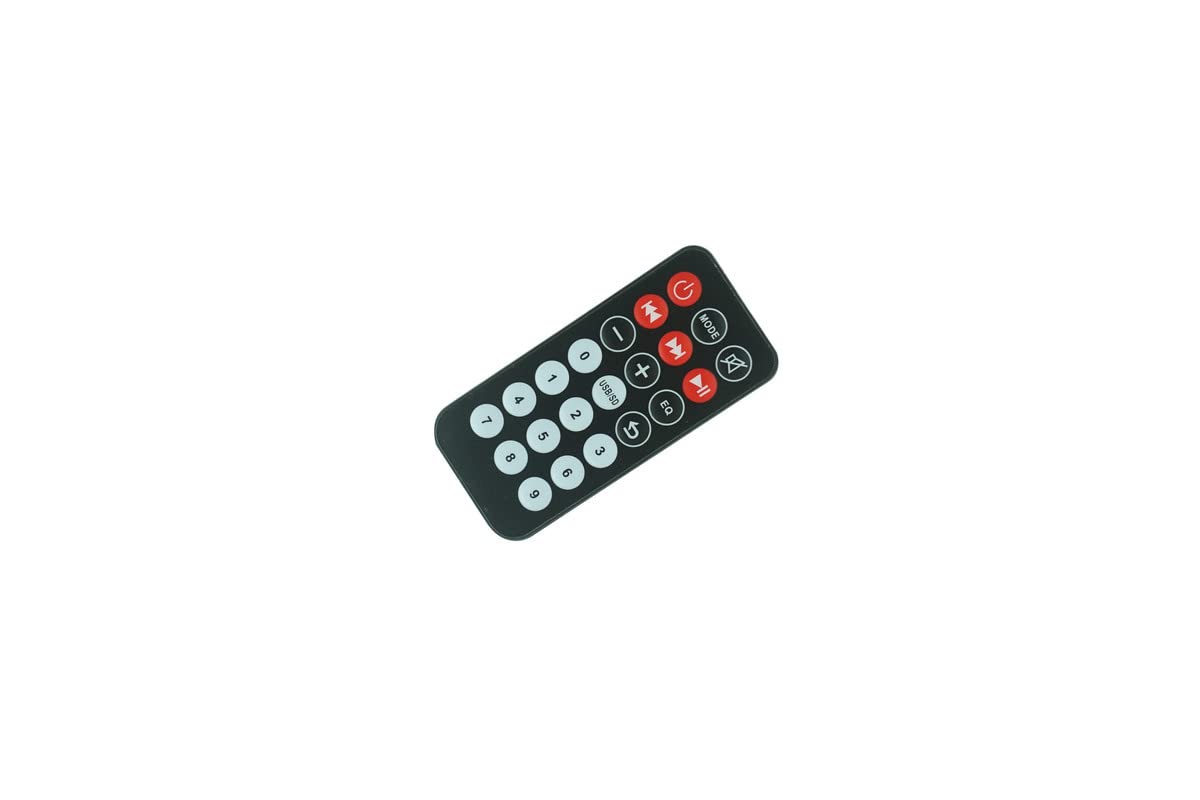
Figure 1: Front view of the remote control, displaying all operational buttons.

Figure 2: Back view of the remote control, highlighting the battery compartment.
Setup
Battery Installation
The remote control requires two (2) CR2 batteries for operation. Batteries are not included with the remote control and must be purchased separately.
- Locate the battery compartment on the back of the remote control (refer to Figure 2).
- Slide the battery compartment cover downwards or in the direction indicated by an arrow to open it.
- Insert two CR2 batteries, ensuring the positive (+) and negative (-) terminals align correctly with the markings inside the compartment.
- Close the battery compartment cover securely.
After installing the batteries, the remote control is ready for use.
Operating Instructions
This remote control operates via infrared signals. Ensure there is a clear line of sight between the remote control and the IR receiver on your PA system for proper functionality.
Basic Functions
- Power Button (⏻): Press to turn the PA system on or off.
- MODE Button: Cycles through input modes (e.g., Bluetooth, USB, SD, AUX, FM).
- Mute Button (🔇): Mutes or unmutes the audio output.
- Volume Control (- / +): Adjusts the audio volume level.
- Track Control (⏮ / ⏭): Skips to the previous or next track/station.
- Play/Pause Button (⏯): Plays or pauses media playback.
- EQ Button: Cycles through equalizer presets.
- USB/SD Button: Selects USB or SD card input directly.
- Numeric Keypad (0-9): Used for direct track selection or frequency input in FM mode.
Important Note: As a replacement remote, some functions or buttons may not operate identically to your original remote or may not be supported by your specific PA system model. Full compatibility with all original functions cannot be guaranteed.
Maintenance
Battery Replacement
Replace batteries when the remote control's range decreases or it stops responding. Always replace both batteries simultaneously with new CR2 batteries. Do not mix old and new batteries or different battery types.
Cleaning
To clean the remote control, use a soft, dry cloth. For stubborn dirt, lightly dampen the cloth with water. Do not use abrasive cleaners, solvents, or chemical sprays, as these can damage the remote's surface or internal components.
Storage
Store the remote control in a cool, dry place away from direct sunlight and extreme temperatures. If the remote will not be used for an extended period, it is advisable to remove the batteries to prevent leakage.
Troubleshooting
- Remote not responding:
- Check if the batteries are inserted correctly with the correct polarity.
- Replace the batteries with fresh CR2 batteries.
- Ensure there is a clear line of sight between the remote's IR emitter and the PA system's IR receiver. Obstructions can block the signal.
- Make sure you are within the effective operating range of the remote control.
- Some functions do not work:
- This is a replacement remote. It may not support all functions of your original remote or your specific PA system model. Refer to your PA system's original manual for its remote control capabilities.
Specifications
| Brand | Generic |
| Model Number | Easytry20679 |
| Compatible Devices | Costzon FWAM-01989, Sykik SP2091BT |
| Connectivity Technology | Infrared (IR) |
| Controller Type | Button Control |
| Battery Type | 2 x CR2 (not included) |
| ASIN | B0CBQ2GGXV |
Warranty Information
This product comes with a 90-day warranty from the date of purchase. This warranty covers manufacturing defects. Please retain your proof of purchase for any warranty claims.
Support
For further assistance regarding the functionality of this replacement remote control, please refer to the instruction manual provided with your Costzon FWAM-01989 or Sykik SP2091BT Bluetooth Portable PA System. As this is a generic replacement, specific technical support for this remote may be limited.