
Introduction
The Omana Arm Next Totems electronic noise-cancelling earplugs are designed to provide hearing protection while enhancing situational awareness. These in-ear devices feature both sound amplification for quieter sounds and noise reduction for loud impulses, making them suitable for environments such as shooting ranges, hunting, tactical operations, and musical events. They offer a Noise Reduction Rate (NRR) of 27dB and include two distinct sound modes for indoor and outdoor use.
Key features include:
- Active Sound Capture and Noise Reduction: Amplifies low-level sounds while attenuating harmful loud noises.
- Dual Noise Reduction Modes: Select between Indoor and Outdoor modes to optimize performance for different acoustic environments.
- Extended Battery Life: Earplugs provide 8-13 hours of use, with the charging case offering an additional 24 hours (3 full charges).
- Intuitive Operation: Simple button controls and voice prompts for ease of use.
- Comfortable and Portable: Lightweight design with multiple ear tip and ear hook sizes for a secure and comfortable fit.
- Type-C Charging: Modern and convenient charging interface.
1. Setup
1.1 Package Contents
Before use, please verify that all items are present in the package:
- Omana Arm Next Totems Electronic Earplugs (Left and Right)
- Charging Case
- USB Type-C Charging Cable
- Silicone Ear Tips (Small, Medium, Large)
- Silicone Ear Hooks (Small, Medium, Large)
- Lanyard (optional attachment)
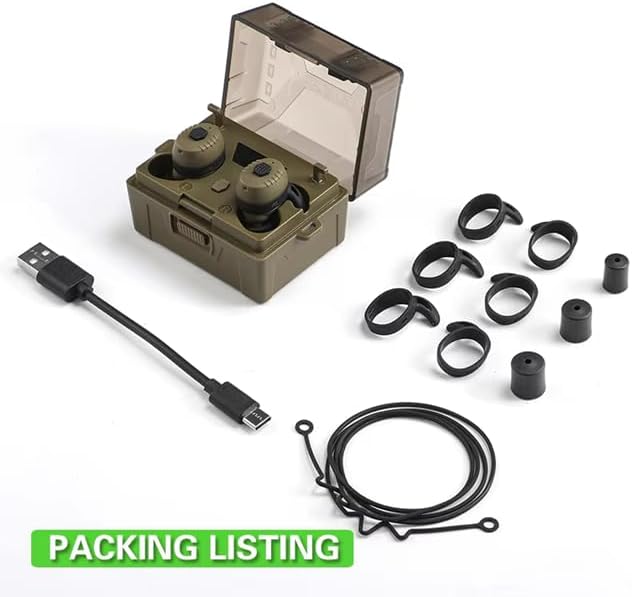
Image 1.1: Package contents showing the earplugs, charging case, USB cable, and multiple sizes of ear tips and ear hooks.
1.2 Charging the Device
The earplugs and charging case should be fully charged before first use to ensure optimal performance.
- Connect the provided USB Type-C charging cable to the charging port on the back of the charging case.
- Connect the other end of the USB cable to a compatible USB power source (e.g., wall adapter, computer USB port).
- The digital display on the charging case will show the battery percentage, indicating charging status. The earplugs will also charge when placed inside the case.
- A full charge typically takes approximately 2 hours for the case and earplugs.

Image 1.2: The charging case with the Type-C charging port in use.

Image 1.3: Earplugs charging within the case, showing the battery display.
1.3 Selecting and Fitting Ear Tips/Ear Hooks
Proper fit is crucial for both comfort and effective noise reduction. Experiment with the different sizes of silicone ear tips and ear hooks to find the best fit for your ears.
- Choose ear tips that create a snug seal in your ear canal.
- Select ear hooks that comfortably secure the earplugs in place without causing pressure.
- Gently insert the earplugs into your ear canal, twisting slightly until a comfortable and secure fit is achieved.

Image 1.4: Selection of ear tips and ear hooks in different sizes.
2. Operating Instructions
2.1 Power On/Off
- Power On: Remove the earplugs from the charging case. They will automatically power on. Alternatively, press and hold the button on each earplug for approximately 3 seconds until you hear a power-on prompt.
- Power Off: Place the earplugs back into the charging case. They will automatically power off and begin charging. Alternatively, press and hold the button on each earplug for approximately 5 seconds until you hear a power-off prompt.
2.2 Mode Switching
The earplugs feature three distinct modes: Silent, Indoor, and Outdoor. These modes adjust the sound amplification and noise reduction characteristics to suit different environments.
- With the earplugs powered on, press and hold the "Mode Switch" button (refer to Image 2.1 for location) on either earplug to cycle through the modes.
- You will hear a voice prompt indicating the current mode: "Silent Mode," "Indoor Mode," or "Outdoor Mode."
- Silent Mode: Provides maximum passive noise reduction.
- Indoor Mode: Optimized for indoor environments, reducing echo and reverberation while amplifying ambient sounds.
- Outdoor Mode: Optimized for outdoor use, providing clear sound amplification and effective noise reduction for impulse sounds.
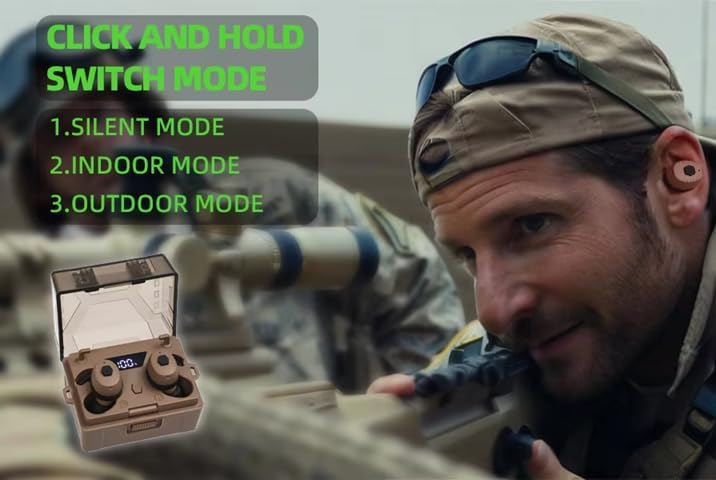
Image 2.0: Instructions for switching between Silent, Indoor, and Outdoor modes.

Image 2.1: Overview of earplug and charging case features, including the mode switch button.
2.3 Noise Reduction and Sound Amplification
The earplugs are designed to react quickly to loud noises, attenuating them within 1 millisecond, while simultaneously amplifying quieter sounds up to 4 times their original volume. This allows for clear communication and environmental awareness without compromising hearing protection.

Image 2.2: Illustration of NRR 27dB and 4X sound magnification.
2.4 Bluetooth Operation (Bluetooth V5.4)
The earplugs support Bluetooth V5.4 for wireless connectivity. While the primary function is hearing protection, they can also be used for audio playback or communication if supported by your connected device.
- Pairing: When removed from the charging case, the earplugs will automatically enter pairing mode. Search for "Omana Totems" (or similar) on your device's Bluetooth settings and connect.
- Audio Control: Single click the button for play/pause. Double click for next track (functionality may vary by device).
- Call Management: Single click to answer/end calls. Double click to reject calls.
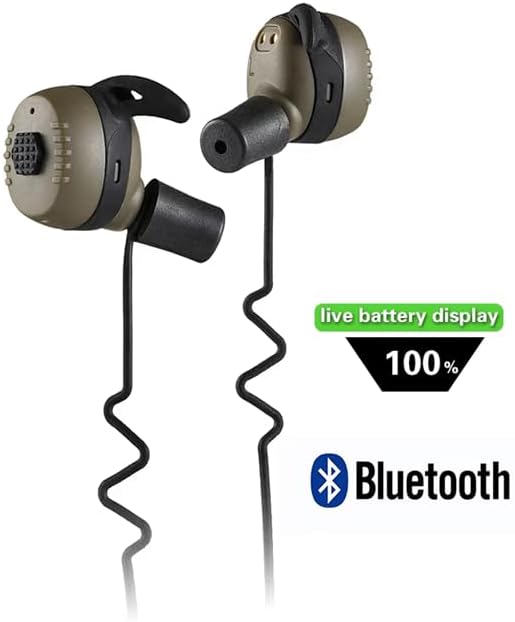
Image 2.3: Earplugs indicating Bluetooth connectivity and battery status.

Image 2.4: Overview of Bluetooth operation and key features.
2.5 Battery Status
The charging case features a digital display that shows the current battery percentage. When earplugs are placed in the case, their individual charging status is also indicated. The earplugs also provide voice prompts for low battery warnings.
- The earplugs will automatically power off after 2 hours of standby to conserve battery.
- The charging case will automatically stop charging once the earplugs are fully charged.
3. Maintenance
3.1 Cleaning
Regular cleaning ensures hygiene and optimal performance of your earplugs.
- Gently wipe the earplugs and charging case with a soft, dry, lint-free cloth.
- Remove ear tips and clean them with mild soap and water. Ensure they are completely dry before reattaching.
- Do not use abrasive cleaners, solvents, or immerse the earplugs or charging case in water.
3.2 Storage
When not in use, store the earplugs in their charging case to protect them from dust, moisture, and physical damage.
- Store in a cool, dry place away from direct sunlight and extreme temperatures.
- Ensure the earplugs and case are fully charged before long-term storage to maintain battery health.
4. Troubleshooting
| Problem | Possible Cause | Solution |
|---|---|---|
| No sound amplification or noise reduction. | Earplugs not powered on, incorrect mode, or improper fit. | Ensure earplugs are powered on. Cycle through modes (Indoor/Outdoor). Adjust ear tips for a secure seal. |
| Earplugs not charging. | Charging cable not connected properly, faulty cable/adapter, or dirty charging contacts. | Check cable connection. Try a different USB cable or power adapter. Clean charging contacts on earplugs and case. |
| Poor sound quality or intermittent audio. | Weak Bluetooth connection, earplugs too far from device, or interference. | Ensure earplugs are within range of the Bluetooth device. Avoid obstacles between earplugs and device. Re-pair if necessary. |
| Earplugs uncomfortable or fall out. | Incorrect ear tip or ear hook size. | Experiment with different sizes of ear tips and ear hooks to find the most comfortable and secure fit. |
5. Specifications
- Model: Totems
- Noise Reduction Rate (NRR): 27dB
- Sound Amplification: Up to 4X
- Response Time: Less than 1 millisecond
- Operating Modes: Silent, Indoor, Outdoor
- Earplug Battery Life: 8-13 hours (depending on usage)
- Charging Case Battery Life: Provides 3 full charges (approx. 24 hours additional use)
- Charging Port: USB Type-C
- Bluetooth Version: V5.4
- Auto-Off Feature: After 2 hours of standby
- Earplug Weight: Approximately 8.2g per earplug
6. Warranty Information
Omana Arm Next products are manufactured with quality and durability in mind. This product comes with a standard manufacturer's warranty against defects in materials and workmanship. The specific duration and terms of the warranty may vary by region and retailer. Please retain your proof of purchase for any warranty claims.
For detailed warranty information, please refer to the documentation provided with your purchase or contact the retailer.
7. Customer Support
If you encounter any issues or have questions regarding your Omana Arm Next Totems electronic earplugs that are not covered in this manual, please contact our customer support team.
- Online Support: Visit the official Omana website for FAQs and support resources.
- Email Support: Refer to your product packaging or purchase documentation for specific email contact information.
- Retailer Support: For purchase-related inquiries, contact the retailer from whom you purchased the product.