Download PDFFree PDF. The Save button below keeps a bookmark and private notes in your account.
iWALK Amour Air Duo2 True Wireless Bluetooth Earbuds
User Instruction Manual
Model: Amour Air Duo2 (BTA005-001)
1. Introduction
Thank you for choosing the iWALK Amour Air Duo2 True Wireless Bluetooth Earbuds. These earbuds are designed to provide an immersive audio experience with powerful bass, advanced noise cancelling technology, and a comfortable, secure fit. This manual will guide you through the setup, operation, and maintenance of your new earbuds.
Key Features:
Advanced Design: Sleek, stylish, and innovative design for individuality and technology.
All-Day Playtime: Up to 7.5 hours of playtime on a single charge, with a total of 24 hours using the charging case. Supports wireless charging and USB-C.
Premium Sound Quality: Built-in advanced TWS chip for harmonized trebles and undistorted bass.
Strong Connection & Features: Stable Bluetooth 5.0 connection, automatic pairing, IPX5 Water-Resistant, Dual-Voice Calls, and Smart Assistant support.
Comfortable Experience: Ergonomic design with S/M/L ear tips for a snug and secure fit. Ultra-thin charging case for portability.
Package Contents:
iWALK Amour Air Duo2 Earbuds
Wireless Charging Case
USB-C Charging Cable
Multiple Sized Ear Tips (S/M/L)
2. Product Overview
Familiarize yourself with the components of your iWALK Amour Air Duo2 earbuds and charging case.
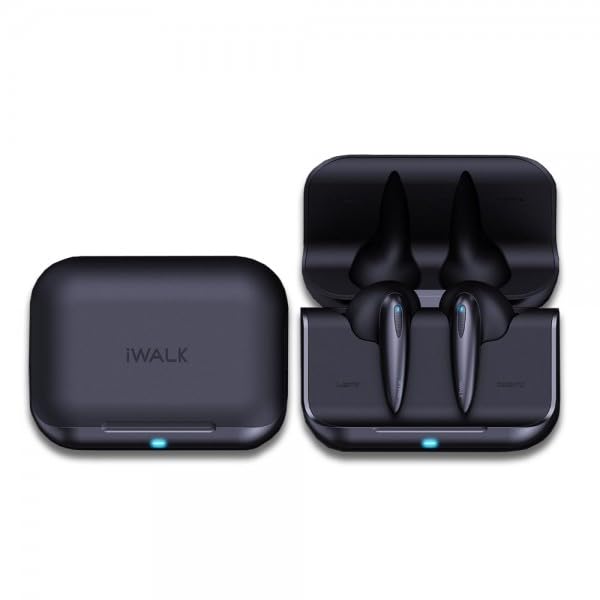
Image: The iWALK Amour Air Duo2 earbuds shown alongside their open charging case, highlighting their compact design.
Image: A pair of iWALK Amour Air Duo2 earbuds resting on a feather, illustrating their unique and lightweight design (4.0g).
Image: A visual representation of the comfortable and snug fit of the earbuds, along with the three included ear tip sizes (Small, Medium, Large).
3. Setup
3.1 Charging the Earbuds and Case:
Before first use, ensure both the earbuds and the charging case are fully charged.
Charging the Case: Connect the provided USB-C cable to the charging port on the case and to a power source. Alternatively, place the case on a compatible wireless charging pad. The indicator light on the case will show charging status.
Charging the Earbuds: Place the earbuds into their respective slots in the charging case. They will automatically begin charging. The indicator lights on the earbuds or case will confirm charging.
Image: An illustration detailing the battery life: 4.5 hours on a single earbud charge, 1 hour for a full earbud charge, and 20 hours total playtime with the charging case.
3.2 Pairing with Your Device:
The iWALK Amour Air Duo2 earbuds feature one-step pairing for convenience.
Ensure the charging case has power and the earbuds are inside.
Open the charging case and lift the earbuds out. They will automatically enter pairing mode.
On your smartphone or Bluetooth-enabled device, go to Bluetooth settings.
Search for new devices and select "Amour Air Duo2" from the list.
Once connected, the earbuds will automatically pair with your device whenever you take them out of the charging case.
Image: A visual guide demonstrating the one-step pairing process, showing the earbuds and a smartphone screen with the 'Amour Air Duo2' listed in Bluetooth devices.
4. Operating Instructions
4.1 Touch Controls:
The iWALK Amour Air Duo2 earbuds utilize intuitive touch controls for various functions. Specific touch commands may vary slightly; refer to the quick start guide included with your product for precise actions.
Play/Pause: Single tap on either earbud.
Next Track: Double tap on the right earbud.
Previous Track: Double tap on the left earbud.
Answer/End Call: Single tap on either earbud during an incoming call.
Reject Call: Press and hold either earbud for 2 seconds during an incoming call.
Activate Voice Assistant: Triple tap on either earbud (e.g., Siri, Google Assistant).
4.2 Mono and Twin Mode:
The earbuds support both mono and twin (stereo) modes, allowing for flexible usage.
Twin Mode: Use both earbuds simultaneously for a stereo audio experience. This is the default mode when both earbuds are taken out of the case.
Mono Mode: Use only one earbud (left or right) while the other is in the case or turned off. This is useful for calls or when you need to be aware of your surroundings.
Image: A comparison illustrating the use of the earbuds in Mono Mode (single earbud connected) and Twin Mode (both earbuds connected for stereo sound).
4.3 Calling Functions:
The earbuds are equipped with a built-in microphone for clear calls and support dual-voice calls.
Answering/Ending Calls: Use the touch controls as described above.
Dual-Voice Calls: Both earbuds can be used during a call, providing a more immersive and clear conversation experience.
5. Maintenance
5.1 Cleaning:
To ensure optimal performance and hygiene, regularly clean your earbuds and charging case.
Use a soft, dry, lint-free cloth to wipe the surface of the earbuds and case.
For ear tips, remove them from the earbuds and clean with a mild soap solution if necessary, then rinse thoroughly and dry completely before reattaching.
Gently clean the charging contacts on both the earbuds and inside the case with a dry cotton swab.
5.2 Water Resistance:
The iWALK Amour Air Duo2 earbuds are IPX5 water and sweat resistant, meaning they can withstand splashes and sweat. They are not designed for submersion in water.
Do not expose the earbuds to running water or submerge them.
Dry the earbuds thoroughly after exposure to sweat or splashes before placing them back in the charging case to prevent damage to the charging contacts.
Image: The iWALK Amour Air Duo2 earbuds shown with water splashing, illustrating their IPX5 water and sweat resistant capabilities.
5.3 Storage:
When not in use, store the earbuds in their charging case to protect them and keep them charged.
6. Troubleshooting
If you encounter issues with your iWALK Amour Air Duo2 earbuds, try the following solutions:
Earbuds not pairing: Ensure both earbuds are charged. Place them back in the case, close the lid, wait a few seconds, then open and remove them to re-initiate pairing mode. Check your device's Bluetooth settings and forget/remove previous pairings before attempting to reconnect.
No sound from one earbud: Ensure both earbuds are charged. Try placing both back in the case and taking them out again. Sometimes, a factory reset (refer to specific product instructions if available) can resolve this.
Charging issues: Check the charging cable and power adapter. Ensure the charging contacts on both the earbuds and the case are clean and free of debris. For wireless charging, ensure the case is correctly positioned on the charging pad.
Poor sound quality: Ensure the earbuds are properly seated in your ears and you are using the correct size ear tips for a good seal. Check the audio source device for any issues.
Earbuds not connecting to device: Ensure Bluetooth is enabled on your device and the earbuds are within range. Try restarting your device and the earbuds.
7. Specifications
Detailed technical specifications for the iWALK Amour Air Duo2 Earbuds:
Feature
Specification
Model Name
Amour Air Duo2
Item Model Number
BTA005-001
Connectivity Technology
Wireless, Bluetooth 5.0
Wireless Communication Technology
Bluetooth
Form Factor
In Ear
Ear Placement
In Ear
Control Method
Touch
Special Features
Built-In Voice Assistant, Noise Cancellation
Water Resistance Level
IPX5 Water Resistant
Battery Life (Earbuds)
Up to 7.5 hours (single charge)
Total Playtime (with Case)
Up to 24 hours
Charging
USB-C, Wireless Charging
Material
Plastic
Item Weight
180 g (total package weight)
Product Dimensions
15 x 10 x 3 cm
8. Warranty and Support
iWALK products are manufactured to the highest quality standards. For information regarding warranty coverage and terms, please refer to the warranty card included with your product or visit the official iWALK website.
If you require technical assistance or have questions not covered in this manual, please contact iWALK customer support through their official website or the contact information provided in your product packaging.
Ask about setup, troubleshooting, compatibility, parts, safety, or missing instructions. Manuals+ will review the question and use this page’s manual context to help answer it.