
Acekool PAC-M09
Acekool 9000 BTU Portable Air Conditioner
User Manual
1. Safety Information
Please read this manual carefully before operating your Acekool Portable Air Conditioner. Keep it for future reference. Failure to follow these instructions may result in electric shock, fire, or serious injury.
General Safety Precautions
- This appliance is for indoor use only.
- Do not operate the unit with a damaged cord or plug.
- Ensure the power supply matches the voltage specified on the unit's rating label.
- Do not block air inlets or outlets. Maintain at least 20 cm clearance from walls and other objects.
- Do not insert fingers or objects into the air outlet.
- Always unplug the unit before cleaning or servicing.
- Do not use chemical solvents (e.g., benzene, alcohol, gasoline) to clean the unit.
- Keep the unit away from heat sources and direct sunlight.
- Do not place heavy objects on top of the unit.
- This appliance is not intended for use by persons (including children) with reduced physical, sensory or mental capabilities, or lack of experience and knowledge, unless they have been given supervision or instruction concerning use of the appliance by a person responsible for their safety.
2. Product Overview
The Acekool 9000 BTU Portable Air Conditioner is a versatile 3-in-1 unit designed to provide cooling, fan, and dehumidification functions for your home or office. Its compact design and mobility make it ideal for various room sizes.

Image: Acekool 9000 BTU Portable Air Conditioner with its remote control, showing cool air flowing from the unit.
Package Contents
Verify that all items are present in the package:
- Portable Air Conditioner × 1
- Remote Control × 1
- User Manual × 1
- Exhaust Hose × 1
- Window Sealing Plate Kit × 1
- Hose Connector × 1
- Drain Hose × 1

Image: All components included in the Acekool Portable Air Conditioner package, laid out next to the main unit.
Control Panel Display

Image: Close-up of the control panel on top of the Acekool portable air conditioner, showing buttons for Timer, Speed, Swing, Sleep, Mode, and Power, along with indicator lights.
- TIMER Button: Sets the auto-on/off time.
- SPEED Button: Adjusts fan speed (Low/High).
- SWING Button: Activates/deactivates automatic louver swing.
- UP/DOWN Arrows: Adjusts temperature or timer settings.
- SLEEP Button: Activates sleep mode for quiet operation.
- MODE Button: Selects operation mode (Cool, Fan, Dry).
- POWER Button: Turns the unit on or off.
3. Setup
Proper installation is crucial for the efficient operation of your portable air conditioner. Follow these steps to set up the unit.
Exhaust Hose Installation
- Attach the hose connector to one end of the exhaust hose.
- Attach the window kit adapter to the other end of the exhaust hose.
- Insert the hose connector into the exhaust outlet on the back of the air conditioner unit.
- Adjust the window sealing plate kit to fit your window opening.
- Connect the window kit adapter to the opening in the window sealing plate.
- Ensure all connections are secure to prevent air leakage.

Image: Visual guide showing the dimensions of the unit and the five steps for installing the exhaust hose and window kit.
Placement
- Place the unit on a flat, stable surface.
- Ensure there is sufficient space around the unit for proper airflow (at least 20 cm from walls).
- Position the unit near a window or opening for the exhaust hose.
4. Operating Instructions
Your Acekool Portable Air Conditioner offers multiple modes and settings for optimal comfort. You can operate the unit using the control panel on top or the included remote control.

Image: Split image showing the remote control being used with the unit on the left, and the unit operating with swing mode on the right.
Turning On/Off
- Press the POWER button on the control panel or remote control to turn the unit on or off.
Mode Selection
Press the MODE button repeatedly to cycle through the available modes:
- Cooling Mode: For powerful cooling. Adjust temperature using the UP/DOWN arrows (16-31°C).
- Fan Mode: Circulates air without cooling. Choose between Low and High fan speeds.
- Dehumidifying Mode: Removes excess moisture from the air (up to 42L/day).

Image: Three panels illustrating the cooling mode (lowest 16°C), dehumidifying mode (42L/day), and fan mode (2 speeds).
Fan Speed Adjustment
- In Cooling or Fan mode, press the SPEED button to select Low or High fan speed.
Timer Function
- Press the TIMER button to set the desired auto-on or auto-off time (up to 24 hours). Use the UP/DOWN arrows to adjust the time.
Sleep Mode
- Press the SLEEP button to activate sleep mode, which provides quieter operation and gradually adjusts the temperature for comfortable sleep.

Image: An illustration showing a child sleeping peacefully, with icons indicating Automatic Shut-off, Sleep Mode, 24H Smart Timer, and Ultra Quiet operation, along with a noise level comparison chart.
5. Maintenance
Regular maintenance ensures the longevity and efficiency of your portable air conditioner.
Cleaning the Air Filter
The unit has a removable and reusable air filter that should be cleaned regularly (every two weeks or more often depending on usage) to maintain optimal performance and air quality.
- Unplug the air conditioner from the power outlet.
- Locate the air filter panel, usually on the side or back of the unit.
- Gently pull out the air filter.
- Clean the filter with a vacuum cleaner to remove dust and debris. For heavy dirt, wash it with lukewarm water and a mild detergent.
- Allow the filter to air dry completely before reinserting it. Do not expose to direct sunlight.
- Slide the dry filter back into its slot until it clicks into place.

Image: A hand demonstrating the removal of the washable air filter from the side of the air conditioner unit.
Draining Water
This air conditioner features an advanced auto-evaporation technology, which automatically evaporates condensed water through the condenser and discharges it outdoors, significantly reducing the need for manual drainage. However, in very humid conditions, the water tank may fill up. When the 'FULL' indicator light illuminates, the unit will stop operating, and you will need to drain the water manually.
- Turn off the unit and unplug it from the power source.
- Place a shallow pan or container under the drain port at the bottom rear of the unit.
- Remove the drain plug. Water will begin to flow out.
- Once all water has drained, replace the drain plug securely.
Storage
If the unit will not be used for an extended period:
- Drain all condensed water from the unit.
- Clean the air filter.
- Unplug the power cord and coil it neatly.
- Store the unit in a cool, dry place, away from direct sunlight and extreme temperatures.
6. Troubleshooting
Before contacting customer support, please refer to the following common issues and solutions.
| Problem | Possible Cause | Solution |
|---|---|---|
| Unit does not turn on | No power supply Power cord not plugged in Water tank full | Check power outlet Ensure plug is securely inserted Drain water tank |
| Unit does not cool effectively | Air filter clogged Exhaust hose not properly installed Room too large Doors/windows open Temperature setting too high | Clean air filter Check exhaust hose connection and window kit Ensure unit is suitable for room size Close all doors and windows Lower the set temperature |
| Unit is noisy | Unit not on a flat surface Air filter clogged Internal components vibrating | Place unit on a flat, stable surface Clean air filter This unit operates at 55 dB, which is normal. If noise is excessive, contact support. |
| Water leakage | Drain plug loose Unit tilted Drain hose blocked | Ensure drain plug is secure Place unit on a level surface Check drain hose for blockages |
7. Specifications
| Feature | Specification |
|---|---|
| Brand | Acekool |
| Model Number | PAC-M09 |
| Cooling Capacity | 9000 BTUs |
| Dehumidification Capacity | 42 Liters/day |
| Temperature Control Range | 16-31 °C |
| Voltage | 220 Volts |
| Noise Level | 55 dB |
| Refrigerant | R290 (Environmentally Friendly) |
| Product Dimensions (L x W x H) | 36 x 39 x 89 cm |
| Weight | 26 kg |
| Special Feature | Rapid Cooling |
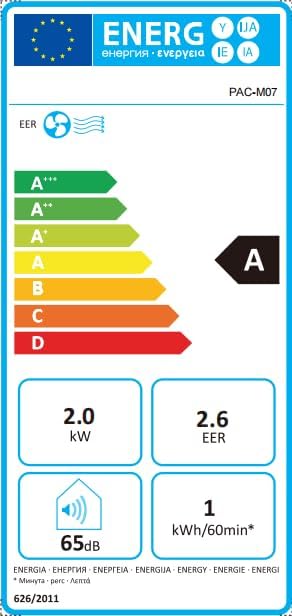
Image: Energy efficiency label showing an 'A' rating for cooling, 2.0 kW power, 2.6 EER, 65dB noise, and 1 kWh/60min energy consumption.
8. Warranty and Support
For information regarding warranty and returns, please refer to the purchase platform's policies. If you have received a defective or damaged product, consult the specific help page on the platform where you made the purchase.
For technical support or further assistance, please contact Acekool customer service through the contact information provided on your purchase receipt or the official Acekool website.
Related documentsPAC-M09


Ask a question about this manual
Ask about setup, troubleshooting, compatibility, parts, safety, or missing instructions. Manuals+ will review the question and use this page’s manual context to help answer it.