
Introduction
This manual provides detailed instructions for the assembly, operation, and maintenance of your Aheaplus Bakers Rack. This versatile kitchen storage solution features integrated power outlets, USB charging ports, and LED lighting. Please read this manual thoroughly before assembly and use to ensure safe and correct operation.

Image: The Aheaplus Bakers Rack, showcasing its five tiers, integrated power strip, and LED lighting, holding various kitchen appliances and decor.
Safety Information
Please observe the following safety precautions to prevent injury or damage to the product:
- Ensure all parts are present and undamaged before beginning assembly.
- Assemble the unit on a soft, clean surface to prevent scratches.
- Do not overtighten screws during assembly.
- Always use the included anti-tip device to secure the rack to a wall, especially in households with children or pets.
- Do not exceed the maximum weight capacity for each shelf (refer to Specifications section).
- Keep electrical components (power strip, LED lights) away from water or excessive moisture.
- Do not plug in appliances that exceed the power strip's rated capacity.
- Ensure the power cord is not pinched or damaged.
Package Contents
Verify that all components listed below are included in your package. If any parts are missing or damaged, please contact customer support.
- Metal Frame Components
- Engineered Wood Shelves (5 tiers)
- Integrated Power Strip (3 AC outlets, 2 USB ports)
- LED Light Strip
- 6 S-shaped Hooks
- Anti-tip Device
- Assembly Hardware (screws, bolts, Allen wrench)
- Instruction Manual
Assembly Instructions
Assembly typically requires one person and takes approximately one hour. All parts are clearly labeled, and necessary tools are included.
- Unpack and Identify Parts: Carefully unpack all components and lay them out on a protected surface. Refer to the parts list in the included manual to identify each piece.
- Assemble the Frame: Begin by connecting the main vertical metal frame pieces using the provided hardware. Ensure all connections are secure but do not fully tighten screws until the frame is stable.
- Attach Shelves: Install the engineered wood shelves onto the frame. The shelves can be adjusted to different pre-drilled positions to accommodate various item heights. Secure each shelf with the appropriate hardware.
- Install Power Strip and LED Lights: Mount the integrated power strip and LED light strip according to the diagrams in your manual. Ensure all electrical connections are firm.
- Attach Accessories: Install the 6 S-shaped hooks to the designated areas on the frame.
- Final Tightening and Anti-tip Device: Once the entire unit is assembled, carefully tighten all screws. Finally, attach the anti-tip device to the top rear of the rack and secure it to a wall stud using appropriate wall anchors (not always included, depending on wall type).
- Adjust Feet: Adjust the leveling feet at the bottom of the rack to ensure stability on uneven floors.

Image: Close-up showing key structural and accessory features: S-shaped hooks for hanging, an X-shaped crossbar for stability, adjustable feet for leveling, and an anti-tip device for safety.
Operating Instructions
Power Outlets and USB Ports
The bakers rack is equipped with a built-in power strip featuring 3 AC outlets and 2 USB charging ports. This allows you to conveniently power and charge up to 5 devices simultaneously, such as coffee makers, blenders, or mobile devices, directly on the rack.
- Plug the rack's main power cord into a standard wall outlet.
- Connect your appliances to the AC outlets.
- Connect your USB devices to the USB charging ports.
- Ensure total power consumption does not exceed the power strip's maximum rating (refer to Specifications).

Image: The integrated power strip with 3 AC outlets and 2 USB ports, demonstrating its use for charging electronic devices like a tablet and smartphone.
LED Strip Lights
The integrated LED lighting system offers customizable illumination for your rack. It supports both smart app control and IR remote control.
- App Control: Download the designated smart app (refer to the included LED light manual for app name and QR code). Follow the app's instructions to pair your device with the LED lights. This allows for control over multiple colors, flashing modes, and music sync functions.
- IR Remote Control: Use the provided IR remote to change colors, adjust brightness, and select various lighting modes. Ensure the remote is pointed towards the LED receiver.
- Music Sync Function: When activated via the app, the LED lights can change color and rhythm in sync with ambient sound or music, enhancing the atmosphere.

Image: The bakers rack illuminated with blue LED lights, highlighting the various control options such as RGB colors, built-in mic for music sync, timing function, app control, and remote control.
Maintenance
To keep your bakers rack in optimal condition, follow these simple maintenance guidelines:
- Cleaning: Wipe surfaces with a soft, damp cloth. Avoid abrasive cleaners or harsh chemicals that could damage the finish. For stubborn stains, a mild soap solution can be used, followed by drying with a clean cloth.
- Dusting: Regularly dust the shelves and frame to prevent buildup.
- Hardware Check: Periodically check all screws and bolts to ensure they remain tight. Retighten if necessary to maintain stability.
- Electrical Components: Ensure the power cord and LED light connections are free from damage. Do not attempt to repair electrical components yourself; contact qualified personnel if issues arise.
Troubleshooting
If you encounter any issues with your Aheaplus Bakers Rack, refer to the following common problems and solutions:
| Problem | Possible Cause | Solution |
|---|---|---|
| Rack is wobbly or unstable. | Loose screws; uneven floor. | Tighten all assembly screws. Adjust the leveling feet at the bottom of the rack. Ensure the anti-tip device is properly installed. |
| Power outlets or USB ports not working. | Rack's main power cord unplugged; power strip switch off; circuit overload. | Ensure the rack's power cord is securely plugged into a functional wall outlet. Check if the power strip has an on/off switch and ensure it is on. Unplug some devices to check for overload. Test the wall outlet with another appliance. |
| LED lights not turning on or responding. | LED light strip unplugged; remote battery dead; app not connected. | Check the connection of the LED light strip to the power source. Replace remote control batteries. Re-pair the LED lights with the smart app if using app control. |
| S-shaped hooks fall off easily. | Hooks not properly seated; excessive weight. | Ensure hooks are fully engaged on the rail. Do not hang items heavier than the hook's capacity. |
Specifications
| Feature | Detail |
|---|---|
| Model | B0CBPJXPRD |
| Material | Engineered Wood, Metal |
| Color | White |
| Product Dimensions (D x W x H) | 15.7" x 23.6" x 58.1" |
| Number of Shelves | 5 |
| Power Outlets | 3 AC outlets (120V/12A) |
| USB Charging Ports | 2 USB ports (5V/2A) |
| Power Cord Length | 6.56 FT |
| Special Features | Adjustable shelves, Built-In USB Outlet, LED Light (App/IR control, Music Sync) |
| Item Weight | 28 pounds |
| Shelf Weight Capacity (Top 2 tiers) | 55 lbs each |
| Shelf Weight Capacity (Bottom 3 tiers) | 80 lbs each |
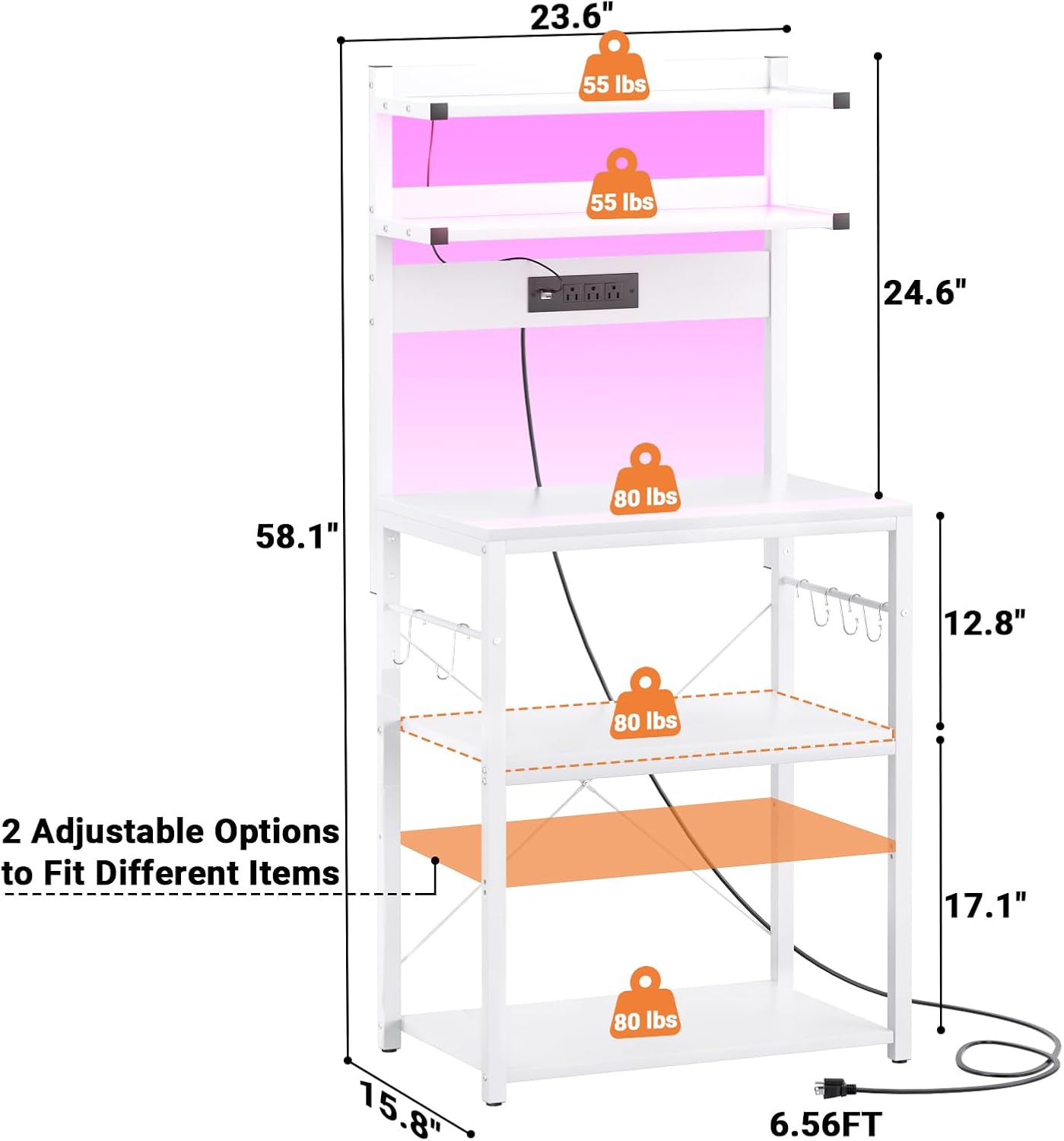
Image: Technical diagram illustrating the overall dimensions (23.6"W x 58.1"H x 15.8"D) and individual shelf weight capacities (55 lbs for top two, 80 lbs for bottom three).
Warranty and Support
Aheaplus provides lifetime customer support for this product. If you have any questions, concerns, or require assistance, please do not hesitate to contact our experienced customer service team. We aim to respond to all inquiries within 24 hours.
For support, please visit the Aheaplus store on Amazon or refer to the contact information provided with your purchase.