
Tronsmart Tronsmart Bang Max
Tronsmart Bang Max Portable Bluetooth Speaker User Manual
Model: Tronsmart Bang Max | Brand: Tronsmart
Introduction
The Tronsmart Bang Max Portable Bluetooth Speaker is designed to deliver powerful, high-fidelity audio with deep bass and clear treble. Featuring advanced Bluetooth 5.3 connectivity, customizable EQ, and dynamic light shows, it's built for both indoor and outdoor use. Its IPX6 waterproof rating and long battery life make it an ideal companion for any gathering or adventure. This manual provides essential information on setting up, operating, and maintaining your speaker to ensure optimal performance.
What's in the Box
- 1x Tronsmart Bang Max Bluetooth Speaker
- 1 x 3.5mm Audio Cable
- 1 x Warranty Card
- 1 x User Manual
- 1 x SoundPulse® Card
Product Overview
The Tronsmart Bang Max features a robust design with intuitive controls and versatile connectivity options.
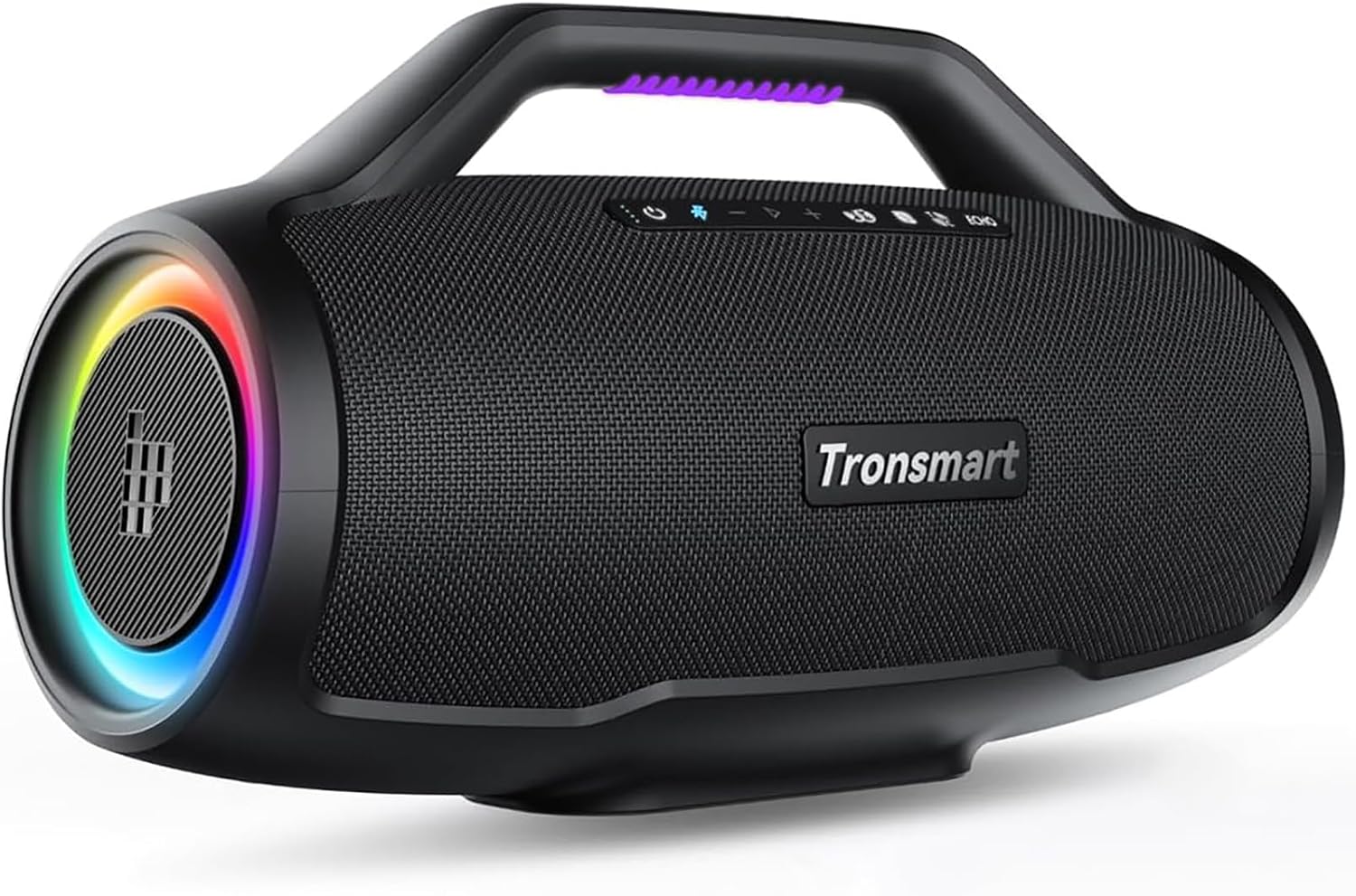
Figure 1: Front view of the Tronsmart Bang Max speaker, showcasing its sleek design and integrated handle.
Key Features:
- 130W Powerful Sound: Equipped with full-range speakers and aluminum alloy bass diaphragms for rich, high-fidelity audio.
- Three-Way Frequency: Delivers distinct high-definition treble, clear human voice, and powerful bass.
- Bluetooth 5.3: Provides a fast and stable connection with various Bluetooth devices.
- Customized EQ & Light Show: Adjust sound and lighting effects via the Tronsmart app.
- Party Sync: Connect up to 100+ Bang Max speakers for a synchronized audio experience.
- IPX6 Waterproof: Resistant to splashes, rain, and mild dew, suitable for outdoor use.
- 24-Hour Playtime: Long-lasting battery for extended listening (at medium volume).
- Power Bank Function: Charge your devices directly from the speaker.
Control Panel:
Figure 2: Top view of the speaker showing the control buttons (Power, Bluetooth, Volume, Play/Pause, SoundPulse, Stereo Pairing, Broadcast).
- Power Button: Press and hold to power on/off. Short press to change light modes.
- Bluetooth Button: Press to enter Bluetooth pairing mode.
- Volume - / +: Adjust volume levels.
- Play/Pause Button: Play or pause audio playback.
- SoundPulse® Button: Activate SoundPulse® mode for enhanced audio.
- Stereo Pairing Button: Initiate stereo pairing with another Bang Max speaker.
- Broadcast Button: Connect to multiple (100+) Bang Max speakers.
Rear Ports:

Figure 3: Close-up view of the rear panel revealing the input ports, protected by a silicone cover.
- TF Card Slot: Insert a Micro SD card for direct music playback.
- USB-A Port: For U-disk music playback and power bank function.
- AUX-in Port: Connect external audio devices via 3.5mm audio cable.
- Guitar/Mic2 Input: Connect a guitar or second microphone.
- Mic1 Input: Connect a microphone.
- DC IN Port: For charging the speaker.
Setup
Initial Charging:
Before first use, fully charge your Tronsmart Bang Max speaker. Connect the provided power adapter to the DC IN port on the rear of the speaker and plug it into a power outlet. The charging indicator lights will show the charging status. A full charge typically takes 4-5 hours.
Bluetooth Pairing:
- Power on the speaker by pressing and holding the Power button. The Bluetooth indicator light will flash blue, indicating it's in pairing mode.
- On your device (smartphone, tablet, laptop), enable Bluetooth and search for "Tronsmart Bang Max" in the list of available devices.
- Select "Tronsmart Bang Max" to connect. Once connected, the Bluetooth indicator light will remain solid blue.
- If pairing fails, clear your device's Bluetooth history, restart both the speaker and your device, and try again.
Operating Instructions
Basic Playback:
- Play/Pause: Press the Play/Pause button.
- Volume Up/Down: Press the Volume + or Volume - buttons.
- Next/Previous Track: Long press Volume + for next track, long press Volume - for previous track.
Light Modes:
The Bang Max features 7 different colors and 3 light modes. Short press the Power button to cycle through the light modes. You can also turn off the lights to save battery life.

Figure 4: Speaker displaying various dynamic light modes.
SoundPulse® Mode:
Press the SoundPulse® button to activate or deactivate the enhanced audio mode. This mode provides a more powerful and immersive sound experience.
Stereo Pairing (TWS):
To pair two Tronsmart Bang Max speakers for True Wireless Stereo (TWS) sound:
- Ensure both speakers are powered on and not connected to any other Bluetooth devices.
- On one speaker, press the Stereo Pairing button. It will enter pairing mode.
- The two speakers will automatically connect to each other. Once connected, the Stereo Pairing indicator will be solid on both speakers.
- Connect your device to one of the paired speakers via Bluetooth.
Broadcast Mode (Party Sync):
Connect up to 100+ Tronsmart Bang Max speakers for a synchronized audio and light show experience. This feature is ideal for large gatherings.

Figure 5: Multiple Tronsmart Bang Max speakers synchronized for a party.
Using Microphone/Guitar Inputs:
Plug your microphone(s) or guitar into the respective input jacks on the rear panel. Adjust the individual volume and gain knobs for optimal sound. This allows for karaoke or live music performances.
Official Product Videos:
Video Description: An official Tronsmart video showcasing the Bang Max Portable Bluetooth Speaker, highlighting its features and design.
Video Description: An instructional video demonstrating how to operate the Tronsmart Bang Max speaker, covering various functions and controls.
Maintenance
Cleaning:
Wipe the speaker with a soft, damp cloth. Do not use harsh chemicals or abrasive cleaners. Ensure all port covers are securely closed before exposing the speaker to water.
Water Resistance (IPX6):
The speaker is IPX6 waterproof, meaning it can withstand high-pressure water jets from any direction. It is suitable for use in rainy conditions or near pools/beaches. However, do not submerge the speaker in water.

Figure 6: The Tronsmart Bang Max speaker on a sandy beach, demonstrating its IPX6 waterproof capability.
Battery Care:
- To prolong battery life, avoid fully discharging the speaker frequently.
- Charge the speaker regularly, even if not in use, to maintain battery health.
- Store the speaker in a cool, dry place when not in use for extended periods.
Troubleshooting
| Problem | Possible Cause | Solution |
|---|---|---|
| Speaker won't turn on. | Low battery. | Charge the speaker fully. |
| Cannot pair via Bluetooth. | Speaker not in pairing mode; device Bluetooth off; interference. | Ensure speaker is in pairing mode (flashing blue light). Turn device Bluetooth off/on. Move closer to speaker. Clear device's Bluetooth history. |
| No sound. | Volume too low; incorrect input mode; device not connected. | Increase volume on speaker and device. Check input mode (Bluetooth, AUX, TF, USB). Reconnect device. |
| Sound distortion. | Volume too high; low battery. | Lower volume. Charge speaker. |
Specifications
| Feature | Detail |
|---|---|
| Brand | Tronsmart |
| Model | Tronsmart Bang Max |
| Product Dimensions | 7.72 x 18.46 x 9.21 inches |
| Item Weight | 13.18 pounds |
| Connectivity Technology | Bluetooth 5.3, AUX, TF Card, USB-A |
| Speaker Type | Outdoor |
| Color | Black |
| Battery Capacity | 18000 mAh (11.1V 6000 mAh) |
| Playtime | Up to 24 hours (medium volume) |
| Charging Time | 4-5 hours |
| Waterproof Rating | IPX6 |
Warranty & Support
Tronsmart offers a 12-month quality guarantee for the Bang Max Portable Bluetooth Speaker. For any product-related inquiries, technical assistance, or warranty claims, please contact Tronsmart customer service. They provide 24-hour customer service to assist you.
You can find more information and contact details on the official Tronsmart website or through your purchase platform.
Visit the Tronsmart Store on Amazon for additional products and support.
Related documentsTronsmart Bang Max


Ask a question about this manual
Ask about setup, troubleshooting, compatibility, parts, safety, or missing instructions. Manuals+ will review the question and use this page’s manual context to help answer it.