
Introduction
Thank you for choosing the NUNET 1.2L Smart Mini Hot Pot. This versatile appliance is designed for convenient and efficient cooking, perfect for individuals or small households. With its smart control panel, multiple cooking modes, and non-stick interior, preparing a variety of meals is simple and enjoyable. Please read this manual thoroughly before use to ensure safe and optimal operation.
Safety Instructions
- Always ensure the base of the cooker is dry before plugging it in. Do not immerse the main unit (base) in water or any other liquid.
- Do not place the appliance on or near a hot gas or electric burner, or in a heated oven.
- Use only non-metal utensils (e.g., wood or silicone) to avoid scratching the non-stick inner coating.
- This appliance is equipped with overheating and dry-burning protection. If there is no water or the pot overheats, it will automatically power off.
- Always use the appliance on a stable, heat-resistant surface.
- Keep out of reach of children.
- Unplug the appliance from the outlet when not in use and before cleaning.
- Do not operate any appliance with a damaged cord or plug, or after the appliance malfunctions or has been damaged in any manner.
Product Overview
Components
- Main Pot with Non-Stick Inner Coating
- Stainless Steel Steamer Basket
- Transparent Glass Lid with Handle
- Control Panel with Function Buttons
- Power Cord (removable)
- Anti-scald Handle
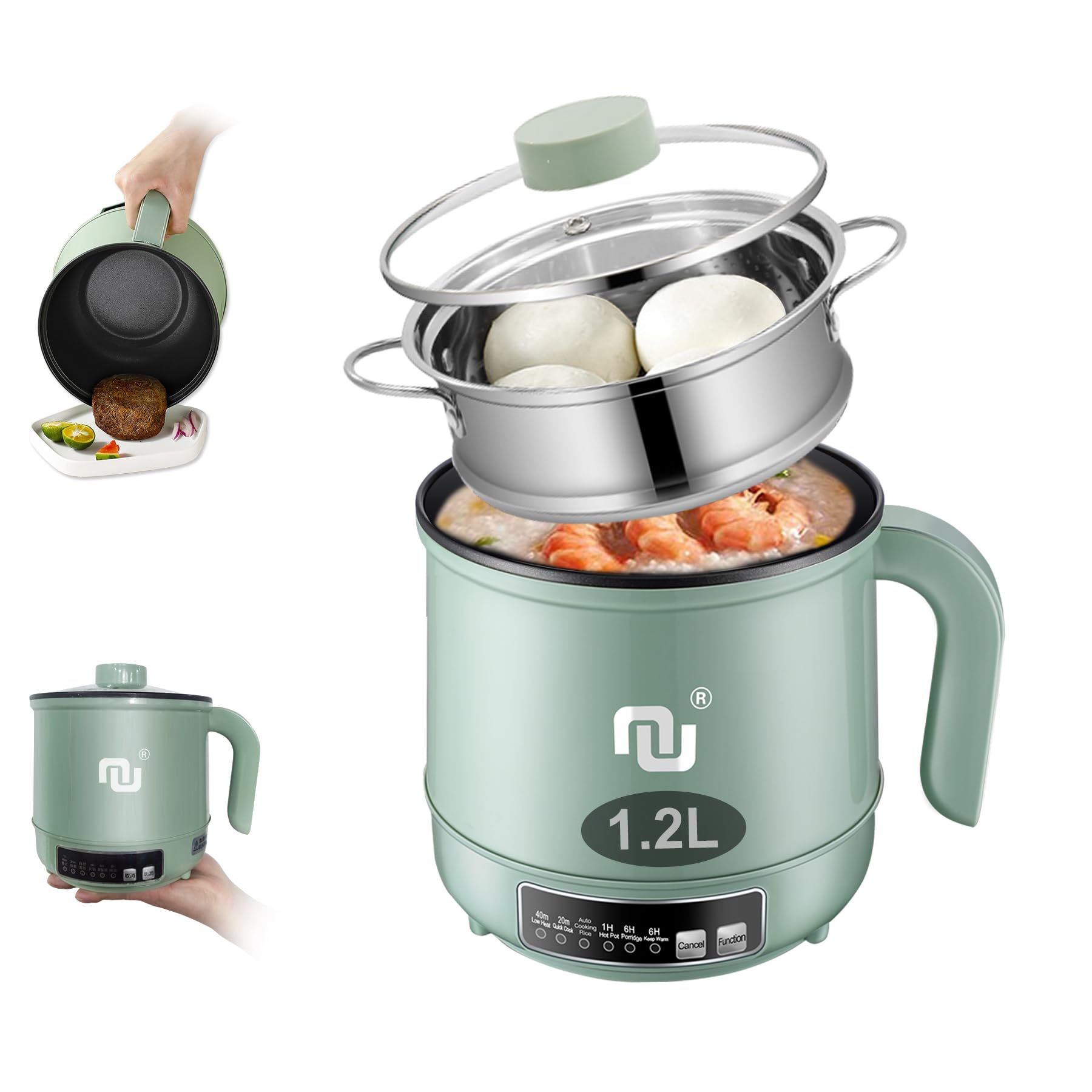
Image: The NUNET 1.2L Smart Mini Hot Pot with its glass lid and stainless steel steamer basket in place.
Control Panel Functions
The smart control panel features intuitive buttons for selecting various cooking modes and power options:
- 40m Low Heat (300W): Ideal for slow cooking or gentle simmering.
- 20m Quick Cook (600W): For rapid heating and quick meal preparation.
- Auto Cooking Rice: Automatically cooks rice to perfection.
- 1H Hot Pot: Maintains a rolling boil for 1 hour, then automatically shuts off.
- 6H Porridge: A preset mode for cooking porridge over 6 hours.
- 6H Keep Warm (15W): Keeps food warm for up to 6 hours after cooking.
- Function Button: Press to cycle through the different cooking modes.
- Cancel Button: Press to stop the current cooking mode.

Image: A detailed view of the smart control panel with illuminated indicators for each cooking mode.
Setup
- Unpack: Carefully remove all components from the packaging.
- Clean: Before first use, wash the inner pot, steamer basket, and glass lid with warm, soapy water. Rinse thoroughly and dry completely. Ensure the main unit (base) is never immersed in water.
- Connect Power: Insert the removable power cord into the designated port at the back of the main unit, then plug it into a standard electrical outlet.
Operating Instructions
The NUNET Smart Mini Hot Pot offers versatile cooking options. Here's how to use its main functions:
General Cooking Steps:
- Place the main unit on a stable, flat, and heat-resistant surface.
- Add your ingredients to the non-stick inner pot.
- Plug in the power cord. The indicator lights on the control panel will illuminate.
- Press the "Function" button repeatedly to select your desired cooking mode. The corresponding indicator light will turn red.
- The appliance will begin cooking automatically after selecting a mode.
- Once cooking is complete, the appliance will either switch to "Keep Warm" mode (for 6 hours) or automatically shut off, depending on the selected mode.
- To stop cooking at any time, press the "Cancel" button.
Using the Steamer Basket:
The stainless steel steamer basket allows for simultaneous steaming while cooking in the main pot.
- Add water to the main pot (ensure it does not exceed the maximum fill line).
- Place the steamer basket on top of the main pot.
- Arrange your food (e.g., vegetables, dumplings, fish) in the steamer basket.
- Cover with the glass lid.
- Select a cooking mode that generates steam (e.g., Quick Cook, Hot Pot).

Image: The mini hot pot with food cooking in the main pot and buns steaming in the upper basket, illustrating its dual functionality.
Specific Cooking Modes:
- Auto Cooking Rice: Add rice and water (recommended ratio: 1 cup rice to 1.5 cups water). Stir the rice after 10 minutes of cooking for best results. The cooker will automatically adjust cooking time and switch to keep warm.
- 1H Hot Pot: This mode provides 1 hour of continuous high heat (600W) for hot pot dishes, then automatically shuts off.
- 6H Porridge: Use this mode for a delayed start or slow-cooked porridge.
- Frying/Sautéing: Add a small amount of oil to the non-stick pot. Select "20m Quick Cook" for higher heat or "40m Low Heat" for gentler sautéing.
Video: An official seller video demonstrating the NUNET Electric Hot Pot with Steamer, showcasing its features and ease of use.
Video: An official seller video highlighting the smart control features and overall functionality of the Nunet Mini Hot Pot.
Cleaning and Maintenance
- Always unplug the appliance and allow it to cool completely before cleaning.
- Inner Pot: The non-stick inner coating is easy to clean. Use a soft sponge or cloth with mild dish soap and warm water. Do not use abrasive cleaners or metal scouring pads, as these can damage the non-stick surface.
- Steamer Basket & Lid: Wash with warm, soapy water. These components are generally dishwasher safe, but hand washing is recommended to prolong their lifespan.
- Main Unit (Base): Wipe the exterior with a damp cloth. Ensure no water enters the electrical components. The base of the cooker needs to be kept dry and cannot be washed by water or put in a dishwasher.
- Storage: Store the appliance in a dry place when not in use.

Image: The non-stick interior of the hot pot being cleaned, highlighting its waterproof design for easy maintenance.
Troubleshooting
| Problem | Possible Cause | Solution |
|---|---|---|
| Appliance does not turn on. | Not plugged in correctly; power outage; overheating/dry-burning protection activated. | Check power cord connection and outlet; allow appliance to cool down if protection was activated. |
| Food sticks to the bottom. | Insufficient oil; cooking at too high a temperature for too long; damaged non-stick coating. | Add a small amount of oil; adjust cooking mode/time; use non-metal utensils. |
| Steaming is slow or ineffective. | Insufficient water in the main pot; lid not properly sealed. | Ensure adequate water level; check lid placement. |
| Water leaks from the pot. | Overfilling the pot; damage to the pot. | Do not exceed the maximum fill line; inspect the pot for any damage. |
Specifications
| Feature | Detail |
|---|---|
| Model Number | Hot Pot |
| Capacity | 1.2 Liters |
| Rated Power | 600W (Rapid Heating), 300W (Low Heat), 15W (Keep Warm) |
| Material | Stainless Steel (Steamer), Non-Stick Coating (Inner Pot) |
| Color | Green |
| Item Weight | 2.2 pounds |
| Package Dimensions | 9.13 x 7.72 x 7.64 inches |

Image: The mini hot pot with its dimensions and power cord length indicated.
Warranty and Support
The NUNET Smart Mini Hot Pot comes with a one-year hassle-free warranty. For any questions, concerns, or to request a spare part (e.g., glass cover or longer power cord), please contact NUVENDING customer service. NUVENDING is a US-based company committed to providing quick response customer service.
Contact information can typically be found on the product packaging or the seller's official website.