
1. Introduction and Overview
The ODK 54-inch Reversible L-Shaped Computer Desk is designed for versatility and functionality in various settings, including home offices, gaming setups, and study areas. Its reversible design allows for left or right-hand configuration to suit your space requirements. The desk features a spacious desktop, ample storage solutions, and a sturdy construction for long-term use.

Image 1.1: The ODK L-Shaped Computer Desk in a typical home office setup, showcasing its spacious design and integrated monitor stand.
Key Features:
- Reversible L-Shape Design: Configurable for left or right-hand orientation to fit various room layouts.
- Spacious Desktop: Main desktop depth of 21.7 inches provides generous space for computers, peripherals, and work materials.
- Integrated Storage: Includes an under-desk bookshelf, two-tier storage shelves, and an adjustable monitor stand.
- Adjustable Monitor Stand: Accommodates up to two monitors and other accessories, allowing for ergonomic height adjustment to reduce neck and back strain.
- Durable Construction: Made from high-quality MDF board that is scratch-resistant and waterproof, supported by a robust metal frame.
- Enhanced Stability: Features adjustable leg pads to maintain stability on uneven flooring.
2. Safety Instructions
Please read and understand all safety instructions before assembly and use of the ODK L-Shaped Computer Desk. Failure to follow these instructions may result in injury or damage to the product.
- Assembly: Assemble the desk on a soft, clean surface to prevent scratches. Ensure all screws and fasteners are tightened securely before use. Do not overtighten.
- Weight Capacity: Do not exceed the recommended weight capacity for the desktop and shelves. Distribute weight evenly.
- Stability: Always use the adjustable leg pads to ensure the desk is level and stable. Avoid placing heavy items on the edges of the desk.
- Placement: Position the desk away from direct sunlight, heat sources, and excessive moisture to prevent material degradation.
- Children: Keep small parts and packaging materials away from children during assembly. Do not allow children to climb on or play with the desk.
- Moving the Desk: When moving the desk, lift it rather than dragging it to prevent damage to the frame or flooring.
3. Package Contents
Before beginning assembly, verify that all components listed below are present and undamaged. If any parts are missing or damaged, please contact ODK customer service.
- Desktop Panels (Main, Side, Corner)
- Monitor Stand Panel
- Storage Shelf Panels (2-tier and under-desk)
- Metal Frame Components (Legs, Support Bars)
- Hardware Pack (Screws, Bolts, Washers, Allen Key)
- Adjustable Leg Pads
- Instruction Manual
4. Setup (Assembly)
The ODK L-Shaped Computer Desk is designed for straightforward assembly. Follow the detailed, clear instructions provided in the included user manual. All necessary tools are supplied to facilitate the process.

Image 4.1: Detailed dimensions and illustration of the reversible L-shaped design, allowing configuration to either the left or right side.
Assembly Steps:
- Unpack and Identify Parts: Lay out all components on a soft, clean surface. Match each part to the corresponding label in the instruction manual.
- Assemble the Frame: Connect the metal frame components according to the diagrams, ensuring all screws are finger-tightened initially.
- Attach Desktop Panels: Secure the desktop panels to the assembled frame. Pay attention to the desired left or right configuration for the L-shape.
- Install Storage Shelves: Attach the under-desk bookshelf and two-tier storage shelves as indicated in the manual.
- Mount Monitor Stand: Secure the adjustable monitor stand to the main desktop.
- Final Tightening: Once all components are in place, systematically tighten all screws and bolts using the provided Allen key.
- Adjust Leg Pads: Adjust the leg pads at the bottom of the desk to ensure it is level and stable on your floor.
5. Operating (Usage)
The ODK L-Shaped Computer Desk offers a versatile workspace designed for comfort and efficiency.
Utilizing Your Workspace:
- Spacious Desktop: The 21.7-inch deep main desktop provides ample room for multiple monitors, keyboards, mice, and other essential equipment.
- Adjustable Monitor Stand: Position your monitor(s) at an ergonomic height using the adjustable stand to maintain proper posture and reduce strain.
- Integrated Storage: Use the under-desk bookshelf and two-tier shelves to organize books, office supplies, and your computer tower, keeping your main desktop clear.
- Gaming and Office Setup: The L-shape provides distinct areas for gaming, work, or creative projects.
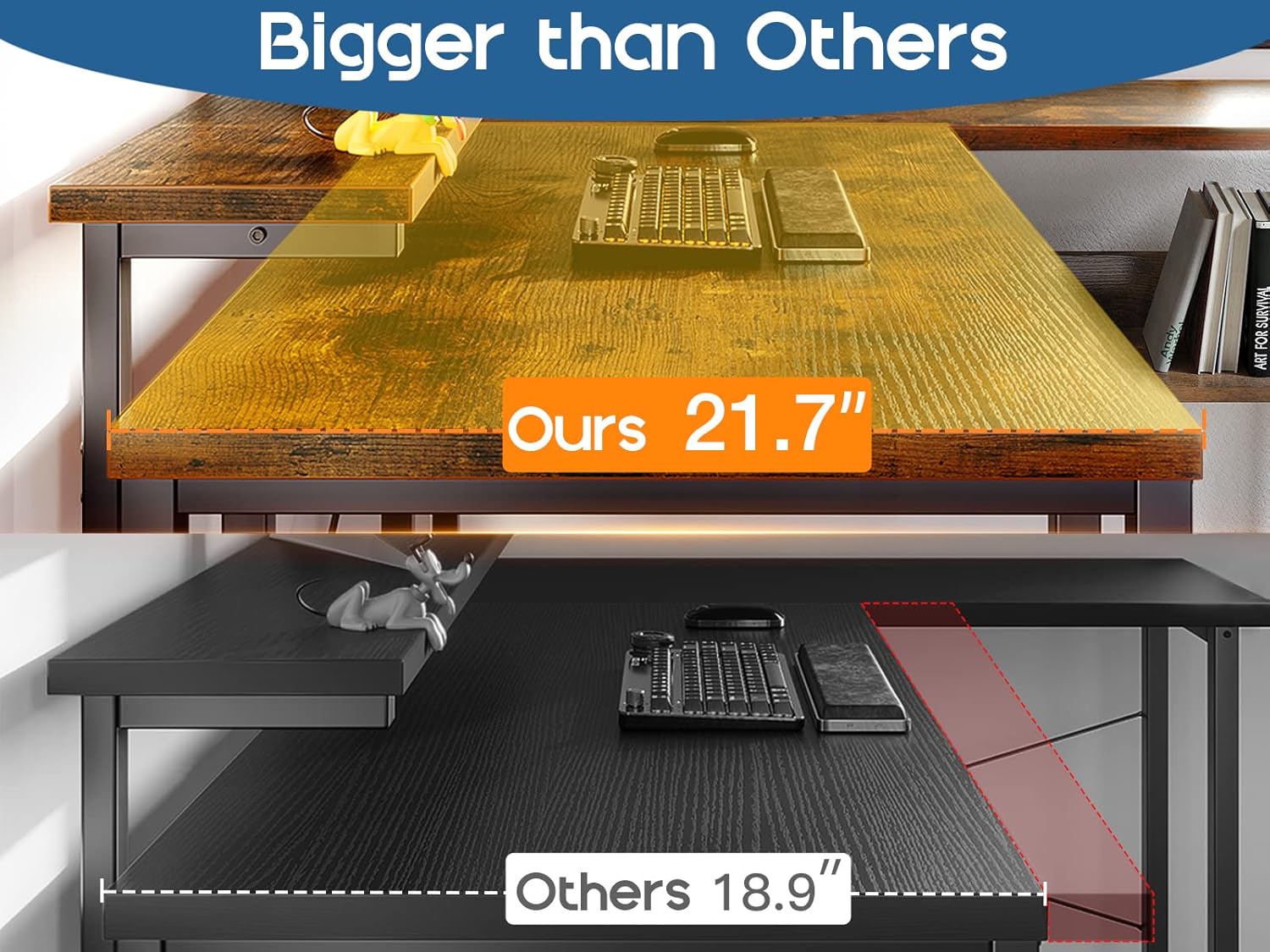
Image 5.1: The generous 21.7-inch depth of the main desktop, offering more usable space.
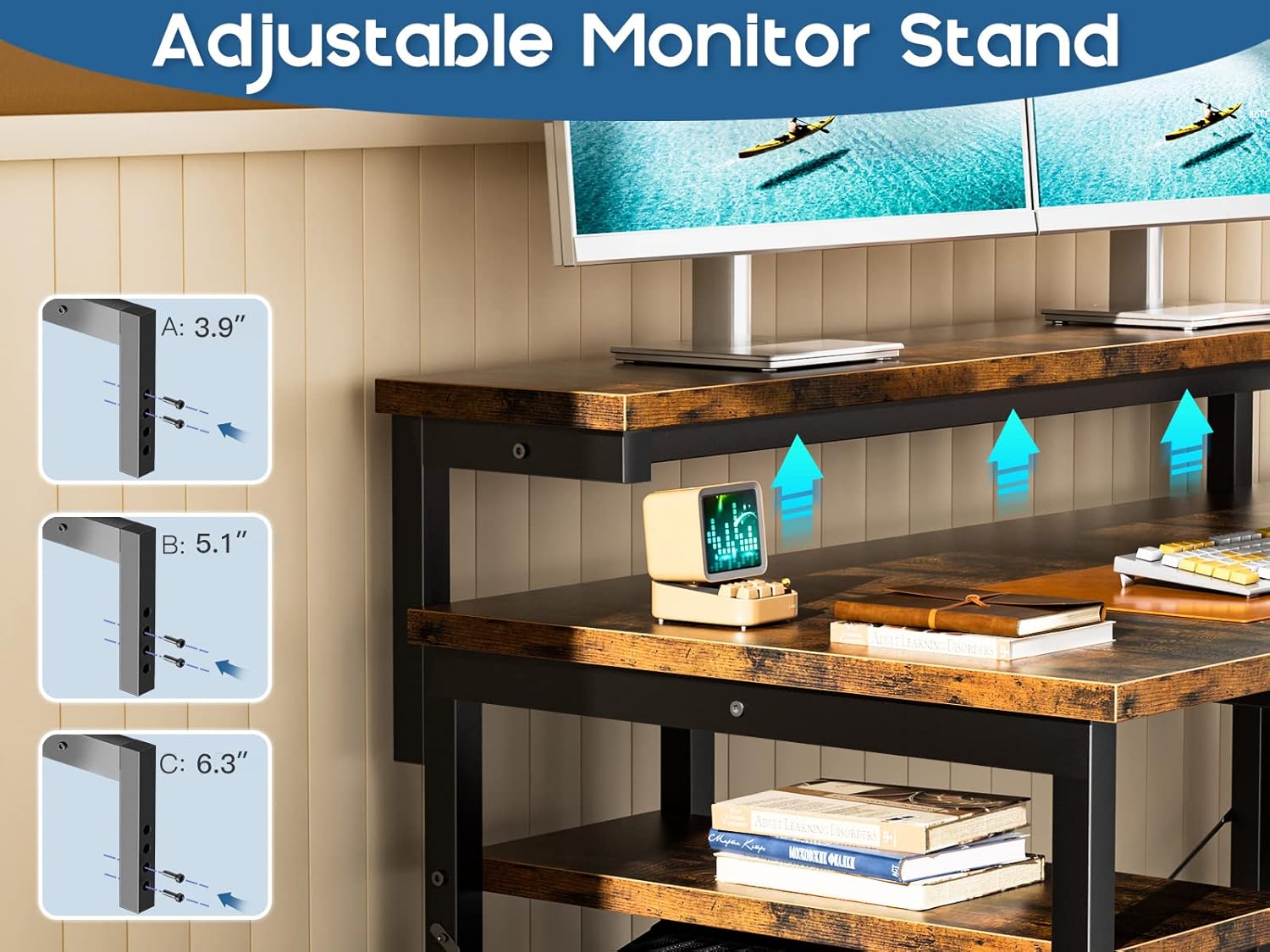
Image 5.2: The adjustable monitor stand, allowing users to customize screen height for comfort.

Image 5.3: The convenient under-desk storage shelf for books and office essentials.

Image 5.4: The dedicated computer tower stand, keeping your PC off the floor and easily accessible.

Image 5.5: An example of the desk used in a gaming environment, highlighting its ample space for equipment.

Image 5.6: Two ODK L-Shaped Desks arranged to create a larger U-shaped workstation.
6. Maintenance
Proper maintenance will ensure the longevity and appearance of your ODK L-Shaped Computer Desk.
- Cleaning: Wipe surfaces regularly with a soft, damp cloth. For stubborn marks, use a mild soap solution and dry immediately. Avoid harsh chemicals or abrasive cleaners.
- Spills: Clean up spills immediately to prevent water damage to the MDF board.
- Hardware: Periodically check all screws and bolts to ensure they remain tight. Retighten if necessary.
- Protection: Use coasters for drinks and mouse pads to protect the desktop surface from scratches and stains.
7. Troubleshooting
If you encounter any issues with your ODK L-Shaped Computer Desk, refer to the following common solutions:
- Desk Wobbles: Adjust the leg pads at the bottom of the desk until it is stable on the floor. Ensure all assembly screws are securely tightened.
- Parts Don't Align During Assembly: Double-check the instruction manual to ensure you are using the correct parts for each step and that they are oriented correctly. Loosen previously tightened screws slightly to allow for adjustment, then retighten once aligned.
- Missing Hardware/Parts: Refer to the package contents list. If any items are missing, contact ODK customer service for assistance.
- Surface Scratches/Damage: While the desk is scratch-resistant, minor damage can occur. For aesthetic repairs, consider touch-up pens or furniture repair kits matching the vintage finish.
8. Specifications
| Feature | Specification |
|---|---|
| Brand | ODK |
| Model Number | XSD-B010116 |
| Shape | L-Shape |
| Desk Design | Computer Desk, Ladder Desk |
| Product Dimensions (D x W x H) | 53.94"D x 40.16"W x 29.92"H |
| Color | Vintage |
| Style | Vintage |
| Base Material | Metal |
| Top Material Type | Engineered Wood |
| Finish Type | Powder Coated |
| Special Feature | Reversible |
| Item Weight | 9.87 Kilograms |
| Number Of Shelves | 3 |
| Tabletop Thickness | 0.75 Inches |
| Required Assembly | No (implies all tools included and straightforward) |
| Recommended Number of People for Assembly | 1 |
| Included Components | Monitor Arm (Monitor Stand) |
| Room Type | Office |
| Recommended Uses For Product | Gaming, Working |
9. Warranty and Support
ODK is committed to providing high-quality products and excellent customer service.
- Return/Exchange Policy: ODK offers a 30-day free return or exchange service from the date of purchase. Please retain your proof of purchase for any claims.
- Customer Service: Our professional customer service team is available 24 hours online to assist you with any questions, concerns, or issues you may encounter with your product.
- Contact Information: For support, please visit the ODK official website or refer to the contact details provided in your product packaging.


