
Festool SYMC 70 EB-Basic
Festool Cordless Compound Miter Saw SYMC 70 EB-Basic User Manual
Model: SYMC 70 EB-Basic | Brand: Festool
1. Introduction
This user manual provides essential information for the safe and efficient operation, maintenance, and troubleshooting of your Festool Cordless Compound Miter Saw SYMC 70 EB-Basic. Please read this manual thoroughly before first use and keep it for future reference.
2. Safety Instructions
Always adhere to general power tool safety warnings and local regulations. Failure to follow these instructions may result in electric shock, fire, and/or serious injury.
General Safety Warnings:
- Work Area Safety: Keep your work area clean and well-lit. Cluttered or dark areas invite accidents.
- Electrical Safety: Do not expose power tools to rain or wet conditions. Water entering a power tool will increase the risk of electric shock.
- Personal Safety: Always wear eye protection, hearing protection, and a dust mask when operating the saw. Secure loose clothing and long hair.
- Tool Use and Care: Do not force the power tool. Use the correct power tool for your application. Disconnect the battery pack before making any adjustments, changing accessories, or storing power tools.
- Battery Tool Use and Care: Recharge only with the charger specified by the manufacturer. Use power tools only with specifically designated battery packs.
3. Components Overview
Familiarize yourself with the main components of your Festool SYMC 70 EB-Basic miter saw.

Figure 3.1: The Festool SYMC 70 EB-Basic Cordless Compound Miter Saw shown with its complete set of accessories, including the saw blade, angle transfer tool, and various attachments.

Figure 3.2: The miter saw equipped with optional wheels for enhanced mobility and ease of positioning on the job site.

Figure 3.3: Close-up view of a hand inserting a battery pack into the saw's battery slot, highlighting the cordless design.

Figure 3.4: Detailed view of the saw blade and the integrated LED light for precise cutting line visualization.
4. Setup
4.1 Unpacking and Inspection
Carefully remove all components from the packaging. Inspect the saw and accessories for any signs of damage. Report any damage to your dealer immediately.
4.2 Attaching the Saw Blade
- Ensure the battery is removed from the saw.
- Press the spindle lock button.
- Use the provided wrench to loosen the blade retaining screw.
- Carefully remove the old blade (if applicable) and install the new blade, ensuring the rotation direction matches the arrow on the saw.
- Tighten the blade retaining screw securely.
4.3 Installing Batteries
The SYMC 70 EB-Basic operates with two 18V battery packs for optimal power and runtime. Insert fully charged battery packs into the designated slots until they click into place.
4.4 Attaching Mobility Wheels (Optional)
For easy transport and positioning, attach the optional mobility wheels to the base of the saw as shown in Figure 3.2. Ensure they are securely fastened.

Figure 4.1: Close-up of the robust mobility wheels, designed for quick and effortless repositioning of the saw.
5. Operating Instructions
5.1 Measuring and Transferring Angles
The SYMC 70 EB-Basic features a symmetrical stop system and an angle transfer tool for precise miter cuts. Use the angle transfer tool to accurately measure internal and external angles from your workpiece and transfer them directly to the saw's setting.

Figure 5.1: A user demonstrating the use of the angle transfer tool to measure a corner angle, ensuring accurate cuts.

Figure 5.2: The angle measured is then transferred to the saw's fence system, allowing for precise and symmetrical angle adjustments.
5.2 Making Cuts
- Place the workpiece firmly against the fence and the saw table.
- Adjust the desired cutting angle using the symmetrical stop system.
- Activate the LED light for cutting line visualization if needed.
- Hold the workpiece securely with one hand (or use clamps) and operate the saw with the other. The switch and handle are centrally located for left or right-handed operation.
- Slowly lower the saw blade through the workpiece.
- Allow the blade to stop completely before raising the saw head.
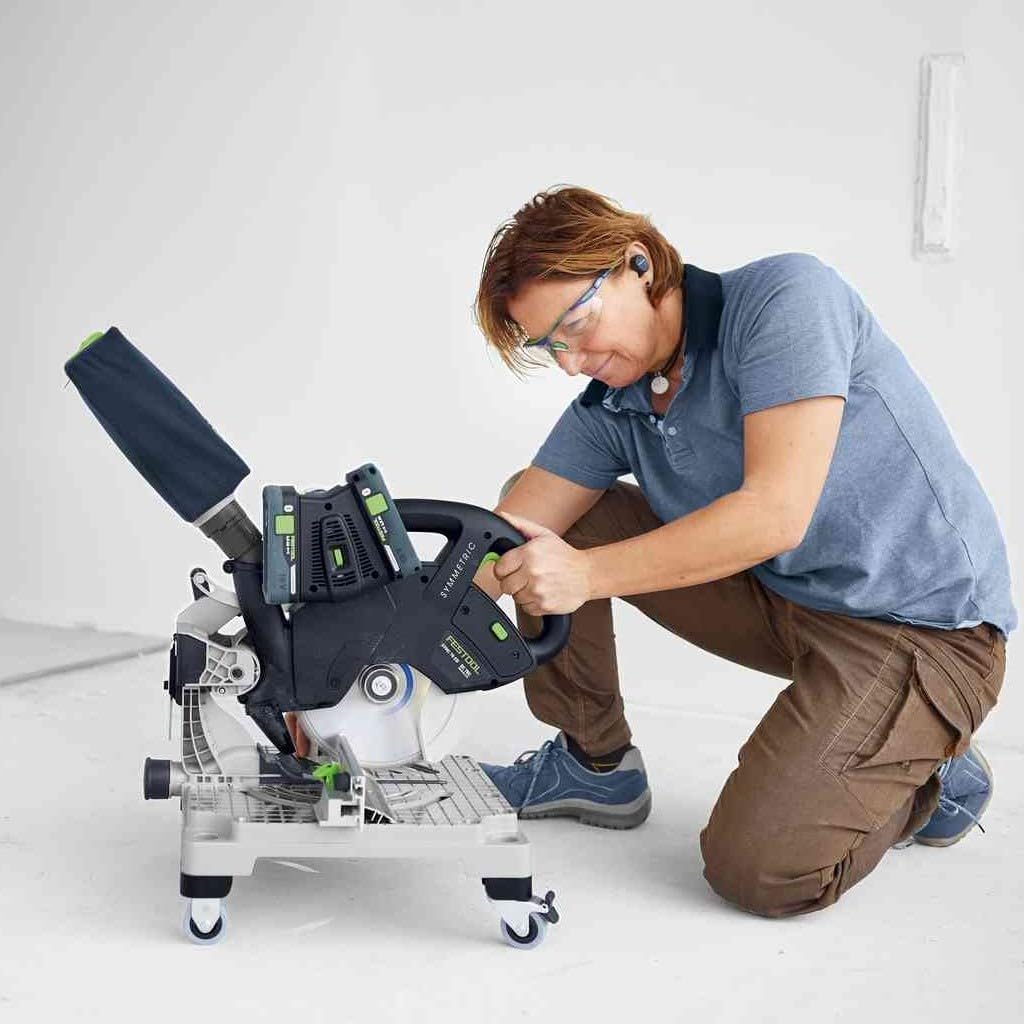
Figure 5.3: A user making a cut with the saw, demonstrating the integrated dust collection bag for reduced airborne dust.

Figure 5.4: The saw connected to an external mobile dust extraction system for a cleaner and healthier work environment.
5.3 Dust Management
The SYMC 70 EB-Basic is designed for low-dust operation. You can use the included dust collection bag for basic dust capture, or connect the saw to a mobile dust extractor for superior dust control.
6. Maintenance
6.1 Cleaning
Regularly clean the saw to ensure optimal performance and longevity. Use a brush or compressed air to remove sawdust and debris from the motor vents, blade guard, and table surface. Do not use solvents or abrasive cleaners.
6.2 Blade Replacement
Replace the saw blade when it becomes dull or damaged. Refer to section 4.2 for detailed instructions on blade replacement. Always use high-quality saw blades specifically designed for your Festool saw and the material being cut.
6.3 Battery Care
Store batteries in a cool, dry place. Do not expose them to extreme temperatures. Follow the charging instructions provided with your Festool charger.
7. Troubleshooting
| Problem | Possible Cause | Solution |
|---|---|---|
| Saw does not start | Dead or improperly inserted battery; faulty switch | Ensure batteries are fully charged and correctly inserted. Check the switch for damage. |
| Poor cut quality | Dull or incorrect blade; improper angle setting | Replace the blade. Verify angle settings are accurate. |
| Excessive dust | Dust bag full or improperly attached; dust port clogged | Empty and reattach dust bag. Clear any blockages in the dust port. Consider using an external dust extractor. |
For issues not listed here, please contact Festool customer support or an authorized service center.
8. Technical Specifications
| Feature | Detail |
|---|---|
| Model Number | 577424 |
| Product Dimensions | 1 x 1 x 1 cm (0.39 x 0.39 x 0.39 inches) |
| Item Weight | 8 g (0.018 lbs) |
| Drive Type | Hand-powered (Cordless) |
| Batteries Included | No |
| Batteries Required | Yes (2 x 18V) |
| Included in Delivery | Festool Cordless Compound Miter Saw SYMC 70 EB-Basic |
Note: Product dimensions and weight seem unusually small (1x1x1cm; 8g) based on the provided data. This might be a data entry error in the source. Please refer to official Festool documentation for precise specifications.
9. Warranty and Support
9.1 All-Inclusive Warranty
Festool offers an "all-inclusive" warranty. After online registration of your new Festool tool within 30 days of purchase, it is fully covered for the first three years. This allows you to concentrate on your work with peace of mind.

Figure 9.1: The Festool "all-inclusive" warranty symbol, representing comprehensive service benefits.
9.2 Customer Support
For further assistance, technical support, or warranty claims, please visit the official Festool website or contact your local authorized Festool dealer. Always provide your product model number (SYMC 70 EB-Basic) and serial number when seeking support.
Related documentsSYMC 70 EB-Basic


Ask a question about this manual
Ask about setup, troubleshooting, compatibility, parts, safety, or missing instructions. Manuals+ will review the question and use this page’s manual context to help answer it.