
Introduction
The BTMETER BT-618B Oscilloscope Handheld Scope Multimeter is a high-performance device designed for precise waveform analysis. It is suitable for professionals and electronics enthusiasts, offering advanced features for various applications including circuit analysis, signal characterization, and troubleshooting.
Key Features
- 2 Channels: Allows for simultaneous measurement and comparison of two signals.
- 100MHz Bandwidth: Capable of capturing high-frequency signals accurately.
- 1GSa/s Sampling Rate: Ensures detailed and precise waveform acquisition.
- 7-inch Large Touchscreen: Provides an intuitive and user-friendly interface for waveform viewing and analysis.
- Versatile Trigger Modes: Includes Single, Normal, and Automatic trigger modes for effective signal capture.
- Lissajous Graphic Display: Analyze phase difference, frequency ratio, and amplitude ratio between signals.
- FFT Viewing Capability: Perform frequency domain analysis to identify signal components.
- X-Y Mode: Visualize the relationship between two signals.
- 1GB Storage: Store up to 1000 waveform pictures and data.
- Picture Save & USB Export: One-touch screenshot and convenient data export via USB-C.
- Anti-Burn Design: Built-in high-voltage protection module tolerates continuous voltage up to 400V.
- Rechargeable Battery: 6000mAh battery provides up to 4 hours of operation.
Package Contents
The BTMETER BT-618B Oscilloscope package includes the following items:
- BTMETER BT-618B Oscilloscope Handheld Scope Multimeter
- 100MHz Oscilloscope Probe (1X and 10X)
- USB Cable
- USB Charging Adapter
- Color rings for probe identification
- Screwdriver for probe adjustment

Image: The BTMETER BT-618B Oscilloscope shown with its included accessories: USB cable, USB charging adapter, 100MHz oscilloscope probe, color rings, and a screwdriver.
Setup
Charging the Device
Before initial use, fully charge the oscilloscope using the provided USB cable and charging adapter. Connect the USB-C end to the device and the USB-A end to the adapter, then plug into a power outlet. The 6000mAh battery provides up to 4 hours of continuous operation on a full charge.
Powering On/Off
Press and hold the power button located on the device to turn it on or off. The 7-inch touchscreen will illuminate upon startup.
Connecting Probes
Connect the oscilloscope probe to the appropriate input channel (CH1 or CH2) on the device. Ensure a secure connection. Adjust the probe attenuation setting (1X or 10X) on the probe itself to match the setting selected on the oscilloscope display for accurate measurements.

Image: A close-up view of the BTMETER BT-618B Oscilloscope's 7-inch touchscreen display, showing its physical dimensions and the connection points for probes.
Operating Instructions
Basic Waveform Display and Adjustment
Upon powering on, the device will display waveforms. Use the touchscreen to interact with the display. You can adjust the vertical scale (Volts/Div) and horizontal scale (Time/Div) by tapping the corresponding channel settings (CH1, CH2) and time base settings on the top bar. Dragging waveforms vertically or horizontally allows for fine-tuning their position on the screen.
Video: This video demonstrates basic waveform manipulation on the BTMETER BT-618B oscilloscope, including adjusting vertical and horizontal scales, and moving waveforms on the screen using touch gestures.
Trigger Modes
The oscilloscope supports three trigger modes to stabilize and capture specific events:
- Single Trigger: Captures a single event or transient signal, ideal for troubleshooting.
- Normal Trigger: Continuously captures and displays waveforms when the trigger condition is met.
- Automatic Trigger: Provides effortless continuous monitoring, even without a stable trigger event.
Select the desired trigger mode from the control menu. You can also set the trigger edge (rising or falling) and the trigger channel (CH1 or CH2).

Image: The BTMETER BT-618B Oscilloscope display illustrating different trigger patterns and the cursor measurement function.
Waveform Analysis Features
Utilize the advanced analysis features for in-depth signal examination:
- Lissajous Graphic Display: Access this mode to plot the relationship between two input signals, enabling analysis of phase, frequency, and amplitude ratios.
- FFT (Fast Fourier Transform) Viewing: Convert time-domain waveforms into frequency-domain spectra to identify frequency components.
- Cursor Measurement: Use the cursor function to obtain precise waveform parameters such as voltage and time values at specific points.
- X-Y Mode: Display the relationship between two signals, useful for phase comparisons and component testing.
Video: This video demonstrates the FFT (Fast Fourier Transform) and X-Y mode functionalities on the BTMETER BT-618B oscilloscope, showing how to switch between modes and interpret the resulting displays.
Saving and Exporting Data
The device allows you to save waveform data and screenshots:
- One-touch Screenshot: Capture the current waveform display instantly.
- 1GB Storage: Store up to 1000 pictures and waveform data files.
- USB-C Connection: Connect to a computer via USB-C to export saved images and data for further analysis or documentation.

Image: The BTMETER BT-618B Oscilloscope highlighting its USB-C connection feature for data export and its 1GB internal storage capacity.
Video: This video demonstrates how to save and delete waveform data on the BTMETER BT-618B oscilloscope, showing the menu navigation and confirmation prompts.
Display Settings
Adjust the display to your preference:
- Screen Brightness: Modify the screen brightness for optimal viewing in various lighting conditions.
- Grid Brightness: Adjust the visibility of the on-screen grid lines.
- X-Y Mode Display: Toggle the X-Y mode display on or off.
Video: This video illustrates how to adjust screen brightness and grid brightness settings on the BTMETER BT-618B oscilloscope, demonstrating the visual impact of these changes.
Vertical and Horizontal Adjustment
Fine-tune the display of your waveforms:
- Vertical Scale (Volts/Div): Adjust the vertical amplitude of the waveform.
- Horizontal Scale (Time/Div): Adjust the horizontal time base of the waveform.
- Vertical Position: Move the waveform up or down on the screen.
- Horizontal Position: Shift the waveform left or right on the screen.
Video: This video demonstrates how to adjust the vertical and horizontal scaling and position of waveforms on the BTMETER BT-618B oscilloscope, showing the touch controls for these functions.
Specifications
| Feature | Specification |
|---|---|
| Channels | 2 |
| Bandwidth | 100MHz |
| Sampling Rate | 1GSa/s |
| Display | 7-inch 800 x 480 pixels Touchscreen |
| Storage Depth | 240Kbit |
| Input Resistance | 1MΩ |
| Sensitivity | 50mV~500V |
| Coupling | AC/DC |
| Highest Test Voltage | 1X: 40V; 10X: 400V |
| Voltage Accuracy | ±2% |
| Frequency Accuracy | ±0.01% |
| Trigger Modes | Single / Normal / Auto |
| Trigger Edge | Rising / Falling |
| Storage Capacity | 1GB |
| Battery | 6000mAh (up to 4 hours operation) |
| Product Dimensions | 7.24 x 4.88 x 2 inches |
| Item Weight | 1.9 pounds |
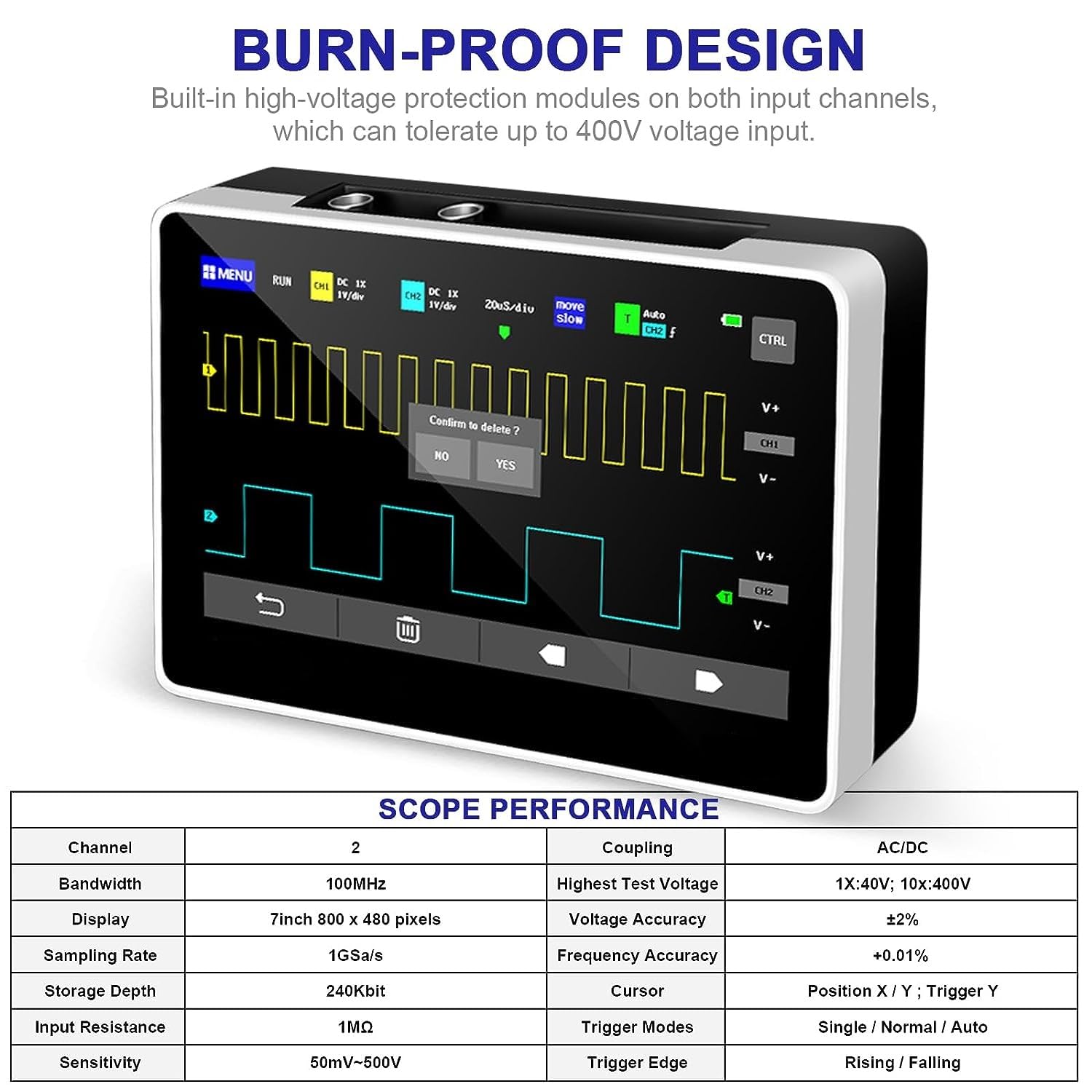
Image: A detailed table displaying the key performance specifications of the BTMETER BT-618B Oscilloscope, including channel count, bandwidth, sampling rate, and display resolution.
Maintenance
To ensure the longevity and optimal performance of your BTMETER BT-618B Oscilloscope, follow these maintenance guidelines:
- Cleaning: Use a soft, dry cloth to clean the device. For stubborn dirt, a slightly damp cloth with mild detergent can be used, ensuring no liquid enters the device. Do not use abrasive cleaners or solvents.
- Storage: Store the oscilloscope in a cool, dry place away from direct sunlight, extreme temperatures, and high humidity. Keep it in its original packaging or a protective case when not in use.
- Battery Care: To prolong battery life, avoid fully discharging the battery frequently. If storing for extended periods, charge the battery to approximately 50% and recharge every few months.
- Probe Care: Handle probes carefully. Avoid bending or stressing the probe tips. Keep them clean and free from dust or contaminants.
- Avoid Impact: Protect the device from drops and impacts, which can damage the internal components and the touchscreen.
Troubleshooting
If you encounter issues with your BTMETER BT-618B Oscilloscope, refer to the following common problems and solutions:
- Device does not power on:
- Ensure the battery is sufficiently charged. Connect the device to the charger and try again.
- Verify the power button is pressed and held for a few seconds.
- No waveform displayed:
- Check if the probes are correctly connected to the input channels and the circuit under test.
- Ensure the input signal is within the device's voltage range.
- Adjust the vertical (Volts/Div) and horizontal (Time/Div) scales to an appropriate range for the signal.
- Verify the trigger settings. Try 'Auto' trigger mode to see if a signal appears.
- Ensure the channel is enabled (ON) in the menu.
- Unstable or noisy waveform:
- Adjust the trigger level to stabilize the waveform.
- Check for proper grounding of the device and the circuit.
- Ensure probe compensation is correctly adjusted.
- Minimize external electromagnetic interference.
- Touchscreen unresponsive:
- Restart the device.
- Ensure the screen is clean and dry.
- Data export issues:
- Verify the USB-C cable is securely connected to both the oscilloscope and the computer.
- Ensure the computer recognizes the device as a storage drive.
- Check the USB connection settings on the oscilloscope.
Warranty and Support
The BTMETER BT-618B Oscilloscope Handheld Scope Multimeter comes with a 365-day quality warranty from the date of purchase. This warranty covers manufacturing defects and ensures the product meets its specified performance standards.
For technical support, warranty claims, or any questions regarding the operation of your device, please contact BTMETER customer service. You can find more information and contact details by visiting the official BTMETER Store on Amazon: BTMETER Store.