
Introduction
This manual provides detailed instructions for the assembly, operation, maintenance, and troubleshooting of your Yaheetech 3-Drawer Lateral File Cabinet. Please read all instructions carefully before beginning assembly or use to ensure proper function and safety.
Safety Information
- Do not overload the cabinet. The maximum weight capacity is 242 pounds.
- Always allow for measurement tolerance during use.
- Ensure all parts are securely fastened during assembly. Regularly check all bolts, screws, and nuts every 3 months for tightness.
- Avoid direct sunlight exposure to prevent material degradation.
- Do not use abrasive cleaners or harsh solvents on the surface. Use a soft, clean cloth or sponge with mild soap and water to clean.
- If the product shows structural damage or poses a safety hazard, discontinue use immediately and contact support.
Parts List
Before assembly, verify that all components are present and undamaged. Refer to the included hardware and panel diagrams for identification.

Image: All components and their respective dimensions for the file cabinet.
Assembly Instructions (Setup)
Follow these steps carefully to assemble your file cabinet. It is recommended to have two people for assembly.
- Prepare Drawer Slides: Separate the inner and outer parts of the drawer slides. Attach the outer slides to the side panels of the cabinet and the inner slides to the drawer sides using the provided screws.
- Assemble Cabinet Frame: Connect the base panel to the side panels using dowels and cam locks. Ensure the panels are aligned correctly before tightening.
- Attach Casters: Securely attach the four industrial-grade lockable wheels to the bottom panel of the cabinet using the provided screws. Ensure two of the casters are lockable and positioned at the front for stability.
- Install Shelves: Insert the adjustable shelves into the open storage compartments. Use the shelf pins to secure them at your desired height.
- Assemble Drawers: Construct the drawers by attaching the front, back, and side panels. Secure the bottom panel of each drawer. Attach the metal handles to the front of each drawer.
- Install Drawers: Carefully align the inner drawer slides with the outer slides on the cabinet frame and push the drawers into place until they click securely.
- Install File Hanging Bars: For the bottom drawer, insert the adjustable file hanging bars to accommodate A4 or letter-size files.
Video: This video provides a visual guide on how to install the Yaheetech File Cabinet, demonstrating key assembly steps.

Image: The fully assembled file cabinet, showcasing its design and functionality in an office environment.
Operating Instructions
- Using Drawers: Pull the metal handles to open the drawers. The smooth-gliding ball-bearing slides ensure easy access even when fully loaded.
- Lockable Top Drawer: The top drawer features a lock for securing important documents or personal items. Insert the key into the lock located on the top right-hand corner of the drawer and turn to lock or unlock.
- Open Storage Compartments: Utilize the two open cubbies for easy access to frequently used items, books, or decorative elements.
- Mobility: The cabinet is equipped with four smooth wheels for flexible movement. Two of these wheels are lockable. To secure the cabinet in place, press down on the locking mechanism of the two lockable wheels. To move, release the locks.
Video: This video demonstrates the features of the Yaheetech Lateral File Cabinet, including its drawers and open storage.
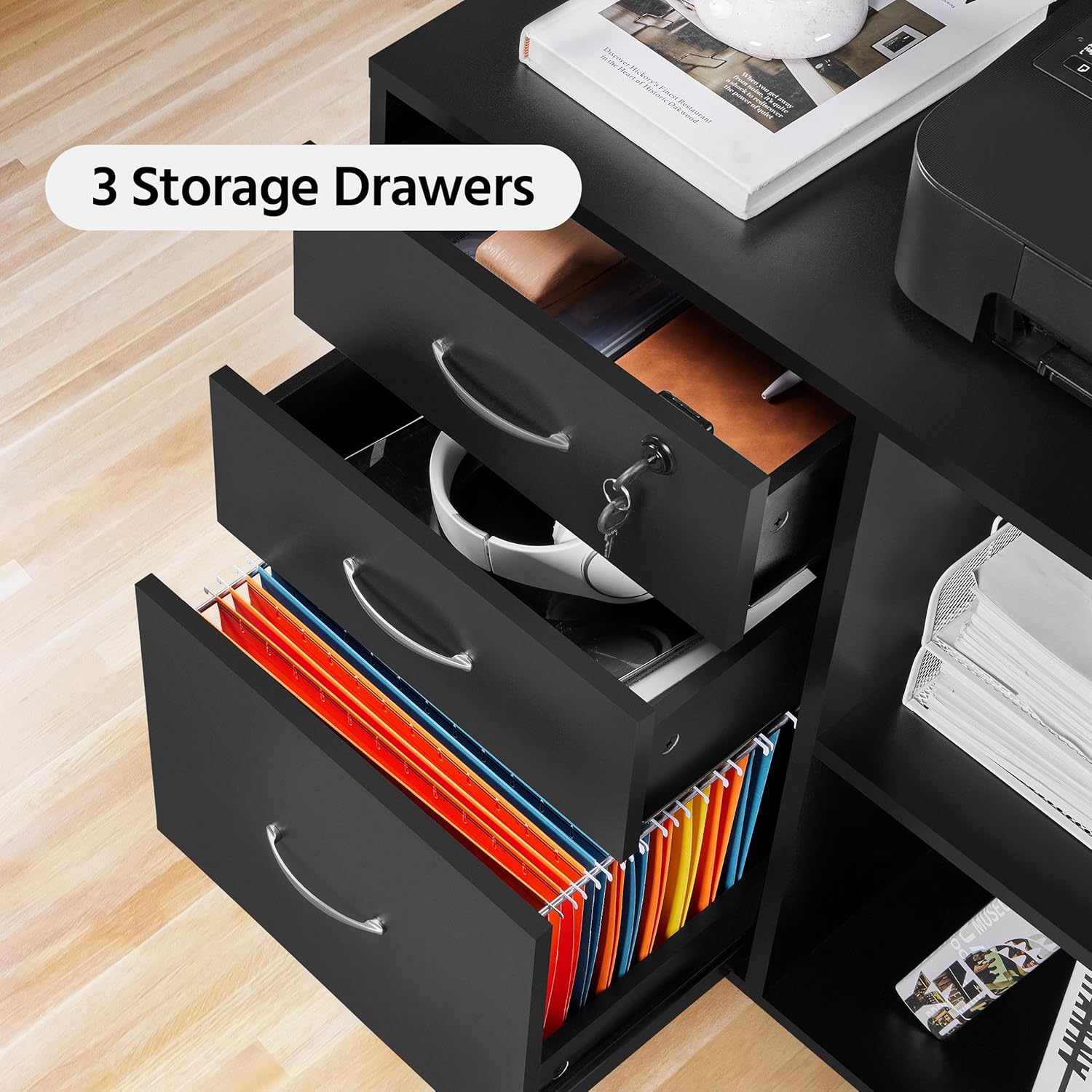
Image: A detailed view of the storage drawers, highlighting their capacity for organizing documents and office essentials.
Maintenance
- Cleaning: Wipe the outer surface of the cabinet with a soft, clean cloth or sponge dampened with mild soap and water. Avoid using abrasive cleaners, harsh chemicals, or solvents that could damage the water-resistant and scratch-proof coating.
- Inspection: Periodically inspect all fittings (bolts, screws, nuts, etc.) every 3 months and re-tighten them as necessary to maintain stability.
- Environmental Care: Keep the cabinet away from direct sunlight and excessive moisture to preserve its finish and structural integrity.
Troubleshooting
- Wobbly Cabinet: Ensure all cam locks and screws are fully tightened. Check that the cabinet is on a level surface.
- Drawers Not Sliding Smoothly: Check the drawer slides for any obstructions or damage. Ensure they are correctly installed and lubricated if necessary.
- Missing Parts: If any parts are missing or damaged upon arrival, do not proceed with assembly. Contact customer support for assistance.
Specifications
| Brand | Yaheetech |
| Model Name | File Cabinet |
| Item Model Number | YT-00125847-00V1 |
| Color | Black |
| Material | Engineered Wood |
| Product Dimensions | 16"D x 31.5"W x 26"H |
| Item Weight | 54.7 Pounds |
| Weight Limit | 242 Pounds |
| Number of Drawers | 3 |
| Number of Open Compartments | 2 |
| Special Features | Durable, Lockable, Water Resistant |
Warranty and Support
Yaheetech products are designed for durability and customer satisfaction. For warranty information or to report any issues, please contact our customer support team. We offer a 30-day easy return policy.
Contact Information:
- Email: info@yaheetech.shop
- Website: Yaheetech Store on Amazon

