
Introduction and Overview
The SURFOU Dental Water Flosser is designed to provide effective oral hygiene with its advanced features. This device offers deep cleaning and improves gum health by efficiently removing plaque and food debris from between teeth and below the gumline. It features multiple cleaning modes, a variety of nozzles, and a portable, waterproof design for convenient use at home or while traveling.

Image: The SURFOU Y209A Dental Water Flosser, showcasing its main unit, various nozzle tips, and USB-C charging cable.
Key features include:
- Deep Cleaning & Improved Gum Health: Equipped with an ultra-fine 0.6 mm water column, a pulse frequency of 1400-1800 per minute, and water pressure of 30-120 PSI, effectively removing 99.9% of dental plaque and food residues.
- 5 Cleaning Modes: Strong (for deep cleaning), Normal (for daily cleaning), Soft (for sensitive teeth and new users), Pulse (for gum massage), and Child (gentle pressure for children).
- 7 Nozzles & 360° All-Direction Cleaning: Includes 4 standard tips, 1 periodontal tip, 1 tongue cleaner, and 1 orthodontic tip. The 360° rotating nozzle and innovative gravity ball water pipe allow for easy cleaning at all angles.
- IPX7 Waterproof & Memory Function: Features a 300ml water tank and IPX7 waterproof design for dual protection, allowing safe use in the shower. Automatic shutdown after two minutes. The memory function recalls the last used mode.
- USB-C Rechargeable: Built-in 1500mAh battery, fully charges in 4 hours for up to 30 days of use. Can be charged via computer, power adapter, power bank, or car charger.
Safety Information
Please read and understand all safety warnings before using the device.
- Do not use while sleeping or in the bath.
- Keep out of reach of children.
- Do not immerse the charging port in water.
- Allow the unit to cool down before charging.
- Do not use if the device is damaged.
- Unplug and discontinue use if the unit becomes hot or noisy during operation or charging.
Setup
- Unpack: Carefully remove the oral irrigator and all accessories from the packaging.
- Initial Cleaning: Clean all detachable parts with warm, soapy water. Rinse thoroughly.
- Charge the Device: Before first use, fully charge the device using the provided USB-C cable. Connect the cable to the charging port on the device and a suitable USB power source. The charging indicator will show the charging status.
- Fill Water Tank: Open the water tank cover and fill the 300ml tank with lukewarm water. Ensure the tank is securely closed after filling.
- Attach Nozzle: Select a nozzle tip suitable for your needs (e.g., standard, orthodontic, periodontal, tongue cleaner) and firmly attach it to the top of the device until it clicks into place.

Image: The 300ml removable water tank being filled, demonstrating two methods of water injection.

Image: A selection of the 7 included nozzle tips for different dental care needs.

Image: The SURFOU Water Flosser connected for USB-C charging, illustrating its long battery life.
Operating Instructions
- Power On: Press the power button to turn on the device.
- Select Mode: Choose a cleaning mode (Strong, Normal, Soft, Pulse, or Child) based on your preference and cleaning requirements. The mode indicator lights will show the selected setting.
- Strong: For deep cleaning and stubborn plaque.
- Normal: For daily dental cleaning.
- Soft: For sensitive teeth and first-time users.
- Pulse: For gum massage and improved circulation.
- Child: Gentle water pressure suitable for children.
- Begin Flossing: Lean over a sink and place the nozzle tip into your mouth, aiming it at your teeth and gumline. Press the start button to initiate the water flow.
- Guide the Water Jet: Guide the water jet along your gumline and between each tooth. Allow the water to flow into the sink.
- Automatic Shut-off: The oral irrigator will automatically turn off after two minutes of continuous operation.
- Power Off: Press the power button again to turn off the device if you finish before the automatic shut-off.
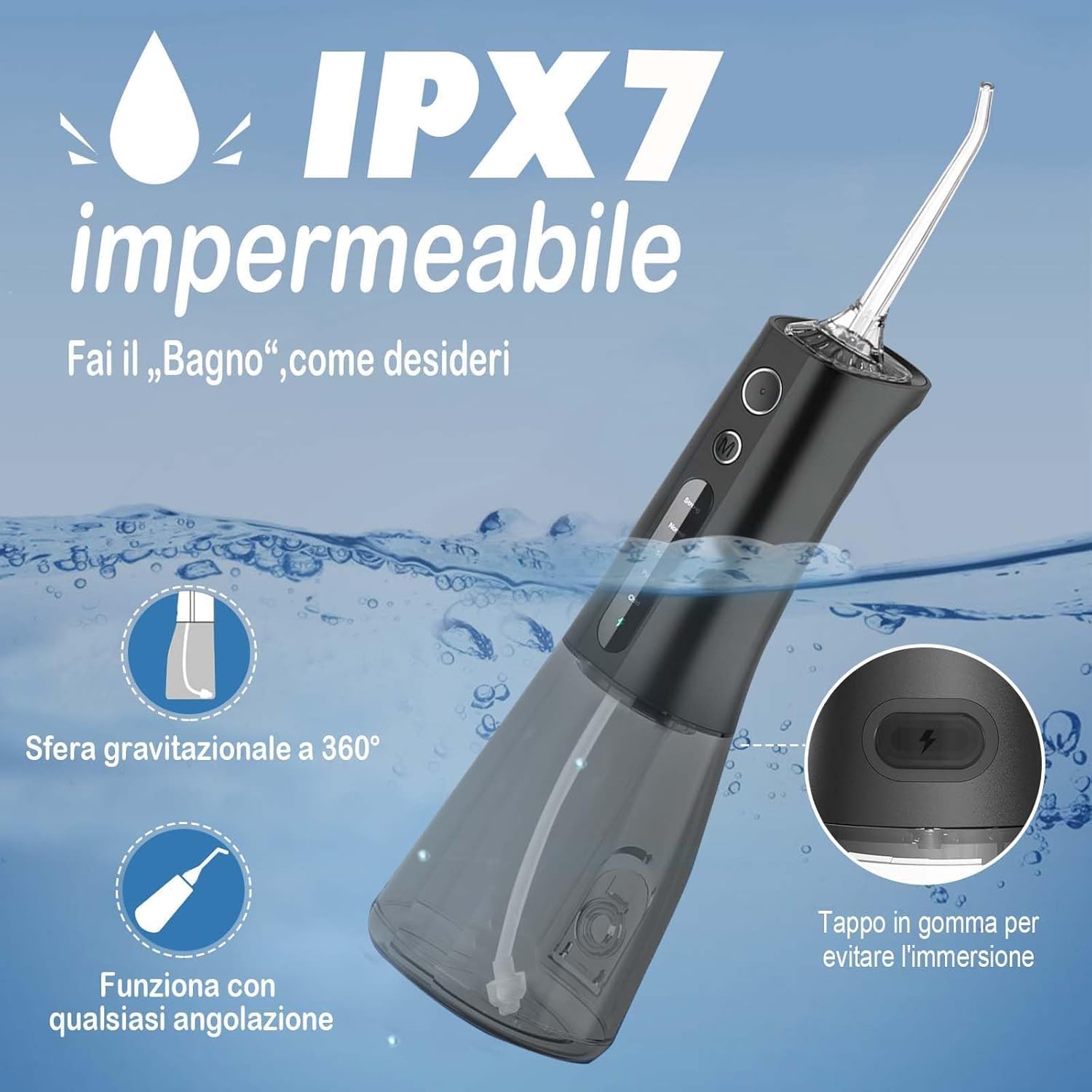
Image: Visual representation of the 5 distinct cleaning modes available on the device.

Image: Illustration of the high-pressure water pulse effectively removing plaque from teeth.
Video: A demonstration of the SURFOU water flosser in use, highlighting its features and effectiveness.
Maintenance
- Daily Cleaning: After each use, empty any remaining water from the tank. Rinse the tank and nozzle tip under running water.
- Deep Cleaning (Weekly/Bi-weekly): For a more thorough clean, detach the water tank and nozzle. Clean them with warm, soapy water. You can also use a mixture of water and white vinegar (1:1 ratio) to clean the tank and internal components to prevent mineral buildup. Run this solution through the device for a few seconds, then rinse thoroughly with clean water.
- Drying: Allow all parts to air dry completely before reassembling or storing the device.
- Storage: Store the device in a cool, dry place away from direct sunlight.
- Nozzle Replacement: Replace nozzle tips every 3-6 months, or sooner if they show signs of wear.
Image: The water flosser submerged, illustrating its IPX7 waterproof capability for easy cleaning and safe use.
Troubleshooting
| Problem | Possible Cause | Solution |
|---|---|---|
| Device does not turn on. | Low battery or not charged. | Charge the device fully using the USB-C cable. |
| Weak water pressure. | Water tank is low or empty; nozzle is clogged; mineral buildup. | Refill water tank. Clean the nozzle. Perform a deep clean with vinegar solution. |
| Water leaks from the device. | Water tank not properly sealed; nozzle not correctly attached. | Ensure the water tank is securely closed. Re-attach the nozzle firmly until it clicks. |
| Device becomes hot or noisy. | Internal malfunction. | Immediately unplug the device and discontinue use. Contact customer support. |
Specifications
- Model Name: Y209A (also referred to as Y209)
- Brand: SURFOU
- Power Source: Battery Powered (1 Lithium Metal Battery included)
- Special Features: Wireless, IPX7 Waterproof, USB-C Rechargeable
- Product Dimensions: 7.9 x 7 x 21.4 cm (3.11 x 2.76 x 8.43 inches)
- Item Weight: 225 Grams (0.5 lbs)
- Water Tank Volume: 300 Milliliters
- Material: Plastic, Plastic or Silicone
- GTIN/UPC: 792684216012
- Country of Origin: China
- Recommended Uses: Daily dental care, maintaining gum health, plaque removal, supplementary use for brushing and rinsing teeth.
Warranty and Support
This SURFOU Dental Water Flosser is covered by a manufacturer's warranty. For specific details regarding warranty coverage, duration, and terms, please refer to the warranty card included in your product packaging or contact SURFOU customer support directly.
If you encounter any issues with your device, require technical assistance, or have questions not addressed in this manual, please contact SURFOU customer support through the retailer where you purchased the product or visit the official SURFOU website for contact information.