
1. Product Overview
The Tuffcare Compact Transport Chair Model 727W is designed for easy, lightweight patient transport. It features a high-strength frame, 12-inch rear wheels for a comfortable ride, and padded upholstery. This manual provides essential information for the safe and effective use of your transport chair.

Figure 1: Tuffcare Compact Transport Chair in use.

Figure 2: Key features of the Tuffcare Compact Transport Chair.
2. Setup and Assembly
Follow these steps to assemble your Tuffcare Compact Transport Chair. Refer to the assembly video for visual guidance.
2.1 Unpacking and Initial Setup
- Carefully remove all components from the packaging. The product includes the main frame, leg rests, and a backrest.
- Re-adjust the main frame to an upright position and open the wheelchair. Ensure the seat clicks into place.

Figure 3: Front-side view of the transport chair.

Figure 4: Rear-side view of the transport chair.
2.2 Attaching the Backrest and Seatbelt
- Insert the handlebars of the backrest into the main frame, ensuring the holes are aligned.
- Insert the provided bolts into each aligned hole and secure them.
- If using the optional seatbelt, place the golden rings onto the bolt ends and secure with the provided knobs.
- Use the velcro zip tie to secure the backrest with the side bar.
2.3 Attaching and Adjusting Leg Rests
- Latch the leg rests onto the wheelchair by aligning the holes on the leg rest with the buttons on the wheelchair frame.
- To adjust the height of the leg rest, use the size 13 wrench and Allen wrench (provided) to loosen the nut. Align the leg rest to the desired length, then re-insert the screw and nut and tighten.
- To move the leg rest out of the way, pull on the lever near the leg rest.
2.4 Assembly Video
Video 1: Tuffcare Compact 727 Assembly and Feature. This video demonstrates the complete assembly process and highlights key features of the transport chair.
3. Operating Instructions
3.1 Attendant Locking Brakes
The transport chair is equipped with attendant locking hand brakes for easy handling and control.
- To activate the wheel brakes, squeeze the lever lock brake firmly.
- To lock the lever lock brake, squeeze the lever until it clicks into place.
- To unlock the lever lock brake, lift the lower lock lever until the lever releases.
Video 2: How to operate Lever Lock Brake. This video demonstrates the proper use of the attendant locking brakes.
3.2 Side Brakes (User Operated)
The user can also engage the side brakes to lock the wheelchair in place. Press down on the side brakes until you hear a click to engage. To disengage, lift the smaller handles on the brakes.
3.3 Anti-Tippers
The anti-tipping wheels are provided to prevent the wheelchair from falling over, enhancing user safety during transport.
3.4 Swing Back Arms
The swing back arms can be moved out of the way for easier transfer of the user into and out of the chair.
3.5 Seat Belt
Ensure the seat belt is securely fastened around the user for added safety during transport. The seat belt is adjustable from 14 to 42 inches.
4. Maintenance
Regular maintenance is crucial for the longevity and safe operation of your transport chair.
- Weekly Inspection: Regularly inspect all bolts, screws, and fasteners. Tighten any loose components to ensure structural integrity.
- Cleaning: Clean the frame and upholstery with a mild soap and water solution. Avoid abrasive cleaners.
- Wheel and Bearing Check: Periodically check the precision quality race bearings on all four wheels and caster stems for smooth operation.
- Tire Condition: Inspect urethane tires on front casters and rear wheels for wear and tear.
5. Troubleshooting
If you encounter any issues with your Tuffcare Compact Transport Chair, please refer to the following common solutions:
- Loose Components: If the chair feels unstable or components are rattling, check and tighten all bolts and screws as described in the Maintenance section.
- Brake Malfunction: Ensure the brake levers are fully engaged or disengaged. If issues persist, inspect the brake cables for damage or proper tension.
- Difficulty Folding/Unfolding: Check for any obstructions or misaligned parts. Ensure all locking mechanisms are properly released or engaged.
- Uncomfortable Seating: Verify that the back height and footrest/legrest adjustments are set correctly for the user's comfort.
For persistent issues or concerns not addressed here, please contact Tuffcare customer support.
6. Specifications
| Feature | Detail |
|---|---|
| Model Number | 727W |
| Product Dimensions | 27 x 24 x 36 inches (assembled) |
| Item Weight | 28 Pounds (Frame: 25 to 28 lbs., Footrests: 3.5 lbs., Legrests: 8 lbs.) |
| Weight Limit | 310 lbs (for 20 inch Wide Chairs) |
| Seat Width | 20 Inches |
| Back Height Adjustment | 16, 17, or 18 inches |
| Front Seat to Footplate Adjustment | 17, 18, 19, and 20 inches |
| Seat Belt Adjustment | 14 to 42 inches |
| Color | Black |
| Manufacturer | Tuffcare |
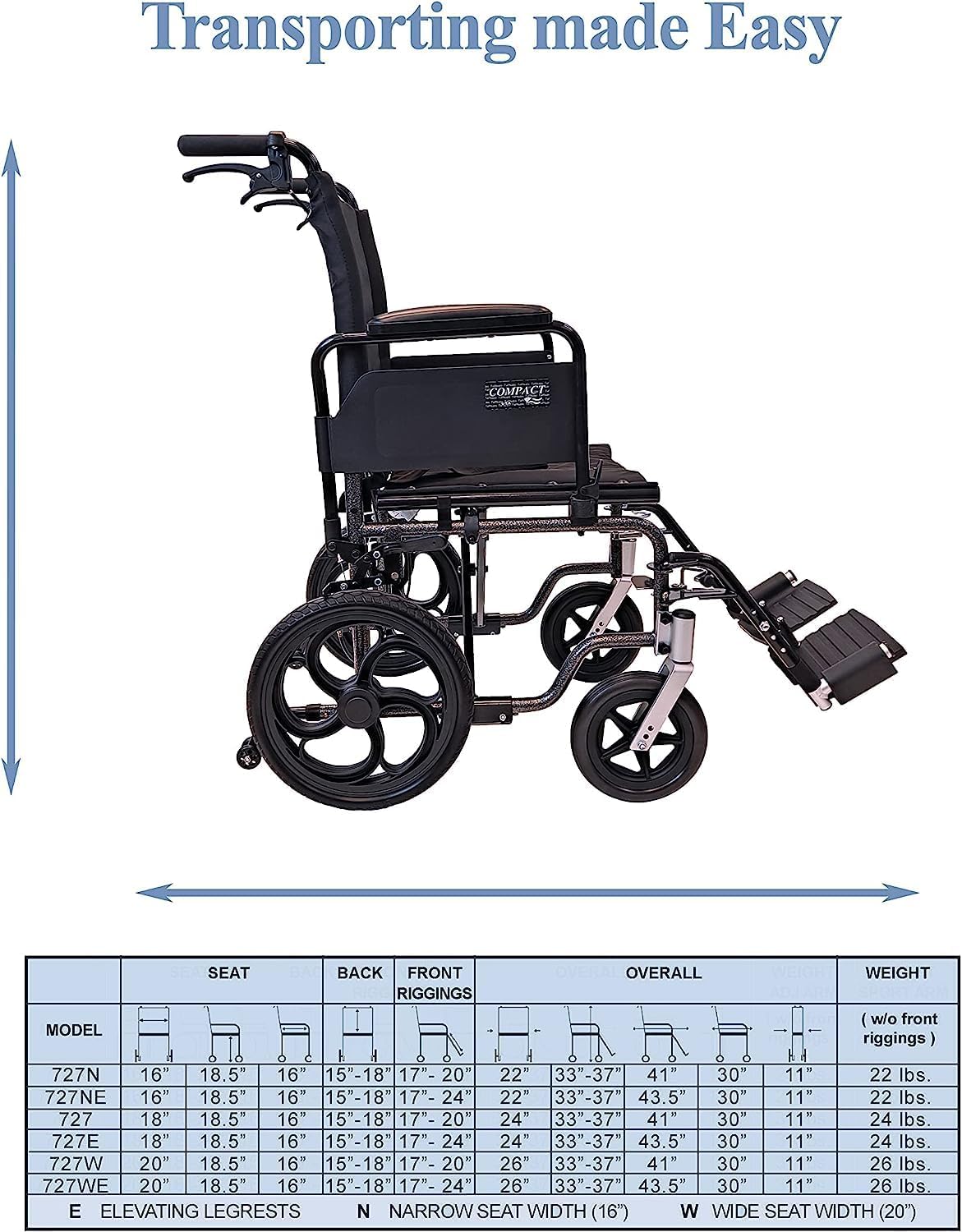
Figure 5: Detailed dimensions and specifications table for Tuffcare Transport Chairs.
7. Warranty Information
Tuffcare provides the following warranty for this product:
- Frame: Lifetime warranty
- Bearings: 3 years
- Tires and Upholstery: 1 year
Please retain your proof of purchase for warranty claims.
8. Customer Support
For further assistance, questions, or to report any issues, please contact Tuffcare customer support or the authorized seller, Able Healthcare.
- Manufacturer: Tuffcare
- Authorized Seller: Able Healthcare