
THQ Nordic Flashback 2: Limited Edition (PS5)
Flashback 2: Limited Edition (PS5) User Manual
Brand: THQ Nordic | Model: Flashback 2: Limited Edition (PS5)
Introduction
Welcome to the world of Flashback 2: Limited Edition for PlayStation 5. This manual provides essential information to help you set up, operate, and troubleshoot your game, ensuring an optimal experience as you join Conrad in his fight against the Morphs.
In this thrilling sequel, Conrad and his allies face the renewed threat of the Morphs, who seek total control of the solar system. When his friend Ian is kidnapped, Conrad must embark on a dangerous investigation across five diverse levels filled with action and intense shoot-outs.
The Limited Edition includes the full game, an exclusive Steelbook case, and a digital soundtrack, enhancing your collection and immersion into the Flashback universe.

Figure 1: Flashback 2: Limited Edition for PlayStation 5 game box art.
Setup
To begin your adventure with Flashback 2: Limited Edition on your PlayStation 5 console, follow these simple steps:
- Insert the Game Disc: Gently insert the Flashback 2 game disc into your PlayStation 5 console's disc drive. Ensure the disc is clean and free of scratches.
- Installation: The game will automatically begin installation. Follow any on-screen prompts. Ensure your console has sufficient storage space.
- System Updates: It is recommended to ensure your PlayStation 5 system software is up to date for optimal performance and compatibility. Navigate to Settings > System > System Software > System Software Update and Settings to check for updates.
- Game Updates: After installation, the game may require an update. Allow the console to download and install any available game patches to ensure you have the latest version with bug fixes and performance improvements.
- Connect Controller: Ensure your DualSense wireless controller is charged and connected to your PS5.

Figure 2: The Flashback 2: Limited Edition package, showcasing the game, exclusive Steelbook, and digital soundtrack.
Operating the Game
Flashback 2 offers a rich gameplay experience across various environments. Here's an overview of key operational aspects:
Basic Controls (DualSense Wireless Controller)
While specific in-game control mapping can be customized or viewed in the game's settings menu, here are common actions:
- Left Analog Stick: Character Movement
- Right Analog Stick: Camera Control / Aiming
- X Button: Jump / Interact
- Square Button: Attack / Shoot Weapon
- Circle Button: Dodge / Roll
- Triangle Button: Contextual Action / Inventory Access
- L2 / R2 Triggers: Aim / Special Ability
- L1 / R1 Buttons: Weapon Select / Item Use
- Options Button: Pause Menu / Game Settings
Gameplay Mechanics
The game features a blend of action, exploration, and puzzle-solving:
- Combat: Utilize your trusty weapon, which can be upgraded throughout the game, to destroy the Morphs. Engage in intense shoot-outs and strategically use cover.
- Stealth: Hide in the shadows to evade enemies and gain tactical advantages.
- Armor: Discover and use various types of armor to protect yourself from environmental hazards and enemy attacks.
- Vehicles: Take control of powerful vehicles, such as a mecha for enhanced combat capabilities or your Mojo Jet for high-speed traversal.
- Inventory System: Manage your inventory to equip upgraded weapons and essential equipment.

Figure 3: Conrad engaging in combat against multiple enemies in an indoor environment.

Figure 4: Conrad navigating a futuristic corridor, with enemies in the distance.

Figure 5: A vibrant city environment in Flashback 2, showcasing multi-level architecture and dynamic elements.
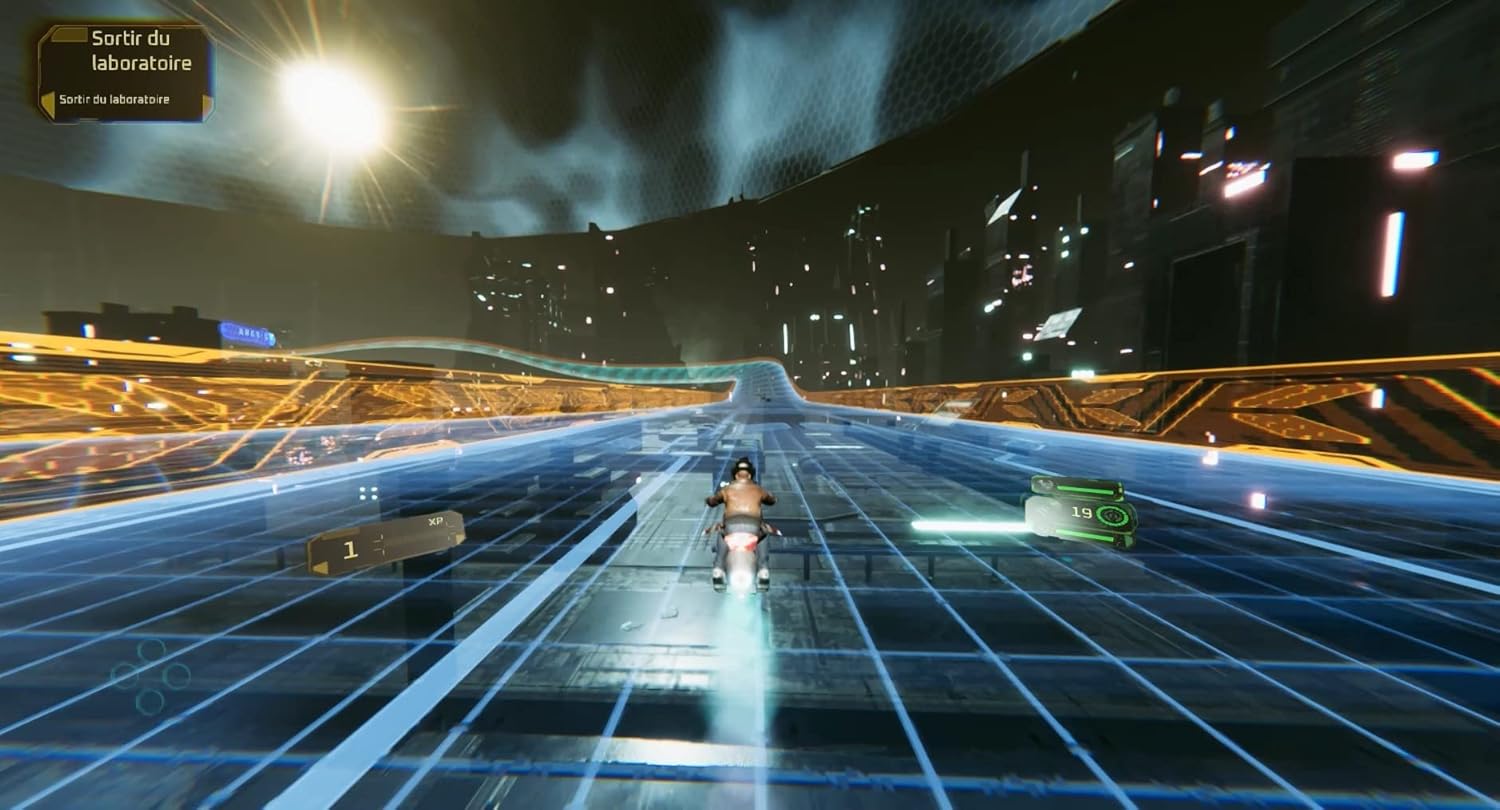
Figure 6: Conrad riding his Mojo Jet through a futuristic, high-speed track.

Figure 7: Combat in a lush jungle environment, featuring large alien flora.

Figure 8: Conrad using stealth to navigate past enemies in a dimly lit industrial area.
Maintenance
To ensure the longevity and optimal performance of your Flashback 2 game, consider the following maintenance tips:
- Keep Game Disc Clean: If you have the physical disc, handle it by the edges and store it in its case when not in use. Clean the disc with a soft, lint-free cloth if smudges or dust appear, wiping from the center outwards.
- Regular System Updates: Keep your PlayStation 5 console's system software updated. These updates often include performance enhancements and compatibility fixes that can improve game stability.
- Game Patches: Always download and install any available game patches or updates. Developers frequently release updates to fix bugs, improve performance, and add content.
- Adequate Ventilation: Ensure your PlayStation 5 console has proper ventilation to prevent overheating, which can affect game performance and console lifespan.
- Save Data Management: Periodically back up your game save data to cloud storage (PlayStation Plus subscription required) or a USB drive to prevent loss in case of data corruption.
Troubleshooting
If you encounter issues while playing Flashback 2, try the following troubleshooting steps:
- Game Not Starting/Crashing:
- Ensure the game disc is clean and properly inserted.
- Restart your PlayStation 5 console.
- Check for and install any pending game or system software updates.
- If the issue persists, try rebuilding the PS5 database (Power off PS5, then hold power button until second beep to enter Safe Mode, select "Clear Cache and Rebuild Database").
- Performance Issues (Lag, Frame Rate Drops):
- Ensure your PS5 has adequate ventilation and is not overheating.
- Close any other applications running in the background on your PS5.
- Verify that the game has the latest updates installed. Some users reported performance improvements with the June 2024 update.
- Graphical Glitches/Bugs:
- Ensure your PS5 system software and game are fully updated.
- If a specific bug is encountered, try restarting the game or loading a previous save.
- Report persistent bugs to the game publisher's support channels.
- Controller Not Responding:
- Ensure your DualSense controller is charged.
- Try resetting the controller by pressing the small button on the back with a paperclip.
- Reconnect the controller via USB cable.
For more detailed troubleshooting or specific technical support, please refer to the official THQ Nordic support website or the game's dedicated community forums.
Specifications
| Attribute | Detail |
|---|---|
| Title | Flashback 2: Limited Edition |
| Platform | PlayStation 5 |
| Brand | THQ Nordic |
| UPC | 810066290143 |
| ASIN | B0CBD23T5X |
| Release Date | February 16, 2024 |
| Product Dimensions | 6.8 x 5.3 x 0.6 inches (Game Case) |
| Item Weight | 3.2 ounces |
| Language | English |
| ESRB Rating | Teen |
| Manufacturer | THQ Nordic |
| Country of Origin | USA |
Warranty and Support
For information regarding the warranty of Flashback 2: Limited Edition, please refer to the documentation included with your game purchase or visit the official website of the publisher, THQ Nordic. Warranty terms typically cover manufacturing defects and are subject to regional consumer protection laws.
For technical support, gameplay assistance, or to report bugs, please contact THQ Nordic's customer support. You can often find support resources, FAQs, and contact information on their official website:
Visit the THQ Nordic Store on Amazon
Always ensure you are visiting official support channels to receive accurate and reliable assistance.
Related documentsFlashback 2: Limited Edition (PS5)


Ask a question about this manual
Ask about setup, troubleshooting, compatibility, parts, safety, or missing instructions. Manuals+ will review the question and use this page’s manual context to help answer it.