
1. Introduction
This manual provides instructions for the installation, operation, and maintenance of your Lakumu 50FT Solar String Lights. These G40 globe patio lights are designed for outdoor use, featuring solar power, USB charging, shatterproof E12 bulbs, and multiple lighting modes to enhance various outdoor settings.

Image 1: Lakumu 50FT Solar String Lights, showcasing the G40 globe bulbs, solar panel, and included accessories.
The lights are equipped with 27 warm white 2700K LED bulbs, spread across a 50-foot string, with 2 spare bulbs included. They are designed to be waterproof and shatterproof, ensuring durability in various weather conditions.

Image 2: Examples of Lakumu G40 string lights used in different outdoor environments, such as parties, gardens, and backyards.
2. Package Contents
- 1 x 50FT String Light with 25 E12 Sockets
- 27 x G40 LED Bulbs (25 installed, 2 spare)
- 1 x Solar Panel with Ground Stake
- 1 x USB Charging Cable
- Mounting accessories (clips, screws)
3. Setup Instructions
3.1 Solar Panel Placement
Select a location for the solar panel that receives direct sunlight for 4-6 hours daily. This ensures optimal charging and maximum illumination time. The solar panel can be mounted using the included ground stake or attached to a wall/fence. Adjust the panel's angle for maximum sun exposure.
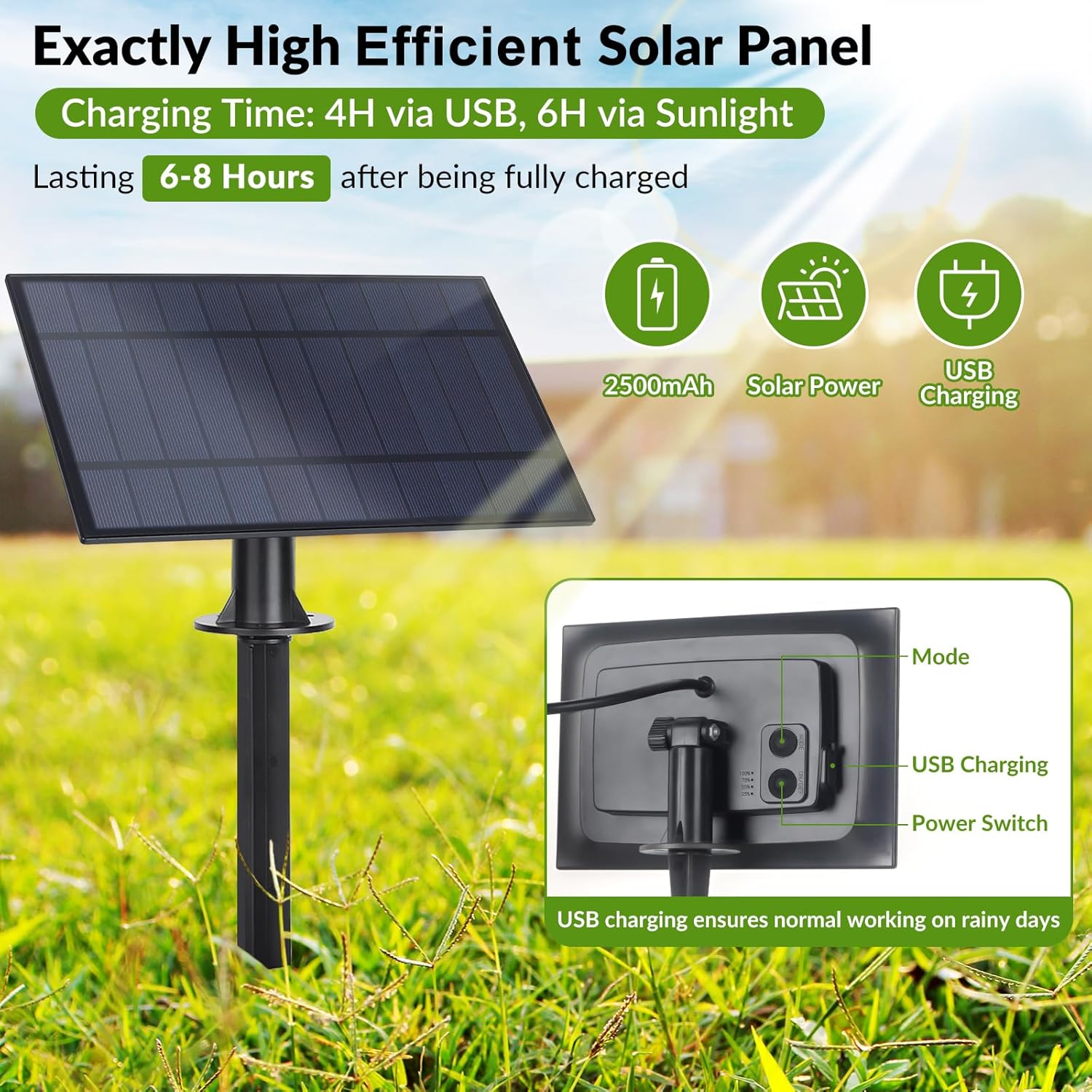
Image 3: The high-efficiency solar panel, illustrating its charging capabilities via sunlight (6 hours) or USB (4 hours) for 6-8 hours of operation.
3.2 Bulb Installation
- Carefully remove the bulbs from their packaging.
- Gently screw each G40 LED bulb into the E12 sockets on the string light. Ensure they are finger-tight but do not overtighten.
- Hang the string lights in your desired location using appropriate hooks or clips.
Video 1: An overview of the G40 Solar String Lights, demonstrating features like bulb installation, charging, and various lighting modes. This video highlights the product's ease of use and durability.
4. Operating Instructions
4.1 Power On/Off
Locate the power switch on the back of the solar panel. Ensure it is in the "ON" position for automatic operation. The lights will automatically turn on at dusk and turn off at dawn.
4.2 Charging
The string lights are primarily solar-powered. For optimal performance, ensure the solar panel receives 4-6 hours of direct sunlight daily. In situations with insufficient sunlight (e.g., prolonged cloudy days), the solar panel features a USB charging port for alternative charging. A red light indicates charging, and a blue light indicates a full charge.
4.3 Lighting Modes
The lights offer 4 distinct lighting modes. Press the "MODE" button on the solar panel to cycle through the available options and select your preferred setting.

Image 4: The solar panel control button, demonstrating how to switch between the 4 available lighting modes.
5. Maintenance
5.1 Cleaning
Periodically wipe the solar panel with a soft, damp cloth to remove dust and debris. This ensures efficient charging. Clean the bulbs as needed to maintain brightness.
5.2 Bulb Replacement
The G40 LED bulbs are shatterproof and designed for a long lifespan (up to 25,000 hours). In case a bulb needs replacement, use the included spare bulbs or purchase compatible E12 G40 LED bulbs. Ensure the power is off before replacing any bulbs.

Image 5: A close-up of a G40 globe bulb, highlighting its shatterproof design for enhanced safety and durability.
5.3 Weather Resistance
These string lights feature commercial-grade waterproof technology, making them resistant to rain, snow, sun, and storms. No special weather-related maintenance is typically required.

Image 6: Lakumu G40 solar string lights demonstrating their waterproof capabilities during rainfall, ensuring reliable outdoor performance.
6. Troubleshooting
- Lights not turning on at dusk:
- Ensure the solar panel's power switch is in the "ON" position.
- Verify the solar panel is placed in an area receiving sufficient direct sunlight (4-6 hours daily).
- Check for any obstructions blocking sunlight to the panel.
- Confirm the solar panel is fully charged (blue indicator light). If not, charge via USB.
- Lights are dim or turn off quickly:
- The solar panel may not be receiving enough sunlight for a full charge. Relocate the panel or charge via USB.
- Clean the solar panel surface to remove dirt or debris.
- Battery capacity may be reduced due to prolonged cloudy weather or age.
- Individual bulbs not lighting up:
- Gently tighten the bulb into its socket.
- Replace the non-working bulb with a spare bulb to test if the bulb itself is faulty.
7. Specifications
| Feature | Detail |
|---|---|
| Model Number | GLS-18J2P-G40-25 |
| String Length | 50 Feet |
| Number of Bulbs | 27 (25 installed + 2 spare) |
| Bulb Type | G40 LED, Shatterproof |
| Bulb Base | E12 |
| Color Temperature | 2700K Warm White |
| Power Source | Solar Powered, USB Charging |
| Charging Time (Solar) | 4-6 hours (direct sunlight) |
| Operating Time | Up to 8-10 hours (after full charge) |
| Waterproof Rating | Commercial-grade waterproof |
| Special Features | Shatterproof, 4 Lighting Modes, Dusk-to-Dawn Auto On/Off |

Image 7: An infographic detailing key specifications and features of the Lakumu G40 string lights, including length, number of sockets, wattage, color temperature, and charging options.
8. Safety Information
- Do not attempt to modify or disassemble the product.
- Keep the solar panel and bulbs away from open flames or extreme heat sources.
- Ensure all connections are secure before use.
- While the bulbs are shatterproof, handle them with care during installation or replacement.
- Do not immerse the solar panel or light string in water.
9. Warranty and Support
For warranty information or technical support, please refer to the product packaging or contact Lakumu customer service directly. Keep your purchase receipt for any warranty claims.