
1. Introduction
This user manual provides essential information for the safe and efficient operation of your WZRELB 6000W Split Phase Pure Sine Wave Inverter. Please read this manual thoroughly before installation and use, and retain it for future reference. This inverter converts 24V DC power from batteries into 120V/240V AC power, suitable for various off-grid and backup power applications.
2. Safety Instructions
WARNING: Improper installation or use can result in electric shock, fire, or serious injury. Always follow safety guidelines.
- Ensure all connections are tight and secure to prevent loose connections that can cause overheating.
- Do not expose the inverter to rain, snow, spray, or excessive dust.
- Operate the inverter in a well-ventilated area.
- Do not open the inverter casing. There are no user-serviceable parts inside. Refer servicing to qualified personnel.
- Always disconnect battery power before working on the inverter or its connections.
- Ensure the DC input voltage matches the inverter's rated voltage (24V DC).
- Connect the inverter to a properly grounded system.
3. Product Overview
3.1 Key Features
- Powerful Output: 6000 watts continuous, 12000 watts peak power, 24V DC to 120V/240V AC split phase pure sine wave output.
- High Efficiency: Up to 91.6% conversion efficiency.
- Multiple AC Outputs: Two 120V AC circuits with four AC outlets (each supporting 3000W max) and one 240V AC circuit (max 6000W output).
- Hardwire Terminal: Includes an AC hardwire terminal for flexible wiring (L1+L2=240V, L1+N=120V, L2+N=120V).
- Intelligent Control: LCD display monitors battery status, working temperature, and output voltage.
- Comprehensive Protections: Features against overload, short circuit, over temperature, high/low voltage, and battery reverse polarity.
- Wide Compatibility: Compatible with AGM, gel, flooded, lead-acid, and lithium-ion batteries.
3.2 What's in the Box
- WZRELB 6000W Split Phase Pure Sine Wave Inverter
- DC Input Cables
- Spare Fuses
- User Manual (this document)
3.3 Specifications
| Specification | Value |
|---|---|
| Rated Continuous Power | 6000W |
| Surge Output Power | 12000W |
| DC Input Voltage | 24V DC |
| DC Input Voltage Range | 20~30V DC |
| AC Output Voltage (Nominal) | 120VAC and 240VAC |
| AC Output Frequency | 60 ± 2Hz |
| AC Output Waveform | Pure Sine Wave |
| Conversion Efficiency | ≥ 91.6% |
| Ambient Operating Temperature | 0℃ - 70℃ (32℉ - 104℉) |
| Cooling Method | Intelligent temperature controlled fan |
| Dimensions (L x W x H) | 21.8" x 10" x 5.3" |
| Weight | 25 Pounds |
4. Setup
4.1 DC Connection Guide
Follow these steps to connect the inverter to your 24V DC battery bank. Use the provided cables for optimal performance and safety.
- Connect Negative Cable First: After connecting the black cable to the battery's negative terminal, connect the other end of the black cable to the negative terminal of the inverter.
- Contacting Spark-Proof Nut: After connecting the red cable to the battery's positive terminal, briefly contact the other side of the red cable to the spark-proof nut on the inverter's positive terminal for 3-5 seconds. This helps to prevent sparks during final connection.
- Connect Positive Cable: Securely connect the red cable to the positive terminal of the inverter to complete the DC wiring.

4.2 AC Output Connection
The inverter provides both 120V AC outlets and a hardwire terminal for 120V/240V split-phase output. Ensure all AC connections are made by a qualified electrician and comply with local electrical codes.
- 120V AC Outlets: The inverter features four standard US outlets, divided into two circuits, each capable of supporting up to 3000W.
- Hardwire Terminal: For 120V/240V split-phase applications, connect to the hardwire terminal. The connections are L1 (Hot 1), N (Neutral), L2 (Hot 2), and G (Ground).


5. Operating Instructions
5.1 LCD Display
The LCD display provides real-time information about the inverter's status and performance.
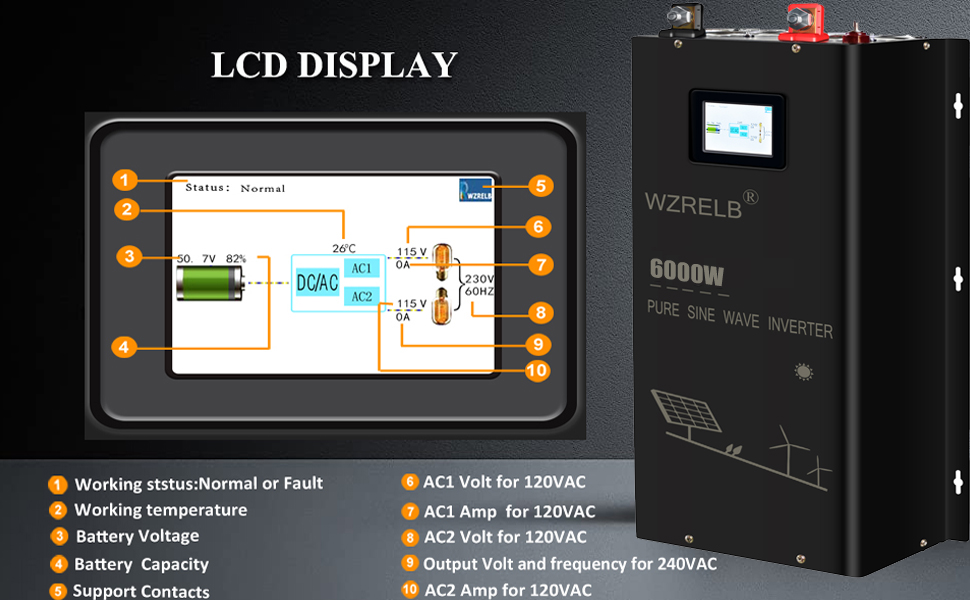
- Status: Indicates normal operation or fault conditions.
- Battery Voltage & Capacity: Shows the current DC input voltage and estimated battery charge level.
- Temperature: Displays the internal temperature of the inverter.
- AC1/AC2 120V Output: Shows voltage and amperage for each 120V circuit.
- 240V Output: Displays the output voltage and frequency for the 240V circuit.
5.2 General Operation
- After completing all DC and AC connections, ensure the inverter's power switch is in the OFF position.
- Turn on the DC power from your battery bank.
- Switch the inverter's power button to the ON position. The LCD display will illuminate, showing operational status.
- Connect your AC loads to the outlets or hardwire terminal. Do not exceed the inverter's rated continuous power.
- To turn off the inverter, first disconnect all AC loads, then switch the inverter's power button to OFF, and finally disconnect the DC power from the battery bank.
6. Maintenance
Regular maintenance ensures the longevity and reliable operation of your inverter.
- Cleaning: Periodically clean the exterior of the inverter with a dry, soft cloth. Ensure ventilation openings are free from dust and debris. Do not use liquid cleaners.
- Connections: Annually check all DC and AC connections for tightness. Loose connections can cause resistance, heat buildup, and potential damage.
- Battery Health: Monitor your battery bank's health and charge levels regularly, as poor battery performance can affect inverter operation.
- Environment: Ensure the inverter is operating within the recommended ambient temperature range and in a dry, well-ventilated location.
7. Troubleshooting
This section addresses common issues you might encounter with your inverter.
| Problem | Possible Cause | Solution |
|---|---|---|
| Inverter does not turn on | No DC input power; Low battery voltage; Blown fuse; Loose connections. | Check battery connections and voltage. Ensure batteries are charged. Inspect DC input fuses. Tighten all connections. |
| No AC output | Overload; Over-temperature; Short circuit; Inverter fault. | Reduce AC load. Allow inverter to cool down. Check AC wiring for short circuits. If problem persists, contact support. |
| LCD display shows error code | Specific fault condition (e.g., high/low voltage, overload). | Refer to the LCD display section for error code meanings. Address the indicated issue (e.g., check battery voltage, reduce load). |
| Unusual noises from inverter | Loose internal components; Fan obstruction; Component failure. | Ensure the inverter is on a stable surface. Check for fan obstructions. If noises persist or are accompanied by other issues, discontinue use and contact support. |
8. Product Video
Watch the official product video for a visual guide on the WZRELB 6000W Split Phase Pure Sine Wave Inverter.
Official product video demonstrating the features and applications of the WZRELB 6000W Split Phase Pure Sine Wave Inverter.
9. Warranty and Support
The WZRELB 6000W Split Phase Pure Sine Wave Inverter comes with a one-year warranty from the date of purchase. This warranty covers defects in materials and workmanship under normal use.
For technical support, warranty claims, or service inquiries, please contact WZRELB customer service through the retailer where the product was purchased or visit the official WZRELB website for contact information.
