
1. Introduction
This manual provides detailed instructions for the proper use and maintenance of your VILTROX 16mm F1.8 FE Full Frame Wide Angle Autofocus Lens. Please read this manual thoroughly before using the lens to ensure optimal performance and longevity.
The VILTROX 16mm F1.8 FE is a high-performance wide-angle lens designed for Sony E-mount mirrorless cameras. It features a large f/1.8 aperture, advanced optical design, and an integrated LCD screen for enhanced control and information display.
2. Key Features
- F1.8 Super Large Aperture: Provides excellent low-light performance and shallow depth of field for creative effects.
- Wide-angle Perspective: 16mm focal length with a 105.6° angle of view, ideal for landscapes, cityscapes, and interiors.
- Eye and Face Recognition Support: Ensures sharp and well-focused shots by detecting and tracking subjects' eyes and faces.
- Integrated LCD Display: Shows important shooting parameters such as aperture and focus distance directly on the lens body.
- Advanced Optical Design: Features 12 groups of 15 optical elements, including 3 aspherical lenses, for high resolution and detailed image capture.
- Weather-Resistant Design: Professional-level waterproof and dust-proof construction for use in various outdoor environments.
3. Package Contents
Verify that all items are present in your package:
- VILTROX 16mm F1.8 FE Lens
- Lens Hood
- Front Lens Cap
- Rear Lens Cap
- Lens Pouch
- Instruction Manual

Image: Contents of the VILTROX 16mm F1.8 FE lens package.
4. Product Overview
4.1 Lens Components

Image: Front view of the VILTROX 16mm F1.8 FE lens mounted on a camera.
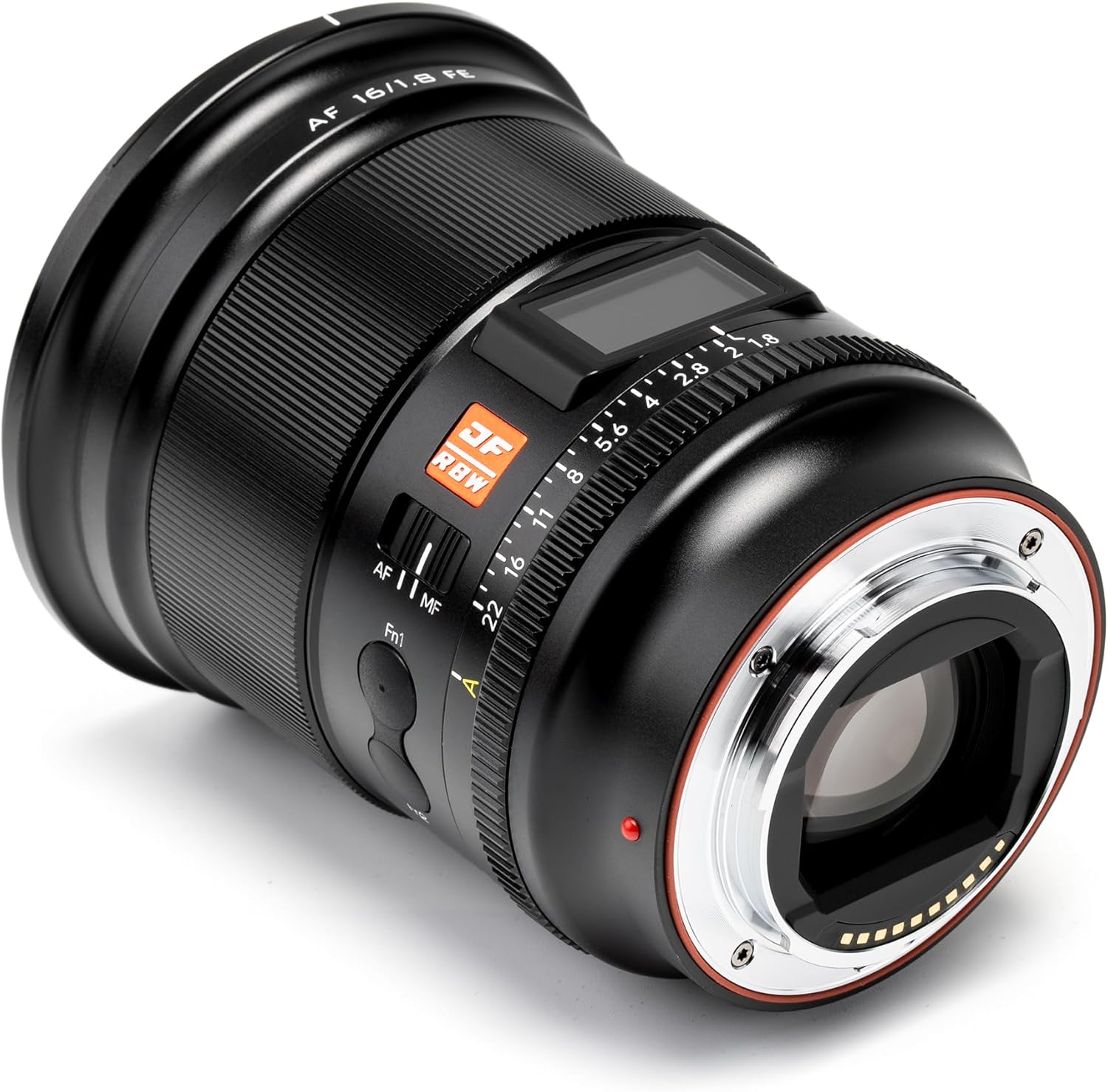
Image: Rear view of the VILTROX 16mm F1.8 FE lens, highlighting the E-mount.
4.2 LCD Display
The lens features an integrated LCD display that provides real-time information about your shooting parameters. This includes object distance, depth of field, and current aperture setting.

Image: The LCD display on the lens showing focus distance and aperture information.

Image: Detailed view of the LCD screen interface and its indicators.
4.3 Control Switches and Ports
- AF/MF Switch: Toggles between autofocus and manual focus modes.
- Fn Buttons: Customizable function buttons for quick access to camera settings.
- Aperture Click Switch: Enables or disables click stops for the aperture ring.
- USB-C Port: For firmware updates.

Image: AF/MF switch.

Image: Fn buttons.

Image: Aperture click switch.

Image: USB-C port for firmware updates.
5. Setup
5.1 Attaching the Lens
- Remove the rear lens cap from the lens and the body cap from your camera.
- Align the red dot on the lens with the red dot on your camera's lens mount.
- Rotate the lens clockwise until it clicks into place.
5.2 Attaching the Lens Hood
Align the mark on the lens hood with the mark on the front of the lens, then rotate the hood clockwise until it locks securely. The lens hood helps to prevent flare and protects the front element.

Image: Lens with attached hood.
6. Operating Instructions
6.1 Autofocus and Manual Focus
Use the AF/MF switch on the lens barrel to select your desired focus mode. In AF mode, the lens will automatically focus. In MF mode, rotate the focus ring to adjust focus manually. The LCD display will show the current focus distance.
6.2 Aperture Control
The lens features an aperture ring for direct control over the aperture setting. You can enable or disable click stops for the aperture ring using the 'CLICK' switch, which is useful for video recording to achieve smooth aperture transitions.
6.3 Eye and Face Recognition
When paired with a compatible Sony E-mount camera, the lens supports advanced eye and face recognition autofocus. This feature helps maintain sharp focus on human subjects, even when they are moving.

Image: Examples of eye and face recognition in use.
6.4 Vlogging and Video Use
The wide-angle perspective and fast autofocus make this lens suitable for vlogging and video production. The de-clickable aperture ring allows for silent and smooth aperture adjustments during recording.
Video: Demonstrates the VILTROX 16mm F1.8 FE lens in various shooting scenarios, including vlogging and action shots.
6.5 Landscape and Astrophotography
The 16mm focal length and f/1.8 aperture are ideal for capturing expansive landscapes and detailed astrophotography. The wide aperture allows for significant light gathering, crucial for night sky photography.

Image: Example of astrophotography using the lens, showcasing its large aperture performance.

Image: Example of a wide-angle landscape shot.
7. Maintenance
- Keep the lens caps on when not in use to protect the front and rear elements.
- Clean lens surfaces with a soft, lint-free cloth specifically designed for optical lenses.
- Avoid touching the lens elements directly with your fingers.
- Store the lens in a dry, cool place, away from direct sunlight and extreme temperatures.
- The weather-resistant design provides protection against dust and water droplets, but avoid prolonged exposure to harsh conditions.

Image: Diagram showing the weather-resistant sealing of the lens.
8. Troubleshooting
| Problem | Possible Cause | Solution |
|---|---|---|
| Lens not recognized by camera | Improper attachment; dirty contacts | Re-attach lens securely; clean lens and camera contacts with a clean, dry cloth. |
| Autofocus not working | Lens set to MF; camera settings; insufficient light | Ensure AF/MF switch is on AF; check camera's focus mode; use adequate lighting. |
| Image quality issues (e.g., blur, soft focus) | Dirty lens elements; incorrect focus; camera shake | Clean lens; ensure proper focus; use a tripod or faster shutter speed. |
| LCD display not working | Firmware issue; lens malfunction | Check for available firmware updates; contact customer support if issue persists. |
9. Specifications
| Feature | Detail |
|---|---|
| Brand | VILTROX |
| Model Name | VILTROX 16mm F1.8 |
| Focal Length | 16 mm |
| Maximum Aperture | f/1.8 |
| Minimum Aperture | f/22 |
| Lens Mount | Sony E |
| Lens Type | Wide Angle, Prime |
| Focus Type | Auto Focus |
| Optical Design | 15 elements in 12 groups (including 3 aspherical lenses) |
| Angle of View | 105.6 Degrees |
| Minimum Focus Distance | 0.27 meters |
| Filter Size | 77 mm |
| Image Stabilization | Optical (if camera body supports) |
| Water Resistance Level | Water Resistant |

Image: Lens construction diagram and MTF (Modulation Transfer Function) chart.
10. Warranty and Support
This VILTROX lens comes with a 1 Year Manufacturer Warranty. For warranty claims, technical support, or service inquiries, please contact VILTROX customer service through their official website or the retailer where the product was purchased.
Please retain your proof of purchase for warranty validation.


