
1. Product Overview
The IKIFLY King Size Storage Headboard (Model: HU9100-BK) is designed to enhance your bedroom with functional features and modern aesthetics. This farmhouse metal headboard includes integrated LED lights, a convenient charging station, and two-tier storage shelves. It is compatible with King size beds and comes in a black finish.
Key Features:
- Modern LED Lights: Customizable lighting with remote and app control, offering 16 colors and 4 flashing modes. Includes a Music Sync mode.
- Practical Charging Station: Features 2 standard AC outlets and 2 USB ports (including 1 Type-C) for convenient device charging.
- Durable Storage Headboard: Constructed from high-quality MDF and metal for longevity. Provides 2 tiers of storage for books, decorations, and personal items.
- Easy Assembly: Designed for straightforward installation with a detailed instruction manual and all necessary tools included.
2. Setup and Assembly
This headboard is designed for easy assembly. Please follow the detailed instruction manual provided in the package. All necessary tools are included. Ensure all components are present before beginning assembly.
- Unpack Components: Carefully remove all parts from the packaging and lay them out on a clean, soft surface to prevent scratches. Verify all parts against the included parts list.
- Assemble Frame: Follow the step-by-step diagrams in the manual to connect the metal frame components. Ensure all screws are tightened securely.
- Install Storage Shelves: Attach the MDF storage shelves to the frame as indicated in the instructions.
- Mount Charging Station: Secure the charging station into its designated slot on the headboard.
- Attach LED Lights: Adhere the LED light strip to the underside of the top shelf, ensuring proper connection to the power source.
- Connect to Bed Frame: Once the headboard is fully assembled, attach it to your existing King size bed frame using the provided hardware. Ensure a stable and secure connection.

Image: Fully assembled IKIFLY King Size Storage Headboard with LED lights and charging station, integrated into a bedroom setup.

Image: Close-up view of the two-tier storage shelf, demonstrating its capacity for various items, highlighted by the integrated LED lighting.
3. Operation
3.1 LED Lights Control
The integrated LED lights offer various customization options via remote control or a dedicated mobile application.
- Remote Control: Use the provided remote to power the lights on/off, change colors (16 options), adjust brightness, and select from 4 flashing modes.
- Mobile App: Download the compatible app (refer to the manual for QR code or app name) to access advanced features, including a wider range of colors, custom light scenes, and the Music Sync mode. The Music Sync mode allows the LED lights to flash in rhythm with music played in the room.

Image: Illustration of the LED light control options, including the physical remote and a smartphone app interface.
Video: Demonstration of the IKIFLY LED Storage Headboard with its various lighting features and charging station in use.
3.2 Charging Station Usage
The headboard is equipped with a built-in charging station for your electronic devices.
- AC Outlets: Two standard AC outlets are available for powering devices such as laptops, lamps, or other small appliances.
- USB Ports: Two USB ports, including one Type-C port, are provided for charging smartphones, tablets, and other USB-powered devices.
- Safety: Ensure devices are compatible with the charging station's power output. Avoid overloading the outlets.

Image: Detailed view of the integrated charging station, highlighting the AC outlets and USB ports for device connectivity.
4. Maintenance and Care
To ensure the longevity and appearance of your IKIFLY headboard, follow these simple care instructions:
- Cleaning: Wipe the headboard surfaces with a dry, soft cloth. Avoid using abrasive cleaners, harsh chemicals, or excessive moisture, as these can damage the finish or electronic components.
- Dusting: Regularly dust the storage shelves and LED light area to maintain optimal light output and cleanliness.
- Electrical Components: Ensure the charging station and LED light connections remain dry and free from debris. Do not attempt to disassemble or repair electrical components yourself.
- Structural Integrity: Periodically check all screws and connections to ensure they remain tight. Retighten if necessary to maintain stability.
5. Troubleshooting
If you encounter any issues with your headboard, refer to the following common troubleshooting steps:
| Problem | Possible Cause | Solution |
|---|---|---|
| LED lights do not turn on. |
|
|
| Charging station not working. |
|
|
| Headboard feels unstable. |
|
|
If these steps do not resolve the issue, please contact IKIFLY customer support for further assistance.
6. Product Specifications
| Feature | Detail |
|---|---|
| Model Number | HU9100-BK |
| Brand | IKIFLY |
| Size | King |
| Material | MDF Board + Metal + LED Light + Charging Station |
| Style | Farmhouse |
| Color | Black |
| Item Dimensions (W x H) | 76.1"W x 41.7"H |
| Item Weight | 40.6 pounds |
| Number of Shelves | 2 |
| Charging Station | 2 Standard AC Outlets, 2 USB Ports (1 Type-C) |
| LED Lights | Modern LED Lights, 16 colors, 4 flashing modes, Music Sync, Remote & App Control |
| Mounting Type | Bed Frame Mount |
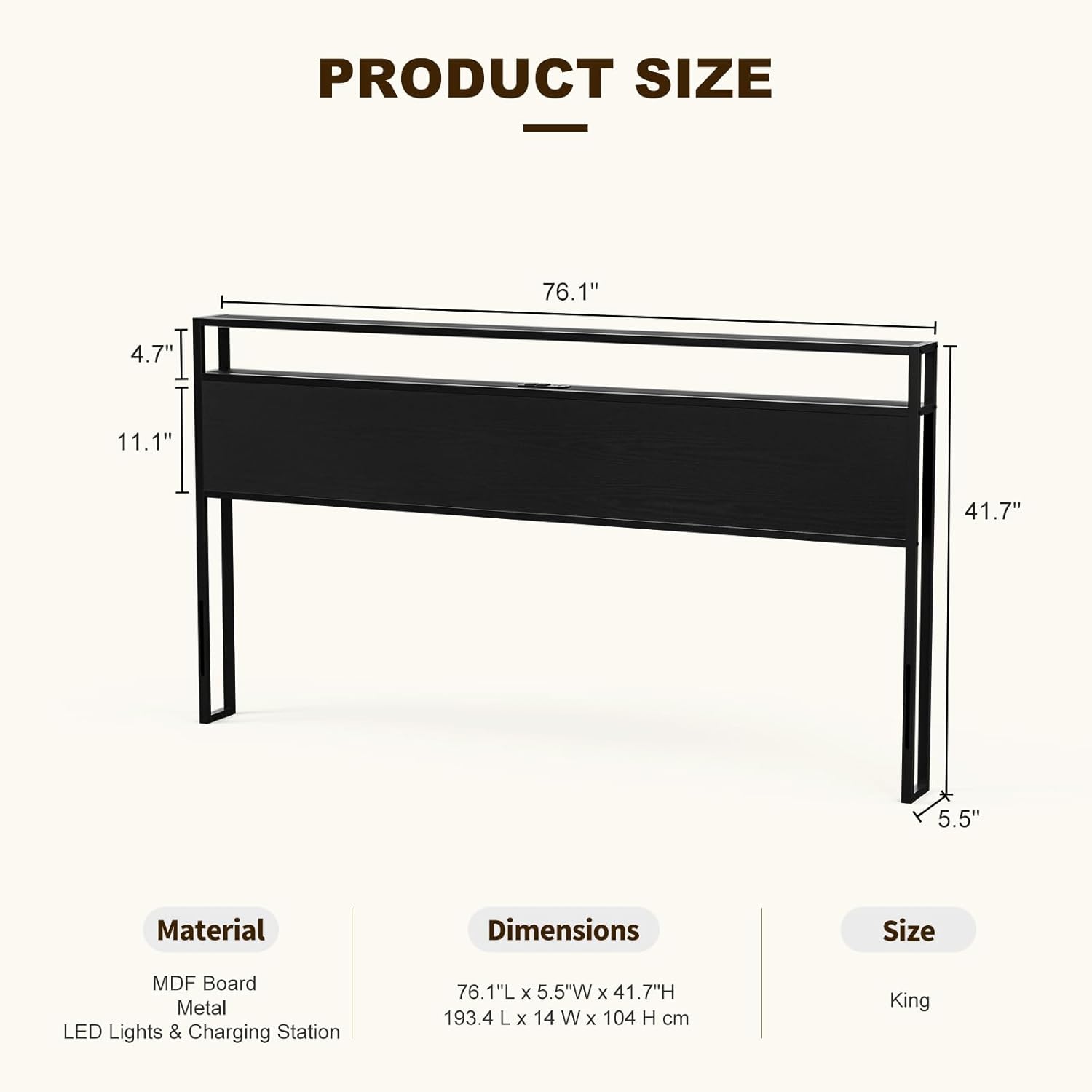
Image: Product dimensions diagram for the King Size headboard.
7. Warranty and Support
IKIFLY is committed to providing high-quality products. For specific warranty information regarding your headboard, please refer to the documentation included in your product packaging or visit the official IKIFLY website. If you require technical support, have questions about assembly, or need assistance with any product issues, please contact IKIFLY customer service.
Customer Service Contact: Please refer to your purchase receipt or the IKIFLY official website for the most current contact information.