Introduction
This manual provides comprehensive instructions for the safe and effective use of your HYBE NEWJEANS Official Light Stick. Please read this manual thoroughly before operating the device and retain it for future reference.
The NewJeans official light stick is designed in the shape of NJ Tokki and can be customized with various parts.
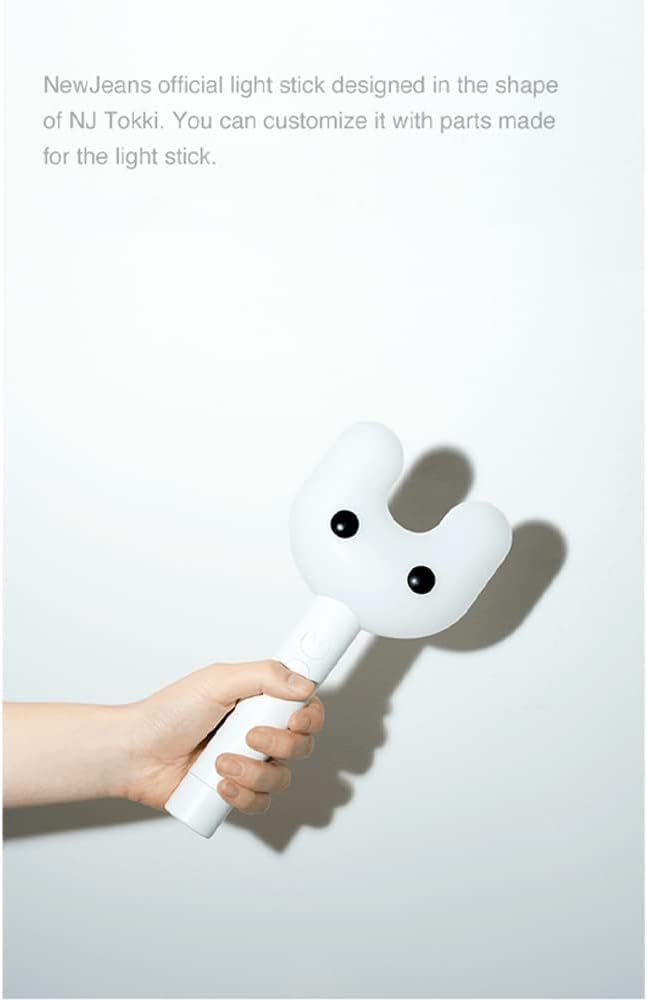
Figure 1: Product Overview. This image displays the HYBE NEWJEANS Official Light Stick being held, providing a clear view of its unique design and ergonomic shape.
Product Contents
Verify that all items listed below are included in your package:
- Light Stick
- Dust Bag
- Strap
- PHOTO CARDS (5ea)
- User Manual

Figure 2: Product Contents. This image displays the complete set of items included in the package: the light stick, a strap, a dust bag, five photo cards, and the user manual.
Setup
Battery Installation
The light stick requires 3 AAA batteries (not included). Please purchase them separately.
- Locate the battery compartment at the bottom of the light stick.
- Open the battery compartment cover.
- Insert 3 AAA batteries, ensuring correct polarity (+/-).
- Close the battery compartment cover securely.
Note: Batteries will last approximately 3 hours. Always use genuine AAA batteries.
Operating Instructions

Figure 3: Light Stick Buttons. This diagram illustrates the location and basic functions of Button 1 (Turn ON/OFF, Default Mode) and Button 2 (Control: Color Shaking, Bluetooth, Concert Mode).
1. Turn ON / OFF
- Press and hold Button 1 to turn the light stick on.
- When the power is on, the light stick will enter Default Mode.
- Press and hold Button 1 again to turn the light stick off.
2. Default Mode
- Press Button 1 to change the light color. The color sequence is: White → Green → Pink → Blue → Orange → Yellow.
- Press Button 2 to change the flashing speed. The light will flash in the order of: long blink → blink → flicker → OFF.
- Press and hold Button 2 to switch to Color Shaking Mode.
3. Color Shaking Mode
- When the power is on, press and hold Button 2 to enter Color Shaking Mode.
- The light color will change when you shake the light stick. The color sequence is: White → Green → Pink → Blue → Orange → Yellow.
- Press and hold Button 2 again to return to Default Mode.
4. Bluetooth Mode
- Turn on the Bluetooth mode on your smartphone.
- Press and hold both Button 1 and Button 2 on the light stick simultaneously.
- The light will flicker in blue as it attempts to pair with your smartphone via Bluetooth.
- Once paired, the light stick's color will change according to the settings in the official app.
- Press and hold both Button 1 and Button 2 again to return to Default Mode.
- Important: More information on the OFFICIAL LIGHT STICK app for Bluetooth mode will follow.
- Note: When in Bluetooth mode, you may experience sporadic disconnection with your smartphone.
- Compatibility: Supports Bluetooth 4.2 or higher.
5. Concert Mode
- Enter your seat number via the OFFICIAL LIGHT STICK app or visit the pairing booth at the venue to use the concert mode during the concert.
- Turn on the light stick after pairing, and it will automatically enter concert mode.
- Note: Some concerts do not have a pairing process. Please refer to the guidelines for each concert.
- Important: When in concert mode, you will not be able to control the buttons. This is not a defect.
- Troubleshooting Pairing: If you have trouble pairing the light stick with your smartphone, please visit the pairing booth at the concert venue.

Figure 4: Basic Operation Instructions. This image details how to turn the light stick on/off, operate in default mode (changing colors and flashing speeds), and activate color shaking mode.
Maintenance and Precautions
- Avoid high temperatures or humidity. Store at room temperature.
- Do not allow the LED light to shine directly in the eyes.
- Be careful not to drop or apply excessive damage, as it may affect the LED color.
- Do not swallow parts or put them in the mouth.
- Always use genuine AAA batteries.
Troubleshooting
- Light stick not turning on: Ensure batteries are inserted correctly with proper polarity and are not depleted. Replace with new genuine AAA batteries if necessary.
- Light stick not pairing via Bluetooth: Ensure Bluetooth is enabled on your smartphone. Try restarting both the light stick and your smartphone. If at a concert, visit the pairing booth.
- Light stick color not changing: Ensure you are in Default Mode or Color Shaking Mode. If in Concert Mode or Bluetooth Mode (after pairing), button control is disabled.
- Sporadic disconnection in Bluetooth mode: This can occur and is not considered a defect. Ensure your smartphone is within close range and there are no major interferences.
Specifications
| Attribute | Detail |
|---|---|
| Product Name | NEWJEANS Official Light Stick |
| Model No. | NJFA23JOS900NN0 (NEWJEANS LS) |
| Material | Acrylonitrile Butadiene Styrene (ABS), Plastic |
| Power Source | 3 AAA Alkaline Batteries, DC 4.5V (Batteries not included) |
| Light Source Type | LED |
| Operating Temperature | 0°C to 50°C (32°F to 122°F) |
| Dimensions (L x W x H) | 4.33"L x 2.07"W x 9.04"H (110 x 52.7 x 229.7 mm) |
| Item Weight | 3.99 Ounces (113 g) (Excluding Battery) |
| Manufacturer | THINKWARE Co. |
| Country of Manufacture | Made in Korea |
| UPC | 679529264721 |
| Barcode | 8809863116154 |
| Bluetooth Version | 4.2 or higher supported |

Figure 5: Product Specifications and Certifications. This image provides a comprehensive list of technical specifications, safety precautions, and various certification logos (KC, CE, RoHS, FCC, Bluetooth) for the light stick.
Warranty and Support
This product is manufactured by THINKWARE Co. and is an official HYBE/Weverse product. All rights are reserved by ADOR & HYBE.
For support inquiries, please contact:
Email: light-stick.support@hybecorp.com
Please note that specific warranty details are not provided in this manual. For warranty information, please contact the support email or refer to the official product website.


