
LEVOIT LVAC-200 White
LEVOIT LVAC-200 Cordless Vacuum Cleaner User Manual
Model: LVAC-200 White
1. Product Overview
The LEVOIT LVAC-200 Cordless Vacuum Cleaner is designed for efficient and convenient daily cleaning. Featuring a tangle-resistant design, powerful suction, and a lightweight build, it is versatile for various surfaces including carpets, hard floors, and pet hair. The vacuum incorporates a 5-stage filtration system for cleaner air emissions.

Figure 1: LEVOIT LVAC-200 Cordless Vacuum Cleaner and its components.
2. Setup
2.1 Included Components
- 1 x Vacuum Body
- 1 x Long Stick
- 1 x Short Stick
- 1 x Vacuum Head
- 1 x 2-in-1 Crevice Tool
- 1 x 2-in-1 Pet Tool
- 1 x Wall Mount
- 2 x Screws
- 2 x Wall Anchors
- 1 x Charger
- 1 x User Manual
2.2 Assembly
- Attach the Long Stick: Insert the long stick into the main vacuum body until it clicks securely into place.
- Attach the Vacuum Head: Connect the vacuum head to the other end of the long stick, ensuring it locks firmly.
- Install Wall Mount (Optional): Use the provided screws and wall anchors to securely mount the wall mount in a convenient location for storage and charging.
2.3 Initial Charging
Before first use, fully charge the vacuum's battery. The battery can be charged while attached to the vacuum or separately. Connect the charger to the battery. The battery indicator lights will show charging progress and turn off when fully charged. Ensure the charging environment is between 24.8°F (-4°C) and 104°F (40°C) for optimal charging.
3. Operating Instructions
3.1 Power Modes and Runtime
The LVAC-200 offers three power modes to suit different cleaning needs:
- Eco Mode: Provides up to 50 minutes of runtime, ideal for light cleaning and extended use with the crevice or pet tool.
- Standard Mode: Offers approximately 30 minutes of runtime with the vacuum head, suitable for daily cleaning tasks.
- Turbo Mode: Delivers maximum suction for tough messes, with a runtime of approximately 12 minutes.
Note: Runtimes are based on testing at room temperature and may vary based on power mode, battery conditions, floor type, and attachments used.

Figure 2: The LVAC-200 offers flexible runtime for various cleaning tasks.
3.2 Versatile Cleaning
The LVAC-200 is designed for comprehensive cleaning across various surfaces and areas:
- Floors and Low Pile Carpets: The main vacuum head is effective on both hard floors and low pile carpets. It features 3 LED lights to illuminate dust and debris.
- Under Furniture: The vacuum can lie 180° flat, allowing easy access to clean under furniture.
- Furniture and Upholstery: Use the 2-in-1 pet tool or crevice tool for cleaning sofas, chairs, and other upholstered surfaces.
- Car Interiors: The compact design and specialized tools make it suitable for cleaning car interiors.

Figure 3: The 2-in-1 crevice tool is ideal for hard-to-reach areas like baseboards.

Figure 4: The 2-in-1 pet tool effectively removes pet hair from upholstery.
Important Note: This vacuum is designed for dry messes only and should not be used to clean up wet spills or liquids.
4. Maintenance
4.1 Dustbin Emptying
The large dustbin can be emptied with a single click, making disposal quick and hygienic. Regularly empty the dustbin to maintain optimal suction performance.

Figure 5: One-touch emptying for convenient dust disposal.
4.2 Filter Cleaning and Replacement
The LVAC-200 features a 5-stage filtration system. For optimal performance, it is recommended to clean the filters regularly and replace them every three months.
- Cleaning: The filters and dustbin components are washable and reusable. Rinse them with water and ensure they are completely dry before reassembling.
- Replacement: Genuine replacement filters are available from LEVOIT. Search for "Levoit lvac-200 filter" to ensure authenticity.

Figure 6: Washable and reusable parts for easy maintenance.

Figure 7: Look for the Levoit Certified Genuine Badge for authentic replacement parts.
4.3 Anti-Tangle Brush
The LVAC-200 features an anti-tangle brush designed to prevent hair from wrapping around the roller, reducing the need for manual untangling and making cleaning faster and more stress-free.
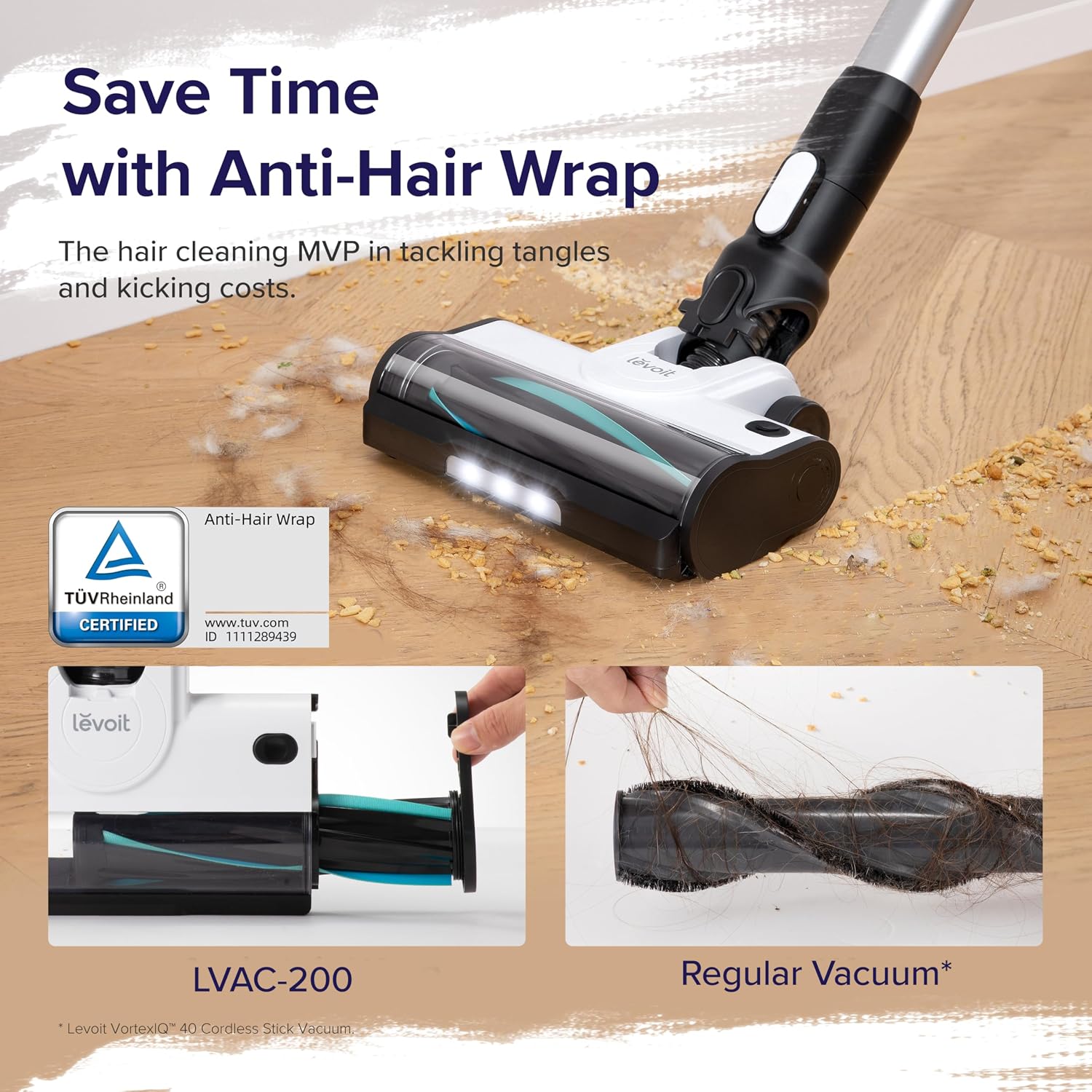
Figure 8: The LVAC-200's anti-hair wrap technology minimizes tangles.
5. Troubleshooting
If you encounter any issues with your LEVOIT LVAC-200, refer to the following common troubleshooting steps:
| Problem | Solution |
|---|---|
| Suction power low or not picking up debris |
|
| Vacuum won't turn on |
|
| Battery won't charge (indicator lights flash red or don't light up) |
|
| Vacuum turns off automatically after short use |
|
6. Specifications
| Brand | LEVOIT |
| Model Name | Anti-Tangle Cordless Vacuum Cleaner |
| Item Model Number | LSV-V201-WUS |
| Color | Black & White |
| Product Dimensions | 9.8"L x 7.7"W x 43.3"H |
| Item Weight | 6.17 pounds |
| Wattage | 180 watts |
| Runtime | Up to 50 minutes |
| Capacity | 0.58 Liters |
| Noise Level | 77.5 dB |
| Filter Type | Foam (5-stage filtration) |
| Power Levels | 3 |
| Battery Type | Lithium Ion (included) |
7. Warranty and Support
LEVOIT is committed to providing quality products and excellent customer service. If you experience any issues with your LVAC-200 Cordless Vacuum Cleaner, please do not hesitate to contact us directly.
- Customer Service: Our customer service team aims to respond to inquiries within 24 hours.
- User Manual: For detailed information and contact details, please refer to the official user manual available at https://manuals.plus/m/074d7389be0d0391a99653a1d84535e418576fbd0eaf3319161c3bf2c1689a4b.
Related documentsLVAC-200 White


Ask a question about this manual
Ask about setup, troubleshooting, compatibility, parts, safety, or missing instructions. Manuals+ will review the question and use this page’s manual context to help answer it.