
1. Introduction
This manual provides essential information for the safe and efficient operation, maintenance, and troubleshooting of your LONCIN GR2300iS Portable Inverter Generator. Please read this manual thoroughly before operating the generator to ensure proper use and to prevent injury or damage.
The LONCIN GR2300iS is a portable inverter generator designed to provide clean and stable power for various applications, including outdoor activities, travel, camping, RV use, and home backup. It features a peak power output of 2300 watts and a continuous operating power of 1800 watts.
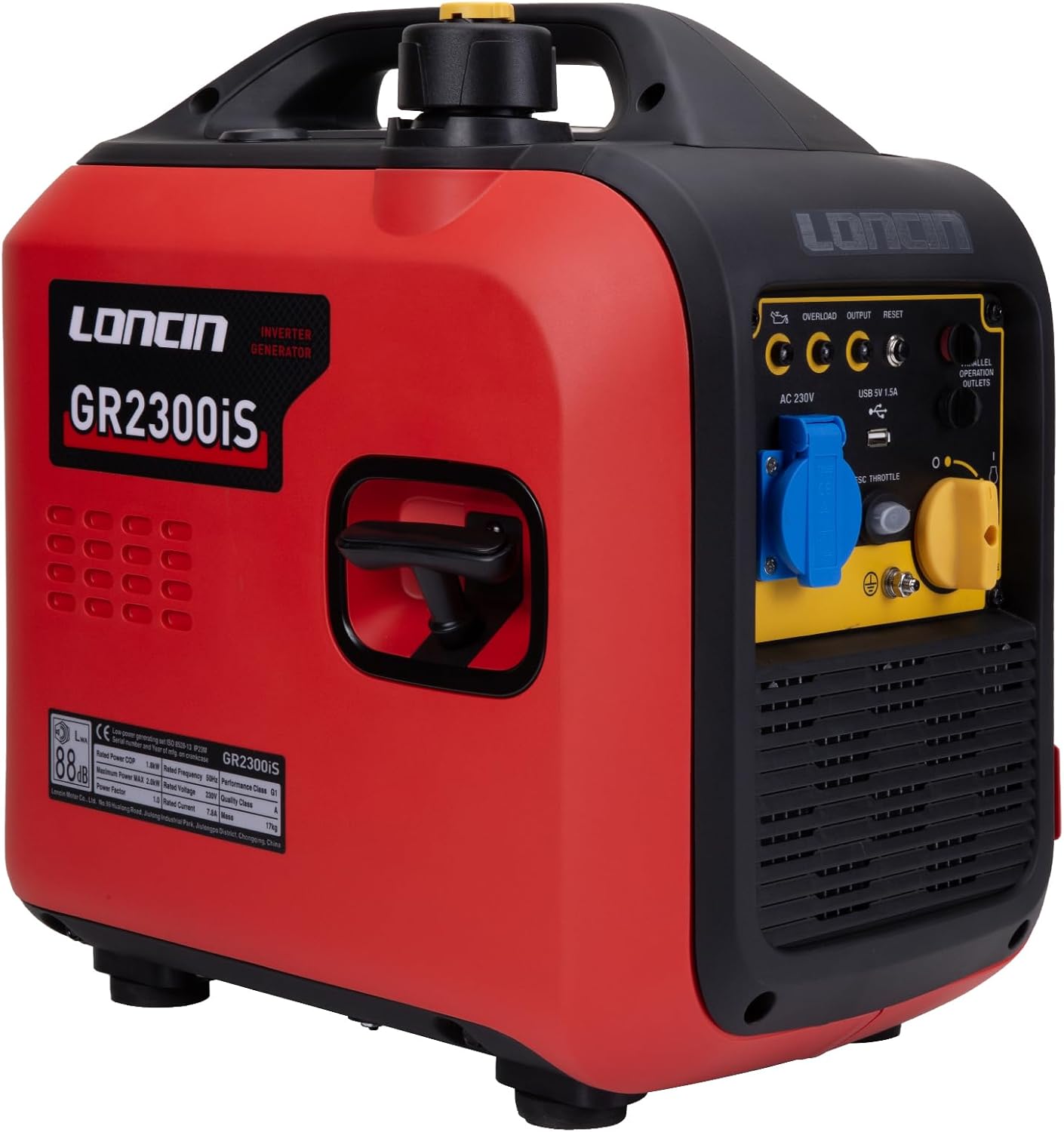
Front view of the LONCIN GR2300iS portable inverter generator, showcasing its red and black casing, control panel with outlets, and integrated handle.
2. Safety Instructions
Always follow these safety guidelines to prevent serious injury or property damage:
- Operate the generator in a well-ventilated outdoor area. Never operate it in an enclosed space.
- Keep the machine clean and free from oil spills.
- Avoid using the generator in excessively humid environments.
- Turn off the generator and allow it to cool before refueling. Keep away from ignition sources during refueling.
- Keep children and pets away from the generator during operation and storage.
- Place the generator on a stable, level surface in a safe location.
- Be aware of high temperatures during operation, especially around the exhaust area.
- Do not overload the generator. Ensure the total wattage of connected devices does not exceed the generator's rated output.
- Always use a properly grounded extension cord when connecting appliances.
3. Package Contents
Upon unpacking, verify that all the following items are included:
- LONCIN GR2300iS Portable Inverter Generator
- User Manual
- Oil Funnel
- Screwdriver
- Spark Plug Wrench
- 12V DC Charging Clamps (max 8A)
4. Product Features
- High Starting Power: Provides a peak power of 2300 watts and an operating power of 1800 watts, suitable for various household and outdoor power needs.
- Ultra-Long Running Time: Equipped with a 4L fuel tank, offering up to 8.6 hours of operation at 25% load (450W) and 6.3 hours at 50% load (900W).
- Compact and Lightweight Design: Weighs approximately 17 kg, featuring a suitcase-style design for easy portability and storage.
- Low Noise Operation: Operates at a noise level of ≤ 60 dBA at 7 meters distance in ECO mode, ensuring a quiet environment.
- Clean Power Output: Inverter technology generates a pure sine wave, providing stable and safe power for sensitive electronic devices.
- Versatile Outlets: Includes one 230V 16 Amp AC socket and one 5V DC USB socket for compatibility with various electrical equipment.
- Parallel Functionality: Allows connection of two generators for increased power output when needed.

The LONCIN GR2300iS generator positioned outside a tent, illustrating its use in outdoor camping scenarios. Icons highlight features like high-quality power, multi-purpose use, low noise, clean power, long lifespan, and safety.

A person easily carrying the LONCIN GR2300iS generator, highlighting its lightweight design (17 kg) and portability.
5. Components and Controls

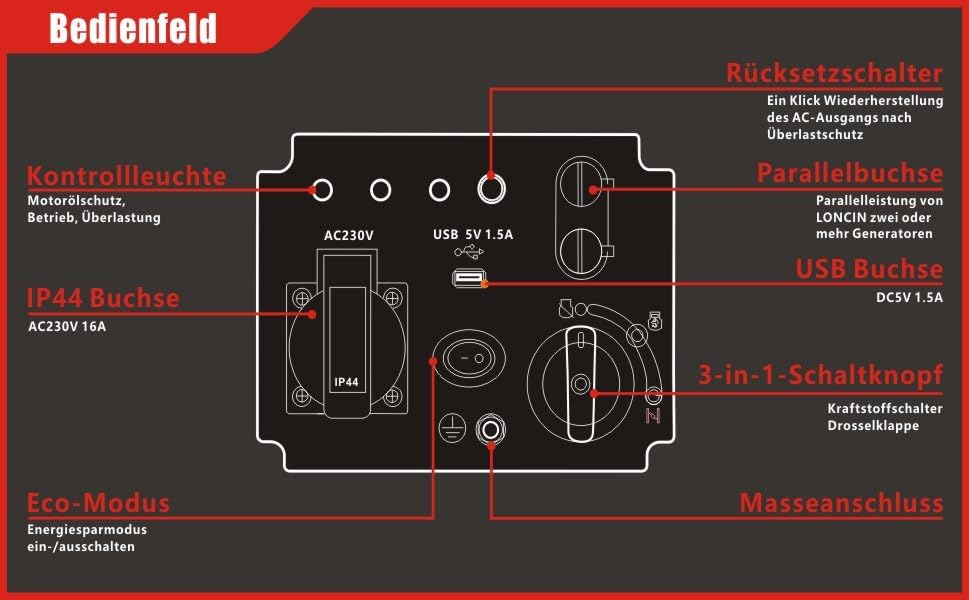
Detailed diagram of the generator's control panel, labeling key components such as the reset switch, parallel socket, USB socket, 3-in-1 switch knob (fuel switch/choke), IP44 AC 230V 16A socket, Eco-mode switch, and ground connection. Control lights for oil, operation, and overload are also indicated.
- Control Lights: Indicate low oil, normal operation, and overload status.
- AC 230V 16A Socket (IP44): Main power output for standard appliances.
- USB 5V 1.5A Socket: For charging USB-powered devices.
- Reset Switch: Restores AC output after an overload protection event.
- Parallel Socket: Used to connect two LONCIN generators for combined power.
- 3-in-1 Switch Knob: Controls fuel flow and choke for starting and stopping the engine.
- Eco-Mode Switch: Activates or deactivates the energy-saving mode.
- Ground Connection: For connecting a grounding wire to ensure electrical safety.
6. Setup
6.1 Unpacking and Inspection
Carefully remove the generator from its packaging. Inspect for any shipping damage. Report any damage to your dealer immediately.
6.2 Adding Engine Oil
The generator is shipped without engine oil. It is crucial to add the correct amount and type of oil before first use.
- Place the generator on a level surface.
- Locate the oil fill cap/dipstick.
- Using the provided funnel, add approximately 0.4 - 0.45 liters of 5W-30 engine oil. Fill until the oil level reaches the upper mark on the dipstick or the edge of the fill opening.
- Securely replace the oil fill cap.
6.3 Adding Fuel
Use unleaded gasoline with an octane rating of 87 or higher.
- Ensure the generator is turned off and cool.
- Open the fuel tank cap.
- Carefully pour gasoline into the fuel tank, up to the indicated fill line. The tank capacity is 4 liters.
- Do not overfill. Securely close the fuel tank cap.
6.4 Grounding the Generator
For safety, connect the generator to an earth ground. Use a grounding wire (not included) connected to the ground connection terminal on the control panel and to a suitable earth ground rod.
7. Operating Instructions
7.1 Starting the Engine
- Ensure the generator is on a level surface and all connections are secure.
- Turn the 3-in-1 switch knob to the 'CHOKE' position (if the engine is cold). For a warm engine, set it to 'RUN'.
- Grasp the recoil starter handle firmly and pull it slowly until resistance is felt, then pull sharply to start the engine. Repeat if necessary.
- Once the engine starts, slowly move the 3-in-1 switch knob to the 'RUN' position.
7.2 Connecting Electrical Devices
- Plug your 230V AC appliances into the AC 230V 16A socket.
- Plug your USB devices into the USB 5V 1.5A socket for charging.
- Do not exceed the generator's rated output of 1800 watts.
7.3 ECO Mode Operation
The ECO mode optimizes fuel consumption and reduces noise during light loads.
- To activate ECO mode, press the Eco-Mode switch. The engine speed will adjust automatically based on the load.
- To deactivate ECO mode, press the Eco-Mode switch again. The engine will run at a constant speed.
7.4 Parallel Operation
For increased power, two LONCIN GR2300iS generators can be connected in parallel using a dedicated parallel kit (sold separately).
- Refer to the parallel kit's instruction manual for detailed connection procedures.
- Ensure both generators are off before connecting the parallel cable.
- Start both generators according to the standard starting procedure.

Two LONCIN GR2300iS generators linked together with a parallel cable, demonstrating the capability to combine their power output for increased electrical supply.
7.5 Stopping the Engine
- Disconnect all electrical loads from the generator.
- Turn the 3-in-1 switch knob to the 'OFF' position.
8. Maintenance
Regular maintenance ensures optimal performance and extends the lifespan of your generator.
- Check Oil Level: Before each use, verify the engine oil level and add if necessary.
- Clean Air Filter: Inspect and clean the air filter regularly, especially in dusty conditions. Replace if damaged.
- Spark Plug: Inspect the spark plug for wear and carbon buildup periodically. Clean or replace as needed.
- General Cleaning: Keep the generator exterior clean. Remove any debris from cooling vents.
- Storage: For long-term storage, drain the fuel tank and carburetor, or use a fuel stabilizer. Store in a dry, well-ventilated area.
9. Troubleshooting
| Problem | Possible Cause | Solution |
|---|---|---|
| Engine does not start |
|
|
| No power output |
|
|
| Engine runs, but stalls |
|
|
10. Specifications
| Specification | Value |
|---|---|
| Model | GR2300iS |
| Peak Power | 2300 Watts |
| Rated Operating Power | 1800 Watts |
| Voltage | 230 Volts |
| Fuel Type | Gasoline |
| Fuel Tank Capacity | 4 Liters |
| Engine Oil Capacity | Approx. 0.4 - 0.45 Liters |
| Noise Level (7m, ECO mode) | ≤ 60 dBA |
| Product Dimensions (L x W x H) | 49 x 35 x 49 cm |
| Weight | 17 Kilograms |
| AC Output | 1 x 230V 16A (IP44) |
| DC Output | 1 x USB 5V 1.5A |

An image showing various outdoor activities powered by the LONCIN GR2300iS generator, with estimated runtimes for common appliances: refrigerator (200W) ~13h, lamp (60W) ~10h, fan (600W) ~8h, grill (800W) ~7h. Note: Actual runtime varies based on conditions.
A visual comparison illustrating the lighter weight of the LONCIN GR2300iS generator (17 kg) compared to other generators in its class (20 kg), emphasizing its portability advantage.
11. Warranty and Support
LONCIN provides a 2-year warranty for this inverter generator, covering any manufacturing defects under normal use conditions. For warranty claims or technical support, please contact your authorized LONCIN dealer or customer service.
Please retain your proof of purchase for warranty validation.

