
Widex Widex BTE Charger
Widex BTE Charger User Manual
Model: Widex BTE Charger
1. Introduction
This manual provides essential information for the safe and effective use of your Widex BTE Charger. This charger is specifically designed for use with Widex Moment Behind-The-Ear (BTE) rechargeable hearing aids.
Please read this manual thoroughly before using the charger and retain it for future reference.
2. Safety Information
Always observe the following safety precautions to prevent damage to the charger, hearing aids, or personal injury:
- Do not expose the charger to extreme temperatures, humidity, or direct sunlight.
- Keep the charger away from water and other liquids. If the charger becomes wet, disconnect it immediately from the power source and allow it to dry completely before reuse.
- Do not attempt to disassemble or modify the charger. This will void the warranty and may cause damage or injury.
- Use only the power adapter and cable supplied with the charger.
- Keep out of reach of children and pets.
- Disconnect the charger from the power outlet when not in use for extended periods.
3. Product Overview
The Widex BTE Charger is a compact and efficient device designed to recharge your Widex Moment BTE hearing aids. It features a simple, user-friendly design for convenient daily use.
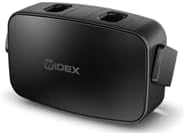
Figure 1: Widex BTE Charger. This image shows the compact black charger with its two charging slots visible on the top surface.
4. Setup
- Connect Power: Insert the small end of the charging cable into the charging port on the back of the Widex BTE Charger. Plug the larger end of the cable into a compatible USB power adapter (not included, typically a standard USB wall adapter) and then plug the adapter into a wall outlet.
- Placement: Place the charger on a stable, flat surface, away from direct heat sources or moisture.
5. Operating Instructions
5.1 Charging Your Hearing Aids
- Ensure the charger is connected to a power source.
- Carefully place your Widex Moment BTE hearing aids into the designated charging slots on the charger. Ensure they are correctly seated. The hearing aids will typically indicate charging status (e.g., an LED light on the hearing aid or charger).
- Full Charge: A full charge takes approximately 4 hours.
- Quick Charge: If your hearing aids are completely depleted and you need them quickly, charge them for 30 minutes. This will provide approximately 4 hours of use.
- Once charging is complete, remove the hearing aids from the charger.
Note: This charger does not have an internal rechargeable battery and requires a wired connection to a power source to operate.
6. Maintenance
6.1 Cleaning the Charger
- Before cleaning, disconnect the charger from the power outlet.
- Wipe the exterior of the charger with a soft, dry, lint-free cloth.
- Do not use abrasive cleaners, solvents, or harsh chemicals.
- Ensure no dust or debris accumulates in the charging ports. Use a soft brush if necessary to gently clear any obstructions.
6.2 Storage
When not in use, store the charger in a cool, dry place, away from direct sunlight and extreme temperatures.
7. Troubleshooting
| Problem | Possible Cause | Solution |
|---|---|---|
| Hearing aids not charging. |
|
|
| Charging is slow or inconsistent. |
|
|
| Charger feels warm during operation. | Normal operation. | A slight warmth is normal during charging. If it becomes excessively hot, disconnect immediately and contact support. |
8. Specifications
| Feature | Detail |
|---|---|
| Product Dimensions | 1.97 x 1.97 x 2.76 inches |
| Brand | Widex |
| Connectivity Technology | 2-Pin |
| Connector Type | 2-Pin |
| Compatible Devices | Widex Moment Behind-The-Ear hearing aids |
| Included Components | 1 charger |
| Special Feature | Magnetic |
| Color | Black |
| Mounting Type | Wall Mount (refers to power adapter, not charger itself) |
| Material | New plastic |
9. Warranty and Support
For warranty information or technical support, please contact your authorized Widex dealer or visit the official Widex website. Keep your purchase receipt as proof of purchase.
For general inquiries, you may visit the Widex official website.
Related documentsWidex BTE Charger


Ask a question about this manual
Ask about setup, troubleshooting, compatibility, parts, safety, or missing instructions. Manuals+ will review the question and use this page’s manual context to help answer it.