
VTOMAN VS200 Pro (200W/48V)
VTOMAN VS200 Pro Portable Solar Panel User Manual
Model: VS200 Pro (200W/48V)
1. Introduction
Thank you for choosing the VTOMAN VS200 Pro Portable Solar Panel. This manual provides essential information for the safe and efficient operation, maintenance, and troubleshooting of your solar panel. Please read this manual thoroughly before use and retain it for future reference.
The VTOMAN VS200 Pro is a high-efficiency, foldable solar panel designed for off-grid power generation, compatible with various power stations, including VTOMAN FlashSpeed 1500. Its robust design and versatile connectivity make it ideal for home backup, camping, and other outdoor activities.
2. Safety Instructions
Always observe the following safety precautions to prevent injury or damage to the product:
- Do not attempt to disassemble, repair, or modify the solar panel. Unauthorized modifications can lead to electric shock, fire, or product damage.
- Keep the solar panel away from open flames, heat sources, and highly flammable materials.
- Avoid dropping or subjecting the solar panel to severe impacts.
- While the panel has an IP67 water-resistant rating, it is not designed to be submerged in water or left exposed to heavy rain for extended periods. Protect connectors from moisture.
- Ensure proper ventilation around the solar panel during operation to prevent overheating.
- Handle the panel by its designated handles. Avoid touching the solar cells directly.
- Keep out of reach of children and pets.
- Before connecting, ensure the voltage and current of the solar panel match the input requirements of your power station.
3. Package Contents
Verify that all items are present in your package:
- 1 x VTOMAN VS200 Pro 200W/48V Portable Solar Panel with MC-4 connector
- 1 x MC-4 to Anderson/XT60/DC5521 Adapter Cable
- 1 x User Manual

Image: Contents of the VTOMAN VS200 Pro package, including the solar panel, adapter cable, and user manual.
4. Setup and Connection
Follow these steps to set up and connect your VTOMAN VS200 Pro solar panel:
- Unfold the Solar Panel: Carefully unfold the VS200 Pro solar panel completely.
- Positioning: Place the solar panel in a location with direct sunlight. Utilize the integrated adjustable kickstands to angle the panel towards the sun for optimal efficiency. For hanging applications, use the circular holes provided.
- Connect the Adapter Cable: Connect the MC-4 connector built into the solar panel to the MC-4 connector on the adapter cable.
- Connect to Power Station: Select the appropriate adapter connector (Anderson, XT60, or DC5521) from the 3-in-1 adapter cable that matches the input port of your power station. Insert the selected connector firmly into the power station's input.
- Begin Charging: Once connected, your power station should begin charging from the solar panel. Monitor the power station's display for charging status.

Image: The VTOMAN VS200 Pro solar panel deployed with its adjustable kickstands, demonstrating easy setup.
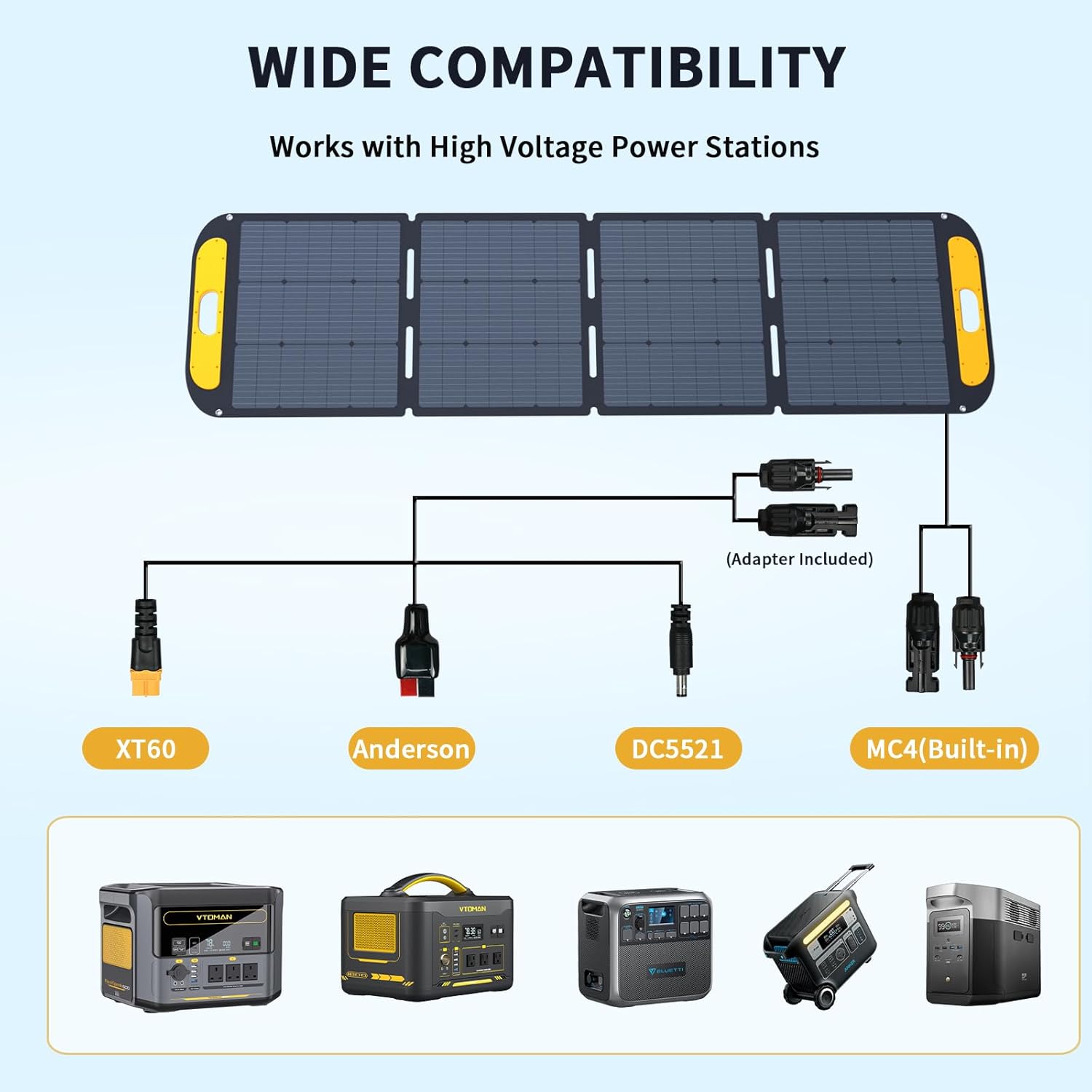
Image: Connection diagram illustrating how to connect the solar panel to various power stations using the included MC-4 to Anderson/XT60/DC5521 adapter cable.
5. Operating the Solar Panel
The VTOMAN VS200 Pro is designed for straightforward operation. Optimal performance is achieved by ensuring maximum exposure to direct sunlight.
- Sunlight Optimization: Adjust the angle of the solar panel throughout the day to follow the sun's path. This maximizes energy capture. The adjustable kickstands facilitate this.
- Efficiency: The panel features 23% high energy conversion rate due to its monocrystalline silicon solar cells. Ensure the panel surface is clean for best performance.
- Portability: When not in use, fold the panel for compact storage and easy transport. Its folded dimensions are approximately 26.4 x 23.7 x 2 inches and it weighs 19.5 lbs.

Image: Illustration of how to adjust the solar panel's angle for optimal sunlight absorption during morning, midday, and afternoon.

Image: Detail of the solar panel emphasizing its 23% high conversion efficiency, achieved through high-efficiency monocrystalline cells.

Image: A person carrying the folded VTOMAN VS200 Pro solar panel, illustrating its portability. Dimensions for both folded and unfolded states are provided.
6. Maintenance and Storage
Proper maintenance ensures the longevity and performance of your solar panel:
- Cleaning: Regularly wipe the surface of the solar panel with a soft, damp cloth to remove dust, dirt, or debris. A clean surface ensures maximum light absorption. Do not use abrasive cleaners or harsh chemicals.
- Water Resistance: The panel is IP67 rated for water resistance, protecting it from splashes. However, avoid prolonged exposure to heavy rain or submersion in water. Ensure connectors are dry before use.
- Storage: When not in use, fold the solar panel and store it in a cool, dry place, away from direct sunlight and extreme temperatures.
- Inspection: Periodically inspect the panel and cables for any signs of damage, wear, or corrosion. If any damage is found, discontinue use and contact customer support.

Image: The solar panel surface with water droplets, demonstrating its IP67 water-resistant rating.
7. Troubleshooting
If you encounter issues with your VTOMAN VS200 Pro solar panel, refer to the following common problems and solutions:
| Problem | Possible Cause | Solution |
|---|---|---|
| No power output / Power station not charging. |
|
|
| Low power output. |
|
|
| Panel appears damaged after transport. | Physical impact during shipping or handling. | Do not use. Contact VTOMAN customer support immediately for assistance. |
8. Specifications
| Model | VS200 Pro (200W/48V) |
| Maximum Power | 200 Watts |
| Maximum Voltage | 48 Volts |
| Efficiency | Up to 23% |
| Material | Monocrystalline Silicon |
| Folded Dimensions (L x W x H) | 26.4" x 23.7" x 2" |
| Item Weight | 19.5 Pounds |
| Water Resistance Rating | IP67 |
| Connectors | Built-in MC-4, includes MC-4 to Anderson/XT60/DC5521 adapter |
| Special Features | Adjustable kickstands, circular holes for easy hanging |
9. Warranty and Support
VTOMAN products come with a manufacturer's warranty. For specific warranty terms and conditions, please refer to the warranty card included with your product or visit the official VTOMAN website.
If you require technical assistance, have questions about product operation, or need to report a defect, please contact VTOMAN customer support:
- VTOMAN Official Website: www.vtoman.com
- Customer Service Email: (Refer to product packaging or official website for current contact information)
Please have your product model number (VS200 Pro) and purchase date ready when contacting support.
Related documentsVS200 Pro (200W/48V)


Ask a question about this manual
Ask about setup, troubleshooting, compatibility, parts, safety, or missing instructions. Manuals+ will review the question and use this page’s manual context to help answer it.