
1. Introduction
This manual provides essential information for the safe and effective operation, assembly, and maintenance of your BOSSCARE GR8013 Full Body Massage Chair. Please read all instructions carefully before use and retain this manual for future reference.

Figure 1: BOSSCARE GR8013 Full Body Massage Chair
2. Safety Information
WARNING: To reduce the risk of electric shock, burns, fire, or injury to persons:
- Always unplug the appliance from the electrical outlet immediately after using and before cleaning.
- Do not exceed the maximum weight capacity of 118 kilograms.
- Follow assembly instructions carefully to ensure stability and safe use.
- Never operate the appliance if it has a damaged cord or plug, if it is not working properly, or if it has been dropped or damaged.
- Keep away from water. Do not use in wet or damp conditions.
- Consult a physician before using if you have any medical conditions.
3. Product Features
The BOSSCARE GR8013 massage chair offers a comprehensive range of features designed for relaxation and therapeutic benefits:
- 16 Fixed-Point Massage Nodes: An upgraded system with 16 precision massage nodes targeting hips and thighs, providing 50% broader coverage than previous models. Features three adjustable intensity levels for varied massage preferences.
- Full-Body Airbags & Heating: Strategically placed airbags provide 360° compression massage to shoulders, arms, feet, and hips. Targeted thermal therapy is available in the lumbar and calf zones to enhance circulation and recovery.
- Shiatsu Massage & Zero Gravity Recline: An extended massage track from neck to thighs, increasing therapeutic reach by over 50%. Three zero-gravity recline positions offer a weightless posture for deep relaxation.
- Multi-Speed Foot Rollers & Leg Extension: Dual foot rollers with 3 speed settings relieve plantar fatigue. Auto-extending leg rests accommodate users from 4.9ft to 6.1ft, extending up to 16cm.
- Global Voltage & USB Port: Compatible worldwide with auto-voltage switching (110V-240V). A built-in USB port allows device charging during use.
- 6 Auto Modes: Pre-programmed massage modes including 'Post-Workout Recovery', 'Evening Relaxation', 'Circulation Boost', 'Deep-tissue kneading', and 'Neck & Shoulder Relief'.

Figure 2: Key Features and Control Options

Figure 3: Full Body Airbag Massage Areas

Figure 4: Zero Gravity Recline Positions
4. Setup and Assembly
The BOSSCARE GR8013 massage chair requires minimal assembly. Follow the instructions provided in the package for detailed steps. Key steps typically involve attaching the leg rests and connecting necessary wiring.
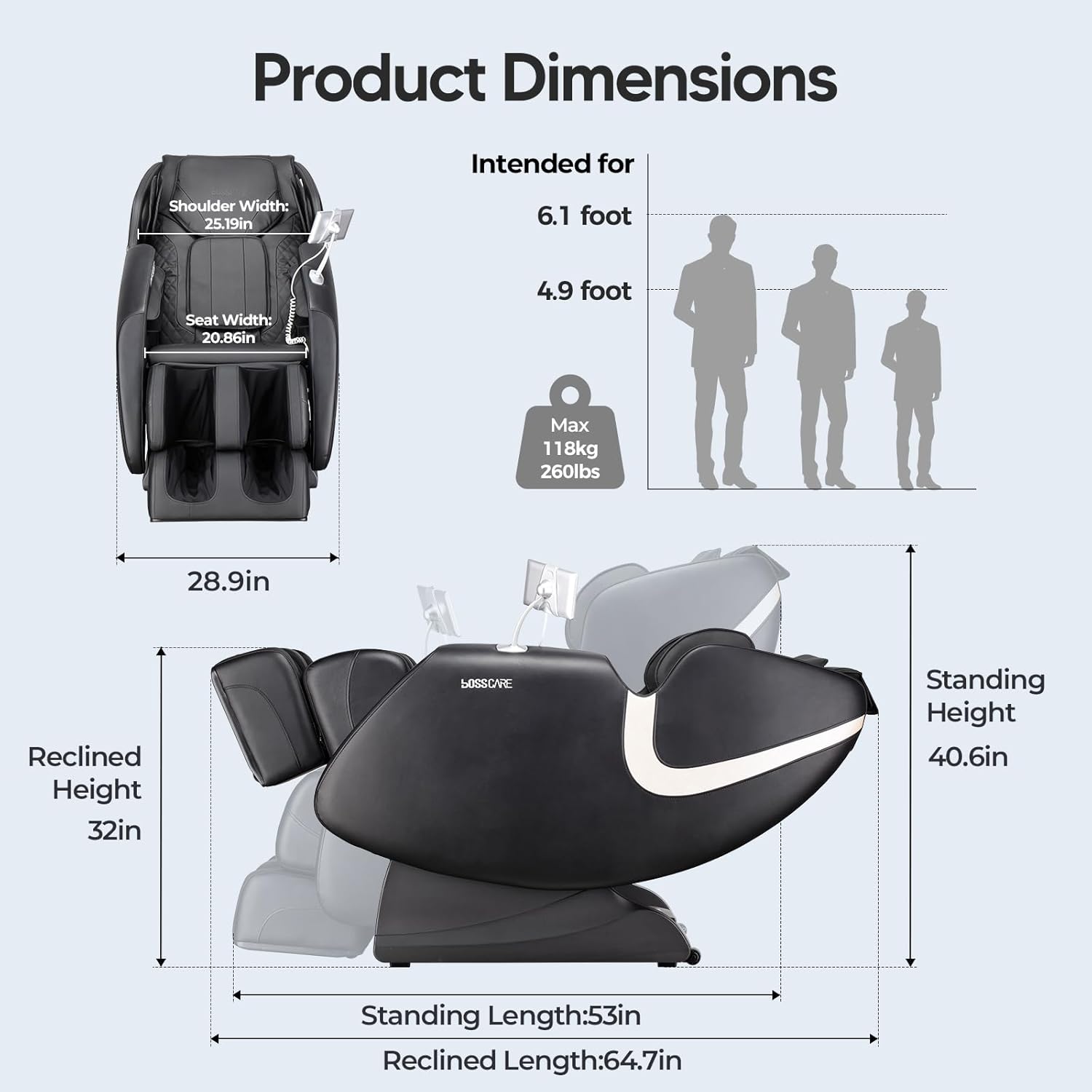
Figure 5: Product Dimensions and User Suitability
Video 1: Installation of the footrest. This video demonstrates the process of attaching the footrest to the massage chair.
5. Operating Instructions
Your BOSSCARE GR8013 massage chair can be controlled via multiple interfaces:
- Touch Screen Control: Use the integrated 7-inch touch screen to select massage modes, adjust intensity, and control various functions.
- Smartphone App Control: Download the dedicated app to control your massage chair from your smartphone.
- AI Voice Control: Activate voice commands for hands-free operation.
- Shortcut Buttons: Conveniently located buttons on the armrest provide quick access to essential functions.
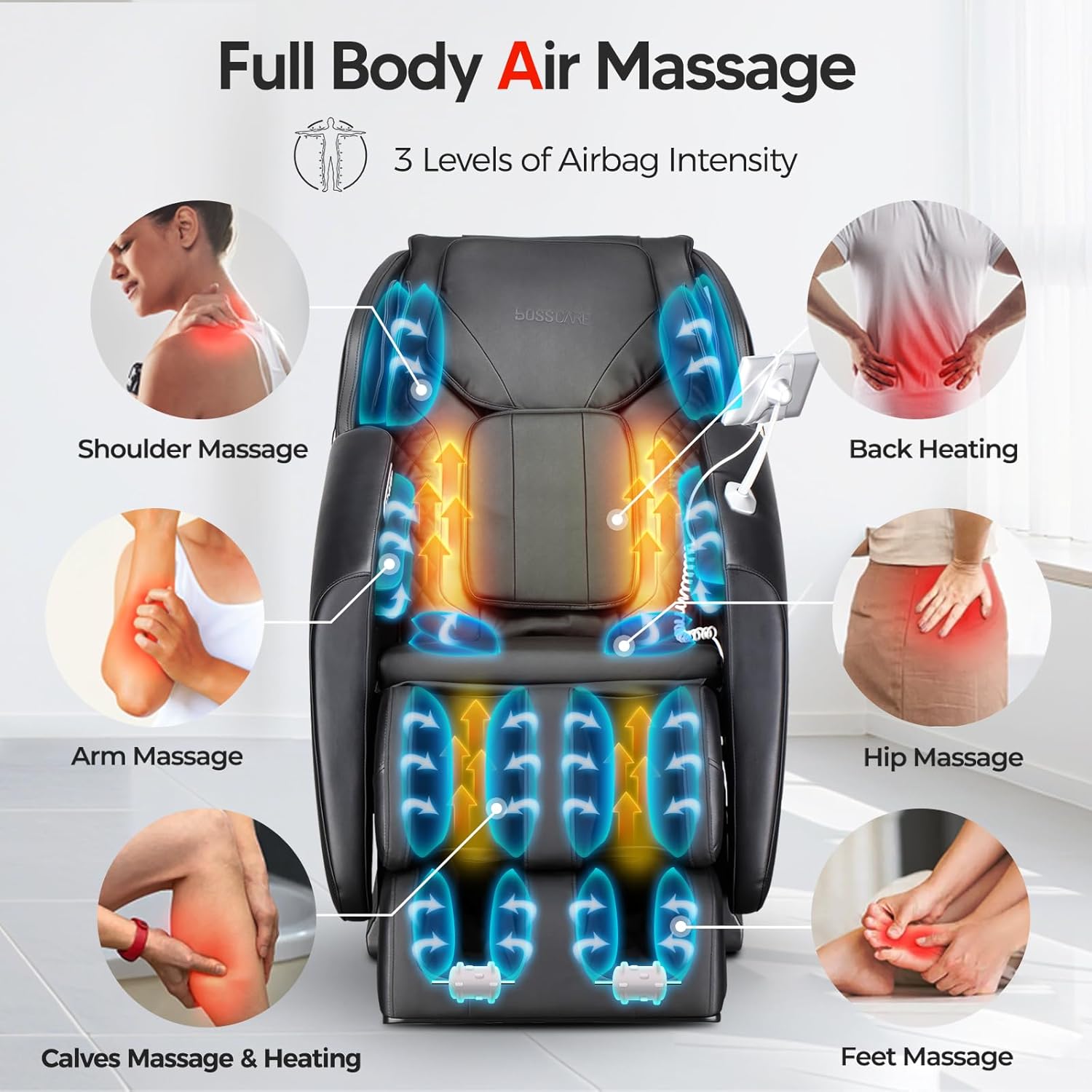
Figure 6: Multiple Control Interfaces
5.1. Selecting Massage Modes
Choose from 6 pre-set auto modes or customize your massage experience:
- Auto Modes: Access pre-programmed sessions like 'Refresh', 'Relax', 'Yoga', 'Neck & Shoulder', 'Waist & Back', and 'Dream' via the touch screen or app.
- Manual Adjustments: Fine-tune massage type (Shiatsu, Kneading, Tapping), intensity, speed, and target specific body areas (neck, back, waist, hip, foot, arm, shoulder, leg).
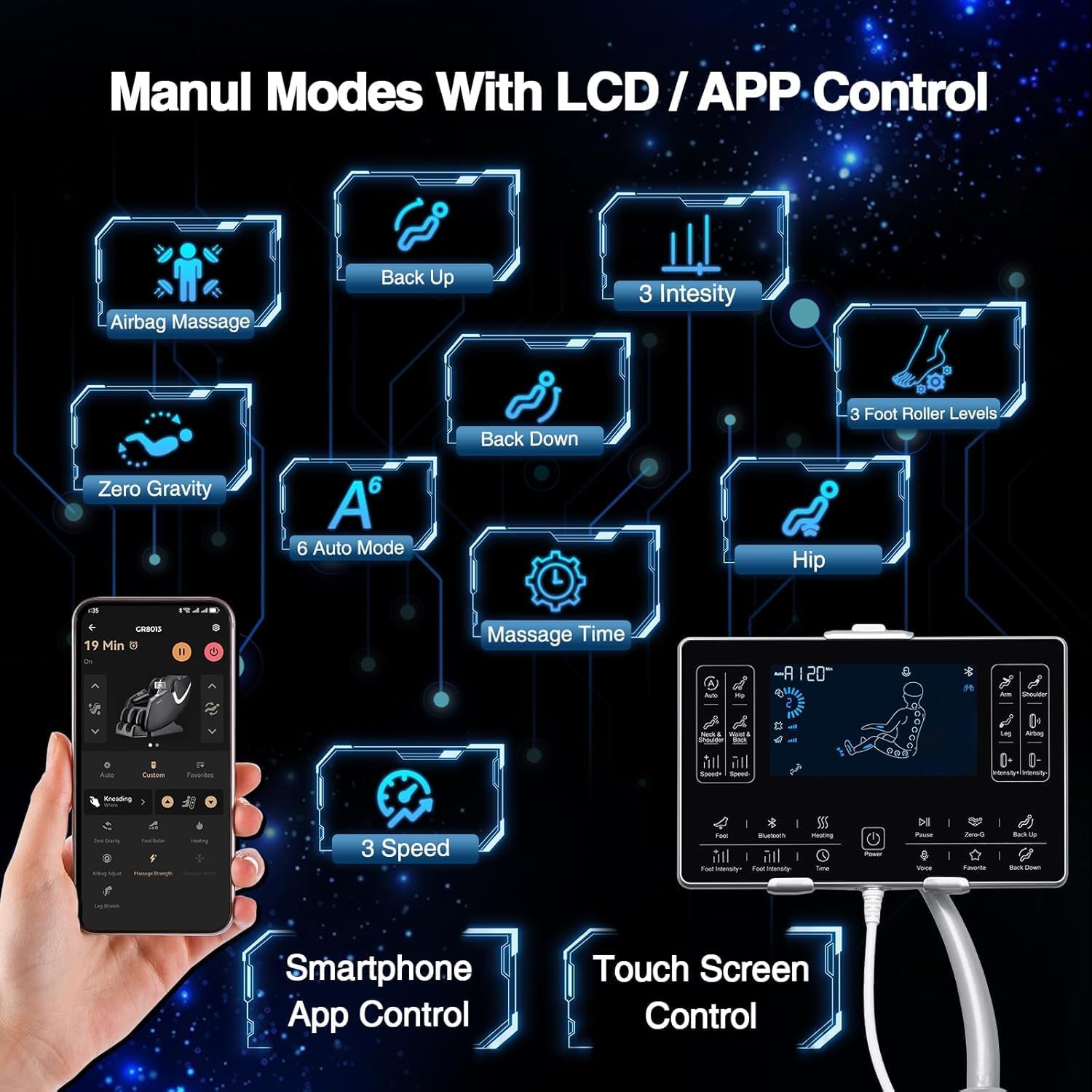
Figure 7: Manual and Auto Mode Selection
5.2. Zero Gravity Function
Activate the Zero Gravity feature to recline the chair into a position that elevates your legs above your heart, reducing pressure on your spine and enhancing relaxation. There are three stages of Zero Gravity recline: Initial, Comfort, and Deep.
5.3. Heating and Foot Rollers
Engage the lumbar and calf heating functions for soothing warmth. The foot rollers can be activated with three adjustable speed settings to target foot fatigue.
5.4. Bluetooth Speakers
Connect your device via Bluetooth to the integrated speakers for an immersive audio experience during your massage.

Figure 8: Bluetooth Speaker Functionality
Video 2: Overview of BOSSCARE GR8013 Massage Chair features, including Zero Gravity and full body massage functions.
Video 3: Demonstration of the GR8013 Full Body Airbags Massage feature.
6. Maintenance
To ensure the longevity and optimal performance of your massage chair, follow these maintenance guidelines:
- Cleaning: The product care instructions specify 'Dry Clean'. For general cleaning, wipe the chair with a soft, damp cloth. Avoid harsh chemicals or abrasive cleaners.
- Storage: When not in use for extended periods, store the chair in a cool, dry place away from direct sunlight.
- Inspection: Periodically check all connections and components for any signs of wear or damage.
7. Troubleshooting
If you encounter any issues with your BOSSCARE GR8013 massage chair, refer to the following common troubleshooting tips:
- Chair not powering on: Ensure the power cord is securely plugged into both the chair and a working electrical outlet. Check the power switch on the chair.
- Massage rollers not moving: Verify that a massage program is selected and the intensity is not set to zero. Ensure no obstructions are present.
- Airbags not inflating: Check that the airbag massage function is activated and the intensity is set appropriately.
- Unusual noises: If you hear unusual noises, immediately turn off the chair and unplug it. Contact customer support for assistance.
For persistent issues, please contact BOSSCARE customer support.
8. Specifications
| Feature | Detail |
|---|---|
| Brand | BOSSCARE |
| Model Name | GR8013 |
| Color | Black |
| Product Dimensions | 53.3"D x 28.9"W x 40"H |
| Item Weight | 132 pounds |
| Maximum Weight Recommendation | 118 Kilograms |
| Material | Foam, Leather |
| Special Features | APP Control, Foot Rollers, Full Body Massage, Heated, Zero Gravity |
| Power Compatibility | 110V-240V (Global Voltage) |
| Included Components | Touch Screen |
9. Warranty and Support
Your BOSSCARE GR8013 massage chair comes with a 3-year motor warranty. Additionally, BOSSCARE provides lifetime technical support, available 12 hours a day, 365 days a year. For any inquiries or assistance, please contact BOSSCARE customer support through the Amazon messaging system or the contact information provided with your product.
