
1. Introduction
Thank you for choosing the Winia KOS-1N3MSS 1.1 Cu. Ft. Microwave Oven. This appliance is designed for convenient and efficient cooking, reheating, and defrosting of various food items. It features 5 power levels, pre-set cooking options, a quick start function, and automatic defrosting by weight or time. The durable steel and glass construction ensures longevity, and the programmed start function adds flexibility to your cooking schedule.
Please read this manual thoroughly before operating your new microwave oven to ensure safe and optimal performance. Keep this manual for future reference.
2. Important Safety Instructions
WARNING: To reduce the risk of fire, electric shock, injury to persons, or exposure to excessive microwave energy, observe the following basic precautions:
- Read all instructions before using the appliance.
- Do not attempt to operate this oven with the door open, as this can result in harmful exposure to microwave energy.
- Do not place any object between the oven front face and the door or allow soil or cleaner residue to accumulate on sealing surfaces.
- Do not operate the oven if it is damaged. It is particularly important that the oven door closes properly and that there is no damage to the: (1) door (bent), (2) hinges and latches (broken or loosened), (3) door seals and sealing surfaces.
- The oven should not be adjusted or repaired by anyone except properly qualified service personnel.
- Ensure the appliance is properly grounded.
- Do not use corrosive chemicals or vapors in this appliance.
- Do not heat liquids or other foods in sealed containers as they are liable to explode.
- Always use microwave-safe cookware.
3. Product Overview
3.1 Exterior View

Figure 3.1: Front view of the Winia KOS-1N3MSS microwave oven, showcasing its silver finish and digital display.

Figure 3.2: Side view of the microwave oven, highlighting the ventilation grilles for proper airflow.
3.2 Interior View
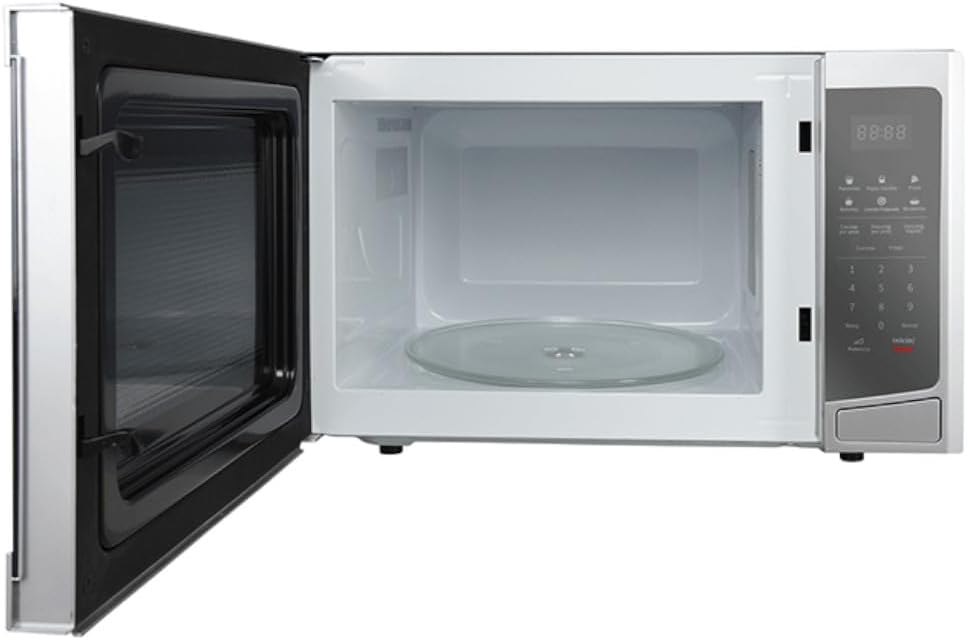
Figure 3.3: Interior view of the microwave oven with the door open, showing the spacious cavity and the removable glass turntable.
3.3 Control Panel

Figure 3.4: Close-up of the control panel, featuring the digital display, number pad, quick-cook buttons, and function buttons.
The control panel includes a digital display, a numeric keypad for time and weight input, and dedicated buttons for various functions such as power level, quick start, and pre-set cooking options.
4. Setup and Installation
4.1 Unpacking
- Remove all packaging materials from inside the oven cavity and from the oven door.
- Inspect the oven for any damage, such as dents or a misaligned door. Do not operate the oven if it is damaged.
- Place the glass turntable and turntable ring securely inside the oven cavity.
4.2 Placement
- Place the microwave oven on a flat, stable surface that can support its weight and the heaviest food item likely to be cooked in the oven.
- Ensure adequate ventilation. Allow at least 10 cm (4 inches) of space at the back, 20 cm (8 inches) at the top, and 5 cm (2 inches) on the sides for proper air circulation.
- Keep the oven away from heat sources, steam, or splashing liquids.
- Do not block air vents.

Figure 4.1: Dimensions of the microwave oven: 51 cm (width), 32 cm (depth), 39 cm (height).
4.3 Electrical Connection
Plug the oven into a standard household electrical outlet (120V, 60Hz). Ensure the outlet is properly grounded. Do not use extension cords or adapters.
5. Operating Instructions
5.1 Setting the Clock
- Press the "Reloj" (Clock) button.
- Use the number pad to enter the current time (e.g., 12:30).
- Press the "Reloj" (Clock) button again to confirm.
5.2 Microwave Cooking
- Place food in a microwave-safe container on the turntable.
- Close the oven door.
- Enter the desired cooking time using the number pad.
- To adjust power level (5 levels available): Press the "Potencia" (Power) button repeatedly to cycle through power levels (e.g., P100 for 100%, P80 for 80%, etc.).
- Press "Inicio/Parar" (Start/Stop) to begin cooking.
5.3 Quick Start Function
For quick heating, simply press the "Inicio/Parar" (Start/Stop) button. Each press will add 30 seconds of cooking time at 100% power. You can program from 5 to 30 seconds in a single touch.
5.4 Auto Defrost Function
This function allows you to defrost food by weight or time.
- Place the frozen food on the turntable.
- Press "Descong. por peso" (Defrost by Weight) or "Descong. rápido" (Rapid Defrost).
- Use the number pad to enter the weight of the food (for defrost by weight) or the desired defrosting time (for rapid defrost).
- Press "Inicio/Parar" (Start/Stop) to begin defrosting.
5.5 Pre-set Cooking Options
The microwave includes pre-set options for common foods, ensuring optimal cooking results with a single touch.
- Palomitas (Popcorn): For popping popcorn.
- Papas Cocidas (Baked Potatoes): For cooking potatoes.
- Pizza: For reheating pizza slices.
- Bebidas (Beverages): For heating drinks.
- Comida Preparada (Prepared Food): For reheating pre-cooked meals.
- Recalentar (Reheat): General reheating function.
To use: Press the desired pre-set button, then press "Inicio/Parar" (Start/Stop).
5.6 Programmed Start
This feature allows you to set a specific time for the oven to start operation.
- Set the current time using the "Reloj" (Clock) function (Section 5.1).
- Press the "Timer" button.
- Enter the desired start time using the number pad.
- Set your desired cooking program (e.g., time and power level, or a pre-set option).
- Press "Inicio/Parar" (Start/Stop). The oven will start at the programmed time.
6. Maintenance and Cleaning
Regular cleaning helps maintain the performance and appearance of your microwave oven.
- Interior: Wipe the interior cavity with a damp cloth after each use. For stubborn stains, use a mild detergent or a microwave-safe cleaner. Do not use abrasive cleaners or scouring pads.
- Exterior: Clean the exterior surfaces with a soft, damp cloth. Avoid spraying cleaners directly onto the control panel.
- Door Seals: Keep the door seals clean to ensure proper closure and prevent microwave energy leakage.
- Turntable: The glass turntable and turntable ring can be removed and washed in warm, soapy water or in a dishwasher.
- Odor Removal: To remove odors, combine a cup of water with several lemon slices or a tablespoon of vinegar in a microwave-safe bowl. Heat on high for 5-7 minutes, then let it sit in the oven for a few minutes before wiping clean.
CAUTION: Always unplug the microwave oven before cleaning.
7. Troubleshooting
If you encounter issues with your microwave oven, refer to the following common problems and solutions:
| Problem | Possible Cause | Solution |
|---|---|---|
| Oven does not start. | Power cord not plugged in; Door not closed properly; Fuse blown or circuit breaker tripped. | Ensure power cord is securely plugged in; Close the door firmly; Check household fuse or reset circuit breaker. |
| Oven not heating. | Door not closed properly; Incorrect cooking time or power level set. | Ensure door is completely closed; Verify cooking time and power level settings. |
| Turntable makes noise. | Turntable or ring not positioned correctly; Debris under turntable. | Reposition turntable and ring; Clean any debris from under the turntable. |
| Food is unevenly cooked. | Food not stirred or rotated; Improper power level or cooking time. | Stir or rotate food during cooking; Adjust power level and cooking time as needed. |
If the problem persists after trying these solutions, please contact Winia customer support.
8. Specifications
| Feature | Detail |
|---|---|
| Brand | WINIA |
| Model Number | KOS-1N3MSS |
| Color | Silver |
| Capacity | 1.1 Cubic Feet |
| Rated Power Consumption | 120 Watts (Note: This value is from product specifications and may refer to standby or a specific component's power. Actual cooking power is typically higher.) |
| Material | Glass (door), Steel (body) |
| Product Dimensions (W x D x H) | 51 cm x 32 cm x 39 cm (approx. 20.1 in x 12.6 in x 15.4 in) |
| Product Weight | 15.6 kg (approx. 34.3 lbs) |
| Special Features | Defrost function, 5 Power Levels, Pre-set Cooking Options, Quick Start, Programmed Start |
| Installation Type | Freestanding |
| Components Included | Turntable ring, Glass turntable |
9. Warranty and Support
This Winia microwave oven comes with a manufacturer's warranty. Please refer to the warranty card included with your purchase for specific terms and conditions, including coverage period and limitations.
For technical assistance, service, or to inquire about replacement parts, please contact Winia customer support. Contact information can typically be found on the Winia official website or on the product packaging.
Please have your model number (KOS-1N3MSS) and purchase date ready when contacting support.


