Introduction
This manual provides detailed instructions for the setup, operation, and maintenance of your Hisense AX5100G 5.1 Channel Soundbar System. This system is designed to enhance your audio experience with 5.1 channel surround sound, Dolby Atmos, and DTS Virtual:X.
What's in the Box
Carefully unpack all components and ensure the following items are included:
- 5.1 Channel Soundbar
- Wireless Subwoofer
- 2 Rear Speakers
- Remote Control
- Power Cables (for Soundbar, Subwoofer, and Rear Speakers)
- HDMI Cable
- Optical Cable
- Wall Mounting Kit (screws, brackets)
- User Manual (this document)

The Hisense AX5100G 5.1 Channel Soundbar System includes the main soundbar unit, a wireless subwoofer, and two dedicated rear speakers for a complete surround sound experience.
Setup
1. Placement
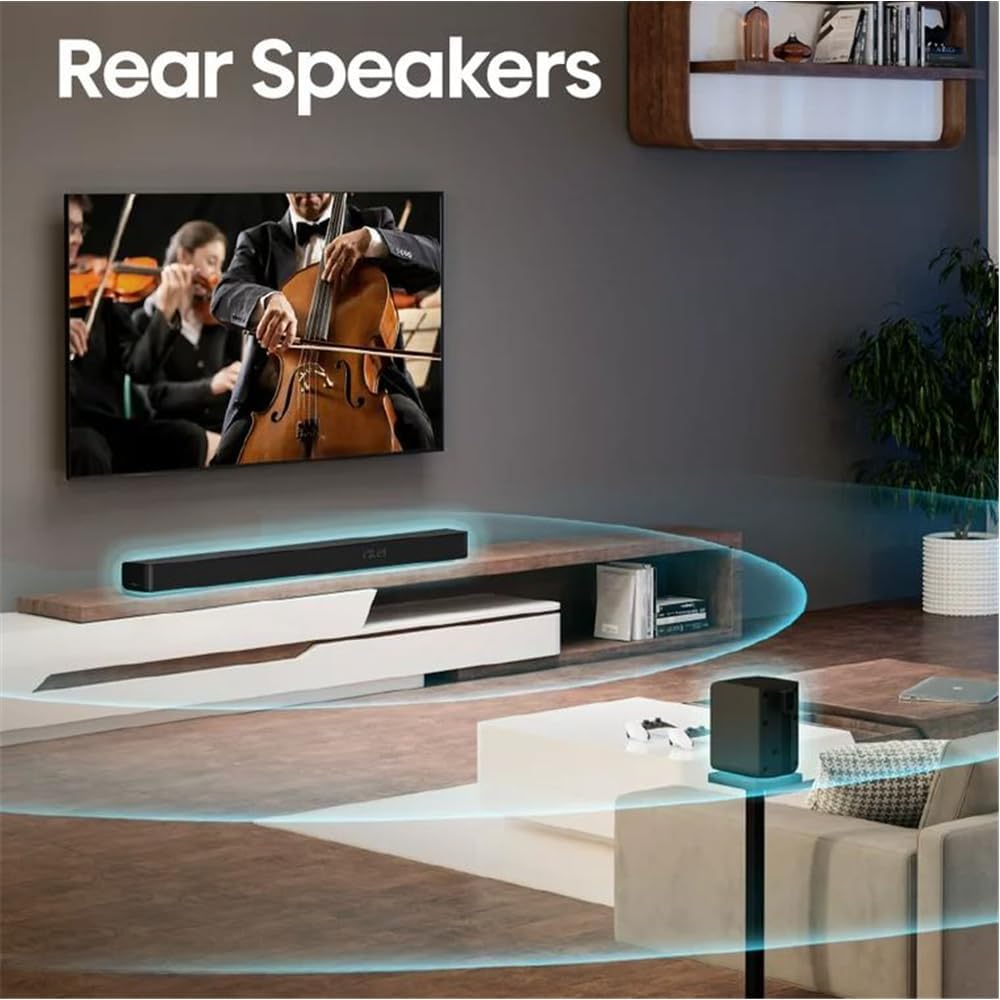
Position the soundbar centrally below your TV. The wireless subwoofer can be placed anywhere in the room, ideally near the soundbar for optimal bass distribution. The rear speakers should be placed behind your listening position, to the left and right, for an immersive surround sound experience.

Optimal placement of the soundbar, wireless subwoofer, and rear speakers in a living room setting to achieve the best 5.1 surround sound.
2. Connecting the Soundbar and Subwoofer
The wireless subwoofer automatically pairs with the soundbar when both are powered on. Ensure both units are plugged into a power outlet.
3. Connecting the Rear Speakers
The rear speakers connect to the wireless subwoofer. Plug the rear speakers into the designated ports on the subwoofer.

Dedicated rear speakers are positioned to provide true surround sound, immersing the listener in audio.
4. Connecting to Your TV
Choose one of the following connection methods based on your TV's available ports:
HDMI eARC (Recommended)
For the best audio quality and control, connect the soundbar to your TV's HDMI eARC port using the provided HDMI cable. This allows for two-way communication, enabling TV remote control of the soundbar.
Optical
If your TV does not have an HDMI eARC port, use the included optical cable to connect the soundbar to your TV's optical audio output.
Bluetooth
For wireless audio streaming from your TV (if supported) or other Bluetooth-enabled devices, pair the soundbar via Bluetooth.
The back panel of the soundbar features multiple connectivity options, including HDMI eARC, Optical, AUX, USB, and Coaxial inputs.
Operating Instructions
Power On/Off
Press the Power button on the soundbar or the remote control to turn the system on or off.
Volume Control
Adjust the volume using the Volume Up (+) and Volume Down (-) buttons on the soundbar or the remote control.
Input Selection
Press the Source button on the soundbar or the remote control to cycle through available input sources (HDMI eARC, Optical, Bluetooth, AUX, USB).
Sound Modes
The soundbar offers various preset sound modes (e.g., Movie, Music, News) to optimize audio for different content types. Select your preferred mode using the remote control.
Bass and Treble Adjustment
Use the remote control to adjust the bass and treble levels to your preference.
Specifications
| Feature | Detail |
|---|---|
| Model Name | AX5100G |
| Surround Sound Channel Configuration | 5.1 |
| Speaker Maximum Output Power | 340 Watts |
| Subwoofer Connectivity | Wireless |
| Subwoofer Diameter | 5.25 Inches |
| Special Features | Bass Boost, Dolby Enabled (Dolby Atmos, DTS Virtual:X) |
| Connectivity Technology | HDMI (eARC), Optical, AUX, USB, Bluetooth |
| Control Method | Remote |
| Color | Black |
| Item Weight | 43 Pounds |
| Manufacturer | HISENSE |
| Roku TV Ready | Yes |
Maintenance
Cleaning
Gently wipe the surfaces of the soundbar, subwoofer, and rear speakers with a soft, dry cloth. Do not use liquid cleaners or abrasive materials, as they may damage the finish.
Ventilation
Ensure adequate ventilation around all components to prevent overheating. Do not block any ventilation openings.
Troubleshooting
No Sound
- Ensure all power cables are securely connected and units are powered on.
- Verify the correct input source is selected on the soundbar.
- Check the TV's audio output settings to ensure it's sending audio to the soundbar (e.g., HDMI ARC/eARC, Optical).
- Confirm the volume is not muted or set too low on both the soundbar and the TV.
Subwoofer Not Working
- Ensure the wireless subwoofer is plugged in and powered on.
- Check if the subwoofer is paired with the soundbar. Refer to the pairing instructions in the full user manual if re-pairing is needed.
Remote Control Not Working
- Check and replace the batteries in the remote control.
- Ensure there are no obstructions between the remote control and the soundbar's sensor.
Warranty and Support
Warranty Information
This Hisense soundbar system comes with a limited warranty. Please refer to the warranty card included in the packaging for specific terms and conditions.
Customer Support
For technical assistance or warranty inquiries, please contact Hisense customer support. Contact details can be found in the full user manual or on the official Hisense website.


