
BrilliantHouse S5
BrilliantHouse S5 Fitness Tracker User Manual
Model: S5
1. Introduction
Thank you for choosing the BrilliantHouse S5 Fitness Tracker. This device is designed to help you monitor your daily activities and health metrics, providing insights to support a healthier lifestyle. It features a heart rate monitor, step counter, calorie tracker, sleep monitor, and various smart notifications. Please read this manual carefully to ensure proper use and optimal performance of your fitness tracker.
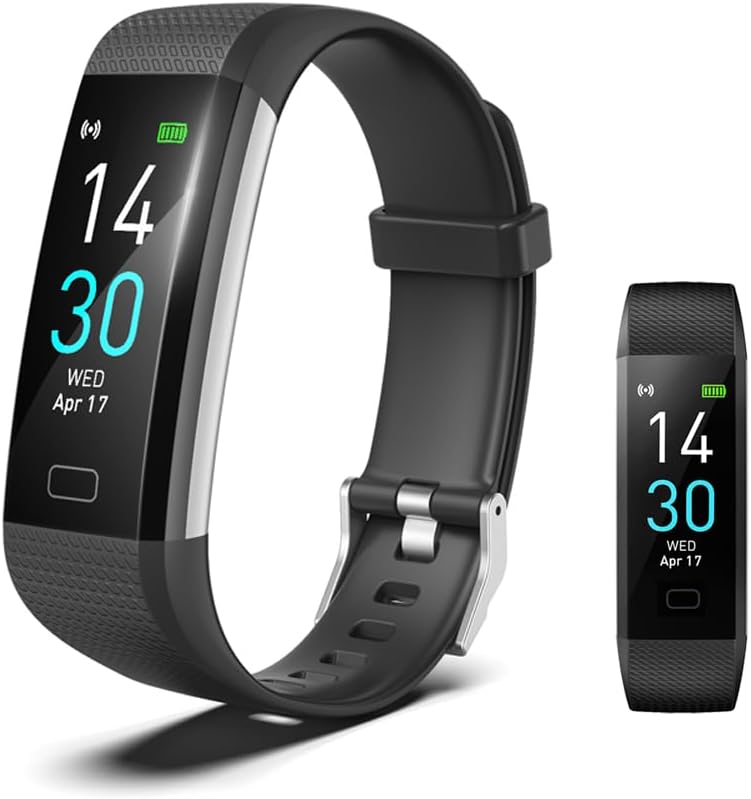
Image: The BrilliantHouse S5 Fitness Tracker with its black band, showing the digital display with time, date, and battery indicator.
2. What's in the Box
Please check the contents of your package. If any items are missing or damaged, contact customer support.
- Fitness Tracker x 1
- Watch Band x 2
- Troubleshooting Tips x 1
- Instruction Manual x 1
3. Setup
3.1 Charging the Device
Before first use, fully charge your fitness tracker. The device features a direct USB charging design.
- Remove the watch band from the watch body. This can be done by gently pulling the band at a 45-degree angle.
- Locate the metal charging piece on one side of the watch body. Only one side has the metal contacts for charging.
- Plug the metal piece directly into a standard USB port (e.g., computer, USB wall adapter).
Note:
- Both sides of the watch band can be removed, but only the side with the metal piece is used for charging.
- When charging begins, the device will vibrate, and a charging icon will appear on the screen. If no vibration or icon appears, turn the watch to the other face and plug it into the USB port again.

Image: Step-by-step guide illustrating the process of removing the watch band and connecting the fitness tracker to a USB port for charging.
3.2 App Installation and Connection
To access all features and synchronize data, download and connect the fitness tracker to the companion app.
- Ensure Bluetooth is enabled on your smartphone.
- Go to the App Store (for iOS) or Google Play Store (for Android).
- Search for the "Runmefit" app and install it. Alternatively, scan the QR code provided in the instruction booklet to download the app.
- Open the Runmefit app and tap the "+" icon to add a new device.
- The app will search for nearby devices. Select "S5" from the list of found devices.
- Wait for the pairing process to complete.
- Once successfully paired, your sports and health data will synchronize between the watch and your phone.

Image: A visual guide detailing the seven steps to connect the BrilliantHouse S5 Fitness Tracker to a smartphone using the Runmefit application, including enabling Bluetooth, downloading the app, and pairing the device.
4. Operating Instructions
4.1 Basic Navigation
The S5 Fitness Tracker typically operates with a touch-sensitive area or a single button. Tap or press to cycle through different screens and functions.
4.2 Activity Tracking
The tracker continuously monitors your daily activities.
- Steps: Records the total number of steps taken throughout the day.
- Distance: Estimates the distance covered based on your steps.
- Calories: Calculates calories burned during your activities.
- Sports Modes: Supports 17 different sports modes for more accurate tracking during specific exercises.
To ensure data accuracy, wear the watch snugly on your wrist, approximately one finger's width away from the wrist bone.
4.3 Health Monitoring
The S5 tracker provides real-time health data.
- Heart Rate: Monitors your heart rate automatically and continuously.
- Blood Pressure: Tracks blood pressure levels.
- Blood Oxygen: Measures blood oxygen saturation.
- Sleep Monitor: Analyzes your sleep patterns, including deep, light, and awake times, providing comprehensive analysis in the app.
These measurements are for reference and should not be used for medical diagnosis.
4.4 Smart Notifications and Reminders
Stay connected with notifications directly on your wrist.
- Call Notifications: Receive alerts for incoming calls, with an option to reject calls from the tracker.
- Message Notifications: Get SMS and calendar reminders.
- Social Media Alerts: Receive notifications from apps like Facebook, Instagram, and Twitter.
- Sedentary Reminder: Alerts you to move if you've been inactive for too long.
- Drink Reminder: Prompts you to drink water at set intervals.
4.5 Customization
- Custom Watch Faces: Choose from over 100 selectable watch faces or customize your own through the app.
- Brightness Setting: Adjust screen brightness for optimal visibility.

Image: A collage showing multiple customizable watch face designs available for the BrilliantHouse S5 Fitness Tracker.
5. Maintenance
5.1 Cleaning
Regularly clean your fitness tracker and band to prevent skin irritation and maintain device longevity.
- Wipe the device and band with a soft, damp, lint-free cloth.
- Do not use harsh chemicals or abrasive cleaners.
- Ensure the device is dry before wearing or charging.
5.2 Water Resistance
The BrilliantHouse S5 Fitness Tracker is IP68 waterproof, meaning it is resistant to dust and can withstand immersion in water up to 1.5 meters for 30 minutes. It is suitable for daily use, such as washing hands, rain, and swimming in shallow water. However, it is not recommended for hot showers, saunas, or diving, as steam and high temperatures can affect the seal.

Image: The BrilliantHouse S5 Fitness Tracker being splashed with water, demonstrating its IP68 waterproof capability, alongside a certification document.
6. Troubleshooting
6.1 Device Not Charging
- Ensure the correct side of the watch body (with metal contacts) is plugged firmly into the USB port.
- Try a different USB port or power adapter.
- Check for any debris or obstruction in the USB port or on the charging contacts.
6.2 Unable to Pair with App
- Make sure Bluetooth is enabled on your smartphone.
- Ensure the fitness tracker is sufficiently charged.
- Keep the tracker close to your phone during the pairing process.
- Restart both your phone and the fitness tracker.
- If previously paired, try unpairing the device from your phone's Bluetooth settings and then re-attempt pairing through the app.
6.3 Inaccurate Readings
- Ensure the tracker is worn correctly: snug on the wrist, one finger's width from the wrist bone.
- For heart rate and blood pressure, remain still during measurement.
- Activity tracking accuracy can be affected by arm movements not associated with steps (e.g., driving).
7. Specifications
| Brand | BrilliantHouse |
| Model Number | S5 |
| Screen Size | 0.96 Inches |
| Battery Capacity | 105 Milliamp Hours |
| Battery Life | 5-7 days (typical usage) |
| Waterproof Rating | IP68 |
| Connectivity | Bluetooth |
| Operating System Compatibility | Android 4.4 (or above) / iOS 9.0 (or above) |
| Special Features | Activity Tracker, Calendaring, Camera Remote, Phone Call Notifications, Sedentary Reminder |
| Item Weight | 23.04 Grams (0.813 ounces) |

Image: A diagram illustrating the physical dimensions of the BrilliantHouse S5 Fitness Tracker, including band length and screen size.
8. Warranty and Support
For warranty information and customer support, please refer to the documentation included with your product or contact the BrilliantHouse customer service team through the retailer where the product was purchased. Keep your purchase receipt as proof of purchase.
Ask a question about this manual
Ask about setup, troubleshooting, compatibility, parts, safety, or missing instructions. Manuals+ will review the question and use this page’s manual context to help answer it.