
1. Safety Information
Please read this manual carefully before using your new CHiQ refrigerator. Keep it in a safe place for future reference. This appliance is designed for household use only.
- Ensure the appliance is properly grounded to avoid electrical shock.
- Do not damage the refrigerant circuit.
- Do not use electrical appliances inside the food storage compartments unless they are of the type recommended by the manufacturer.
- Keep ventilation openings clear of obstruction.
- Unplug the appliance before cleaning or performing maintenance.
- This appliance is not intended for use by persons (including children) with reduced physical, sensory or mental capabilities, or lack of experience and knowledge, unless they have been given supervision or instruction concerning use of the appliance by a person responsible for their safety.
2. Product Overview
The CHiQ Side-by-Side Refrigerator Model CSS730NPIK2 offers a generous 562-liter capacity, designed for efficient food preservation. It features a sleek design, No-Frost technology, and a multi-air flow cooling system to maintain optimal temperatures throughout. The intuitive touch control panel with an LED display allows for easy temperature management and smart mode activation.

Figure 2.1: Front view of the CHiQ Side-by-Side Refrigerator CSS730NPIK2, showcasing its modern design and integrated touch control panel.
3. Setup and Installation
3.1 Unpacking
- Carefully remove all packaging materials, including foam and adhesive tape.
- Inspect the refrigerator for any damage during transit. Report any damage to your retailer immediately.
- Remove all internal accessories and clean them before use.
3.2 Placement
Choose a location that is dry, well-ventilated, and away from direct sunlight or heat sources (e.g., stove, heater). Ensure sufficient clearance around the appliance for proper ventilation.
- Dimensions (Depth x Width x Height): 71 cm x 91 cm x 176 cm.
- Allow at least 10 cm of space at the back and sides for air circulation.
- The floor should be strong enough to support the refrigerator when fully loaded.
- Level the appliance using the adjustable feet to ensure stable operation and proper door sealing.

Figure 3.1: Side view of the refrigerator with indicated dimensions (Depth: 704mm, Width: 912mm, Height: 1770mm), crucial for proper placement.
3.3 Power Connection
- Connect the refrigerator to a dedicated 240V AC power outlet.
- The power plug is a Type B three-pin plug (North America and Japan standard). Ensure your outlet is compatible.
- Do not use extension cords or adapters.
3.4 Initial Operation
- After plugging in, allow the refrigerator to stand for at least 2-4 hours before loading food. This allows the refrigerant to settle.
- The first time you turn on the appliance, set the temperature controls to the coldest setting for 24 hours to ensure proper cooling.
4. Operating Instructions
4.1 Control Panel
The refrigerator features an LED display with touch controls for easy operation. The control panel allows you to adjust temperatures, select modes, and activate special functions.

Figure 4.1: Detailed view of the Smart Touch control panel, showing temperature display and function buttons.
4.2 Temperature Adjustment
- Use the 'Temp. Zone' or 'Temp.' buttons on the touch panel to select and adjust the desired temperature for the refrigerator and freezer compartments.
- The LED display will show the current temperature settings.
- The appliance features adjustable temperature control, allowing you to fine-tune settings for optimal food preservation.
4.3 Special Features
- No-Frost Technology: Prevents ice build-up, eliminating the need for manual defrosting.
- Multi-Air Flow Cooling: Ensures even cooling throughout the compartments, keeping food fresh longer.
- Humidity-Controlled Crisper: A transparent plastic drawer designed to maintain optimal humidity levels for fruits and vegetables, keeping them fresh and crisp. This drawer slides out easily for access and cleaning.
- Smart Mode: Activates an intelligent operating mode that optimizes cooling based on internal and external conditions.
- Built-in Ice Maker: Conveniently produces ice for your needs.

Figure 4.2: View of the integrated ice maker, providing convenient access to ice.

Figure 4.3: Illustration of the CHiQ LECO System, designed to maintain a clean and fresh internal environment.

Figure 4.4: Visual representation of the Inverter Cooling system, emphasizing its energy-saving benefits.
4.4 Food Storage
Organize food efficiently to maximize cooling and freshness. The refrigerator offers ample storage with multiple shelves and door bins.
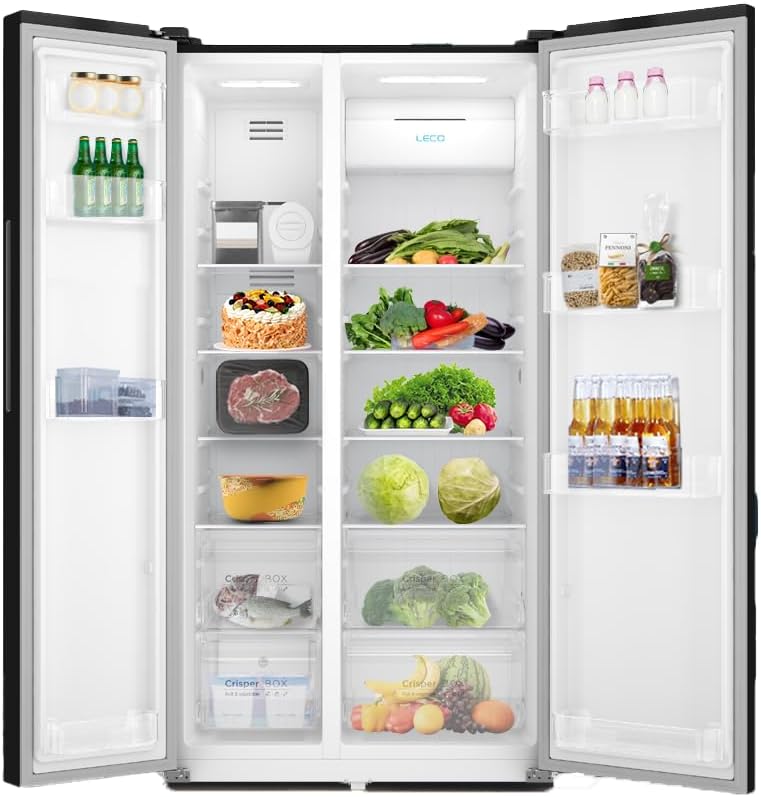
Figure 4.5: Interior layout of the refrigerator, demonstrating its spacious compartments and organization for fresh and frozen goods.
5. Maintenance and Cleaning
Regular cleaning and maintenance will ensure the longevity and efficient operation of your refrigerator.
5.1 Cleaning the Interior
- Always unplug the appliance before cleaning.
- Wash the interior with a solution of warm water and baking soda (2 tablespoons of baking soda to 1 liter of water).
- Rinse thoroughly and wipe dry.
- Clean removable parts like shelves and drawers with mild detergent and water, then dry completely before returning them.
5.2 Cleaning the Exterior
- Wipe the exterior surfaces with a soft cloth dampened with mild detergent and water.
- For the stainless steel finish, use a specialized stainless steel cleaner.
- Clean the door gaskets regularly to ensure a tight seal.
5.3 Defrosting
This refrigerator features No-Frost technology, so manual defrosting of the freezer compartment is not required. However, ensure the air vents inside are not blocked by food items to maintain proper air circulation.
6. Troubleshooting
Before contacting service, check the following common issues and solutions:
| Problem | Possible Cause | Solution |
|---|---|---|
| Refrigerator not cooling | Power outage; plug not inserted; temperature setting too high; door left open; poor ventilation. | Check power supply; ensure plug is secure; lower temperature setting; close door properly; ensure adequate clearance around the unit. |
| Unusual noises | Appliance not level; objects vibrating against the unit; compressor noise (normal). | Adjust leveling feet; remove objects; normal compressor sounds are expected. |
| Water on floor/inside | Drain hole blocked; door not sealed properly; high humidity. | Clear drain hole; check door gasket for obstructions; this is normal in high humidity. |
| LED display not working | Power issue; control panel malfunction. | Check power; contact customer support if issue persists. |
7. Specifications
| Feature | Detail |
|---|---|
| Brand | CHiQ |
| Model Name | Side-by-Side Refrigerator |
| Model Number | CSS730NPIK2 |
| Product Dimensions (DxWxH) | 71 cm x 91 cm x 176 cm |
| Total Capacity | 565 Liters |
| Fresh Food Capacity | 359 Liters |
| Freezer Capacity | 203 Liters |
| Configuration | Side-by-Side |
| Color | Silver |
| Special Features | Touch Control, No-Frost, Multi-Air Flow, Humidity-Controlled Crisper, Smart Mode, Built-in Ice Maker |
| Installation Type | Freestanding |
| Number of Doors | 2 |
| Defrost System | Frost Free |
| Voltage | 240 Volts |
| Shelf Type | Plastic |
| Number of Shelves | 7 |
| Adjustable Temperature Control | Yes |
| Power Plug Type | Type B (North America & Japan) |
| Door Orientation | Reversible |
| Compressor Type | Rotary Scroll |
| Convertible Freezer | No |
| Customizable | No |
| Power Source | Corded Electric |
| Wireless | No |
| Lock Type | Electronic |
| Item Weight | 92 Kilograms |
| Annual Energy Consumption | 1125.1 kWh |
| Energy Efficiency Rating | 4 Star |
| Refrigerant | R-410A |
| Finish Type | Non-glossy |
| Door Material | Aluminum |
| Included Components | 1 x CHiQ Side-by-Side Refrigerator, 562 Liter Capacity, Inox |
| Manufacturer | CHiQ |
8. Warranty Information
This CHiQ refrigerator comes with a two-year warranty from the date of purchase. This warranty covers manufacturing defects and faulty workmanship under normal household use. Please retain your proof of purchase for warranty claims.
The warranty does not cover:
- Damage caused by improper installation or use not in accordance with this manual.
- Damage caused by accidents, misuse, neglect, fire, or other external causes.
- Normal wear and tear.
- Repairs or modifications performed by unauthorized service personnel.
9. Customer Support
For technical assistance, service requests, or further inquiries, please contact CHiQ customer support. You can find contact details on the official CHiQ website or through your local retailer.
Online Resources: Visit the official CHiQ website for FAQs, product registration, and additional support materials.


