
1. Introduction
Welcome to the user manual for your MekedeTech M6 Pro Android Car Stereo. This manual provides detailed instructions for the installation, operation, and maintenance of your new in-dash head unit. Please read this manual thoroughly before using the device to ensure proper functionality and to maximize your user experience.
The MekedeTech M6 Pro is an advanced car multimedia system featuring an Android 12 operating system, a 10-inch 1280x720 QLED IPS touch screen, Bluetooth 5.1, and an Octa Core processor. It supports Wireless CarPlay, Android Auto, and offers superior audio processing with DSP 36-Band EQ and DTS 4.1/5.1 Channel Surround Systems.
2. Product Overview
The MekedeTech M6 Pro is designed to enhance your driving experience with its powerful features and intuitive interface.
2.1 Key Features
- Android 12 System: Upgraded M6 Series Android system for smooth performance.
- High-Performance Processor: 8-core (2 cores ARM Cortex A75 + 6 cores ARM Cortex A55) with 8GB RAM and 128GB ROM.
- QLED IPS Touch Screen: 10-inch 1280x720 resolution QLED full-fit screen for excellent display quality, even in strong sunlight.
- Wireless CarPlay & Android Auto: Seamless integration with your smartphone for navigation, calls, messages, and music without cables.
- Bluetooth 5.1: Qualcomm 3031 chip for low power consumption, faster transmission, and stable signal.
- Voice Control: Intelligent voice control for hands-free operation, compatible with Siri and other voice applications.
- Advanced Audio Processing: DSP 36-Band EQ for precise sound tuning and DTS 4.1/5.1 Channel Surround Systems for immersive audio.
- GPS Accurate Positioning: Built-in global positioning system with real-time traffic conditions.
- 4G Connectivity: Supports 4G for online streaming and data access.
- Built-in High Power Fan: Efficient cooling system to prevent overheating.
2.2 Package Contents
Verify that all items listed below are included in your package:
- 1 x Host Device (Tablet)
- 1 x Instruction Manual
- 1 x Packaging Box
- 1 x RCA Cable Set
- 1 x Reversing Camera (optional, may vary by package)
- 1 x Fakra GPS Antenna
- 1 x Fakra 4G Antenna
- 1 x External Microphone (MIC)
- 3 x USB Plugs

Image: All components included in the MekedeTech M6 Pro package, including the head unit, cables, antennas, and manual.

Image: Front view of the MekedeTech M6 Pro Android Car Stereo, showcasing its 10-inch QLED IPS touch screen and user interface.

Image: Illustrates the 8-core 12NM processor and the 1280x720 QLED full-fit screen of the MekedeTech M6 Pro.
3. Setup and Installation
Professional installation is recommended for this device. Ensure the vehicle's power is disconnected before beginning installation.
3.1 Wiring Diagram
Refer to the detailed connection diagram for proper wiring of the head unit to your vehicle's electrical system, speakers, and accessories.
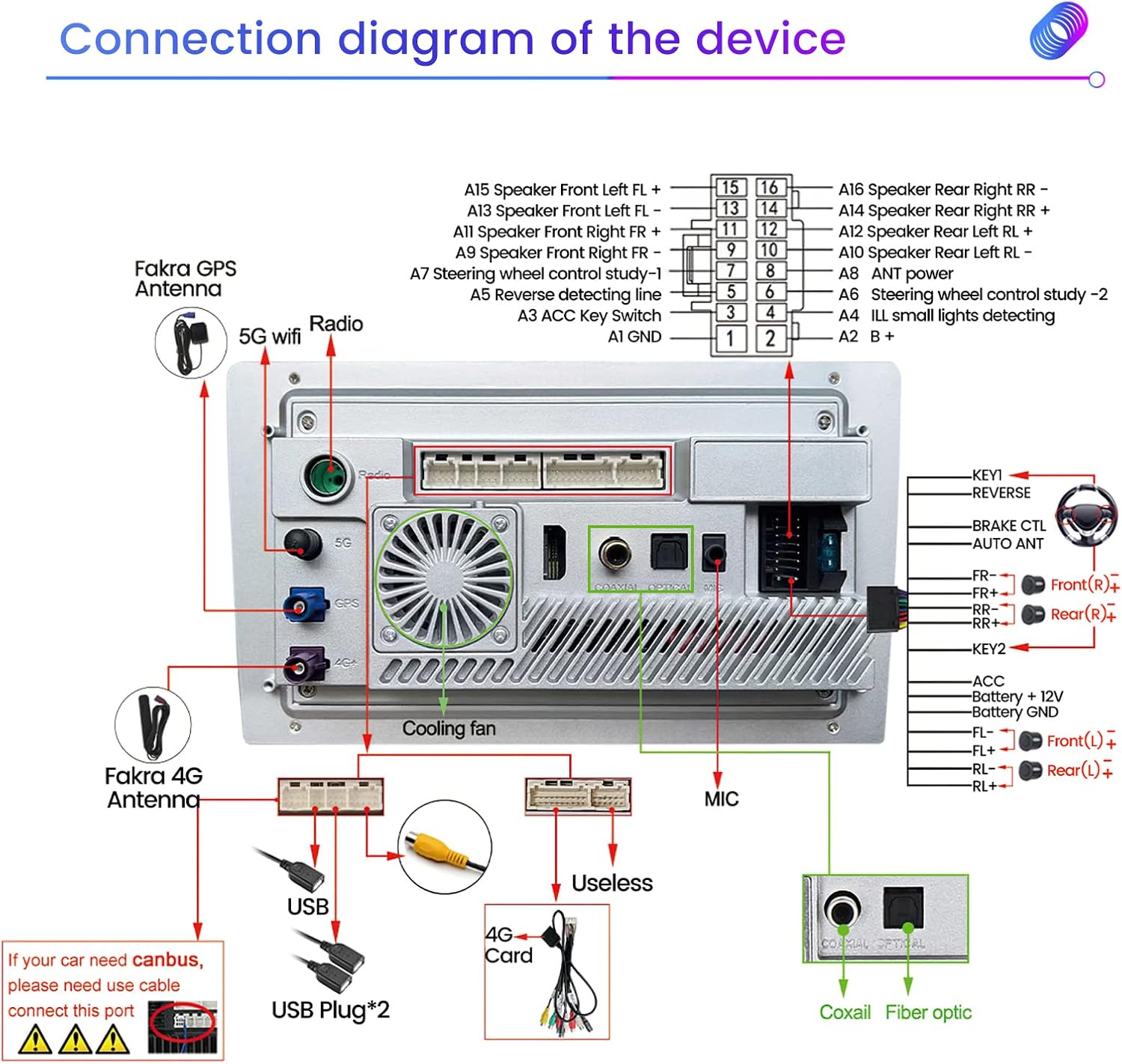
Image: Comprehensive wiring diagram for the MekedeTech M6 Pro, showing connections for power, speakers, USB, GPS, 4G antennas, and optional accessories.
3.2 Connection Steps
- Power Connection: Connect the ACC, Battery +12V, and Battery GND wires to the corresponding vehicle power sources.
- Speaker Connections: Connect the front left, front right, rear left, and rear right speaker wires (FL+, FL-, FR+, FR-, RL+, RL-, RR+, RR-) to your vehicle's speakers.
- Antenna Connections: Connect the Fakra GPS Antenna and Fakra 4G Antenna to their respective ports on the back of the unit.
- USB Connections: Connect the provided USB cables to the USB ports on the unit. These can be routed to a convenient location in your vehicle for connecting external devices.
- Microphone Connection: Plug in the external MIC for improved voice command and call quality.
- RCA Connections: Use the RCA cables for connecting external amplifiers, subwoofers, or video inputs/outputs as needed.
- Reversing Camera: If installing a reversing camera, connect its video output to the 'REVERSE' input on the unit and its power to the vehicle's reverse light circuit.
- CANBUS (Optional): If your vehicle requires a CANBUS module for integration with steering wheel controls, climate control, or other vehicle data, connect it as per the vehicle-specific instructions.
4. Operating Instructions
Once installed, power on the unit. The system will boot up to the main interface.
4.1 Wireless CarPlay & Android Auto
Enjoy seamless smartphone integration without the need for cables.
- Wireless CarPlay:
- Connect your iPhone to the head unit via Bluetooth.
- On the head unit, click on the "Car Link" application and wait for the connection to establish.
- Wired Android Auto:
- Connect your Android phone to the head unit using a USB cable.
- On the head unit, click on the "Car Link" application and wait for the connection to establish.

Image: Steps for connecting Wireless CarPlay to the MekedeTech M6 Pro.

Image: Steps for connecting Wired Android Auto to the MekedeTech M6 Pro.
4.2 Voice Control
The intelligent voice control feature allows for hands-free operation, enhancing driving safety and convenience. Activate voice commands by saying the designated wake word or pressing the voice control button (if available on your steering wheel or screen).
- Examples of commands: "Play Music", "Turn on the radio", "Navigate to the airport", "Go to Los Angeles", "Go to a nearby gas station", "Close navigation", "Dodge the congestion".

Image: Depicts the voice control functionality, showing various commands for navigation, music, and system control.
4.3 Audio Settings (DSP & DTS)
Fine-tune your audio experience with the built-in Digital Signal Processor (DSP) and DTS surround sound.
- DSP 36-Band EQ: Access the equalizer settings to adjust audio frequencies across 36 bands. This allows for more precise and delicate sound tuning compared to standard EQs, creating a customized audio environment.
- DTS 4.1/5.1 Channel Surround Systems: Engage DTS for a more dynamic and smoother sound, providing an immersive surround sound experience within your vehicle.

Image: Details the DSP 36-band equalizer interface and the DTS 4.1/5.1 channel surround sound system, enhancing audio quality.
4.4 GPS Navigation
The unit features a built-in global positioning system for accurate navigation.
- Supports omni-directional map display and synchronous display of real-time traffic conditions.
- Utilizes custom GPS & 4G antennas for more accurate and stable positioning.

Image: Shows the GPS accurate positioning feature with real-time map display and highlights the specially designed main board components.
4.5 Radio (FM/AM RDS)
Access your favorite radio stations with the integrated FM/AM RDS radio tuner.
- Supports automatic search and manual search for stations.
- Customize the main interface by dragging and dropping icons to your preferred positions.
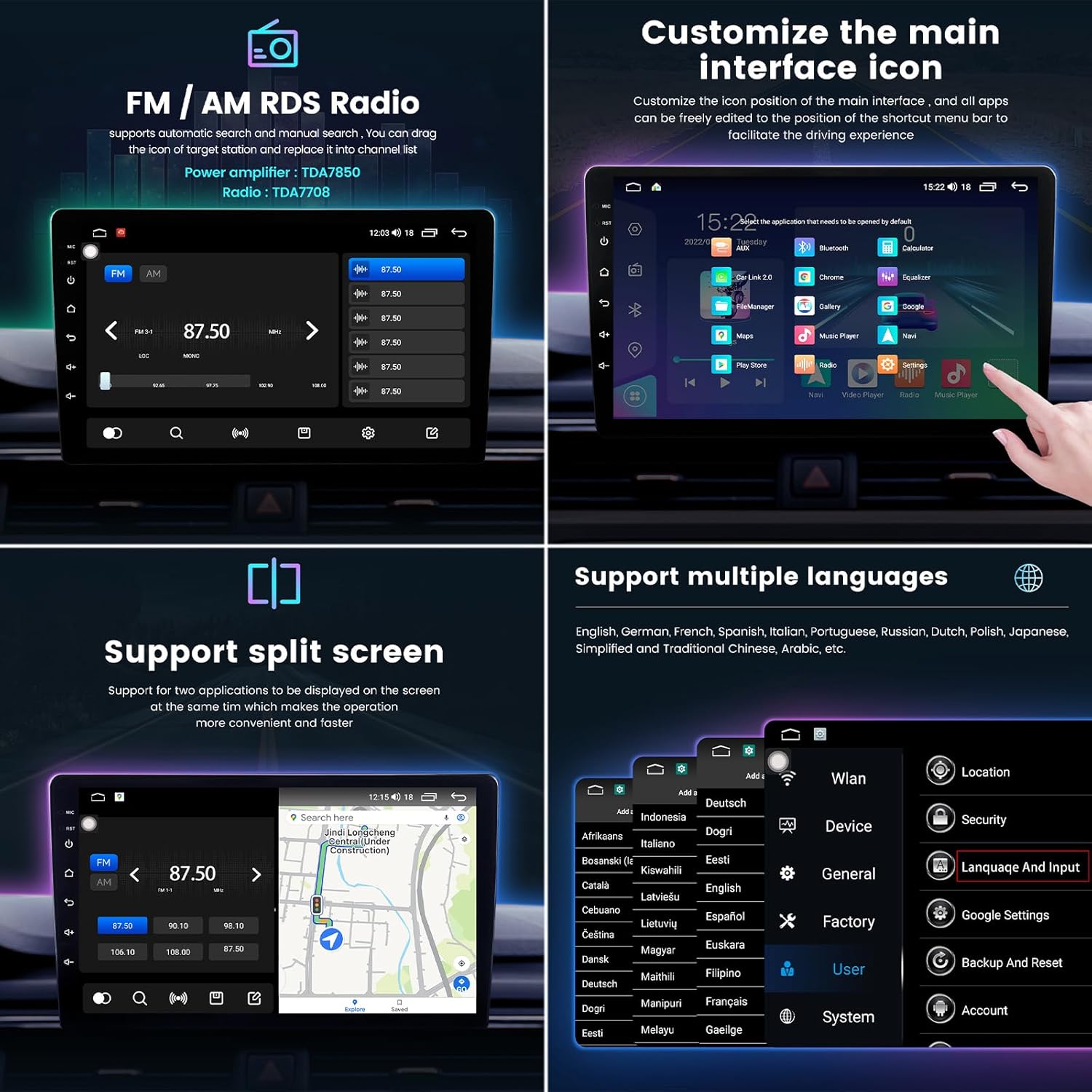
Image: Displays the FM/AM RDS radio interface, options for customizing main interface icons, split-screen functionality, and multi-language support.
4.6 Split Screen Functionality
The split-screen feature allows you to display two applications simultaneously, enhancing convenience and multitasking while driving.
4.7 Bluetooth 5.1 Connectivity
The Qualcomm 3031 Bluetooth 5.1 chip ensures stable and fast wireless connections for calls and music streaming.
- Low electric power consumption.
- Faster transmission speed with no delay for calls or music.
- Strong anti-interference and more stable signal compared to older Bluetooth versions.

Image: Compares Bluetooth 5.1 performance against older versions, highlighting improvements in connection range, stability, and transmission speed.
5. Maintenance
To ensure the longevity and optimal performance of your MekedeTech M6 Pro, follow these maintenance guidelines:
- Cleaning: Use a soft, dry cloth to clean the screen and exterior of the unit. For stubborn smudges, a slightly damp cloth with a mild, non-abrasive cleaner can be used, but avoid spraying liquids directly onto the unit.
- Software Updates: Periodically check for system software updates. Updates can improve performance, add new features, and fix bugs. Follow the on-screen prompts or instructions provided by MekedeTech for updating the system.
- Environmental Conditions: Avoid exposing the unit to extreme temperatures, direct sunlight for prolonged periods, or excessive moisture.
- Connections: Periodically check all cable connections to ensure they are secure and free from corrosion.
6. Troubleshooting
If you encounter issues with your MekedeTech M6 Pro, refer to the following common problems and solutions:
| Problem | Possible Cause | Solution |
|---|---|---|
| Unit does not power on. | Incorrect wiring, blown fuse, vehicle power issue. | Check power connections (ACC, +12V, GND). Verify vehicle fuse. Consult a professional installer. |
| No sound or distorted sound. | Speaker wiring issues, volume too low, audio settings. | Check speaker connections. Increase volume. Reset audio settings (EQ, balance, fader). Ensure no apps are muting sound. |
| Touch screen unresponsive or requires multiple touches. | Software glitch, screen calibration issue, physical damage. | Restart the unit. Check for system updates. If persistent, contact support. |
| Wireless CarPlay/Android Auto not connecting. | Bluetooth/Wi-Fi interference, incorrect pairing, app issues. | Ensure Bluetooth is enabled on phone and unit. Forget and re-pair device. Restart phone and unit. Check "Car Link" app. |
| GPS signal weak or inaccurate. | Antenna placement, environmental interference. | Ensure GPS antenna has a clear view of the sky. Check antenna connection. |
| Unit randomly shuts off or reboots. | Power supply issue, overheating, software instability. | Check power connections for stability. Ensure proper ventilation around the unit. Check for system updates. |
| 4G network not found or slow. | SIM card issue, poor signal area, antenna connection. | Ensure SIM card is correctly inserted and active. Check 4G antenna connection. Move to an area with better network coverage. |
7. Specifications
| Feature | Specification |
|---|---|
| Model Name | M6Pro |
| Display Size | 10 Inches |
| Display Resolution | 1280x720 |
| Operating System | Android 12 |
| Processor | 8-core (2 cores ARM Cortex A75 + 6 cores ARM Cortex A55) |
| Memory (RAM) | 8GB |
| Storage (ROM) | 128GB |
| Bluetooth Version | 5.1 (Qualcomm 3031 chip) |
| Special Features | Touchscreen, Wireless CarPlay, Wired Android Auto, DSP 36-Band EQ, DTS 4.1/5.1 Channel Surround, Voice Control, 4G LTE Support |
| Connectivity Technology | Wireless |
| Map Type | Worldwide |
| Audio Output Mode | Stereo |
8. Warranty and Support
MekedeTech is committed to providing high-quality products and customer satisfaction. For any technical assistance, warranty inquiries, or specific feature questions, please contact MekedeTech directly. Many users have reported positive experiences with direct communication for support and additional features.
You can often find support contact information on the official MekedeTech website or through the platform where you purchased the product. Please have your model number (M6Pro) and purchase details ready when contacting support.