
TRUSTECH KPT-1607F
TRUSTECH 26-inch Tower Space Heater (Model KPT-1607F) User Manual
Comprehensive instructions for safe and efficient operation.
1. Introduction
Thank you for choosing the TRUSTECH 26-inch Tower Space Heater. This manual provides essential information for the proper setup, operation, maintenance, and troubleshooting of your new heater. Please read this manual thoroughly before use and retain it for future reference. Adhering to these instructions will ensure safe and efficient performance of the appliance.
2. Important Safety Information
Always follow basic safety precautions when using electrical appliances to reduce the risk of fire, electric shock, and injury. This heater is designed for indoor use only.
- Placement: Position the heater on a firm, level surface. Maintain a minimum distance of 3 feet (0.9 meters) from walls, furniture, curtains, and other combustible materials.
- Power Supply: Ensure the heater is connected to a grounded 120V AC, 60Hz outlet. Do not use extension cords or power strips.
- Ventilation: Do not block air inlets or outlets. Ensure proper airflow around the heater.
- Supervision: Do not leave the heater unattended while in operation. Keep children and pets away from the heater.
- Moisture: Do not use the heater in wet or damp locations, such as bathrooms or laundry areas.
- Overheat Protection: The heater is equipped with an automatic overheat protection system. If the heater overheats, it will shut off automatically. Unplug the heater, allow it to cool for 30 minutes, then plug it back in.
- Tip-Over Protection: The heater includes a safety switch that automatically turns off the unit if it is accidentally tipped over. Place the heater upright on a stable surface to resume operation.
- Flame Retardant Material: Constructed with V0 flame-retardant materials for enhanced safety.
- ETL Certified: This product is ETL listed, indicating compliance with North American safety standards.

3. Package Contents
- TRUSTECH 26-inch Tower Space Heater (Model KPT-1607F)
- Remote Control (with 1 Lithium Metal battery included)
- User Manual
4. Product Overview
Familiarize yourself with the components of your TRUSTECH Tower Space Heater.

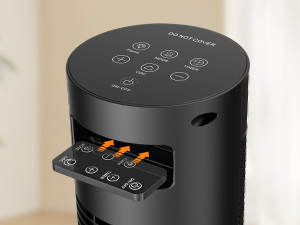
Control Panel & Remote Functions

- On/Off Button: Powers the unit on or off.
- Mode Button: Cycles through heating modes (High, Low, Eco).
- Thermostat Buttons (+/-): Adjusts the desired temperature.
- Oscillation Button: Activates or deactivates the 60° oscillation function.
- Timer Button: Sets the auto-off timer (1-12 hours).
- Flame Button: Controls the 3D flame effect.
5. Setup
- Unpack: Carefully remove the heater and all packaging materials from the box.
- Placement: Place the heater on a stable, level, and heat-resistant surface. Ensure it is at least 3 feet (0.9 meters) away from any walls, furniture, or flammable objects.
- Power Connection: Plug the heater directly into a standard 120V AC, 60Hz electrical outlet. Do not use extension cords or surge protectors.
- Remote Control Battery: The remote control comes with a pre-installed Lithium Metal battery. If needed, replace with a CR2025 battery.
6. Operating Instructions
Power On/Off
Press the On/Off button on the control panel or remote control to turn the heater on or off.
Heating Modes
Press the Mode button to cycle through the available heating settings:
- High (1500W): Provides maximum heat output for rapid warming.
- Low (1000W): Provides moderate heat output.
- Eco Mode: Automatically adjusts heating power (1500W/1000W) to maintain the set temperature, optimizing energy consumption.

Thermostat Control
In Eco Mode, use the + or - buttons to set your desired temperature between 41°F and 95°F (5°C and 35°C) in 1°F increments. The heater will automatically turn on or off to maintain this temperature.
Oscillation Function
Press the Oscillation button to activate the 60° wide-angle oscillation, distributing heat evenly across the room. Press again to stop oscillation.

Timer Function
Press the Timer button to set an auto-off timer from 1 to 12 hours. Each press increases the timer by one hour. The heater will automatically shut off once the set time expires.
3D Flame Effect
Press the Flame button to turn the decorative 3D flame effect on or off. This feature operates independently of the heating function and can serve as a night light.

Remote Control Usage
The remote control allows for convenient operation from a distance. Point the remote directly at the heater's display panel. Ensure there are no obstructions between the remote and the heater.
7. Maintenance
Regular cleaning and proper storage will help prolong the life of your heater.
Cleaning
- Always unplug the heater and allow it to cool completely before cleaning.
- Use a soft, damp cloth to wipe the exterior surfaces of the heater. Do not use abrasive cleaners or solvents.
- Gently vacuum the air inlet and outlet grilles to remove dust and lint.
- Ensure no water or other liquids enter the interior of the heater.
Storage
When not in use, store the heater in a cool, dry place. It is recommended to store it in its original packaging to protect it from dust and damage.
8. Troubleshooting
If you encounter issues with your heater, refer to the following table for common problems and solutions.
| Problem | Possible Cause | Solution |
|---|---|---|
| Heater does not turn on. | No power supply; Power switch off; Tip-over switch activated; Overheat protection activated. | Check power cord connection; Ensure power outlet is functional; Turn on the main power switch; Place heater on a flat, stable surface; Unplug, wait 30 minutes, then plug back in. |
| No heat output. | Low power mode selected; Thermostat set too low; Air inlets/outlets blocked. | Select a higher heating mode (1500W); Increase the thermostat setting; Clear any obstructions from air inlets/outlets. |
| Oscillation not working. | Oscillation function not activated. | Press the Oscillation button on the control panel or remote. |
| Remote control not working. | Battery depleted; Obstruction between remote and heater. | Replace the remote control battery (CR2025); Ensure a clear line of sight to the heater's display. |
If the problem persists after attempting these solutions, please contact TRUSTECH customer support for assistance.
9. Specifications
| Feature | Detail |
|---|---|
| Brand | TRUSTECH |
| Model Number | KPT-1607F |
| Power Output | 1500W / 1000W |
| Voltage | 120V AC |
| Heating Element | PTC Ceramic |
| Heating Coverage | Up to 130 sq. ft. |
| Thermostat Range | 41°F - 95°F (5°C - 35°C) |
| Oscillation Angle | 60° |
| Timer | 1-12 Hours |
| Product Dimensions | 7.87"D x 7.48"W x 27"H |
| Item Weight | 6.61 pounds |
| Safety Features | Overheat Protection, Tip-Over Protection, V0 Flame-Retardant Material, ETL Certified |
| Remote Control Battery | 1 Lithium Metal battery (CR2025) |
10. Warranty and Support
Warranty Information
TRUSTECH provides a 12-month replacement warranty from the date of purchase for any manufacturing defects or malfunctions under normal use. Please retain your proof of purchase for warranty claims.

Customer Support
For any questions, technical assistance, or warranty claims, please contact TRUSTECH customer support. We offer:
- Quick reply within 24 hours.
- Lifetime after-sales service and technical support.


Please visit the official TRUSTECH website or refer to your purchase platform for specific contact details.
Related documentsKPT-1607F

Ask a question about this manual
Ask about setup, troubleshooting, compatibility, parts, safety, or missing instructions. Manuals+ will review the question and use this page’s manual context to help answer it.