
1. Introduction
This manual provides essential information for the safe and efficient use of your Skil PWRCore 40 2.5Ah 40V Lithium Battery and STH4818 14-Inch Rapid Reload Head. Please read these instructions carefully before use and retain them for future reference.
2. Safety Information
Always follow basic safety precautions to reduce the risk of fire, electric shock, and personal injury. Keep the battery and trimmer head away from water, excessive heat, and direct sunlight. Do not attempt to disassemble or modify the battery or trimmer head.
3. Setup
3.1 Charging the PWRCore 40 2.5Ah Lithium Battery
The PWRCore 40 2.5Ah Lithium Battery features an innovative temperature management system for optimal performance and longevity. Use only a compatible Skil PWRCore 40 charger (sold separately) to charge the battery.
- Connect the charger to a standard power outlet.
- Align the battery with the charger's slot and slide it in until it clicks into place.
- Observe the LED indicators on the charger. A blinking green light typically indicates charging. A solid green light indicates a full charge.
- The battery can charge from 0-30% in approximately 15 minutes. A full charge may take longer.

Figure 1: Skil PWRCore 40 2.5Ah Lithium Battery. This image shows the overall design of the battery pack, highlighting its robust construction and branding.

Figure 2: Side view of the Skil PWRCore 40 2.5Ah Lithium Battery. This view emphasizes the side profile and ventilation features of the battery.

Figure 3: Top view of the Skil PWRCore 40 2.5Ah Lithium Battery. This image displays the top surface, including the connection points for the charger and tool.
3.2 Installing the STH4818 14-Inch Rapid Reload Head
The STH4818 Rapid Reload Head is designed for quick and easy line loading, compatible with SKIL Brushless PWRCore 40 14'' String Trimmers.
- Ensure the string trimmer is powered off and the battery is removed before installation.
- Refer to your string trimmer's manual for specific instructions on removing the existing trimmer head.
- Align the Rapid Reload Head with the trimmer shaft and secure it according to the trimmer's instructions.

Figure 4: Skil STH4818 14-Inch Rapid Reload Head. This image shows the complete rapid reload head assembly.
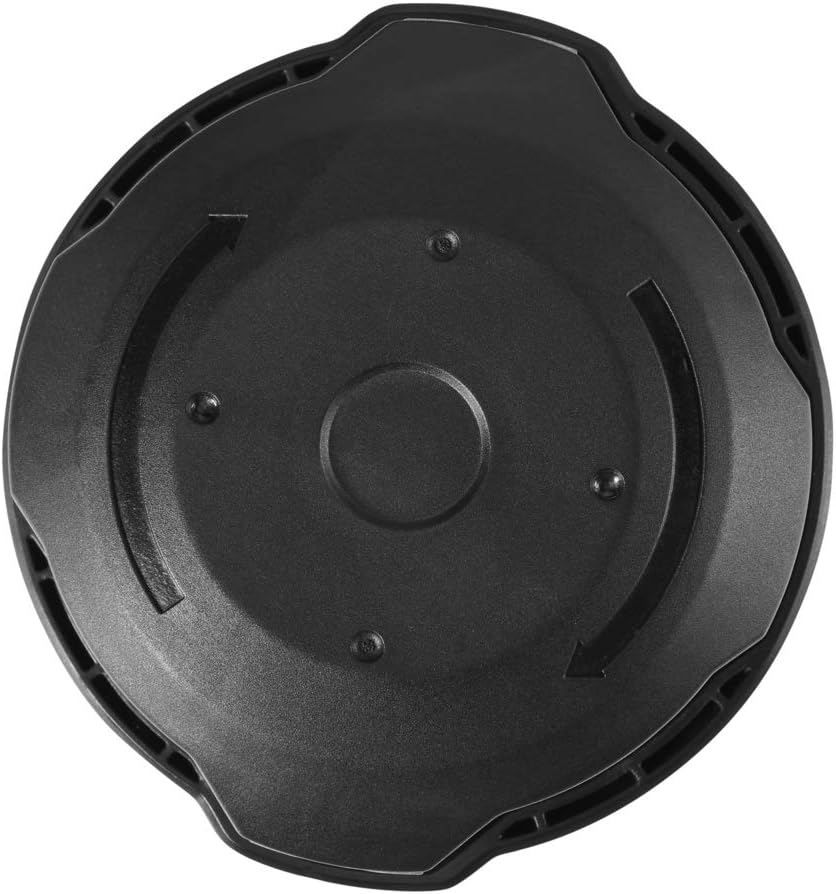
Figure 5: Top view of the Skil STH4818 14-Inch Rapid Reload Head. This view highlights the line loading mechanism and design.
4. Operating Instructions
4.1 Using the PWRCore 40 2.5Ah Lithium Battery
The Skil PWRCore 40 battery is designed to power all Skil PWRCore 40 tools. Ensure the battery is fully charged before use for optimal performance.
- Align the charged battery with the battery slot on your compatible Skil PWRCore 40 tool.
- Slide the battery into the tool until it locks securely in place.
- To remove, press the battery release button (if applicable on your tool) and slide the battery out.
4.2 Loading Line into the Rapid Reload Head
The Rapid Reload Head simplifies the process of adding new trimmer line.
- Ensure the trimmer is off and the battery is removed.
- Align the arrows on the trimmer head with the eyelets.
- Insert the new trimmer line through one eyelet and push it straight through until it exits the opposite eyelet. Ensure equal lengths of line are protruding from both sides.
- Twist the trimmer head knob or use the bump-feed mechanism (depending on model) to wind the line into the head until only the desired length remains exposed.
5. Maintenance
5.1 Battery Care
- Store the battery in a cool, dry place away from direct sunlight and extreme temperatures.
- Do not store the battery in a discharged state for extended periods. Charge it periodically if not in use.
- Clean battery terminals with a dry cloth if necessary.
5.2 Trimmer Head Maintenance
- Regularly inspect the trimmer head for wear, cracks, or damage. Replace if necessary.
- Keep the head free of debris, grass clippings, and dirt to ensure proper line feeding.
- Use only recommended trimmer line sizes and types for optimal performance and to prevent damage.
6. Troubleshooting
6.1 Battery Issues
- Battery not charging: Ensure the charger is properly plugged in and the battery is fully seated. Check the charger's LED indicators for error codes (e.g., high/low temperature, defective battery). Allow the battery to cool down or warm up if temperature is indicated as an issue.
- Reduced run time: Ensure the battery is fully charged. Battery performance can decrease over time with repeated use.
6.2 Trimmer Head Issues
- Line not feeding: Check for tangled or jammed line inside the head. Ensure the line is correctly loaded and not fused together. Verify that the bump-feed mechanism is functioning correctly.
- Excessive line breakage: Ensure you are using the correct diameter and type of trimmer line. Avoid hitting hard surfaces or objects.
7. Specifications
| Component | Specification |
|---|---|
| Brand | Skil |
| Battery Model | BY8705-00 |
| Battery Type | PWRCore 40 Lithium |
| Battery Voltage | 40 Volts |
| Battery Capacity | 2.5 Amp Hours |
| Trimmer Head Model | STH4818 |
| Trimmer Head Size | 14-Inch |
| Trimmer Head Feature | Rapid Reload, Bump-Feed Design |
| Recommended Use | String Trimmer |
| Trimmer Head Dimensions | 7.1" L x 7.1" W x 3.15" H |
8. Warranty and Support
For warranty information and customer support, please refer to the official Skil website or contact their customer service directly. Keep your purchase receipt as proof of purchase.