
SUPNOVA Digital Battery Capacity Tester
SUPNOVA Waterproof Battery Monitor User Manual
Model: Digital Battery Capacity Tester (Blue)
For 12V, 24V, 36V, 48V, 60V, 72V, 84V Systems
Introduction
Thank you for choosing the SUPNOVA Waterproof Battery Monitor. This digital battery meter is designed to accurately test and display the voltage and remaining capacity percentage of various battery types, including Ternary lithium batteries, lead-acid batteries, and lithium iron phosphate batteries. It is suitable for a wide range of applications such as electric motorcycles, cars, golf carts, marine vessels, and RVs. Featuring a fully closed shell and IPX7 waterproof rating, this monitor is built for durability and reliable performance in both indoor and outdoor environments. It also includes a buzzer alarm for voltage alerts and a temperature display.
Safety Information
- Always ensure correct polarity when connecting the battery monitor. Incorrect wiring can damage the device and the battery.
- Do not attempt to disassemble or modify the device. Refer all servicing to qualified personnel.
- Keep the device away from extreme temperatures, direct sunlight, and corrosive substances.
- While the device is IPX7 waterproof, avoid prolonged submersion or high-pressure water jets.
- Ensure the battery voltage is within the supported range (7-100V) before connection.
Product Overview
The SUPNOVA Battery Monitor features a clear digital display and two control buttons. The display shows battery voltage, remaining capacity percentage, and temperature. The device is compact and designed for easy integration into various systems.

Image: Front view of the SUPNOVA Waterproof Battery Monitor, showing its black casing and blue digital display. The display indicates battery voltage, percentage, and a battery level bar.
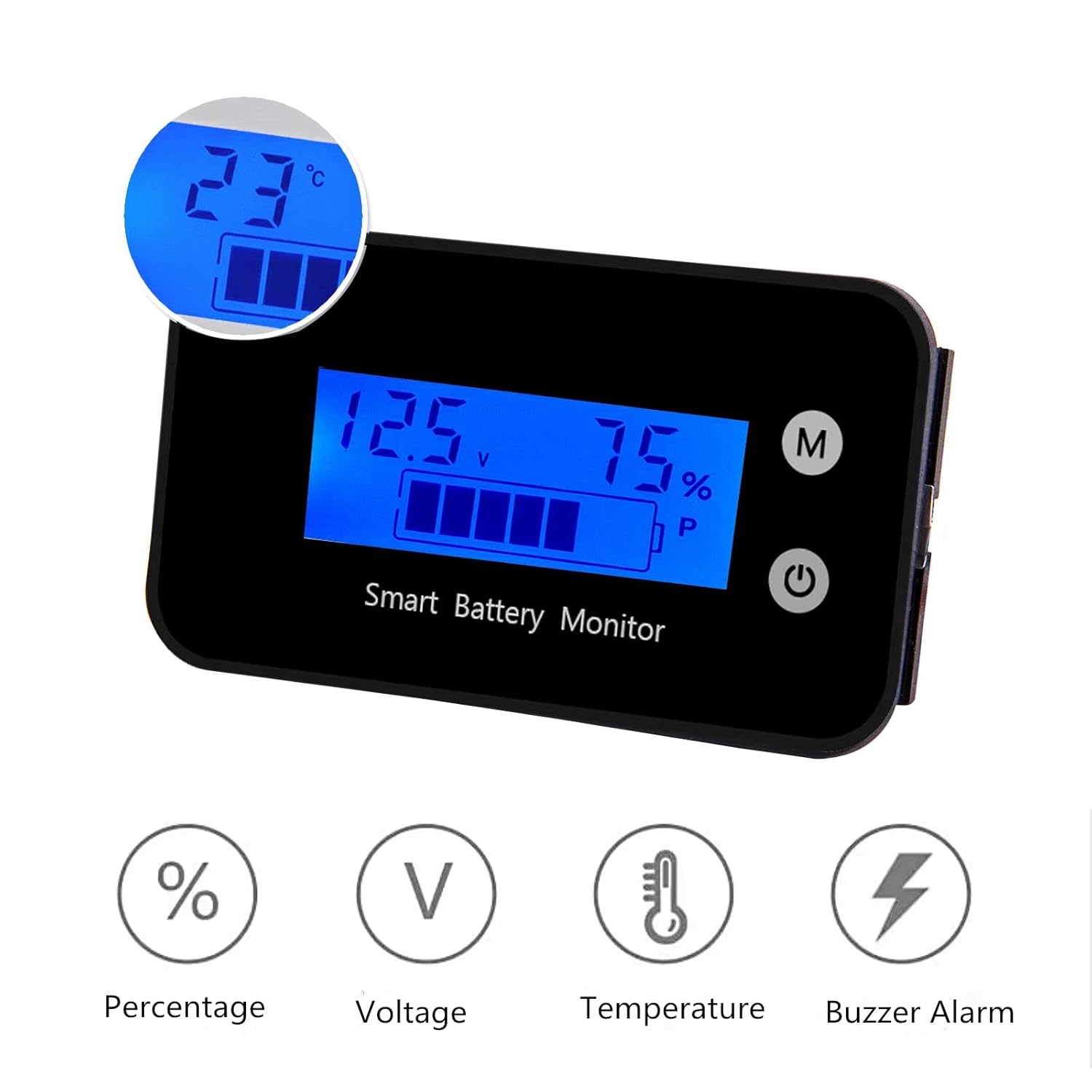
Image: The battery monitor's display showing temperature in Celsius, along with icons representing percentage, voltage, temperature, and buzzer alarm features.

Image: The SUPNOVA Battery Monitor partially submerged in a glass of water, demonstrating its IPX7 waterproof capability. The display remains active.
Setup and Installation
1. Wiring Connection
The battery monitor requires a direct connection to your battery system. Ensure the system voltage is within the 7V-100V range.
- Connect the red wire from the monitor to the positive (+) terminal of your battery.
- Connect the black wire from the monitor to the negative (-) terminal of your battery.
- The wires are approximately 15.75 inches (40 cm) in length.

Image: A simplified wiring diagram showing the SUPNOVA Smart Battery Monitor connected to a battery. The red wire connects to the positive terminal (B+) and the black wire connects to the negative terminal (B-).

Image: Rear view of the battery monitor, showing the red and black wires extending from the back panel.
2. Mounting
The monitor can be mounted using the provided double-sided adhesive. Choose a clean, flat surface for optimal adhesion.
- Clean the mounting surface thoroughly to ensure it is free of dust and grease.
- Peel off the protective backing from the double-sided adhesive.
- Carefully press the monitor onto the desired surface, ensuring firm contact.

Image: Close-up views highlighting the pluggable wire connection point on the back of the monitor and the overall quality of the device's construction.
3. Applicable Battery Types and Voltages
This monitor is compatible with a wide range of battery configurations:
- Voltage Range: 7V to 100V DC.
- Supported Battery Types:
- Ternary Lithium Batteries
- Lead-Acid Batteries (Default setting is 12V lead-acid)
- Lithium Iron Phosphate Batteries
- The monitor supports common battery voltages such as 12V, 24V, 36V, 48V, 60V, 72V, and 84V.
Operating Instructions
1. Display Information
Upon power-up, the monitor will display the current battery voltage and remaining capacity percentage. The display also shows a battery level bar.
- Voltage (V): Shows the real-time voltage of the connected battery.
- Percentage (%): Indicates the estimated remaining battery capacity.
- Temperature (℃): Displays the ambient temperature.
2. Switching Display Modes
To switch between displaying voltage and temperature, short press the "M" key on the monitor.
3. Buzzer Alarm Function
The monitor features a buzzer alarm that can be set for low and high voltage thresholds. When the battery voltage falls below the low threshold or exceeds the high threshold, the buzzer will sound to alert the user.
Note: Specific instructions for setting alarm thresholds are typically found in the full product manual or through on-device menu navigation. Refer to the manufacturer's website or contact support for detailed setup procedures if not immediately apparent.
4. Power-off Memory
The battery tester is equipped with a power-off memory function. This means that any settings configured on the device will be retained even after power is removed, eliminating the need to reconfigure settings each time the device is powered on.
Maintenance
- Cleaning: Use a soft, dry cloth to clean the display and casing. Do not use abrasive cleaners or solvents.
- Storage: When not in use for extended periods, store the monitor in a cool, dry place away from direct sunlight.
- Connections: Periodically check the wiring connections to ensure they are secure and free from corrosion.
Troubleshooting
- No Display/Power:
- Check all wiring connections to ensure they are secure and correctly polarized (red to positive, black to negative).
- Verify that the battery has sufficient voltage within the 7V-100V operating range.
- Inaccurate Readings:
- Ensure the monitor is correctly configured for your specific battery type (e.g., lead-acid, lithium). While the default is 12V lead-acid, specific configuration steps might be required for other types.
- Check for any loose connections that might cause voltage drops or fluctuations.
- Buzzer Alarm Constantly On:
- Check the current battery voltage. It might be outside the set high or low voltage alarm thresholds.
- Review the alarm settings to ensure they are appropriate for your battery system.
Specifications
| Parameter | Value |
|---|---|
| Product Dimensions | 2.4 x 1.4 x 0.5 inches (64 x 36 x 15.3 mm) |
| Item Weight | 0.63 Ounces |
| Manufacturer | SUPNOVA |
| Power Source | DC |
| Style | Digital |
| Color | Blue |
| Waterproof Rating | IPX7 |
| Voltage Range | 7V - 100V DC |
| Supported Battery Types | Ternary Lithium, Lead-Acid, Lithium Iron Phosphate |

Image: A diagram illustrating the precise dimensions of the SUPNOVA Battery Monitor, showing its length (2.5 inches / 64 mm), width (1.4 inches / 36 mm), and thickness (0.6 inches / 15.3 mm).
Warranty and Support
For warranty information, technical support, or any inquiries regarding your SUPNOVA Waterproof Battery Monitor, please contact the manufacturer directly. You can typically find contact details on the product packaging or the official SUPNOVA website.
Manufacturer: SUPNOVA
Seller: SUPNOVA Electronics Co. Ltd.
For further assistance, you may visit the SUPNOVA Store on Amazon.
Related documentsDigital Battery Capacity Tester

Ask a question about this manual
Ask about setup, troubleshooting, compatibility, parts, safety, or missing instructions. Manuals+ will review the question and use this page’s manual context to help answer it.