
QCY T22
QCY T22 Crossky Link Sports Earphones User Manual
Model: T22
Product Overview
The QCY T22 Crossky Link Sports Earphones are designed for comfort and performance, featuring an open-ear design that allows you to stay aware of your surroundings while enjoying high-quality audio. These wireless earbuds utilize Bluetooth 5.3 for stable connectivity and include ENC noise cancellation for clear calls. With an IPX6 waterproof rating, they are suitable for various activities, including sports and outdoor use.
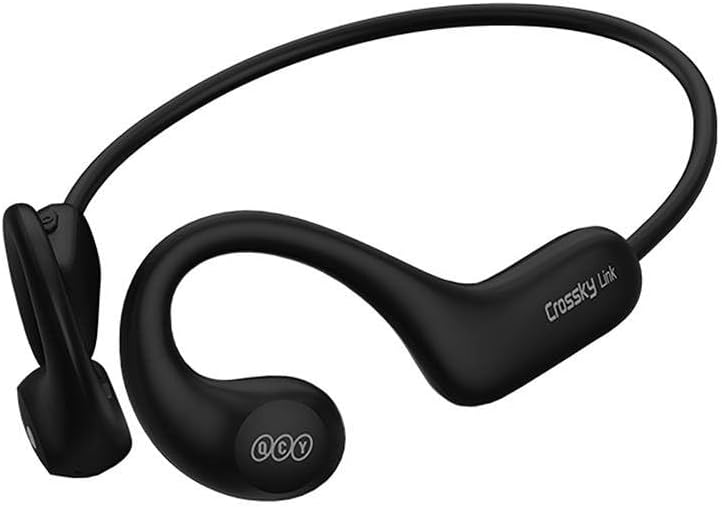
Image: QCY T22 Crossky Link Sports Earphones in black, showcasing their open-ear design and neckband.
Important Safety Information
- Do not use the earphones at high volume for extended periods to prevent hearing damage.
- Do not use the earphones in situations where inability to hear ambient sounds may pose a danger (e.g., driving, cycling, walking in traffic).
- Keep the earphones and accessories out of reach of children and pets to prevent choking hazards.
- Avoid exposing the earphones to extreme temperatures, direct sunlight, or fire.
- Do not disassemble or modify the earphones. This may void the warranty and cause damage.
- Clean the earphones only with a soft, dry cloth. Do not use harsh chemicals or abrasive materials.
Package Contents
- QCY T22 Crossky Link Sports Earphones
- USB Type-C Charging Cable
- User Manual
Getting Started
Charging the Earphones
Before first use, fully charge the earphones. Connect the provided USB Type-C cable to the charging port on the earphones and the other end to a USB power source (e.g., wall adapter, computer USB port). The indicator light will show charging status and turn off when fully charged. A 10-minute quick charge provides up to 3 hours of listening time, and a full charge offers up to 10 hours of playback.
Pairing with Your Device
- Ensure the earphones are charged and powered off.
- Press and hold the multi-function button on the earphones until the indicator light flashes red and blue, indicating pairing mode.
- On your device (smartphone, tablet, computer), enable Bluetooth.
- Search for available Bluetooth devices.
- Select "QCY T22" from the list of found devices.
- Once connected, the indicator light on the earphones will turn off or flash blue slowly.
Operating Your QCY T22 Crossky Link Earphones
Basic Controls
| Function | Action |
|---|---|
| Power On | Press and hold the multi-function button. |
| Power Off | Press and hold the multi-function button. |
| Play/Pause | Single press the multi-function button. |
| Next Track | Double press the multi-function button. |
| Previous Track | Triple press the multi-function button. |
| Answer/End Call | Single press the multi-function button during an incoming call or active call. |
| Reject Call | Press and hold the multi-function button during an incoming call. |
| Activate Voice Assistant | Press and hold the multi-function button (check specific model for duration). |
Using the QCY App
For enhanced functionality and customization, download the official QCY app from your device's app store. The app allows you to:
- Customize EQ settings for personalized sound.
- Update earphone firmware.
- View battery status.
- Access additional features and settings.
Care and Maintenance
- Regularly clean the earphones with a soft, lint-free cloth.
- Avoid using alcohol, cleaning sprays, or abrasive cleaners.
- Store the earphones in a cool, dry place when not in use.
- Do not expose the earphones to water beyond their IPX6 rating (e.g., do not submerge them).
- Charge the earphones regularly, even if not in frequent use, to maintain battery health.
Troubleshooting
| Problem | Possible Solution |
|---|---|
| Earphones do not power on. | Ensure the earphones are fully charged. |
| Cannot pair with device. | Ensure earphones are in pairing mode. Turn off and on Bluetooth on your device. Delete previous pairing records and try again. Move earphones closer to the device. |
| No sound or low volume. | Check volume levels on both earphones and connected device. Ensure earphones are properly connected. |
| Connection is unstable. | Reduce distance between earphones and device. Avoid obstacles. Avoid areas with strong Wi-Fi or other wireless interference. |
Product Specifications
- Model: T22
- Brand: QCY
- Connectivity: Bluetooth 5.3
- Ear Placement: On Ear (Open-Ear Design)
- Noise Control: ENC Noise Cancellation (for calls)
- Waterproof Rating: IPX6
- Battery Life: Up to 10 hours (earphones), 10 min charge for 3 hours playback
- Dimensions: 10 x 5 x 1.27 cm
- Weight: 22 g
- Color: Black
Warranty and Support
QCY products are covered by a limited warranty. For detailed warranty information, technical support, or service inquiries, please refer to the warranty card included with your product or visit the official QCY website. Please retain your proof of purchase for warranty claims.
Related Documents - T22
 |
QCY Crossky R70 Open-Ear Headphones User Manual User guide for QCY Crossky R70 open-ear Bluetooth headphones, detailing setup, pairing, controls, charging, safety precautions, and warranty information. |
 |
QCY Crossky C30 Ear Clip Bluetooth Earbuds User Manual Comprehensive user manual for the QCY Crossky C30 Ear Clip Bluetooth Earbuds, covering setup, pairing, controls, troubleshooting, and safety instructions. |
 |
QCY Crossky R70 Open-ear Headphones User Manual and Product Guide Comprehensive user manual for the QCY Crossky R70 open-ear Bluetooth headphones, covering setup, controls, charging, warranty, safety precautions, and technical specifications. Learn how to pair, connect, and use your headphones effectively. |
 |
QCY Crossky C30 Ear Clip Bluetooth Earbuds User Manual Comprehensive user manual for the QCY Crossky C30 open-ear clip Bluetooth earbuds, covering setup, connection, functions, safety, and warranty information. |
 |
QCY-T13 ANC True Wireless Earbuds User Manual Explore the QCY-T13 ANC True Wireless Earbuds with this comprehensive user manual. Learn about pairing, controls, charging, and troubleshooting for optimal audio experience and Active Noise Cancellation. |
 |
QCY Crossky R70 Open-ear Headphones User Manual User guide for the QCY Crossky R70 Open-ear Headphones, covering overview, Bluetooth pairing, multi-device connection, factory reset, charging, controls, warranty, FCC statement, and safety precautions. |