
1. Introduction
Thank you for choosing the RALAN Wireless Controller. This high-quality gamepad is designed to enhance your gaming experience across multiple platforms, including PlayStation 4 (PS4, PS4 Pro, PS4 Slim), PlayStation 3 (PS3), PC, iOS, and Nintendo Switch. It features dual vibrations, motion sensors, a touch pad, adjustable LED lighting, and a 3.5mm audio jack for immersive gameplay. Please read this manual carefully to ensure proper setup and operation.
2. Product Overview
The RALAN Wireless Controller offers a range of features for an optimized gaming experience:
- Multi-Platform Compatibility: Works with PS4/Pro/Slim, PS3, PC, iOS, and Switch.
- Dual Vibration Motors: Provides realistic feedback for an immersive experience.
- Motion Sensors: 6-axis gyro sensor detects tilt and reacts quickly for motion-sensing games.
- Touch Pad: Integrated touch pad for additional control options.
- Adjustable LED Lighting: Customizable lighting to match your style.
- 3.5mm Audio Jack: Connect your headset for in-game audio and communication.
- Wireless Technology: Stable and responsive signals up to 10 meters.
- Macro Programming Function: Execute complex commands with ease.
- TURBO Button: Switch between different combos for competitive play.
- Ergonomic Design: Non-slip texture and included thumb grip caps for comfortable and secure handling.
- Long Battery Life: Built-in 600 mAh battery provides up to 10 hours of gameplay.
2.1 Controller Components
Familiarize yourself with the various parts of your RALAN Wireless Controller:
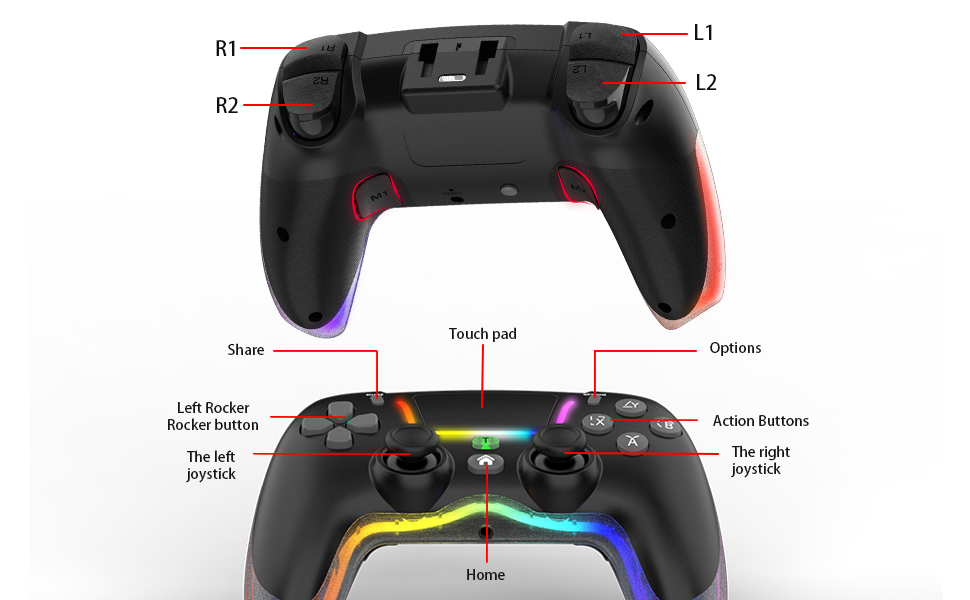
Image: Diagram illustrating the various buttons and features of the RALAN Wireless Controller, including L1, L2, R1, R2, Share, Touch Pad, Options, Left Rocker, Left Joystick, Right Joystick, Action Buttons, and Home button.

Image: Front view of the RALAN Wireless Controller, showcasing its ergonomic design and vibrant adjustable LED lighting along the grips and around the joysticks.

Image: Back view of the RALAN Wireless Controller, highlighting the textured grips and the placement of the L1, L2, R1, R2 buttons, and the reset hole.
3. Setup and Connection
Follow these steps to connect your RALAN Wireless Controller to your device:
3.1 Initial Wired Connection (for PS4/PS3/PC)
- Ensure your console (PS4/PS3) or PC is powered on.
- Connect the included USB cable to the controller and then to a USB port on your console or PC.
- Press and hold the "Home" button on the controller. The controller's light bar will flash, indicating it is attempting to pair.
- Once the light bar turns solid, the controller is successfully connected and paired. You can now disconnect the USB cable to use it wirelessly.
- For subsequent connections, simply press the "Home" button to connect wirelessly.
Note: The first connection must be wired to pair the controller with your device.
3.2 Connecting to Nintendo Switch
Specific instructions for Switch connection may vary. Generally, navigate to the "Controllers" menu on your Switch, select "Change Grip/Order," and then press and hold the "Home" button on the RALAN controller until it pairs.
3.3 Connecting to iOS Devices
For iOS devices, ensure Bluetooth is enabled. Put the controller into pairing mode (usually by holding a specific button combination, refer to the quick start guide if provided). Select the controller from the Bluetooth devices list on your iOS device.
3.4 Unboxing and Connection Demonstration
Video: This video demonstrates the unboxing process of the RALAN Wireless Controller and shows how to perform the initial wired connection to a PlayStation 4 console, followed by wireless operation. It visually guides the user through connecting the USB cable, pressing the Home button, and confirming successful pairing.
4. Operating Instructions
4.1 Basic Controls
The controller features standard gamepad buttons and joysticks. Refer to the "Controller Components" diagram for button layout.
4.2 Dual Vibration Feedback
The controller's dual vibration motors provide haptic feedback that corresponds to in-game actions, enhancing immersion. The intensity of the vibration can be adjusted.

Image: An illustration highlighting the asymmetric dual motor vibration feature within the controller, showing adjustable vibration intensity levels.
4.3 6-Axis Gyro Sensor
The integrated 6-axis gyro sensor detects the controller's tilt and motion, allowing for intuitive control in games that support motion sensing. This feature provides a more engaging and interactive gaming experience.

Image: A visual representation of the six-axis tactile control feature, depicting how controller movements translate into in-game actions for an immersive experience.
4.4 TURBO Function
The TURBO button allows you to set certain buttons for rapid-fire input, which can be useful in action games. Consult the quick start guide for specific instructions on how to activate and assign TURBO functions.
4.5 Macro Programming
The controller supports macro programming, enabling you to record and execute a sequence of button presses with a single input. This feature can provide a competitive edge in games requiring complex button combinations.
4.6 Adjustable LED Lighting
The controller features adjustable LED lighting. Specific controls for changing lighting modes or colors can typically be found in the quick start guide or by pressing a dedicated button combination.
5. Battery and Charging
The controller is equipped with a built-in 600 mAh battery, providing approximately 10 hours of gameplay on a full charge.
- To charge the controller, connect it to a USB power source (e.g., console, PC, USB wall adapter) using the included USB cable.
- You can continue playing while the controller is charging.
- The LED indicator on the controller will typically show charging status (e.g., blinking while charging, solid when fully charged).
6. Maintenance
To ensure the longevity and optimal performance of your RALAN Wireless Controller, follow these maintenance guidelines:
- Cleaning: Use a soft, dry cloth to clean the controller. Avoid using harsh chemicals, solvents, or abrasive materials.
- Storage: Store the controller in a cool, dry place away from direct sunlight and extreme temperatures.
- Avoid Drops: Protect the controller from drops and impacts, which can damage internal components.
- Liquid Exposure: Do not expose the controller to water or other liquids.
- Cable Care: Handle the USB charging cable carefully. Do not pull on the cable itself when disconnecting.
7. Troubleshooting
If you encounter issues with your RALAN Wireless Controller, try the following solutions:
- Controller Not Connecting/Pairing:
- Ensure the controller is charged.
- Perform an initial wired connection as described in Section 3.1.
- Reset the Controller: Insert a paper clip into the reset hole on the back of the controller twice. This can resolve many connectivity issues.
- Ensure no other Bluetooth devices are interfering with the connection.
- Input Lag or Disconnections:
- Ensure you are within the 10-meter wireless range of your device.
- Check for obstacles or other wireless devices that might cause interference.
- Try reconnecting the controller.
- Buttons Not Responding:
- Reset the controller using the paper clip method.
- Ensure the controller is fully charged.
- Test the controller on a different game or platform if possible to rule out software issues.
- Vibration Not Working:
- Check in-game settings to ensure vibration is enabled.
- Some games may not support vibration feedback.
8. Specifications
| Feature | Detail |
|---|---|
| Brand | RALAN |
| Model | Wireless Controller |
| Compatible Devices | PlayStation 4 (PS4, PS4 Pro, PS4 Slim), PlayStation 3, PC, iOS, Nintendo Switch |
| Controller Type | Gamepad |
| Connectivity Technology | Wireless (Bluetooth), USB (Wired) |
| Additional Features | Motion Sensing (6-axis gyro), Dual Vibration, Touch Pad, Adjustable LED Lighting, 3.5mm Audio Jack, TURBO Function, Macro Programming |
| Power Source | Battery Powered (Built-in 600 mAh) |
| Battery Life | Up to 10 hours of gameplay |
| Color | Black |
9. Warranty and Support
RALAN offers a 30-day trial period, allowing for returns or replacements if you are not fully satisfied with your purchase.
For any questions, concerns, or support needs regarding your RALAN Wireless Controller, please contact us directly through the "Contact Seller" option on Amazon. Our customer service team is available to assist you.
