
1. Product Overview
The MUSETEX G07 is a mid-tower ATX PC case designed for gaming and high-performance computing. It features double tempered glass panels for showcasing internal components and comes with six pre-installed PWM ARGB fans to ensure efficient cooling and customizable lighting. The case supports various motherboard sizes and offers ample space for storage and advanced cooling solutions.

Figure 1: MUSETEX G07 ATX PC Case with illuminated fans.
2. Key Features
- Pre-installed PWM ARGB Fans: Equipped with 6 addressable RGB (ARGB) fans that support Pulse Width Modulation (PWM) for adjustable speed and lighting in 16.8 million colors.
- Double Tempered Glass: Features two high-transparent tempered glass panels for a clear view of your PC hardware.
- Optimized Airflow: Designed with multiple airflow channels to ensure efficient heat dissipation.
- Versatile Motherboard Support: Compatible with ATX, Micro ATX, and Mini ITX motherboards.
- Ample Storage Options: Supports up to 4 storage drives (e.g., 2 x 2.5" SSD + 2 x 3.5" HDD or 4 x 2.5" SSD).
- Flexible Cooling Solutions: Supports 280/240mm radiators on the top and up to 8 fans in total.
- Convenient I/O Panel: Includes two USB 3.0 ports and HD Audio with signal shielding for clear sound.
- Easy Maintenance: Features magnetic dust filters on the top and a pull-out dust filter on the bottom.

Figure 2: Comparison of fan types, highlighting PWM ARGB fan capabilities.

Figure 3: Illustration of the case's multiple airflow channel design.
3. Setup and Installation
3.1 Motherboard Installation
The G07 case supports ATX, Micro ATX, and Mini ITX motherboards. Ensure proper standoffs are installed for your motherboard size before mounting.
Video 1: MUSETEX G07 PC case overview and installation guide. This video demonstrates the installation of various components including the motherboard, GPU, and storage drives.
3.2 GPU Installation
The case supports GPUs up to 390mm (15.35 inches) in length. It also allows for vertical GPU installation (requires a separate riser cable, not included).
3.3 PSU Installation
The power supply unit (PSU) can be installed at the rear, supporting units up to 230mm (9.05 inches) in length. Sponge pads are included in the power compartment to reduce vibration.
3.4 Storage Drive Installation
The G07 provides flexible storage options. You can install 2 x 2.5" SSDs and 2 x 3.5" HDDs, or up to 4 x 2.5" SSDs. Refer to the case's internal layout for specific mounting points.

Figure 4: Internal layout indicating SSD and HDD mounting locations.
3.5 Fan and Radiator Installation
The case comes with 6 pre-installed PWM ARGB fans. Additional fans can be installed, with support for up to 8 fans in total. Radiators of 280mm or 240mm can be installed on the top of the case.

Figure 5: Fan and radiator placement options within the case.
3.6 Connecting ARGB Fans
The pre-installed ARGB fans require a 5V3PIN RGB interface on your motherboard for lighting control. Ensure your motherboard has this interface before connecting the fans for full ARGB functionality.
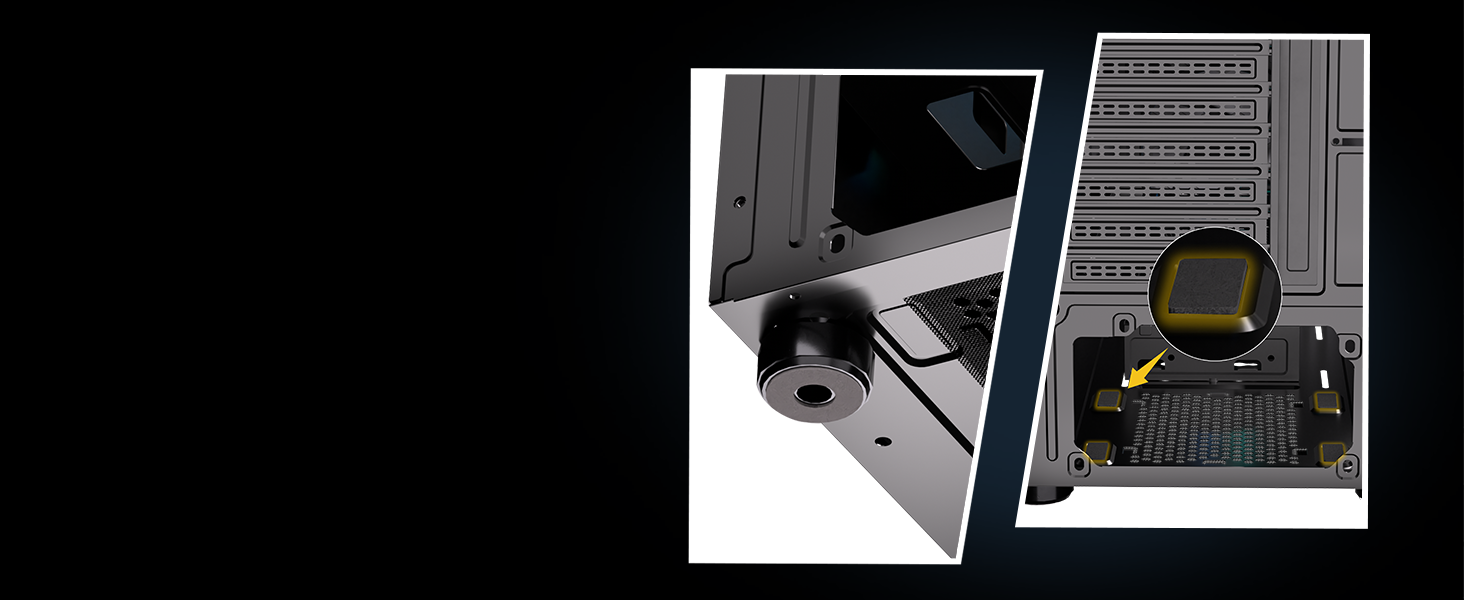
Figure 6: Proper connection of ARGB fans to the motherboard's 5V3PIN RGB interface.
4. Operating Instructions
4.1 I/O Panel Functions
The top I/O panel provides convenient access to essential ports:
- USB 3.0 Ports (x2): For high-speed data transfer and peripheral connectivity.
- HD Audio: Headphone and microphone jacks with signal shielding to prevent noise interference.
- Power Button: To power on/off your system.
- Reset Button: To restart your system.

Figure 7: Detailed view of the simple and smart I/O panel.
4.2 ARGB Lighting Control
The ARGB fans can be controlled via your motherboard's 5V3PIN RGB interface using compatible software (e.g., ASUS Aura Sync, MSI Mystic Light Sync, Gigabyte RGB Fusion). This allows for customization of colors and lighting effects.
5. Maintenance
5.1 Dust Filter Cleaning
To maintain optimal airflow and prevent dust buildup, regularly clean the dust filters:
- Top Magnetic Dust Filter: Easily removable for cleaning.
- Bottom Pull-out Dust Filter: Conveniently slides out for cleaning.
Regular cleaning helps extend the life of your computer components.

Figure 8: Location of the magnetic top dust filter and pull-out bottom dust filter.
6. Troubleshooting
If you encounter any issues with your MUSETEX G07 PC case, please refer to the following general troubleshooting steps:
- No Power: Check all power connections, including the PSU, motherboard, and front panel connectors. Ensure the power switch on the PSU is in the 'on' position.
- Fans Not Spinning/No RGB: Verify that the fans are correctly connected to the motherboard's fan headers and the 5V3PIN ARGB header. Check your motherboard's software for fan speed and RGB settings.
- Overheating: Ensure all fans are spinning correctly and are not obstructed. Clean dust filters regularly. Verify proper installation of CPU cooler and thermal paste.
- Loose Connections: Recheck all internal cable connections, including power, data, and front panel cables.
For further assistance, please contact MUSETEX customer support.
7. Specifications
| Feature | Detail |
|---|---|
| Brand | MUSETEX |
| Model Name | G07 |
| Case Type | Mid Tower |
| Motherboard Compatibility | ATX, Micro ATX, Mini ITX |
| Pre-installed Fans | 6 PWM ARGB Fans |
| GPU Length Support | Up to 390mm (15.35 inches) |
| PSU Length Support | Up to 230mm (9.05 inches) |
| Radiator Support (Top) | 280mm, 240mm |
| Storage Drive Bays | 4 (e.g., 2x 2.5" SSD + 2x 3.5" HDD or 4x 2.5" SSD) |
| I/O Ports | 2 x USB 3.0, HD Audio |
| Dimensions (LxWxH) | 15.28 x 8.86 x 18.43 inches |
| Item Weight | 13.2 pounds |
| Material | Metal, Plastic, Tempered Glass |
8. Warranty and Support
MUSETEX strives to provide the best support to customers. If you encounter any problems with your case, please feel free to contact us by clicking "Sold-by-MUSETEX" on the product page where you purchased the item. We will do our best to assist you.


