
1. Introduction
The BISOFICE AF3 Laser Engraver Protection Panel is designed to enhance the performance and cleanliness of your laser engraving and cutting operations. This panel provides a stable, protective working surface, preventing damage to your desktop and improving cutting results by minimizing smoke residue and grid marks. Its modular design allows for expansion to accommodate larger projects.
This manual provides detailed instructions for the assembly, operation, and maintenance of your AF3 protection panel, ensuring optimal performance and longevity.
2. Safety Information
Please read and understand all safety instructions before assembling or operating the BISOFICE AF3 Laser Engraver Protection Panel. Failure to follow these instructions may result in property damage or injury.
- Always use the protection panel in a well-ventilated area.
- Ensure the panel is placed on a stable, flat, and heat-resistant surface.
- Do not touch the panel immediately after laser operation, as it may be hot.
- Keep flammable materials away from the laser working area.
- Always wear appropriate personal protective equipment (PPE), such as laser safety glasses, when operating a laser engraver.
- This panel is designed to protect the desktop from laser burns and smoke. It does not replace the need for proper laser safety practices.
3. Package Contents
Carefully unpack the box and verify that all items listed below are present and undamaged. If any parts are missing or damaged, please contact customer support.
- 1 x Rear frames saw
- 15 x L type saw blade
- 1 x Front frames saw Blade
- 2 x Left and Right Frames
- 4 x Honeycomb Frame Pressing Block
- 4 x M4*10 Screw
- 4 x Rubber Feet
- 1 x H2.5 Allen Key

Figure 3.1: Components included in the AF3 Protection Panel kit.
4. Setup and Assembly
Follow these steps to assemble your BISOFICE AF3 Laser Engraver Protection Panel:
- Prepare the Frame: Lay out the two Left and Right Frames, the Rear frames saw, and the Front frames saw Blade on a clean, flat surface.
- Insert L-Type Saw Blades: Carefully slide the 15 L-type saw blades into the grooves of the frame pieces. Ensure they are properly aligned and seated. The design allows for a tight fit to create a stable surface.
- Secure the Frame: Connect all frame pieces to form the 460x425mm protection panel. Use the provided M4*10 screws and H2.5 Allen key to secure the frame connections.
- Attach Rubber Feet: Apply the 4 self-adhesive rubber feet to the bottom corners of the assembled panel. These feet raise the platform slightly, allowing for better airflow and protecting your desktop.
- Place Honeycomb Frame Pressing Blocks: Position the 4 Honeycomb Frame Pressing Blocks as needed to secure your material during engraving. These blocks help flatten the workpiece.

Figure 4.1: Modular design allows for expansion by connecting multiple panels.

Figure 4.2: Assembly and features of the AF3 panel, including the flattening fixture and ease of assembly.
Extension Design: The AF3 panel features an unlimited extension design. Each package includes a connector, allowing two protection panels to be quickly assembled into a lengthened panel with a protective area of 460x850mm. This is ideal for larger engraving machines or projects requiring extended working areas.
5. Operating Instructions
The BISOFICE AF3 Protection Panel is designed for use with various laser engravers, including Atomstack, Ortur, NEJE, and xtool. Its unique design offers several advantages over traditional honeycomb panels.
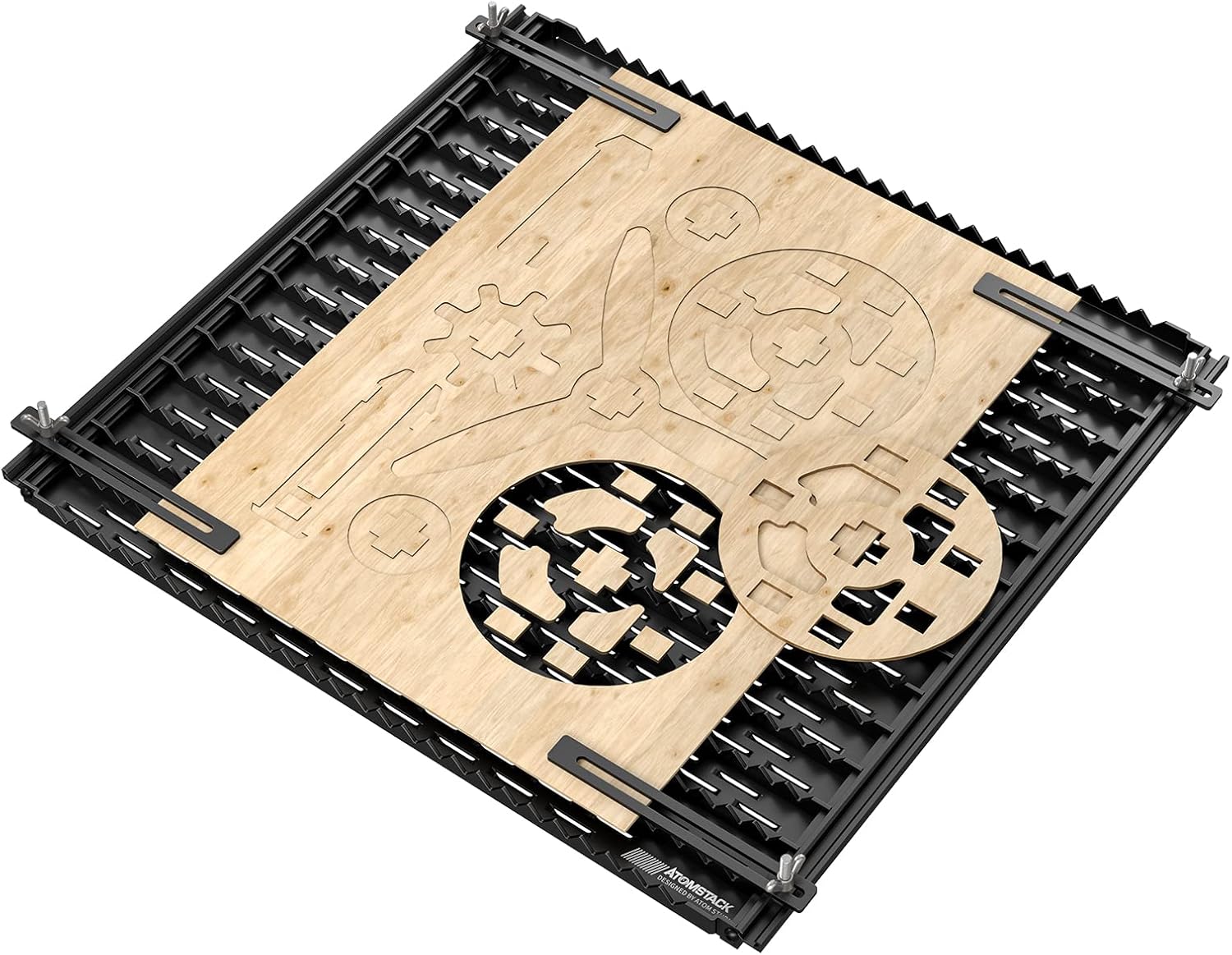
Figure 5.1: The AF3 panel in use with a laser engraver.
5.1 Placement and Material Securing
- Place the assembled AF3 panel on a flat, stable surface where your laser engraver will operate.
- Position your material (e.g., wood, acrylic) on top of the panel.
- Use the Honeycomb Frame Pressing Blocks to secure and flatten your workpiece. Ensure the blocks do not interfere with the laser head's movement.
5.2 Enhanced Cutting Performance
The AF3 panel's design provides a better cutting effect compared to conventional honeycomb panels. The L-type saw blades offer minimal contact points with the material, which:
- Prevents Grid Lines: Reduces the likelihood of leaving noticeable honeycomb imprints on your finished work, ensuring a cleaner appearance.
- Improves Smoke Exhaust: The double-row sunken design facilitates efficient smoke exhaust, preventing smoke backflow and accumulation. This significantly reduces the formation of oil stains on your material and the panel itself.

Figure 5.2: Comparison of AF3 panel benefits vs. other setups.

Figure 5.3: Smaller contact points prevent grid patterns.

Figure 5.4: Effective smoke exhaust prevents oil stains.
6. Maintenance
Regular cleaning of your BISOFICE AF3 Protection Panel will ensure its continued performance and longevity.
- Cleaning: After use, allow the panel to cool completely. Use a brush or vacuum cleaner to remove any debris, dust, or small cut pieces from the panel's surface and between the saw blades. The design makes it easy to clean.
- Stubborn Residue: For any stubborn smoke residue or oil stains, a damp cloth with a mild cleaning solution can be used. Ensure the panel is completely dry before next use.
- Storage: When not in use, the panel can be disassembled into individual blades for compact storage.
Figure 6.1: The AF3 panel is designed for easy cleaning and storage.
7. Troubleshooting
This section addresses common issues you might encounter with your AF3 Protection Panel.
- Difficulty Assembling Blades: If the L-type saw blades are difficult to slide into place, ensure the frame pieces are not overly tightened. Slightly loosen the frame screws if necessary to allow for easier insertion, then re-tighten once all blades are in position.
- Pressing Blocks Interfere with Laser Head: If the Honeycomb Frame Pressing Blocks obstruct the laser head's movement, adjust their position or use them only when necessary for specific materials. For smaller workpieces, consider alternative methods to secure them if the blocks' placement is problematic.
- Etching on Slats: While the AF3 panel is designed to minimize laser impact, direct and prolonged exposure to the laser beam on the black-coated aluminum slats can cause etching. Ensure your laser's focus and power settings are appropriate for your material and that the laser path is primarily on the workpiece. Avoid direct laser contact with the panel whenever possible.
- Panel Instability: Ensure all frame screws are securely tightened and the rubber feet are properly attached to provide a stable base.
8. Specifications
| Feature | Specification |
|---|---|
| Model | AF3 |
| Compatibility | Suitable for most laser engravers (e.g., Atomstack, Ortur, NEJE, xtool) |
| Material | Aluminum Alloy |
| Protection Size (Single Panel) | 460 x 425 mm (18.1 x 16.7 inches) |
| Protection Size (Extended) | 460 x 850 mm (with 2 panels and connector) |
| Product Net Weight | 1900 g (4.1 lbs) |
| Package Size | 470 x 140 x 115 mm (18.5 x 5.5 x 4.5 inches) |
| Package Weight | 2.3 kg (5 lbs) |
9. Warranty and Support
For warranty information or technical support, please refer to the documentation provided with your purchase or contact the seller directly. Keep your proof of purchase for any warranty claims.
For further assistance, you may visit the official Bisofice store online: Bisofice Store